
Introduction
This manual provides essential information for the proper setup, operation, and maintenance of your Kassionel replacement remote control. This remote is designed to be compatible with Sharp TV models GB345WJSA, GB346WJSA, and 4T-C70BK2UD, offering direct access to popular streaming services like Netflix and YouTube.
Setup
1. Battery Installation
The remote control requires two (2) AAA 1.5V batteries (not included) for operation. Follow these steps to install them:
- Locate the battery compartment cover on the back of the remote control.
- Press down on the tab and slide the cover off.
- Insert two AAA batteries, ensuring the positive (+) and negative (-) terminals align correctly with the markings inside the compartment.
- Slide the battery compartment cover back into place until it clicks securely.

Image: Open battery compartment of the remote control, illustrating the correct orientation for inserting two AAA batteries.
2. Initial Use
This replacement remote control is designed for immediate use with compatible Sharp TV models without requiring any programming. Once batteries are installed, it should function directly with your television.

Image: A hand holding the remote control, emphasizing that no programming is required for immediate use.
Operating Instructions
The remote control features 25 buttons for various functions. Below is a general overview of the button layout and their primary functions:
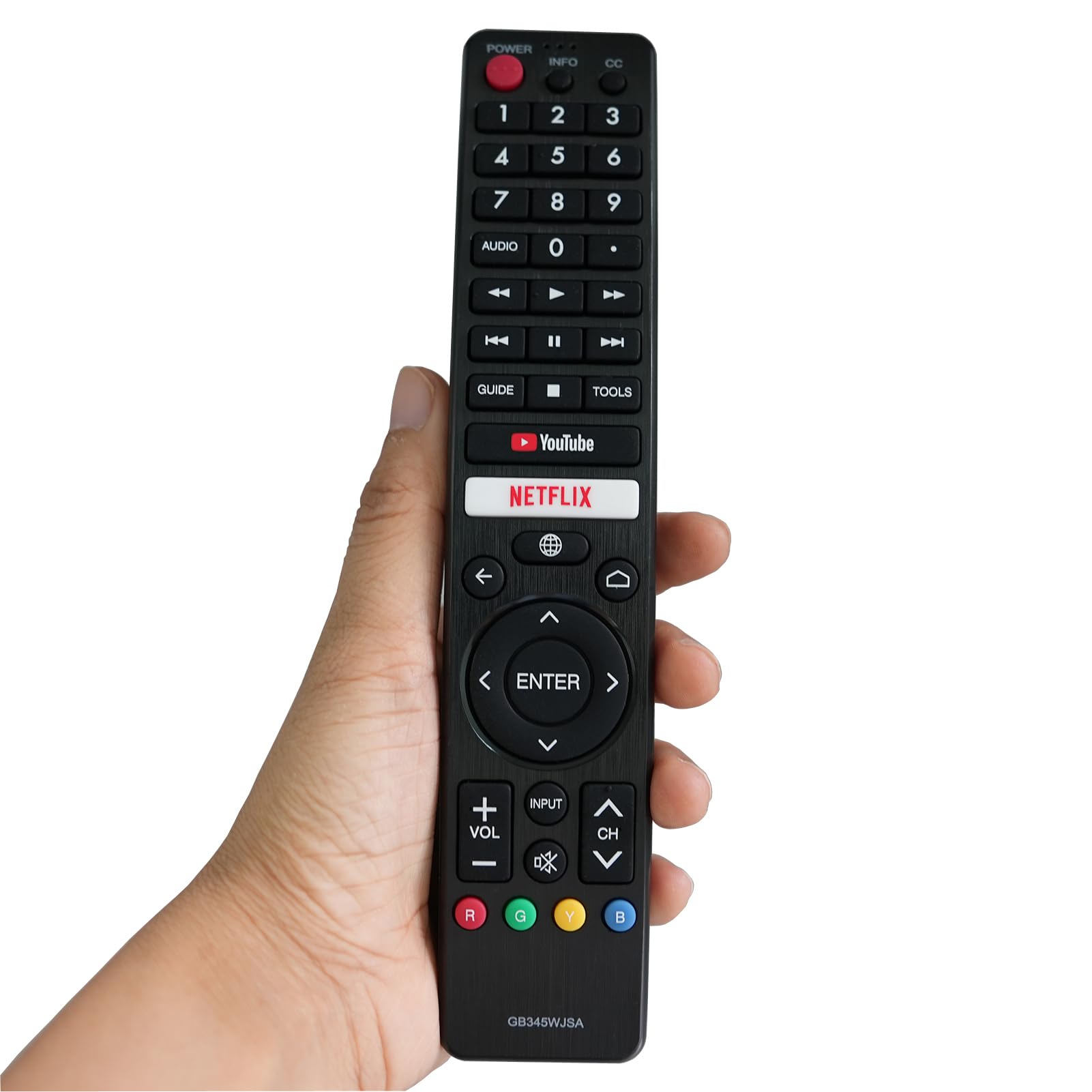
Image: Front view of the remote control, displaying the layout of all buttons including power, number pad, navigation, volume, channel, and dedicated app buttons.
- Power Button (POWER): Turns the TV on or off.
- Number Pad (0-9): Directly input channel numbers.
- INFO / CC: Displays information about the current program or activates Closed Captions.
- AUDIO: Selects audio tracks or modes.
- Media Playback Controls (Rewind, Play/Pause, Fast Forward, Previous, Stop, Next): Controls media playback functions.
- GUIDE / TOOLS: Accesses the TV program guide or additional tools/settings.
- Dedicated App Buttons (YouTube, Netflix): Provides direct access to the respective streaming applications.
- Navigation Pad (Up, Down, Left, Right, ENTER): Navigates menus and confirms selections.
- Back (←) / Home (⌂) / Source (🌐): Returns to the previous screen, goes to the home menu, or selects input source.
- Volume Control (VOL +/-): Adjusts the TV volume.
- Mute (🔇): Mutes or unmutes the TV audio.
- Channel Control (CH +/-): Changes TV channels.
- Color Buttons (R, G, Y, B): Used for specific functions within certain TV menus or applications.
Maintenance
Cleaning
To clean the remote control, use a soft, dry cloth. Do not use liquid cleaners, sprays, or abrasive materials, as these may damage the remote's surface or internal components.
Battery Replacement
Replace the batteries when the remote's performance degrades, such as reduced range or unresponsive buttons. Always replace both batteries at the same time with new AAA batteries. Do not mix old and new batteries or different types of batteries.
Troubleshooting
- Remote not responding:
- Ensure the batteries are correctly installed with the correct polarity.
- Replace old batteries with new ones.
- Check for any obstructions between the remote control and the TV's infrared sensor.
- Ensure the TV is powered on.
- Limited operating range:
- Replace the batteries.
- Ensure there are no strong light sources (e.g., direct sunlight, fluorescent lights) interfering with the remote's signal.
Product Specifications
| Feature | Specification |
|---|---|
| Brand | Kassionel |
| Model Names | GB345WJSA, GB346WJSA |
| Compatible TV Models | Sharp TV 4T-C70BK2UD (and others compatible with GB345WJSA, GB346WJSA) |
| Connection Technology | Infrared |
| Number of Buttons | 25 |
| Maximum Range | 10 Meters |
| Batteries Required | 2 x AAA 1.5V (not included) |
| Special Feature | Ergonomic design |
| Color | Black |
| Item Weight | 72.1 Grams |
| Item Dimensions (L x W x H) | 19.1 x 3.7 x 2.2 centimeters |

Image: Visual representation of the remote control's key attributes, including durability, strong signal capability, soft buttons, and ABS material construction.
Warranty and Support
For any issues or questions regarding your Kassionel replacement remote control, please refer to the retailer's return policy or contact their customer support. This product typically comes with a standard return period, such as a 60-day return window, as offered by many retailers.