
Introduction
This manual provides essential information for the proper setup, operation, and maintenance of your BenQ MOBIUZ EX3210U Gaming Monitor. Please read this manual thoroughly before using the product to ensure optimal performance and safety.
Setup
1. Package Contents
Verify that all items are present in the package:
- BenQ MOBIUZ EX3210U Monitor
- Monitor Stand (Base and Neck)
- Power Cable
- HDMI Cable
- DisplayPort Cable
- USB-B to USB-A Cable
- Remote Control
- Quick Start Guide and Warranty Card
2. Assembling the Monitor Stand
- Carefully remove the monitor from its packaging, keeping it protected on a soft surface.
- Attach the stand neck to the monitor panel. Ensure it clicks securely into place.
- Attach the stand base to the stand neck and tighten the screw at the bottom of the base.
- Place the assembled monitor on a stable, flat surface.

Figure 1: Front view of the BenQ MOBIUZ EX3210U Gaming Monitor with its stand.
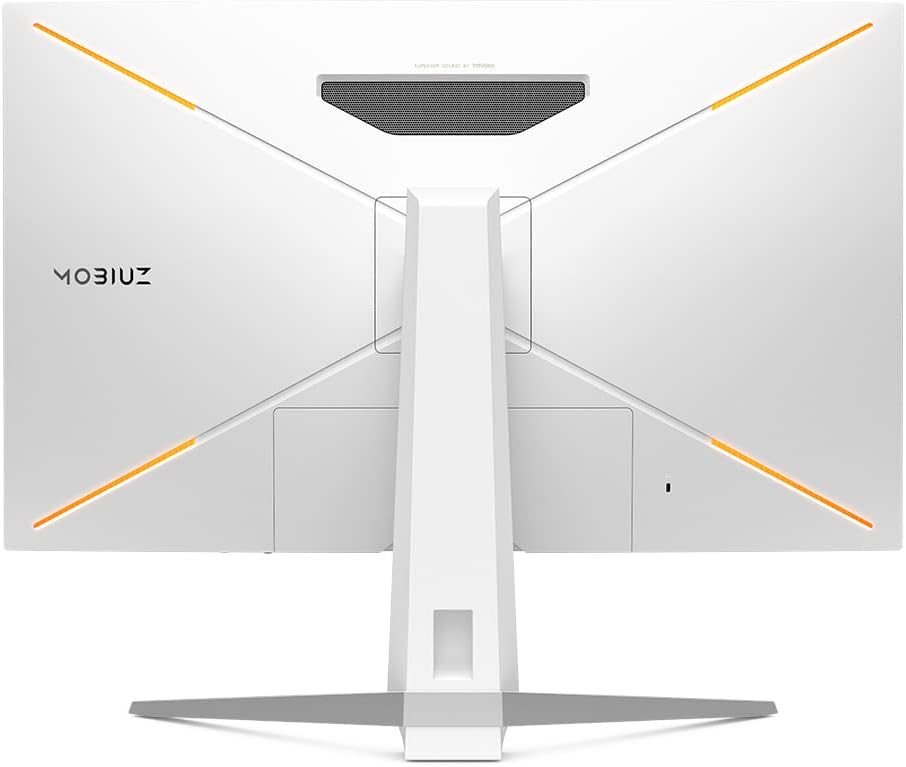
Figure 2: Rear view of the BenQ MOBIUZ EX3210U Gaming Monitor, showing the stand attachment point and design elements.
3. Connecting Cables
Connect the necessary cables to the monitor and your computer or console:
- Power Cable: Connect one end to the monitor's power input and the other to a power outlet.
- Video Input: Connect either an HDMI 2.1 cable or a DisplayPort 1.4 cable from your device to the corresponding port on the monitor.
- USB Upstream: Connect the USB-B to USB-A cable from the monitor's USB-B port to a USB-A port on your computer to enable the monitor's USB hub and noise-cancelling microphone.
- Audio Output: If desired, connect headphones or external speakers to the 3.5mm headphone jack.

Figure 3: Detailed view of the monitor's connectivity ports, including HDMI 2.1, DisplayPort 1.4, USB-B, USB-A, and Headphone Jack.
4. Ergonomic Adjustments
The monitor stand allows for various adjustments to optimize your viewing experience:
- Height Adjustment: Adjust the monitor height by up to 100mm.
- Tilt: Tilt the screen from -5° to 15° to find your preferred vertical angle.
- Swivel: Swivel the screen from -15° to 15° horizontally.

Figure 4: Visual representation of the monitor's ergonomic design, showing height adjustment, tilt, and swivel capabilities.
Operating Instructions
1. Power On/Off
Press the power button located on the monitor or the power button on the remote control to turn the monitor on or off.
2. On-Screen Display (OSD) Menu
The OSD menu allows you to configure various monitor settings. Use the joystick on the monitor or the remote control to navigate and adjust settings such as picture mode, input source, audio, and system settings.

Figure 5: The BenQ MOBIUZ EX3210U monitor shown with its dedicated remote control for convenient OSD navigation.
3. Key Features and Settings
- HDRi Optimization: Enhances HDR content by optimizing color, contrast, and detail for a more immersive viewing experience.
- FreeSync Premium Pro: Provides a fluid, tear-free gaming experience at peak performance. Ensure your graphics card supports AMD FreeSync Premium Pro.
- 144Hz Refresh Rate & 1ms MPRT: Delivers ultra-smooth motion and rapid response times crucial for fast-paced gaming.
- Brightness Intelligence Plus (B.I.+): Automatically adjusts screen brightness and color temperature based on ambient light conditions to reduce eye strain.
- Light Tuner: Allows fine-tuning of light and dark areas in games to reveal hidden details without overexposing bright scenes.

Figure 6: The monitor highlighting its Eye-Care technology, designed to reduce eye strain during extended use.
4. Audio Features
The EX3210U features integrated 2.1 channel audio with a 5W subwoofer, powered by treVolo technology, for enhanced sound quality.
- treVolo Audio: Provides a balanced sound profile with crisp treble, clear midrange, and warm bass.
- AI Noise-Cancelling Microphone: The built-in microphone uses an AI chip to filter out background noise, focusing on your voice. This feature is active when connected via USB-C (for compatible laptops) or the USB-B upstream cable to a PC.

Figure 7: A radar chart illustrating the sound characteristics (Resolution, Fidelity, Treble, Midrange, Bass, Balance, Positioning, Sound Field) of the EX3210U's treVolo audio system.

Figure 8: Illustration of the AI Noise-cancelling Microphone feature, demonstrating how it isolates the user's voice from background sounds like keyboard clicks.
Maintenance
1. Cleaning the Monitor
- Always power off the monitor and unplug the power cord before cleaning.
- Use a soft, lint-free cloth lightly dampened with water or a mild, non-abrasive screen cleaner.
- Do not spray cleaner directly onto the screen or casing.
- Avoid using harsh chemicals, solvents, or abrasive materials, as they can damage the screen and finish.
2. Storage
If storing the monitor for an extended period, ensure it is powered off, unplugged, and stored in a cool, dry place away from direct sunlight and extreme temperatures. Use the original packaging for best protection.
Troubleshooting
If you encounter issues with your monitor, refer to the following common problems and solutions:
| Problem | Possible Solution |
|---|---|
| No image on screen |
|
| Flickering or distorted image |
|
| No sound or low volume |
|
| Microphone not working |
|
For further assistance, please refer to the official user manual (PDF) or contact BenQ customer support.
Specifications
| Feature | Detail |
|---|---|
| Model | EX3210U |
| Screen Size | 31.5 Inches |
| Panel Type | IPS |
| Resolution | 4K UHD (3840 x 2160) |
| Refresh Rate | 144Hz |
| Response Time | 1ms MPRT |
| Aspect Ratio | 16:9 |
| HDR Support | HDRi, VESA DisplayHDR 600 |
| Adaptive Sync | AMD FreeSync Premium Pro |
| Connectivity | 2 x HDMI 2.1, 1 x DisplayPort 1.4, 1 x USB-B (Upstream), 4 x USB-A (Downstream), 1 x Headphone Jack |
| Audio | 2.1 Channel (2 x 2W speakers + 5W subwoofer) with treVolo |
| Microphone | Built-in AI Noise-Cancelling Mic |
| Ergonomics | Height, Tilt, Swivel adjustable |
| Dimensions (LxWxH) | 21.38 x 37.8 x 8.19 inches (with stand) |
| Weight | 23.4 pounds (with stand) |
Warranty Information
The BenQ MOBIUZ EX3210U Gaming Monitor typically comes with a manufacturer's warranty. For new products, this often includes a 1-year direct BenQ technical and warranty support. Please refer to the warranty card included in your product packaging or visit the official BenQ website for the most current and detailed warranty terms and conditions applicable to your region.
Support
For technical support, service, or additional information, please visit the official BenQ support website. You can also download the complete user manual in PDF format for detailed instructions and diagrams:
Download Full User Manual (PDF)
Please have your monitor's model number (EX3210U) and serial number ready when contacting support.


