
SINOTRACK ST-901L
SinoTrack ST-901L 4G GPS Tracker User Manual
Model: ST-901L
1. Introduction
The SinoTrack ST-901L 4G GPS Tracker is a compact and reliable device designed for real-time location tracking of vehicles such as cars, motorcycles, trucks, and taxis. It operates on a 4G network, providing accurate positioning and various monitoring features to enhance vehicle security and management.
This manual provides detailed instructions for the proper setup, installation, operation, and maintenance of your ST-901L GPS tracker. Please read it thoroughly before using the device.
2. Safety Information
- Professional Installation Recommended: For optimal performance and safety, professional installation is highly recommended. Incorrect wiring can damage the device or the vehicle's electrical system.
- Power Supply: Ensure the device is connected to a stable 9-36V DC power supply. Install an appropriate fuse (2-5A recommended) on the power lines to prevent electrical damage.
- SIM Card: Use a 4G-enabled SIM card with active data, SMS, and call services. Ensure the SIM card's PIN code is disabled before insertion.
- Placement: Do not install the tracker in a completely enclosed metallic compartment, as this can interfere with GPS and GSM signals. Position the device with the GPS antenna facing upwards for best signal reception.
- Water Resistance: The device is designed to be waterproof, but ensure the lid is properly sealed after SIM card insertion to maintain its integrity.
- Remote Engine Cut-off: Use the remote engine cut-off feature responsibly and only when the vehicle speed is below 20 km/h to prevent accidents or damage.
3. Package Contents
Verify that all items are present in your package:
- SinoTrack ST-901L 4G GPS Tracker Unit
- Wiring Harness
- Relay (for remote engine cut-off)
- Adhesive Pad
- User Manual (this document)

Image 3.1: Contents of the SinoTrack ST-901L 4G GPS Tracker package, including the tracker unit, wiring, relay, and manual.
4. Product Overview
The SinoTrack ST-901L is a compact GPS tracking device featuring 4G network connectivity for reliable and fast data transmission. It includes a built-in 150mAh backup battery and supports various functions such as real-time tracking, history route playback, geo-fencing, and remote engine cut-off.

Image 4.1: The SinoTrack ST-901L 4G GPS Tracker showing its compact size (approximately 3.54 x 2.04 x 0.66 inches) and key features like real-time tracking, history route playback, waterproof design, geo-fence, shocking alarm, sleep mode, built-in 150mAh battery, and overspeed alarm.
4.1. LED Indicators
The device has LED indicators (visible when the lid is open) that show its operational status:
- Yellow LED (GSM Network):
- Flashing: Searching for GSM network.
- Solid: Connected to GSM network.
- Blue LED (GPS Signal):
- Flashing: Searching for GPS signal.
- Solid: GPS signal acquired.
Note: When the device is in GPRS mode, the yellow LED may remain solid, and in SMS mode, it may continue to flash, which is normal behavior.
5. Setup
5.1. SIM Card Preparation and Insertion
- Acquire a 4G SIM Card: Obtain a local 4G (LTE) SIM card with active call, SMS, and data functionality.
- Disable PIN: Insert the new SIM card into a mobile phone and disable any PIN code requirement. Ensure it can make calls, send SMS, and access the internet.
- Insert SIM Card: Unscrew the lid of the tracker and carefully insert the prepared SIM card into the designated slot. The SIM card acts as the power switch when operating on battery; inserting it turns the device on.

Image 5.1: Visual guide showing how to unscrew the tracker's lid and insert the SIM card.
5.2. Initial Power On and Signal Acquisition
- Charge Device: If not connected to vehicle power, charge the device for approximately 1 hour using a compatible USB cable.
- Observe LEDs: After inserting the SIM and powering on, the yellow and blue LEDs will start flashing as the device searches for network and GPS signals.
- Signal Lock: Place the tracker in an open area (e.g., near a window or outdoors) for about 5 minutes. Both LEDs should eventually become solid, indicating successful network and GPS signal acquisition. If the yellow LED continues to flash, move the device to a location with better network reception.
5.3. APN Configuration (SMS Command)
The tracker requires APN (Access Point Name) settings to connect to the internet for data transmission. You will need to send an SMS command from another phone to the SIM card number in the tracker.
- Obtain APN Details: Contact your SIM card provider to get the correct APN, APN username, and APN password for your network.
- Send APN Command:
- If APN has no username/password: Send SMS: 8030000 APN_NAME (e.g., 8030000 everywhere)
- If APN has username/password: Send SMS: 8030000 APN_NAME APN_USERNAME APN_PASSWORD (e.g., 8030000 everywhere eesecure secured)
- The tracker should reply with "set OK" upon successful configuration.
5.4. GPRS Mode Setup (SMS Command)
After configuring the APN, set the tracker to GPRS mode for online tracking.
- Send SMS: 7100000
- Wait approximately 30 seconds. The blue and orange (yellow) lights should remain solid, indicating the device is online and ready for tracking via the platform.
5.5. Platform Login
Once the device is online, you can track it using the SinoTrackPro website or mobile application.
- Website: Visit sinotrackpro.com
- Mobile App: Download "SinoTrackPro" from your device's app store.
- Login Credentials: Your username is the device's ID number (found on the tracker unit). The default password is 123456.
If the device shows as online but displays a location in China, take it outdoors to acquire a strong GPS signal, and its position will update.
6. Installation
Proper installation is crucial for the tracker's performance and vehicle safety. Consider professional installation.
6.1. Wiring Diagram
Connect the wiring harness as follows:
- Red Wire: Connect to vehicle's positive power supply (Power +).
- Black Wire: Connect to vehicle's negative ground (Power -).
- Orange Wire: Connect to ACC (Accessory) port, which provides power when the ignition is on.
- Yellow Wire: Connect to the relay for remote engine cut-off functionality.
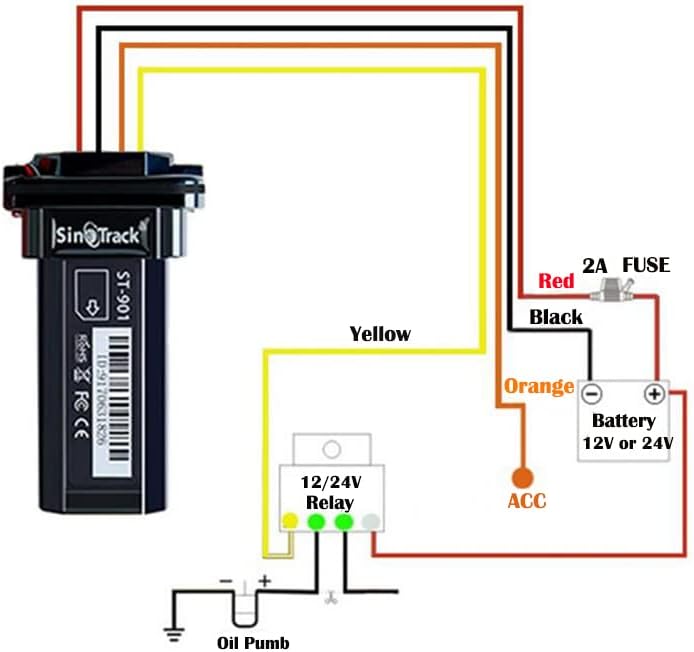
Image 6.1: Detailed wiring diagram showing connections for the red (Power+), black (Power-), orange (ACC), and yellow (Relay) wires, including a recommended 2A fuse on the positive line.
6.2. Relay Connection (Optional)
The included relay allows for remote engine cut-off. Connect the yellow wire from the tracker to the relay, and integrate the relay into the vehicle's fuel pump or ignition circuit as per the diagram. Ensure the relay is rated for your vehicle's electrical system (12V or 24V).
6.3. Placement Considerations
- Choose a hidden location within the vehicle that is not easily accessible to unauthorized individuals.
- Avoid placing the tracker directly under metal objects or in fully enclosed metal compartments, as this can block GPS and GSM signals.
- Ensure the side with the SinoTrack logo (GPS antenna) faces upwards or towards the sky for optimal signal reception.
- Secure the device using the provided adhesive pad or other suitable means to prevent movement.
7. Operating Instructions
7.1. Real-time Tracking
Monitor your vehicle's current location in real-time using the SinoTrackPro platform (website or mobile app).
- Log in to your account using the device ID and password.
- The map will display your vehicle's current position, speed, and status.

Image 7.1: Screenshot of the SinoTrackPro platform displaying real-time vehicle tracking on a map, showing current location and movement.
7.2. History Route Playback
Review past travel routes and activities for up to 2 years.
- On the SinoTrackPro platform, navigate to the "Replay" or "History" section.
- Select a date range to view the vehicle's historical movements on the map. You can play back the route to see the path taken, speed, and stops.

Image 7.2: Mobile application interface showing a historical route playback on a map, detailing the vehicle's path and status at different points in time.
7.3. Geo-fence
Set up virtual boundaries (geo-fences) on the map. You will receive alerts if the vehicle enters or exits these predefined areas.
- Access the "Geo-fence" feature on the SinoTrackPro platform.
- Draw a circular or polygonal area on the map to define your geo-fence.
- Configure alert notifications for entry or exit events.

Image 7.3: Mobile application screens demonstrating real-time tracking on the left and geo-fence creation on the right, showing a circular boundary on a map.
7.4. Remote Engine Cut-off
If the relay is installed, you can remotely cut off the engine by sending an SMS command. This feature is intended for security in case of theft.
- To cut off engine: Send SMS: 940000 (Note: The engine will only cut off if the vehicle speed is below 20 km/h. It will stop moving within 10-20 seconds after receiving the SMS.)
- To restore engine: Send SMS: 9410000
7.5. Other SMS Commands
You can send various SMS commands to the tracker for specific actions:
- Get Location (Google Maps link): Send SMS: 6690000
- Check Device Configuration: Send SMS: RCONF (The tracker will reply with its current settings, including APN, IP, port, and working mode.)
- Set Time Zone (e.g., +1 hour): Send SMS: 8960000E01
- Change Password: Send SMS: 7770000newpassword (Replace 'newpassword' with your desired password.)
8. Maintenance
- Regular Checks: Periodically check the wiring connections to ensure they are secure and free from corrosion.
- Waterproof Seal: If you open the device for any reason, ensure the lid is properly closed and the waterproof seal is intact to protect against moisture.
- Battery: The internal backup battery provides power when the vehicle's main power is disconnected. Its average lifespan is 24 months. If the device frequently loses power or fails to report when vehicle power is off, the internal battery may need replacement.
- Cleaning: Clean the exterior of the device with a soft, dry cloth. Avoid using harsh chemicals or solvents.
9. Troubleshooting
| Problem | Possible Cause | Solution |
|---|---|---|
| Device is offline on the platform. | Incorrect APN settings; No GPRS mode; No GSM signal; SIM card issues; Device not powered. | 1. Send RCONF SMS to check settings. Verify APN, IP, and port. 2. Ensure GPRS mode is set by sending 7100000. 3. Check SIM card balance and data plan. 4. Ensure yellow LED is solid. Move to an area with better signal. 5. Check power connections. |
| Inaccurate or no GPS location. | No GPS signal; Device placed in a signal-blocking area. | 1. Ensure blue LED is solid. 2. Relocate the device to an open area with a clear view of the sky. Avoid metallic enclosures. |
| Remote engine cut-off not working. | Incorrect relay wiring; Vehicle speed too high; Relay malfunction. | 1. Verify yellow wire and relay connections according to the wiring diagram. 2. Ensure vehicle speed is below 20 km/h when sending the command. 3. Test the relay functionality. |
| Device does not respond to SMS commands. | SIM card issues (no credit, no SMS service); Incorrect command format; Device offline. | 1. Check SIM card balance and ensure SMS service is active. 2. Verify the SMS command format and password. 3. Ensure the device is online (yellow LED solid). |
10. Specifications
| Feature | Detail |
|---|---|
| Model Number | ST-901L 4G |
| Connectivity Technology | 4G (LTE), GSM, GPRS, GPS |
| Application Supported | SinoTrackPro GPS Application |
| Special Features | Real-time Tracking, Location History, Remote Engine Cut-off, Geo-fence, Shocking Alarm, Overspeed Alarm, Sleep Mode |
| Material | Plastic, Adhesive |
| Dimensions (L x W x H) | 30 x 20 x 5 millimeters (approx. 1.18 x 0.79 x 0.2 inches) |
| Item Weight | 3.84 Ounces |
| Battery Capacity | 150 mAh (Built-in) |
| Average Battery Life | 24 months (standby, internal battery) |
| Compatible Devices | Smartphone, Tablet |
| Location Accuracy | Up to 10 meters |
11. Warranty and Support
For warranty information, technical support, or service inquiries, please refer to the documentation provided with your purchase or contact SinoTrack customer support directly through their official website.
Keep your purchase receipt and device ID handy when contacting support.
Related documentsST-901L


Ask a question about this manual
Ask about setup, troubleshooting, compatibility, parts, safety, or missing instructions. Manuals+ will review the question and use this page’s manual context to help answer it.