Introduction
The 1Mii ML100 is a compact Bluetooth 5.0 wireless audio receiver designed to add Bluetooth capabilities to your existing audio systems. It allows you to stream music wirelessly from your smartphone, tablet, or other Bluetooth-enabled devices to car stereos, home stereo systems, or wired headphones via a 3.5mm AUX connection. This device also supports hands-free calling with its built-in microphone.
Package Contents
Please check the package for the following items:
- 1x 1Mii ML100 Bluetooth Receiver
- 1x USB Charging Cable
- 1x 3.5mm Audio Cable
- 1x Metal 3.5mm Adapter
- 1x User Manual
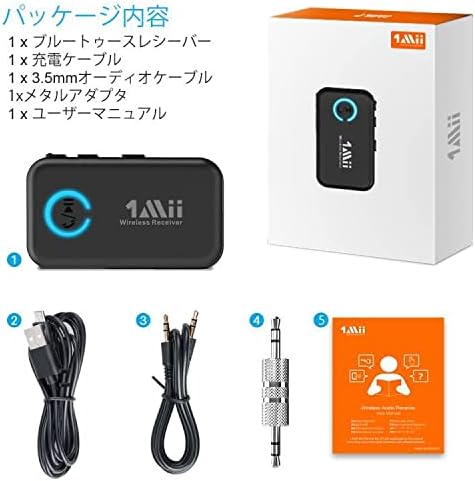
Image: The package contents of the 1Mii ML100 Bluetooth receiver, showing all included accessories.
Product Overview
Familiarize yourself with the components and controls of your 1Mii ML100 receiver.

Image: A detailed diagram highlighting the various parts of the 1Mii ML100 receiver, including the 3.5mm audio jack, AUX input, LED indicator, power switch, volume/track controls, charging port, and microphone.
- 3.5mm Audio Jack: For connecting to audio input of speakers, car stereos, or headphones.
- AUX Port: The connection point for the 3.5mm audio jack.
- LED Indicator: Displays the device's status (e.g., pairing mode, connected, charging).
- Power ON/OFF Switch: To turn the device on or off.
- Volume + / Previous Track Button: Increases volume or skips to the previous track.
- Volume - / Next Track Button: Decreases volume or skips to the next track.
- Multi-function Button (Play/Pause/Bluetooth Pairing): Controls playback, answers/ends calls, and initiates Bluetooth pairing.
- Charging Port: Micro USB port for charging the device.
- Microphone: For hands-free calling.
Setup
1. Charging the Device
Before first use, fully charge the 1Mii ML100. Connect the provided USB charging cable to the receiver's charging port and a USB power source (e.g., car charger, wall adapter, computer USB port). The LED indicator will show charging status.
2. Connecting to an Audio System
Use the included 3.5mm audio cable or metal adapter to connect the 1Mii ML100 to the AUX input of your desired audio system (car stereo, home stereo, wired headphones).
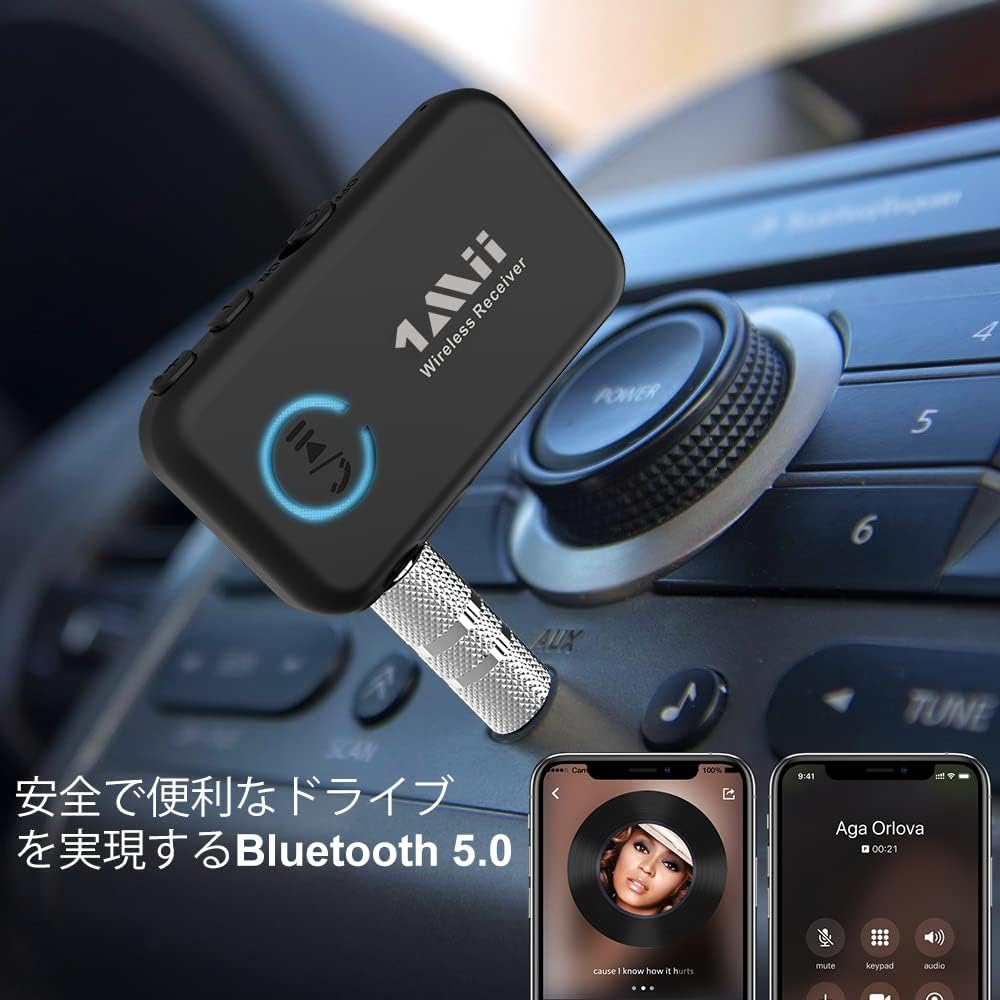
Image: The 1Mii ML100 receiver connected to a car's AUX input, demonstrating its use for wireless audio in vehicles.
3. Pairing with a Bluetooth Device
- Turn on the 1Mii ML100 by sliding the Power ON/OFF switch. The LED indicator will flash, indicating it's in pairing mode.
- On your smartphone, tablet, or other Bluetooth-enabled device, go to the Bluetooth settings.
- Search for new devices and select "ML100" from the list.
- Once connected, the LED indicator will turn solid blue.

Image: A smartphone screen showing the Bluetooth settings menu, with the ML100 receiver available for pairing.
Operating Instructions
The 1Mii ML100 offers various functions controlled by its buttons:
| Task | Button | Operation |
|---|---|---|
| Power ON/OFF | ON/OFF Switch | Slide to ON or OFF |
| Pairing Mode | Multi-function Button | Press and hold for 5 seconds |
| Volume Up / Previous Track | "+" Button | Press once for Volume Up / Press and hold for Previous Track |
| Volume Down / Next Track | "-" Button | Press once for Volume Down / Press and hold for Next Track |
| Play / Pause | Multi-function Button | Press once |
| Activate Voice Assistant (Google Assistant/Siri) | Multi-function Button | Press and hold for 1 second |
| Answer / End Call | Multi-function Button | Press once |
| Reject Incoming Call | Multi-function Button | Press and hold for 1 second |
| Redial Last Number | Multi-function Button | Double press |
| Clear Pairing List | "+" Button | Press and hold for 10 seconds |
The 1Mii ML100 supports connection to various non-Bluetooth audio systems, including car stereos, wired headphones, and home stereo systems, providing a versatile wireless audio solution.

Image: An illustration showing the 1Mii ML100's compatibility with various audio devices, including car audio, wired headphones, and home stereo systems.
Maintenance
To ensure the longevity and optimal performance of your 1Mii ML100 Bluetooth receiver, follow these maintenance guidelines:
- Cleaning: Use a soft, dry cloth to clean the device. Avoid using harsh chemicals, cleaning solvents, or strong detergents, as these may damage the surface or internal components.
- Storage: Store the device in a cool, dry place away from direct sunlight, extreme temperatures, and humidity.
- Handling: Handle the device with care. Avoid dropping it or subjecting it to strong impacts, which can cause internal damage.
- Charging: Only use the provided charging cable or a certified equivalent. Do not overcharge the device.
- Water Exposure: This device is not waterproof. Avoid exposure to water or other liquids.
Troubleshooting
If you encounter issues with your 1Mii ML100, refer to the following common problems and solutions:
- Device won't turn on:
- Ensure the device is fully charged. Connect it to a power source and check the LED indicator.
- Verify the power switch is in the "ON" position.
- Cannot pair with a Bluetooth device:
- Make sure the 1Mii ML100 is in pairing mode (LED flashing). If not, press and hold the Multi-function button for 5 seconds.
- Ensure your source device's Bluetooth is enabled and within range (up to 20 meters).
- Try clearing the pairing list on the 1Mii ML100 (press and hold the "+" button for 10 seconds) and on your source device, then attempt to pair again.
- Restart both the 1Mii ML100 and your source device.
- No audio or poor audio quality:
- Check that the 3.5mm audio cable is securely connected to both the 1Mii ML100 and your audio system's AUX input.
- Ensure your audio system is set to the correct AUX input source.
- Adjust the volume on both your source device and the connected audio system.
- Move the source device closer to the 1Mii ML100 to reduce interference and ensure a stable connection.
- If experiencing static or noise, try using a different 3.5mm audio cable or adapter.
- Hands-free calling issues:
- Ensure the 1Mii ML100 is connected to your phone via Bluetooth.
- Check your phone's audio output settings to ensure calls are routed through the Bluetooth device.
- Speak clearly towards the microphone on the 1Mii ML100.
Specifications
| Feature | Detail |
|---|---|
| Model | ML100 |
| Bluetooth Version | 5.0 |
| Connectivity Technology | Bluetooth, AUX (3.5mm Jack) |
| Audio Output Mode | Stereo |
| Special Features | Built-in Bluetooth, Hands-free Calling |
| Compatible Devices | Speakers, Smartphones, Tablets, Car Audio Systems, Wired Headphones, Home Stereo Systems |
| Product Dimensions | Approximately 14.2 x 10.2 x 2 cm |
| Product Weight | Approximately 80 g |
| Wireless Range | Up to 20 meters (65 feet) in open areas |
Safety Information
Please read and follow these safety precautions to prevent damage to the device or injury to yourself:
- Do not disassemble, repair, or modify the device.
- Keep the device away from water, moisture, and other liquids.
- Avoid exposing the device to extreme temperatures (hot or cold) or direct sunlight.
- Do not use the device in environments with strong electromagnetic interference.
- Keep out of reach of children.
- Dispose of the device and its accessories responsibly according to local regulations.
Warranty and Support
For warranty information and technical support, please refer to the documentation included with your purchase or visit the official 1Mii website. If you have any questions or require assistance, please contact 1Mii customer service.


