
1. Introduction
Thank you for choosing the BLACK+DECKER 20V MAX POWERCONNECT Handheld Vacuum. This cordless vacuum is designed for convenient and efficient cleaning of carpets, furniture, garages, and workshops. Its powerful suction and versatile features make it an ideal tool for quick clean-ups.
Please read this instruction manual thoroughly before operating the vacuum to ensure safe and optimal performance. Keep this manual for future reference.
2. Safety Instructions
WARNING: Always follow basic safety precautions when using electrical appliances to reduce the risk of fire, electric shock, and personal injury.
- Read all instructions before using this appliance.
- Do not pick up liquids, hot ashes, lit cigarettes, or sharp objects.
- Do not use without the dustbowl and filter in place.
- Keep hair, loose clothing, fingers, and all parts of body away from openings and moving parts.
- Use only with BLACK+DECKER 20V MAX* Lithium-Ion Battery System (battery and charger sold separately).
- Do not expose to rain or use in wet conditions.
- This appliance is for household use only.
3. Product Overview & Components
The BLACK+DECKER BCHV001B Handheld Vacuum features a lightweight design and powerful suction for various cleaning tasks.

Figure 1: Product features including removable battery, 2-stage filtration, on-board crevice tool storage, extra-large dustbowl, and high power suction.
Key Components:
- Handheld Vacuum Unit (BCHV001B)
- Removable Dustbowl
- 2-Stage Filtration System (Filter and Pre-Filter)
- Integrated Crevice Tool with On-Board Storage
- Power Button (On/Off)
- Battery Compartment (for 20V MAX* Lithium-Ion Battery, sold separately)
4. Setup
This unit is a bare tool only. A compatible BLACK+DECKER 20V MAX* Lithium-Ion Battery and charger are required for operation and are sold separately.
- Charge Battery: Fully charge a compatible 20V MAX* Lithium-Ion Battery using a BLACK+DECKER charger according to the charger's instructions.
- Insert Battery: Align the charged battery with the battery compartment at the rear of the vacuum handle. Slide the battery into place until it clicks securely.
- Attach Crevice Tool: The crevice tool is integrated into the nozzle. To extend it, pull the tool forward until it locks into position. To retract, push the release button and slide it back.

Figure 2: The image shows a hand inserting a BLACK+DECKER 20V MAX 1.5Ah Lithium-Ion battery into the designated slot at the back of the handheld vacuum's handle. This demonstrates the easy battery attachment process.

Figure 3: A hand is shown using the extended crevice tool of the BLACK+DECKER handheld vacuum to clean between sofa cushions, highlighting its utility for hard-to-reach areas.
5. Operating Instructions
- Power On/Off: Slide the power button located on the handle forward to turn the vacuum ON. Slide it backward to turn the vacuum OFF.
- Cleaning: Guide the nozzle over the area to be cleaned. For tight spaces, extend the integrated crevice tool. The vacuum's portable and lightweight design allows for easy maneuverability in various environments, including home and car interiors.
- On-Board Crevice Tool Storage: The crevice tool can be conveniently stored on-board when not in use.

Figure 4: This image displays the BLACK+DECKER handheld vacuum in two scenarios: cleaning debris from a carpeted floor and vacuuming the interior of a car, emphasizing its portable and lightweight design for versatile use.

Figure 5: A hand is shown retracting the crevice tool back into the body of the BLACK+DECKER handheld vacuum, illustrating its convenient on-board storage feature.
6. Maintenance
Regular maintenance ensures optimal performance and extends the life of your vacuum.
- Emptying the Dustbowl: The extra-large dustbowl is designed to empty less often. To empty, press the dustbowl release button and detach the dustbowl from the main unit. Dispose of collected debris.
- Cleaning the Filters: The vacuum features a 2-stage filtration system (filter and pre-filter) to maintain suction power. Remove the filter and pre-filter from the dustbowl. Tap them gently to remove loose dirt or wash them with warm, soapy water. Ensure filters are completely dry before reassembling.
- Reassembly: Once the dustbowl and filters are clean and dry, reassemble them in reverse order of disassembly. Ensure all parts are securely in place before use.
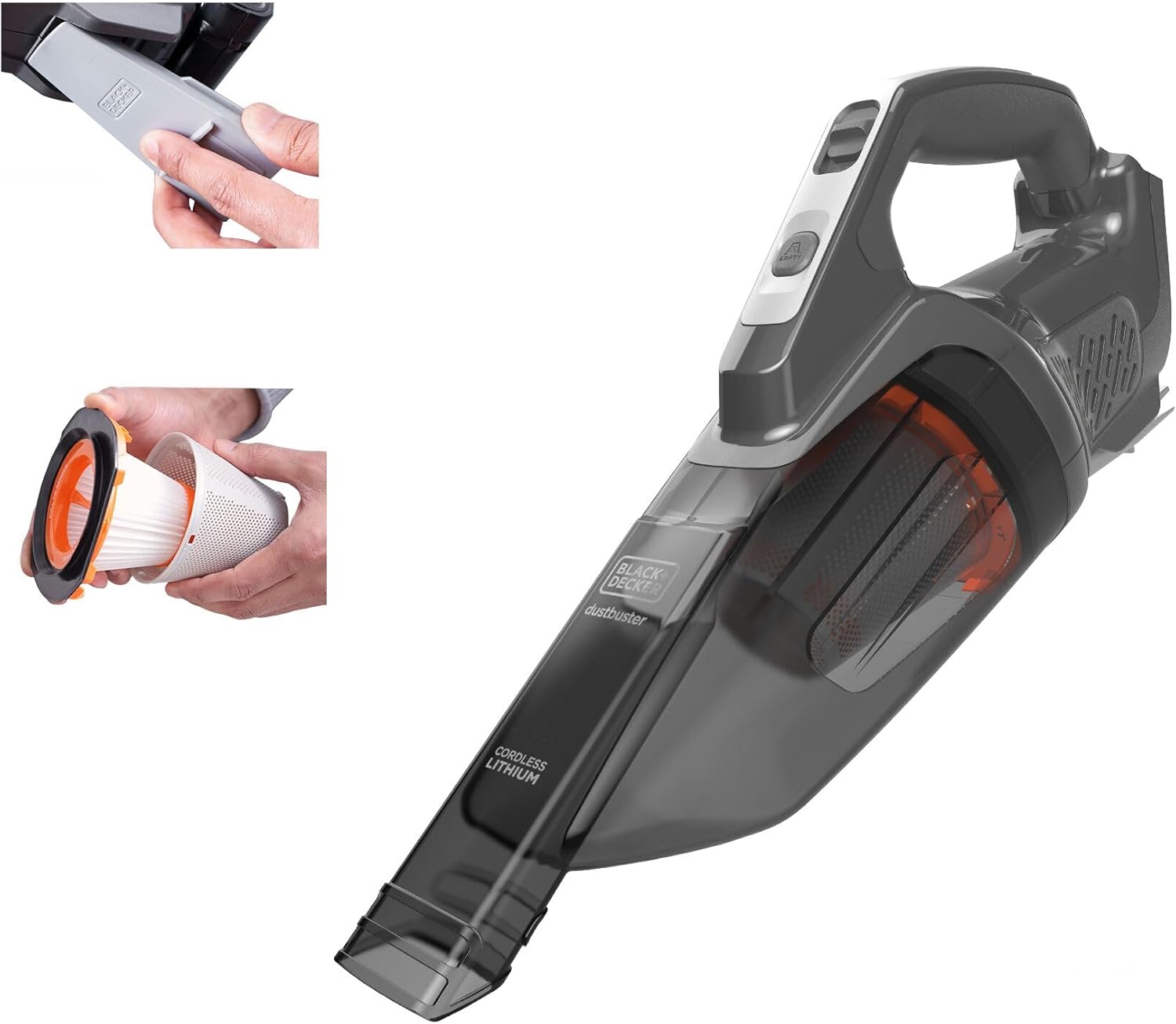
Figure 6: This image shows a sequence of steps for maintaining the BLACK+DECKER handheld vacuum, including detaching the dustbowl and removing the washable filter and pre-filter for cleaning.
7. Troubleshooting
If your vacuum is not performing as expected, consult the following table:
| Problem | Possible Cause | Solution |
|---|---|---|
| Vacuum does not turn on. | Battery not charged or not inserted correctly. | Ensure battery is fully charged and securely inserted. |
| Low suction power. | Dustbowl full or filters clogged. | Empty dustbowl and clean/replace filters. |
| Debris falling out of nozzle. | Dustbowl is full. | Empty dustbowl. |
8. Specifications
- Model Name: BCHV001B
- Power Source: Cordless (20V MAX* Lithium-Ion Battery, sold separately)
- Special Feature: 2-stage filtration, Portable
- Filter Type: Cloth (BCHVF10 Filter, Pre-Filter)
- Wattage: 20 watts
- Amperage: 20 Amps
- Noise Level: 80 Decibels
- Product Dimensions: 7.72"L x 5.26"W x 18.03"H
- Item Weight: 3 pounds
- Color: Gray
- Recommended Uses: Carpet, Furniture, Garage
9. Official Product Videos
Watch these official videos for more information on your BLACK+DECKER handheld vacuum:
Features of this handheld vacuum
This video demonstrates the various features and functionalities of the BLACK+DECKER handheld vacuum, providing a visual guide to its capabilities.
Easy to use hand held vacuum, great suction!
This video showcases the ease of use and strong suction power of the BLACK+DECKER handheld vacuum in practical cleaning scenarios.
10. Warranty and Support
For warranty information, technical support, or to purchase replacement parts, please visit the official BLACK+DECKER website or contact their customer service. Keep your purchase receipt as proof of purchase.