1. Product Overview
The Topcon LS-80X is a laser receiver sensor designed to detect red beam rotary lasers, extending their operational range and enhancing accuracy on job sites. This device features adjustable precision settings, an audible height notification, and a robust, weather-resistant design.

Figure 1: Front view of the Topcon LS-80X Laser Receiver Sensor. This image displays the device's front panel, including the laser detection window, LCD display area, power button, and sensitivity/audio control buttons.
Key features include:
- Extended range for red beam rotary lasers.
- Adjustable precision settings: High Precision (+/- 1.0mm) and Normal Precision (+/- 2.0mm).
- Audible height notification with a rear-mounted speaker for noisy environments.
- Dual LCD displays for data visibility from both sides.
- IP-66 rating for protection against dust and water.
- Automatic shut-off after 30 minutes of inactivity to conserve battery life.
2. Setup
2.1 Battery Installation
The LS-80X requires two AA batteries for operation. Ensure correct polarity when inserting batteries.
- Locate the battery compartment on the rear of the device.
- Open the battery compartment cover by sliding or unlatching it.
- Insert two AA alkaline batteries, matching the positive (+) and negative (-) terminals as indicated inside the compartment.
- Securely close the battery compartment cover.
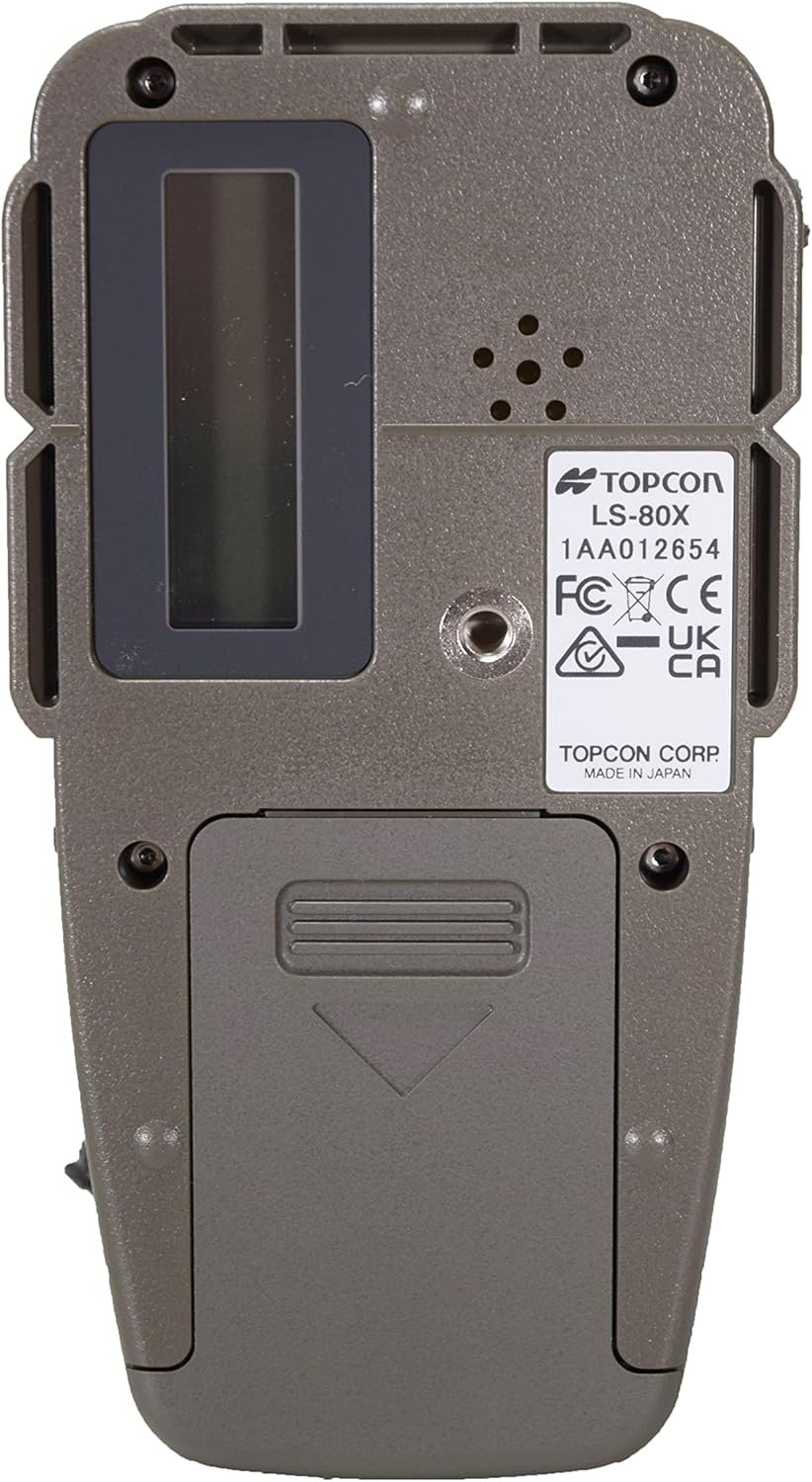
Figure 2: Rear view of the Topcon LS-80X, illustrating the battery compartment and mounting screw thread.
2.2 Mounting (Optional)
For enhanced stability, the LS-80X can be mounted using a Holder 6 bracket (sold separately). The device features a standard mounting thread on its rear.
3. Operating Instructions
3.1 Power On/Off
- To power on the device, press the Power button (usually marked with a circle and a vertical line).
- To power off, press and hold the Power button until the display turns off.
- The device will automatically shut down after 30 minutes of inactivity to conserve battery life.

Figure 3: Detailed view of the LS-80X control panel, showing the power button (top left), precision adjustment button (middle left), and audio control button (bottom left).
3.2 Precision Adjustment
The LS-80X offers two precision settings:
- High Precision: +/- 1.0mm (for tasks requiring greater accuracy).
- Normal Precision: +/- 2.0mm (for general leveling tasks).
To switch between precision modes, press the Precision button (often depicted with two overlapping triangles or similar icon) located on the front panel. The current mode will be indicated on the LCD display.
3.3 Audible Notification
The device provides an audible tone to indicate the laser beam's position relative to the receiver's center. This is particularly useful in situations where the LCD display is not easily visible.
- Press the Audio button (often depicted with a speaker icon) to cycle through different audio settings (e.g., on, off, low volume, high volume).
- The rear-mounted speaker ensures clear audio even in noisy environments.
3.4 Reading the LCD Display
The LS-80X features dual LCD displays, one on each side, allowing for convenient viewing from various angles. The display shows the relative position of the laser beam to the receiver's center line. Arrows or indicators will guide you up or down to achieve the desired level.
- Up Arrow: Indicates the receiver needs to be moved upwards.
- Down Arrow: Indicates the receiver needs to be moved downwards.
- Center Line/Solid Bar: Indicates the receiver is precisely on the laser beam's level.
There are 11 different channels to display the data, providing detailed feedback on the laser's position.
4. Maintenance
- Cleaning: Wipe the device with a soft, damp cloth. Do not use abrasive cleaners or solvents. Ensure the laser detection window and LCD displays are kept clean for optimal performance.
- Storage: Store the LS-80X in a dry, cool place when not in use. Remove batteries if storing for extended periods to prevent leakage.
- Battery Replacement: Replace batteries promptly when the low battery indicator appears on the display to ensure continuous operation and accuracy.
- Protection: The rubber-cased design and IP-66 rating provide protection against dust and water. However, avoid submerging the device or exposing it to extreme conditions beyond its specified rating.
5. Troubleshooting
| Problem | Possible Cause | Solution |
|---|---|---|
| Device does not power on. | Dead or incorrectly installed batteries. | Check battery polarity. Replace with fresh AA alkaline batteries. |
| No laser detection. | Laser not active, receiver out of range, or wrong laser type. | Ensure the rotary laser is on and emitting a red beam. Verify the receiver is within the laser's operational range. Clean the laser detection window. |
| Inaccurate readings. | Receiver not stable, precision setting incorrect, or environmental interference. | Ensure the receiver is held steady or mounted securely. Check if the correct precision mode (High/Normal) is selected for the task. Avoid strong light sources that might interfere. |
| Audible tone is too low or off. | Audio setting is low or off. | Press the Audio button to cycle through volume settings or turn the audio on. |
6. Specifications
| Feature | Detail |
|---|---|
| Model | LS-80X |
| Item Model Number | 1046259-01 |
| Brand | Topcon |
| Compatible Laser Type | Red Beam Rotary Lasers |
| High Precision | +/- 1.0mm |
| Normal Precision | +/- 2.0mm |
| Detection Range | 50mm (vertical detection window) |
| Display | Dual LCD (both sides), 11 channels |
| Audible Notification | Yes, with rear-mounted speaker |
| Power Source | 2 x AA Alkaline Batteries |
| Average Battery Life | Up to 120 hours |
| Automatic Shut-off | After 30 minutes of inactivity |
| IP Rating | IP-66 (Dust and Water Protected) |
| Product Dimensions | 1.8 x 2.4 x 2.6 inches |
| Item Weight | 0.008 ounces (approx. 0.22 grams) |
| Operation Mode | Automatic |
7. Warranty and Support
For warranty information, technical support, or service inquiries, please refer to the official Topcon website or contact your authorized Topcon dealer. Keep your purchase receipt as proof of purchase.
Note: This manual provides general operating instructions. Specific features and performance may vary. Always refer to the latest information from the manufacturer.


