1. Product Overview
The ROCKBROS USB Rechargeable Bike Tail Light is designed to enhance cycling safety by providing bright and visible illumination. This package includes two tail lights, one featuring Red+Blue light options and the other Red+White light options, along with necessary charging cables and installation accessories. Each light is compact, lightweight, and built for durability.

Image 1: ROCKBROS USB Rechargeable Bike Tail Lights and Accessories
2. Setup and Installation
2.1 Charging the Tail Light
The tail lights are equipped with a 250 mAh rechargeable lithium battery. Before first use, or when the light dims, fully charge the device.
- Connect the provided USB charging cable to the tail light's USB port.
- Plug the other end of the cable into a USB power source (e.g., power bank, computer, wall charger).
- A red indicator light signifies charging. The light will turn green when fully charged.
- Charging typically takes approximately 1 hour. A full charge provides up to 16 hours of light in flashing mode or up to 10 hours in steady-on mode.
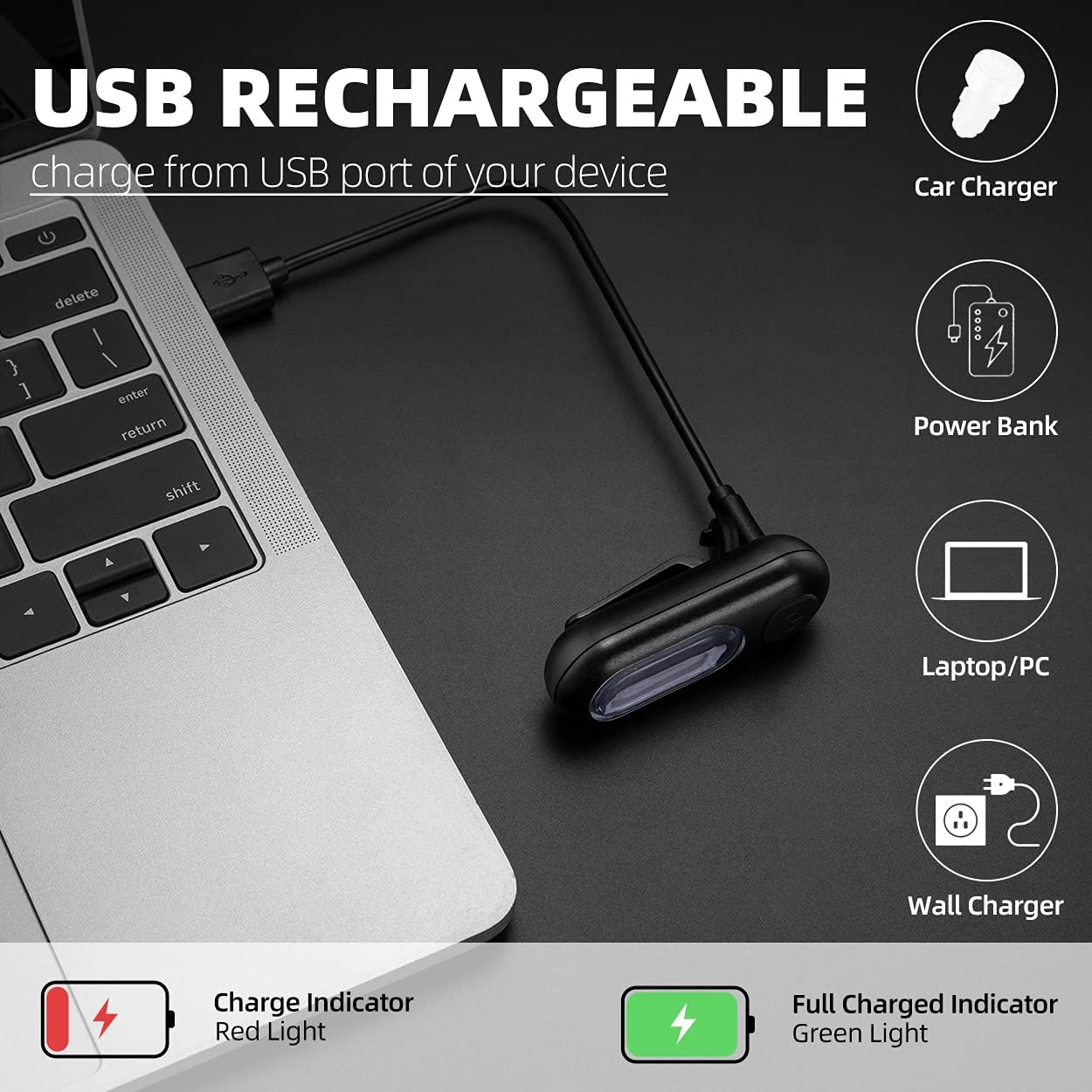
Image 2: USB Charging Options and Indicators
2.2 Installing the Tail Light
The tail light offers versatile installation options using the included silicone mount strap and bracket.
- Using the Silicone Strap: Insert the silicone strap into the bracket on the back of the tail light. Securely attach the strap around your bike's seat post or handlebars. The strap has multiple openings to fit various sizes.
- Clip-on Option: The tail light features a built-in clip, allowing you to attach it directly to your bag, running gear, backpack, dog collar, harness, or clothing.

Image 3: Installation Steps for Seat Post and Clip-on

Image 4: Versatile Mounting Options
3. Operating Instructions
3.1 Power On/Off and Mode Selection
Each tail light features a single button for power control and mode switching.
- To Turn On: Press and hold the power button for approximately 2-3 seconds.
- To Change Mode: Briefly press the power button to cycle through the available lighting modes.
- To Turn Off: Press and hold the power button for approximately 2-3 seconds.
3.2 Lighting Modes
The tail lights come with five distinct lighting modes:
- Red+Blue Light:
- Blue On (Steady)
- Blue Flashing
- Blue + Red Flashing Alternately
- Red On (Steady)
- Red Flashing
- Red+White Light:
- White On (Steady)
- White Flashing
- White + Red Flashing Alternately
- Red On (Steady)
- Red Flashing

Image 5: Available Lighting Modes

Image 6: Tail Light in Operation with Various Colors
4. Maintenance
4.1 Cleaning
To maintain optimal performance and appearance, regularly clean your tail light. Use a soft, damp cloth to wipe away dirt and debris. Avoid using harsh chemicals or abrasive materials that could damage the light's casing or lens.
4.2 Water Resistance
The ROCKBROS tail light features an IP44 water-resistant rating, meaning it is protected against splashing water from any direction. This makes it suitable for daily cycling needs, including light rain. However, it is not designed for submersion in water.

Image 7: IP44 Water-Resistant Design
4.3 Battery Care
To prolong the life of the built-in lithium battery:
- Avoid fully discharging the battery frequently.
- Charge the light regularly, even if not in frequent use, to prevent deep discharge.
- Store the light in a cool, dry place when not in use.
5. Troubleshooting
- Light Not Turning On:
- Ensure the battery is charged. Connect to a USB power source and check the charging indicator.
- Press and hold the power button for 2-3 seconds to ensure it's not just a brief press.
- Light Not Charging:
- Verify the USB cable is securely connected to both the light and the power source.
- Try a different USB cable or power source to rule out faulty equipment.
- Modes Not Switching:
- Ensure the light is powered on.
- Briefly press the power button to cycle through modes. If unresponsive, try turning the light off and on again.
6. Specifications
| Model | PT-6005+PT-6005B/CA |
| Brand | ROCKBROS |
| Power Source | Battery Powered (USB Rechargeable) |
| Battery Type | 250 mAh Lithium Battery (included) |
| Charging Time | Approx. 1 hour |
| Battery Life (Lighting On) | Approx. 10 hours |
| Battery Life (Flashing Mode) | Approx. 16 hours |
| Lighting Modes | 5 modes (Red+Blue light: Blue On, Blue Flashing, Blue+Red Flashing Alternately, Red On, Red Flashing; Red+White light: White On, White Flashing, White+Red Flashing Alternately, Red On, Red Flashing) |
| Water Resistance | IP44 |
| Weight | 25 g |
| Dimensions | 6.2L x 2.5W x 2.1H Centimetres |
| Material | Silicone |
| Light Source | 12 COB LEDs |
7. Warranty and Support
For warranty information or product support, please refer to the retailer's return policy or contact ROCKBROS customer service directly. Keep your purchase receipt as proof of purchase.
For additional information or to explore other ROCKBROS products, visit the official ROCKBROS Store.


