
Beetel M500
Beetel M500 Caller ID Landline Phone with Speaker Phone - User Manual
Model: M500 | Brand: Beetel
1. Introduction
Thank you for choosing the Beetel M500 Caller ID Landline Phone. This phone is designed for reliable communication with features like Caller ID display and a convenient speakerphone function. It is highly durable and compatible with various telephone networks including PSTN, ISDN, Broadband, and Fiber connections. This manual provides essential information for setting up, operating, and maintaining your new phone.
2. Package Contents
Please check the box for the following items:
- Beetel M500 Landline Phone Unit
- Handset
- Coiled Handset Cord
- Telephone Line Cord
- User Manual (this document)
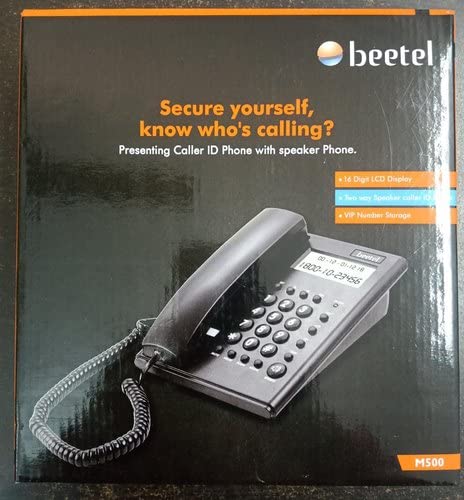
Image: The retail packaging for the Beetel M500 phone, showing the product name and key features on the box.
3. Setup
3.1 Battery Installation
The Beetel M500 requires 3 AA batteries for the LCD display and Caller ID features. These batteries are not typically included and must be purchased separately.
- Locate the battery compartment on the underside of the phone unit.
- Open the battery compartment cover.
- Insert 3 AA batteries, ensuring correct polarity (+ and -) as indicated inside the compartment.
- Close the battery compartment cover securely.
3.2 Connecting the Phone
Follow these steps to connect your phone to the telephone line:
- Connect one end of the coiled handset cord to the handset and the other end to the port labeled HANDSET on the phone unit.
- Connect one end of the telephone line cord to the port labeled LINE on the phone unit.
- Plug the other end of the telephone line cord into your wall telephone jack.

Image: A top-down view of the Beetel M500 landline phone, showing the keypad, LCD display, and connected handset.
4. Operating Instructions
4.1 Making a Call
- Lift the handset or press the SPEAKER button to activate the speakerphone.
- Listen for a dial tone.
- Dial the desired phone number using the numeric keypad.
- To end the call, replace the handset or press the SPEAKER button again.
4.2 Receiving a Call
- When the phone rings, the Caller ID information (if available) will be displayed on the LCD screen.
- Lift the handset or press the SPEAKER button to answer the call.
- To end the call, replace the handset or press the SPEAKER button again.
4.3 Using the Speakerphone
The speakerphone allows for hands-free communication.
- To activate the speakerphone during a call or to make a call hands-free, press the SPEAKER button.
- To switch back to the handset, simply lift the handset.
- To end a speakerphone call, press the SPEAKER button again.
4.4 Adjusting Volume
Use the volume control buttons (usually labeled VOL+ and VOL- or similar) to adjust the speakerphone volume during a call. The handset volume is typically fixed or adjusted by your network provider.
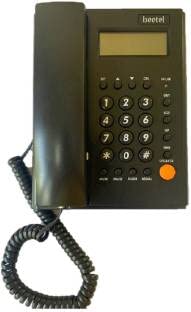
Image: A front view of the Beetel M500 phone, highlighting the LCD display and the arrangement of the keypad and function buttons.
5. Features
- Caller ID Display: Shows incoming caller information (name and number) on the LCD screen, provided you have subscribed to Caller ID service from your telephone service provider.
- Speakerphone: Enables hands-free conversations.
- LCD Display: A clear display for Caller ID, time, and other phone functions.
- Call Log: Stores a history of incoming calls for easy review.
- Tone/Pulse Dialing: Compatible with both dialing modes.
- Flash Function: For use with certain PABX systems or network features.
- Redial Function: Quickly redial the last number called.
6. Maintenance
To ensure the longevity and optimal performance of your Beetel M500 phone, follow these simple maintenance guidelines:
- Cleaning: Wipe the phone's surface with a soft, damp cloth. Do not use abrasive cleaners or solvents.
- Avoid Liquids: Keep the phone away from water and other liquids. If liquid spills on the phone, immediately disconnect it from the wall jack and allow it to dry completely before reconnecting.
- Temperature: Do not expose the phone to extreme temperatures or direct sunlight.
- Handling: Handle the phone and its cords with care to prevent damage.
7. Troubleshooting
If you encounter issues with your Beetel M500 phone, please refer to the following common problems and solutions:
| Problem | Possible Cause | Solution |
|---|---|---|
| No dial tone | Phone line not connected; network issue. | Ensure all cords are securely connected. Test with another phone if possible. Contact your service provider. |
| LCD display is blank or dim | Batteries are low or incorrectly installed. | Replace the AA batteries. Check battery polarity. |
| Caller ID not displayed | Caller ID service not subscribed; network issue. | Contact your telephone service provider to ensure Caller ID service is active on your line. |
| Speakerphone volume is too low/high | Volume not adjusted. | Press the VOL+ or VOL- buttons during a speakerphone call to adjust. |
8. Specifications
- Brand: Beetel
- Model: M500
- Telephone Type: Corded
- Colour: Black
- Display Type: LCD
- Power Source: Corded Electric (for operation), Batteries (for display/features)
- Batteries Required: 3 AA batteries (not included)
- Compatible Devices: Telephone Networks (PSTN, ISDN), Broadband, Fiber
- Material: Plastic
- Item Weight: Approximately 590 g
- Package Dimensions: Approximately 22.1 x 19.6 x 6.3 cm
9. Warranty and Support
The Beetel M500 Landline Phone typically comes with a standard manufacturer's warranty. For specific warranty terms and conditions, please refer to the warranty card included with your product or visit the official Beetel website.
Extended warranty options may also be available for purchase, offering additional coverage beyond the standard period.
For technical support, service, or any inquiries regarding your Beetel M500 phone, please contact Beetel customer support through their official channels. Keep your purchase receipt and product serial number handy when contacting support.
Ask a question about this manual
Ask about setup, troubleshooting, compatibility, parts, safety, or missing instructions. Manuals+ will review the question and use this page’s manual context to help answer it.