1. Introduction
Thank you for choosing the Maclean MC-909W Anti-Theft Tablet Stand. This manual provides essential information for the safe and correct installation, operation, and maintenance of your tablet stand. Please read these instructions thoroughly before use and retain them for future reference.
2. Safety Information
Please observe the following safety guidelines during installation and use:
- Ensure all components are present and undamaged before beginning installation.
- Use appropriate tools for installation.
- When wall mounting, ensure the wall structure can safely support the weight of the stand and the tablet.
- Do not overtighten screws, as this may cause damage.
- Keep keys for the anti-theft lock in a secure location.
3. Package Contents
Verify that all items listed below are included in your package:
- Maclean MC-909W Tablet Stand Enclosure
- Stand Base / Wall Mount Bracket
- Mounting Screws and Wall Anchors
- 2 x Anti-Theft Keys
- Instruction Manual
4. Product Features
- 2-in-1 Mounting: Designed for both table/countertop and wall installation.
- Anti-Theft Protection: Secure enclosure with a lock and two keys to prevent unauthorized access and tablet removal.
- Adjustable Viewing Angle: Features a 30-degree tilt capability for optimal viewing comfort.
- Rotatable Display: Allows for 0 to 90-degree rotation, enabling portrait or landscape tablet orientation.
- Cable Management: Integrated system to route charging cables neatly through the stand.
- Home Button Access: Designed to allow access to the tablet's home button while secured.
- Wide Compatibility: Supports various tablets including 9.7"/10.2" iPad, 10.5" iPad Air/iPad Pro, and 10.1" Samsung Galaxy Tab A (2019).
5. Specifications
| Attribute | Detail |
|---|---|
| Brand | Maclean |
| Model Number | MC-909W |
| Material | Alloy Steel |
| Color | White |
| Mounting Type | Table Mount / Wall Mount |
| Compatible Tablet Sizes | 9.7"/10.2" iPad, 10.5" iPad Air/iPad Pro, 10.1" Samsung Galaxy Tab A (2019) |
| Tilt Angle | 30 degrees |
| Rotation | 0 to 90 degrees |
| Table Stand Height | 124 mm |
| External Dimensions (LxWxH) | 323 x 220 x 18 mm |
| Anti-Theft Feature | Yes, with 2 keys |
| Cable Management | Yes |
| Home Button Access | Yes |

Figure 1: Technical diagram illustrating the dimensions, 30-degree tilt, and 0-90 degree rotation capability of the tablet stand.
6. Setup & Installation
6.1. Unpacking and Component Check
Carefully unpack all components and compare them with the 'Package Contents' list to ensure everything is present and undamaged.

Figure 2: Front and back views of the tablet stand enclosure, showing the tablet opening and internal mounting plate.
6.2. Choosing a Mounting Method
The MC-909W offers two installation options: table/countertop mounting or wall mounting.
6.2.1. Table/Countertop Mounting
- Position the stand on your desired table or countertop surface.
- Mark the locations for the mounting screws through the holes in the base of the stand.
- Drill pilot holes if necessary, according to the screw size and table material.
- Secure the stand to the surface using the provided screws.

Figure 3: The Maclean MC-909W tablet stand securely mounted on a counter with a tablet in place.
6.2.2. Wall Mounting
- Select a suitable wall location that can support the weight of the stand and tablet.
- Hold the stand against the wall at the desired height and mark the positions for the mounting screws.
- Drill holes at the marked positions. Insert the provided wall anchors into the drilled holes.
- Align the stand with the anchors and secure it to the wall using the provided screws.

Figure 4: Side view illustrating the wall mounting method for the tablet stand.
6.3. Tablet Insertion and Securing
- Unlock the tablet enclosure using one of the provided keys and open it.
- Carefully place your compatible tablet into the enclosure. Ensure it is seated correctly and aligned with the home button opening.
- Close the enclosure and lock it using the key. Test the lock to ensure the tablet is securely held.

Figure 5: Internal view of the tablet stand, showing the area where the tablet is placed and secured.

Figure 6: Angled internal view of the tablet stand, highlighting the tablet placement area.
6.4. Cable Management
The stand features a cable management hole at the rear. Route your tablet's charging cable through this opening to keep the setup tidy and prevent cable damage.
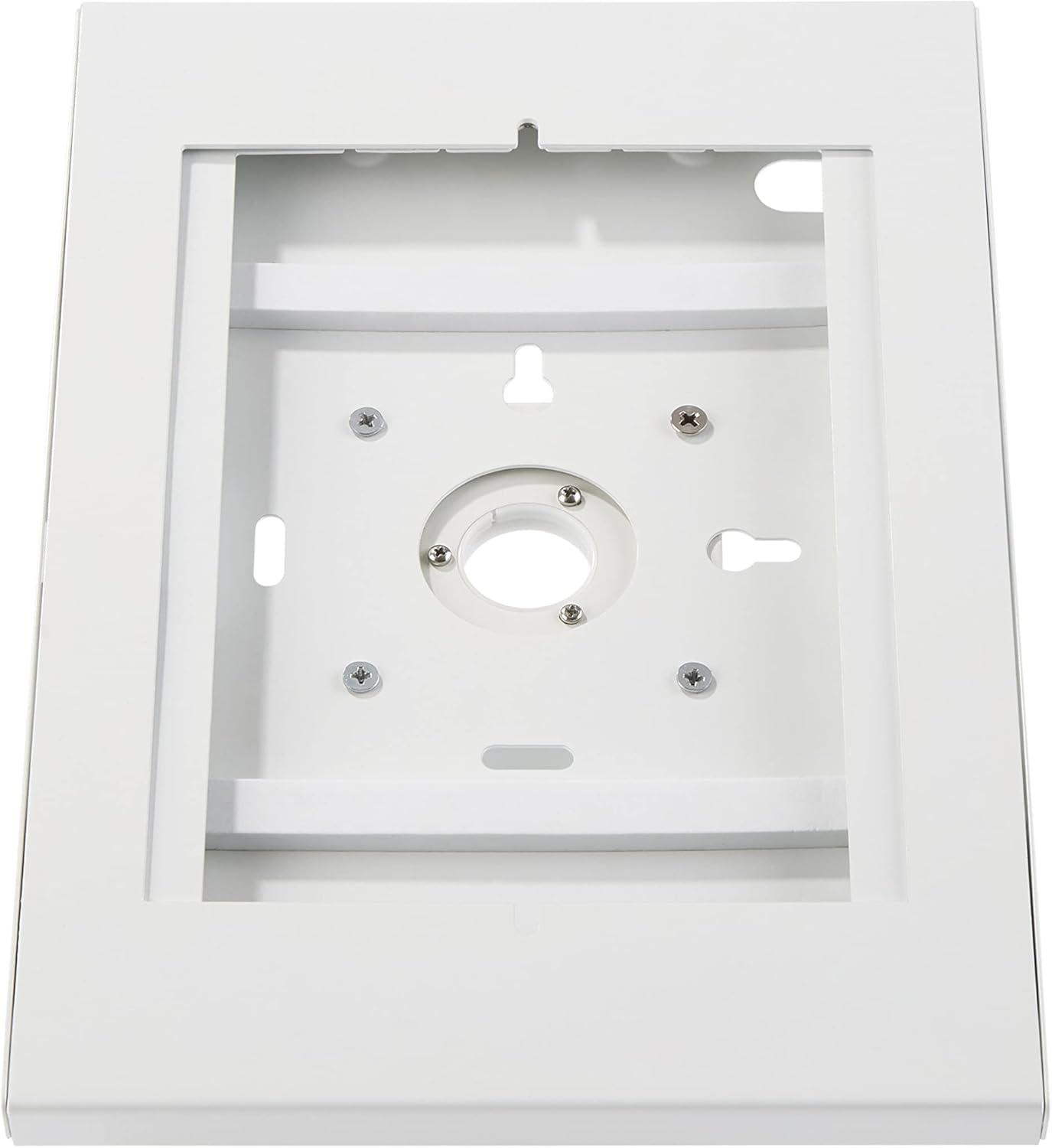
Figure 7: Rear view of the tablet stand, showing the cable routing opening and ventilation slots.
7. Operation
7.1. Adjusting Viewing Angle
The tablet stand allows for a 30-degree tilt. Gently adjust the angle of the tablet enclosure to achieve your desired viewing position.
7.2. Rotating the Tablet
The enclosure can be rotated from 0 to 90 degrees. This allows you to switch between portrait and landscape orientations for your tablet without removing it from the stand.
7.3. Using the Anti-Theft Lock
The anti-theft lock secures your tablet within the enclosure. Insert one of the provided keys into the lock mechanism located at the back of the stand to lock or unlock the enclosure. Always ensure the enclosure is locked when the tablet is unattended in public areas.

Figure 8: Detail of the anti-theft lock and keys on the rear of the tablet stand.
8. Maintenance
To ensure the longevity and proper function of your Maclean MC-909W tablet stand, follow these maintenance guidelines:
- Cleaning: Wipe the stand with a soft, damp cloth. Avoid abrasive cleaners or solvents that could damage the finish.
- Security Check: Periodically check all mounting screws and the anti-theft lock mechanism to ensure they are secure.
- Moving the Stand: If relocating the stand, ensure it is properly disassembled and reassembled according to the installation instructions.
9. Troubleshooting
If you encounter any issues with your Maclean MC-909W tablet stand, consider the following:
- Tablet Not Fitting: Ensure your tablet model is listed as compatible in the specifications. Verify the tablet is inserted correctly and not obstructed.
- Stand Not Stable: Recheck all mounting screws for tightness. For wall mounts, ensure the wall material is appropriate and anchors are correctly installed.
- Lock Mechanism Issues: Ensure the key is fully inserted and turned correctly. Do not force the lock. If the lock is damaged, contact customer support.
- Cable Management Difficulty: Ensure the cable is not too thick or kinked. Route it smoothly through the designated opening.
If problems persist, please contact Maclean customer support for assistance.
10. Warranty and Support
Specific warranty information for the Maclean MC-909W tablet stand is not provided in the product details. For warranty claims, technical support, or inquiries regarding spare parts, please refer to the retailer where the product was purchased or visit the official Maclean website for contact information.

Figure 9: The Maclean MC-909W tablet stand in a typical public display application.


