
Autel BT508
Autel MaxiBAS BT508 Battery & Electrical System Tester User Manual
Model: BT508
1. Introduction
The Autel MaxiBAS BT508 is a professional battery and electrical system analysis tool designed to provide comprehensive testing for 6V and 12V automotive batteries, as well as 12V and 24V cranking and charging systems. Utilizing advanced Adaptive Conductance technology, the BT508 delivers highly accurate test results, helping users quickly identify battery health issues and diagnose electrical system performance. This manual provides detailed instructions for the proper use, maintenance, and troubleshooting of your BT508 device.

Figure 1.1: Autel MaxiBAS BT508 Battery Tester and its components.
2. Safety Information
Always observe the following safety precautions when operating the MaxiBAS BT508 to avoid personal injury or damage to the device or vehicle.
- Wear appropriate eye protection (safety goggles) and protective clothing when working near vehicle batteries.
- Ensure the vehicle is in a well-ventilated area to prevent the accumulation of explosive gases.
- Do not smoke or allow sparks or flames near the battery or engine.
- Avoid touching hot engine parts or exhaust systems.
- Keep the device dry and clean. Do not operate in wet or damp conditions.
- Do not attempt to disassemble or modify the device. Refer all servicing to qualified personnel.
- Ensure proper polarity when connecting the battery clamps. Incorrect connection can damage the device or vehicle.
3. Package Contents
Verify that all items listed below are included in your MaxiBAS BT508 package:
- MaxiBAS BT508 Main Unit
- Battery Clamp Cable (Red)
- Battery Clamp Cable (Black)
- VP200 (OBDII Dongle)
- Users Quick Guide
- Packing Box
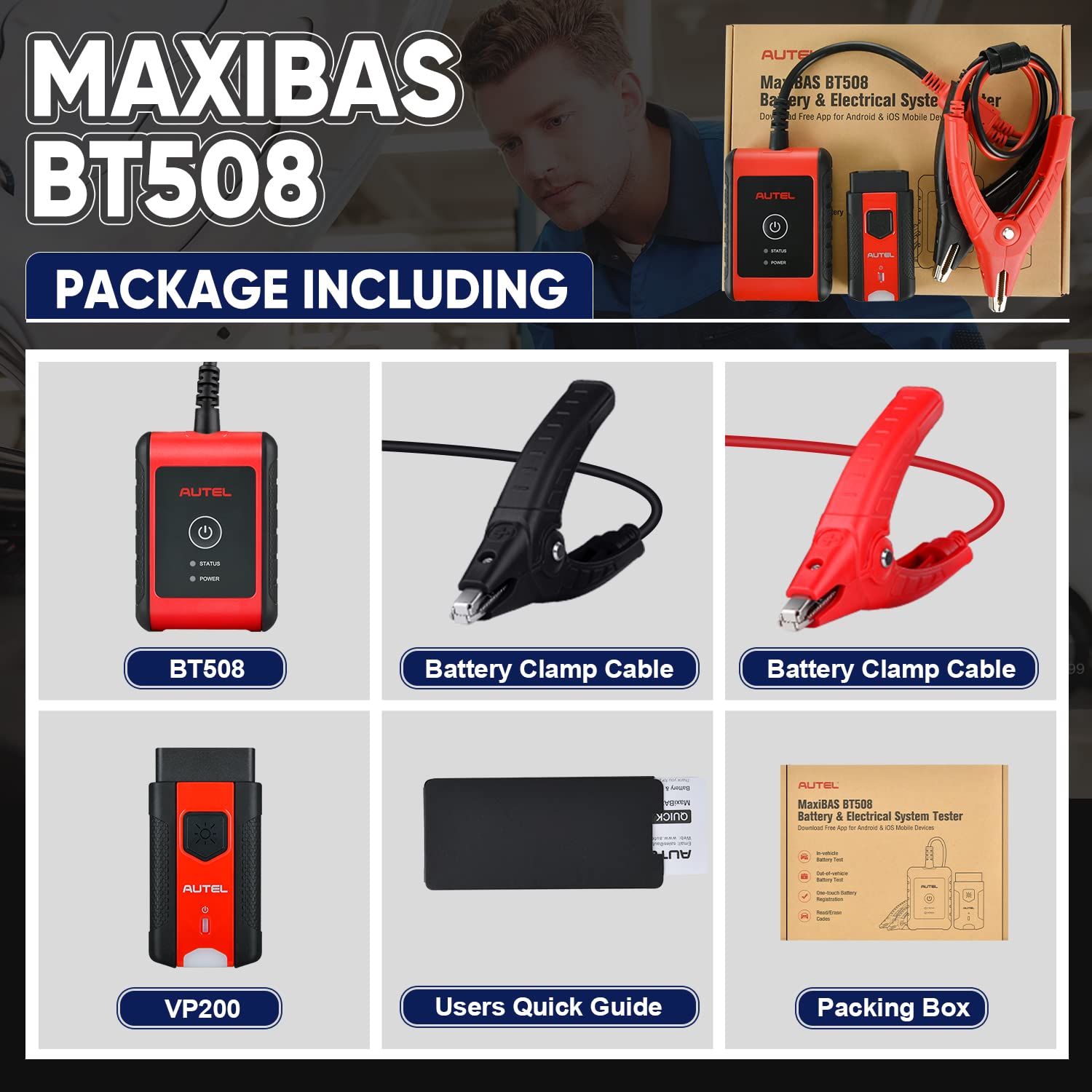
Figure 3.1: All items included in the MaxiBAS BT508 package.
4. Setup
Follow these steps to set up your MaxiBAS BT508 for the first time:
- Download the App: Download the MaxiBAS app on your mobile device (smartphone or tablet) from the App Store (iOS) or Google Play Store (Android).
- Power On: Connect the battery clamp cables to the BT508 main unit. The device will power on when connected to a vehicle battery.
- Connect to Battery: Connect the red clamp to the positive (+) battery terminal and the black clamp to the negative (-) battery terminal. Ensure a secure connection.
- Pair with Mobile Device: Follow the on-screen instructions in the MaxiBAS app to pair your BT508 via Bluetooth.
- Connect VP200 (Optional for Diagnostics): For full system diagnostics, plug the VP200 OBDII dongle into the vehicle's OBDII port. Ensure the vehicle's ignition is in the ON position (engine off).
5. Operating Instructions
The MaxiBAS BT508 offers various testing and diagnostic functions. Navigate through the app interface to select the desired test.
5.1 Battery Test
This function tests the overall health of 6V or 12V batteries, including regular flooded, AGM flat plate, AGM spiral, GEL, and EFB types. It supports 100-2000 CCA range and various standards (JIS, EN, DIN, SAE, CCA, CA, MCA, IEC).
- Connect the BT508 to the battery.
- Select 'Battery Test' in the app.
- Input the battery type and CCA rating as prompted.
- The device will perform the test using Adaptive Conductance technology, providing results on State of Health (SOH), Voltage, Measured Capacity, and Temperature.

Figure 5.1: Example of battery, starter, and generator test results displayed in the app.
5.2 Cranking System Test
Tests the 12V or 24V cranking system, including cranking amps and engine cranking speed.
- Ensure the BT508 is connected to the battery.
- Select 'Cranking Test' in the app.
- Follow the prompts to start the engine. The device will analyze the cranking performance.
5.3 Charging System Test
Evaluates the 12V or 24V charging system, checking the generator output voltage, rectifier diode, and charging current.
- Ensure the BT508 is connected to the battery.
- Select 'Charging Test' in the app.
- Follow the prompts to run the engine at specified RPMs. The device will assess the charging system's efficiency.
5.4 Full System Diagnostic (with VP200)
When paired with the VP200 OBDII dongle, the BT508 can access and diagnose all available vehicle systems (e.g., Engine, Transmission, ABS, SRS, BCM, TPMS). Note: This function is compatible with only one vehicle brand. Additional brands may require separate purchase.
- Connect the BT508 to the battery and the VP200 to the vehicle's OBDII port.
- Ensure the vehicle ignition is ON (engine off).
- Select 'Diagnostics' or 'Auto Scan' in the app.
- The device will scan all ECUs, allowing you to read/clear diagnostic trouble codes (DTCs), view live data, and access ECU information.

Figure 5.2: The BT508 performing an all-systems diagnostic scan.
5.5 Battery Management Functions
The BT508 offers advanced battery management features, including:
- Battery Health Status: Provides a detailed report on the battery's condition.
- Battery Replacement Guidance: Assists in the process of replacing a vehicle battery.
- Auto Registration: Facilitates automatic battery registration after replacement for 53 vehicle makes.
- BMS Reset: Resets the Battery Management System.
- Electrical Appliance Reset: Resets electrical appliances after battery service.

Figure 5.3: Overview of battery management functions.
6. Maintenance
Proper maintenance ensures the longevity and accuracy of your MaxiBAS BT508.
- Cleaning: Use a soft, damp cloth to clean the device. Do not use abrasive cleaners or solvents.
- Storage: Store the device in a dry, cool place away from direct sunlight and extreme temperatures.
- Cable Care: Inspect battery clamp cables for damage before each use. Replace if frayed or broken.
- Software Updates: Regularly check for and install software updates via the MaxiBAS app to ensure optimal performance and access to new features.
7. Troubleshooting
If you encounter issues with your MaxiBAS BT508, refer to the following common problems and solutions:
| Problem | Possible Cause | Solution |
|---|---|---|
| Device does not power on. | Poor battery connection; Battery completely dead. | Ensure clamps are securely connected to battery terminals. Try connecting to a different, known-good battery. |
| Inaccurate test results. | Incorrect battery type/CCA input; Loose connections; Dirty battery terminals. | Verify battery information. Clean battery terminals. Ensure secure clamp connections. |
| Bluetooth pairing failure. | Bluetooth off on mobile device; Device out of range; Interference. | Ensure Bluetooth is enabled. Move mobile device closer to BT508. Restart both devices. |
| VP200 not connecting for diagnostics. | VP200 not fully inserted; Vehicle ignition not ON; OBDII port issue. | Ensure VP200 is firmly seated. Turn vehicle ignition to ON (engine off). Check vehicle's OBDII port for power. |
8. Specifications
Key technical specifications for the Autel MaxiBAS BT508:
- Battery Voltage: 6V, 12V
- CCA Range: 100-2000 CCA
- Supported Battery Types: Flooded, AGM Flat Plate, AGM Spiral, GEL, EFB
- Supported Standards: JIS, EN, DIN, SAE, CCA, CA, MCA, IEC
- Cranking/Charging System Test: 12V & 24V
- Connectivity: Bluetooth
- Item Weight: 1 Pound
- Package Dimensions: 10.08 x 7.87 x 2.64 inches
- Model Number: BT508
9. Warranty and Support
Autel provides comprehensive support for its products.
9.1 Warranty Information
The Autel MaxiBAS BT508 comes with a 30-day money-back guarantee and a hassle-free warranty. Please refer to the official Autel website or your purchase documentation for specific warranty terms and duration.
9.2 Technical Support
For technical assistance, product inquiries, or any issues with your order, please contact Autel customer support. You can typically find contact information on the official Autel website or through the seller's contact details provided at the time of purchase. For direct support, you may contact AutelStoreOnline@outlook.com via buyer-seller messages.
Ask a question about this manual
Ask about setup, troubleshooting, compatibility, parts, safety, or missing instructions. Manuals+ will review the question and use this page’s manual context to help answer it.