
Introduction
The AquaSonic Home Dental Center PRO (HDCPro) is an advanced 2-in-1 oral care system designed to provide comprehensive brushing and flossing. This integrated unit combines a powerful ultrasonic toothbrush with an adjustable water flosser, offering a complete solution for maintaining optimal oral hygiene and promoting healthier gums and whiter teeth.
Safety Information
Do not submerge the device in water. Not intended for use by children without supervision. Retain proof of purchase for warranty claims.
What's in the Box
- 1 Home Dental Center Pro Countertop Setup
- 1 Black Series Pro Electric Toothbrush
- 6 ProFlex Brush heads
- 2 water flosser jet tips
- 1 tongue scraper
- 1 power adapter
- Warranty card
- User manual
Setup
Follow these steps to set up your AquaSonic Home Dental Center PRO:
- Unpack all components from the box.
- Place the Home Dental Center Pro Countertop Setup on a stable, flat surface near a power outlet and sink.
- Charge the power toothbrush and water flosser separately using the provided power adapter.
- Attach a brush head to the power toothbrush by aligning it with the shaft and pushing down until it clicks into place.
- Fill the water flosser's tank with water. Ensure the tank is sitting securely on the base.
- Attach a jet tip to the water flosser handheld piece until you hear a click.

Figure 1: AquaSonic Home Dental Center PRO complete system.

Figure 2: The compact design of the AquaSonic HDCPro, saving countertop space.
Operating Instructions
Power Toothbrush Operation
The Black Series Pro power toothbrush features an advanced 50,000 Vibrations Per Minute motor and 5 distinct brushing modes.
- Apply a small amount of toothpaste to the brush head.
- Wet the brush head.
- Press the power button to turn on the toothbrush.
- Select your desired brushing mode (Clean, Soft, Whiten, Massage, or Deep Clean) by pressing the mode button.
- Brush your teeth for two minutes, following the smart vibrating notification timer for optimal cleaning.
- Rinse your mouth and the brush head after use.

Figure 3: The Black Series Pro electric toothbrush and its ProFlex brush heads.

Figure 4: Visual representation of the brushing and flossing action for whiter teeth and healthier gums.
Water Flosser Operation
The water flosser simplifies flossing with gentle, targeted water pressure. It features a 600ml tank and a 10-level adjustable water pressure dial.
- Before flossing, ensure the device is plugged in and the water tank is securely seated.
- Select your desired pressure setting using the 10-level adjustable dial.
- Lean over the sink and place the jet tip in your mouth.
- Turn on the water flosser.
- Direct the water stream along the gumline and between teeth to remove plaque and food debris.
- The water flosser also includes deep clean and soothing massage modes for gum health.
- Rinse your mouth after flossing.
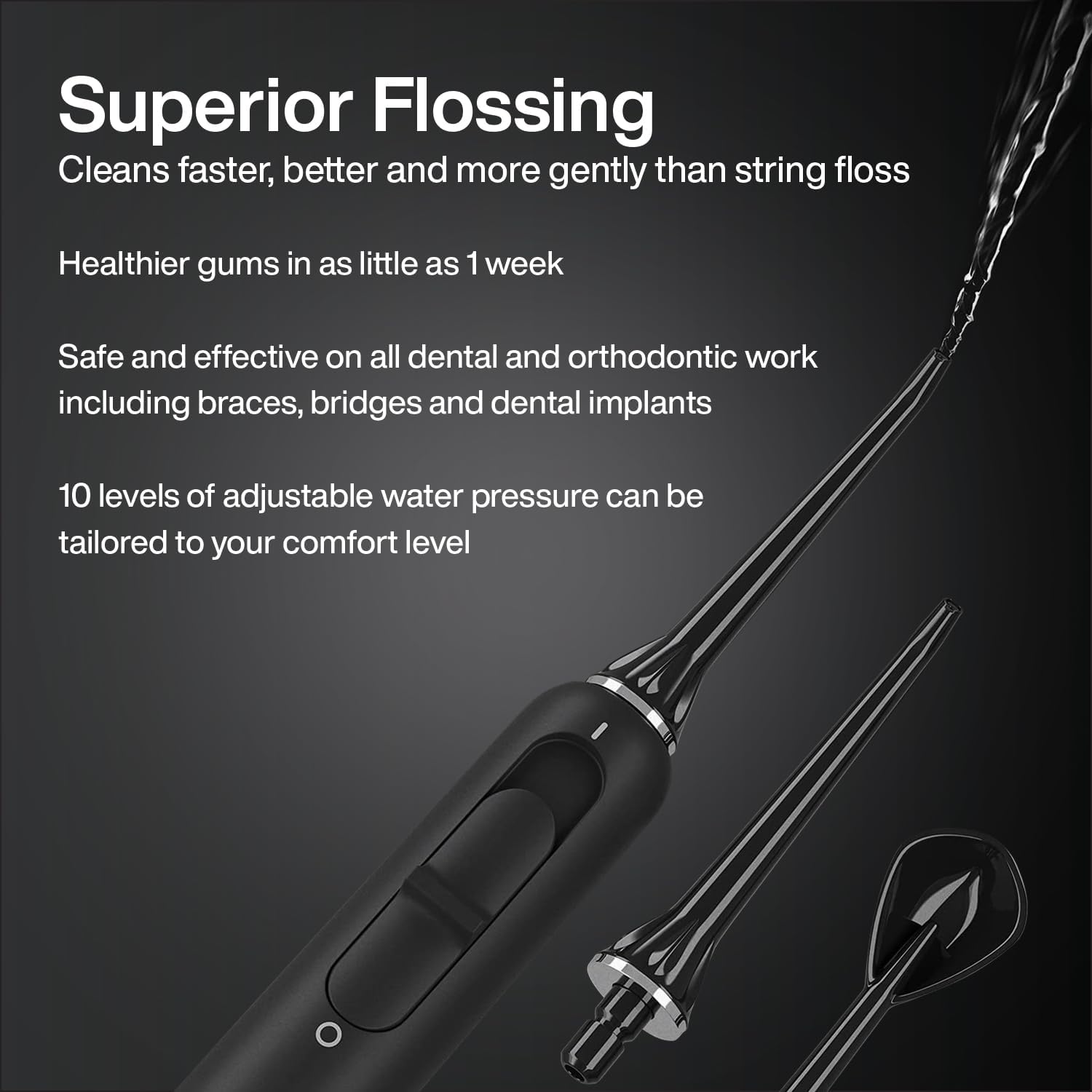
Figure 5: The water flosser and its specialized jet tips for effective cleaning.

Figure 6: Overview of the advanced features of the AquaSonic HDCPro system.
Maintenance
Regular maintenance ensures the longevity and optimal performance of your AquaSonic Home Dental Center PRO.
- Cleaning the Unit: After each use, rinse the brush head and flosser tip thoroughly under running water. Wipe the main unit with a soft, damp cloth. Do not use abrasive cleaners or submerge the main unit in water.
- Water Tank: Empty any remaining water from the reservoir after each use to prevent mineral buildup and bacterial growth. The tank can be removed and rinsed with warm water.
- Brush Head Replacement: Replace brush heads every 3 months, or sooner if the bristles become frayed or worn, to maintain effective cleaning.
- Storage: Store the unit in a dry place when not in use. Ensure the water tank is empty if storing for an extended period.
Troubleshooting
If you encounter any issues with your AquaSonic Home Dental Center PRO, refer to the following common solutions:
- Device Not Turning On: Ensure the unit is properly plugged into a working power outlet. Check if the battery of the toothbrush is charged.
- Weak Water Pressure: Verify that the water tank is filled and securely seated. Check for any blockages in the flosser tip or hose. Adjust the pressure dial to a higher setting.
- Toothbrush Not Vibrating: Ensure the brush head is correctly attached. Recharge the toothbrush if the battery is low.
- Water Leakage: Confirm that the water tank is properly aligned and sealed on the base. Ensure the flosser tip is firmly inserted into the handle.
For persistent issues not resolved by these steps, please contact AquaSonic customer support.
Specifications
| Feature | Detail |
|---|---|
| Model Number | 11 |
| Brand | Aquasonic |
| Power Source | Corded Electric |
| Special Features | Multiple Pressure Settings, Rechargeable, Timer |
| Product Benefits | Gum Health |
| Unit Count | 1.00 Count |
| Package Dimensions | 9.45 x 8.35 x 5.47 inches |
| Weight | 2.4 Pounds |
| Batteries | 1 Lithium Ion battery required |
| First Available Date | December 6, 2021 |
| Manufacturer | AquaSonic |
Warranty and Support
Your AquaSonic Home Dental Center PRO comes with a warranty card included in the box. Please retain your proof of purchase for any warranty claims.
Extended protection plans are available for purchase to provide additional coverage beyond the standard warranty:
- 2-Year Protection Plan
- 3-Year Protection Plan
- Complete Protect (monthly plan covering eligible purchases)
For customer support, inquiries, or to learn more about protection plans, please visit the official AquaSonic store or contact their customer service department. Contact information can typically be found on the warranty card or the manufacturer's website.
Manufacturer: AquaSonic