
goobay 53877
goobay 53877 LED Projector with Motion Detector Instruction Manual
Model: 53877 | Brand: goobay
1. Introduction and Product Overview
This manual provides essential information for the safe and efficient installation, operation, and maintenance of your goobay 53877 LED Projector with Motion Detector. Please read these instructions carefully before use and retain them for future reference.
The goobay 53877 is a highly luminous and functional LED outdoor luminaire designed for various applications such as house entrances, garages, carports, and access paths. It features a compact design and an integrated motion detector for enhanced security and energy efficiency.

Image 1: goobay 53877 LED Projector with Motion Detector, front view.
2. Product Features
- High Brightness: 10 W LED with 850 lm neutral white light (4000 K).
- Motion Detector: Integrated PIR sensor with a detection range of up to 10 m at a 180° angle.
- Adjustable Settings: Customizable switch-off delay (5 - 600 seconds), light sensitivity (5 - 2000 lx), and range (1 - 10 m).
- Dual Functionality: The motion detector can be switched on or off, allowing use as a standard outdoor floodlight.
- Robust Construction: High-quality, shock-resistant die-cast aluminum housing, transparent tempered glass, and plastic sensor.
- Flexible Mounting: Stable, beveled mounting bracket for wall installation with a rotation range of up to 180°.
- Easy Installation: Quick and easy installation thanks to a practical M16 cable gland with plug-in function for cable diameters of 4 to 10 mm.
- Energy Efficient: Up to 80% energy savings compared to halogen floodlights.
- Weather Resistant: IP65 protection rating for outdoor use.

Image 2: Key features of the goobay 53877 LED Projector, highlighting its technical specifications and weather resistance.

Image 3: Compact design and dimensions of the goobay 53877 LED Projector.
3. Technical Specifications
| Specification | Value |
|---|---|
| Model Number | 53877 |
| Power Consumption | 10 W |
| Luminous Flux | 850 lm |
| Color Temperature | 4000 K (Neutral White) |
| Beam Angle | 100° |
| PIR Sensor Detection Range | Max. 10 m at 180° angle |
| Switch-off Delay (Adjustable) | 5 - 600 seconds |
| Light Sensitivity (Adjustable) | 5 - 2000 lx |
| Material | Die-cast aluminum housing, tempered glass, plastic sensor |
| Protection Rating | IP65 |
| Dimensions (L x W x H) | 8 x 17 x 11 cm |
| Weight | 399 grams |
| Recommended Installation Height | 2.3 m to 4 m |
| Certifications | CE, RoHS |
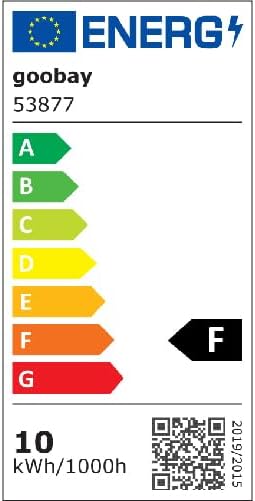
For detailed energy efficiency information, please refer to the EU energy label:
4. Setup and Installation
4.1 Safety Instructions
- Ensure power is disconnected before installation.
- Installation should be performed by a qualified electrician if you are unsure.
- Do not install the product in areas with excessive vibration or extreme temperatures.
- Ensure proper grounding to prevent electrical shock.
4.2 Mounting the Projector
The projector can be mounted on a wall or ceiling. The stable mounting bracket allows for a rotation range of up to 180° for optimal light direction.
- Choose a suitable mounting location, ideally between 2.3 m and 4 m in height, to maximize the motion sensor's effectiveness.
- Use the mounting bracket as a template to mark the drilling points on the wall or ceiling.
- Drill holes and insert appropriate wall plugs (not included).
- Secure the mounting bracket to the surface using screws.
- Attach the LED projector to the bracket, ensuring it is securely fastened. Adjust the angle as needed.

Image 5: Detail of the M16 cable gland for secure and easy wiring.
4.3 Electrical Connection
The goobay 53877 features an M16 cable gland for quick and easy wiring. Ensure correct polarity and secure connections.
- Connect the neutral wire (N) to the blue terminal.
- Connect the live wire (L) to the brown terminal.
- Connect the ground wire to the yellow/green terminal.
Warning: Incorrect wiring can lead to electrical hazards. Consult a professional if necessary.
Video 1: This video demonstrates the installation process and features of a 20W LED Projector with Motion Detector. Note that the specific model shown may vary slightly from the goobay 53877, but the general installation principles apply.
Video 2: This video illustrates the functionality and installation of an LED Projector with Motion Detector. While the wattage may differ, the core features and setup are similar to the goobay 53877.
Video 3: This video showcases an outdoor LED floodlight with a motion detector, demonstrating its use and installation. The principles are applicable to the goobay 53877 model.
Video 4: This video provides an overview of an outdoor LED projector with a detector, including its features and potential applications. It offers a general understanding relevant to the goobay 53877.
5. Operating Instructions
5.1 Motion Sensor Settings
The motion sensor has three adjustable controls: SENS (Sensitivity), TIME (Duration), and LUX (Light Sensitivity).

Image 6: Close-up of the motion sensor's adjustable controls.
- SENS (Sensitivity): Adjusts the detection range of the PIR sensor from 1 m to 10 m. Turn clockwise to increase sensitivity, counter-clockwise to decrease.
- TIME (Duration): Sets how long the light remains on after motion is detected. Adjustable from 5 seconds to 600 seconds (10 minutes). Turn clockwise for longer duration, counter-clockwise for shorter.
- LUX (Light Sensitivity): Determines the ambient light level at which the sensor becomes active.
- Turn towards the "sun" icon for detection during both day and night (5 - 2000 lx).
- Turn towards the "moon" icon for detection only at night (5 lx).
5.2 ON/OFF Switch
An integrated ON/OFF switch allows you to disable the motion detector and use the projector as a standard floodlight, providing continuous illumination regardless of motion.
6. Maintenance
- Cleaning: Clean the projector and sensor regularly with a soft, damp cloth. Do not use abrasive cleaners or solvents.
- Inspection: Periodically check the mounting and electrical connections for any signs of wear, damage, or loosening.
- Bulb Replacement: The LED light source is integrated and not user-replaceable. If the LEDs fail, the entire unit should be replaced.
- Environmental Protection: Dispose of the product responsibly at the end of its lifespan according to local regulations for electronic waste.
7. Troubleshooting
| Problem | Possible Cause | Solution |
|---|---|---|
| Light does not turn on. | No power supply; LUX setting too low (daylight); Motion not detected; Faulty sensor/LED. | Check power connection; Adjust LUX setting towards "sun" icon; Verify motion in detection zone; Contact support if problem persists. |
| Light stays on continuously. | Motion detector switched off; Continuous motion in detection zone; Faulty sensor. | Check ON/OFF switch; Reduce SENS setting; Contact support if problem persists. |
| Light turns on too frequently/infrequently. | SENS or LUX settings are not optimal. | Adjust SENS and LUX settings according to desired operation. |
| Light turns off too quickly/slowly. | TIME setting is not optimal. | Adjust TIME setting to desired duration. |
8. Warranty and Support
For warranty information and technical support, please refer to the documentation provided with your purchase or visit the official goobay website. Keep your proof of purchase for warranty claims.
If you encounter issues not covered in this troubleshooting section, please contact goobay customer service for assistance.
9. Intended Use and Applications
The goobay 53877 LED Projector is designed for outdoor use, providing illumination and security through its motion detection capabilities. Typical applications include:
- Courtyard lighting
- Wall lighting
- Garden spot lighting
- Garage lighting
- House entrance lighting
- Carport lighting
- Parking area lighting
- Deterrent against intruders

Image 7: Examples of the goobay 53877 LED Projector in typical outdoor settings.
Related documents53877


Ask a question about this manual
Ask about setup, troubleshooting, compatibility, parts, safety, or missing instructions. Manuals+ will review the question and use this page’s manual context to help answer it.