
Introduction
The BODYTONE BTC1 Foot Pod is a versatile Bluetooth sensor designed to track your speed, steps, and distance during running activities, particularly useful for monitoring workouts on any treadmill. It seamlessly connects with various fitness applications, allowing you to monitor your training data effectively. This manual provides essential information for the proper setup, operation, and maintenance of your BTC1 sensor.
Safety Information
- Keep the device away from extreme temperatures and direct sunlight.
- Do not attempt to disassemble or modify the sensor. This may void the warranty and cause damage.
- Ensure the sensor is securely attached to your shoe to prevent loss or injury during activity.
- Dispose of the battery according to local regulations.
Package Contents
Verify that all items are present in your package:
- BODYTONE BTC1 Foot Pod Sensor
- User Manual (this document)

Image: The retail packaging for the BODYTONE BTC1 Foot Pod, showing the sensor and branding.
Setup
1. Sensor Overview

Image: A close-up view of the BODYTONE BTC1 Foot Pod sensor, displaying the 'BTCONNECT FOOT POD' label.
The BTC1 Foot Pod is a compact sensor designed for easy attachment to your running shoe.
2. Installation on Shoe
- Locate the laces on your running shoe.
- Thread the shoe laces through the integrated clip on the back of the BTC1 Foot Pod.
- Position the sensor securely on the top of your shoe, ensuring it is centered and does not interfere with your foot movement.
- Tighten your laces as usual to hold the sensor firmly in place.
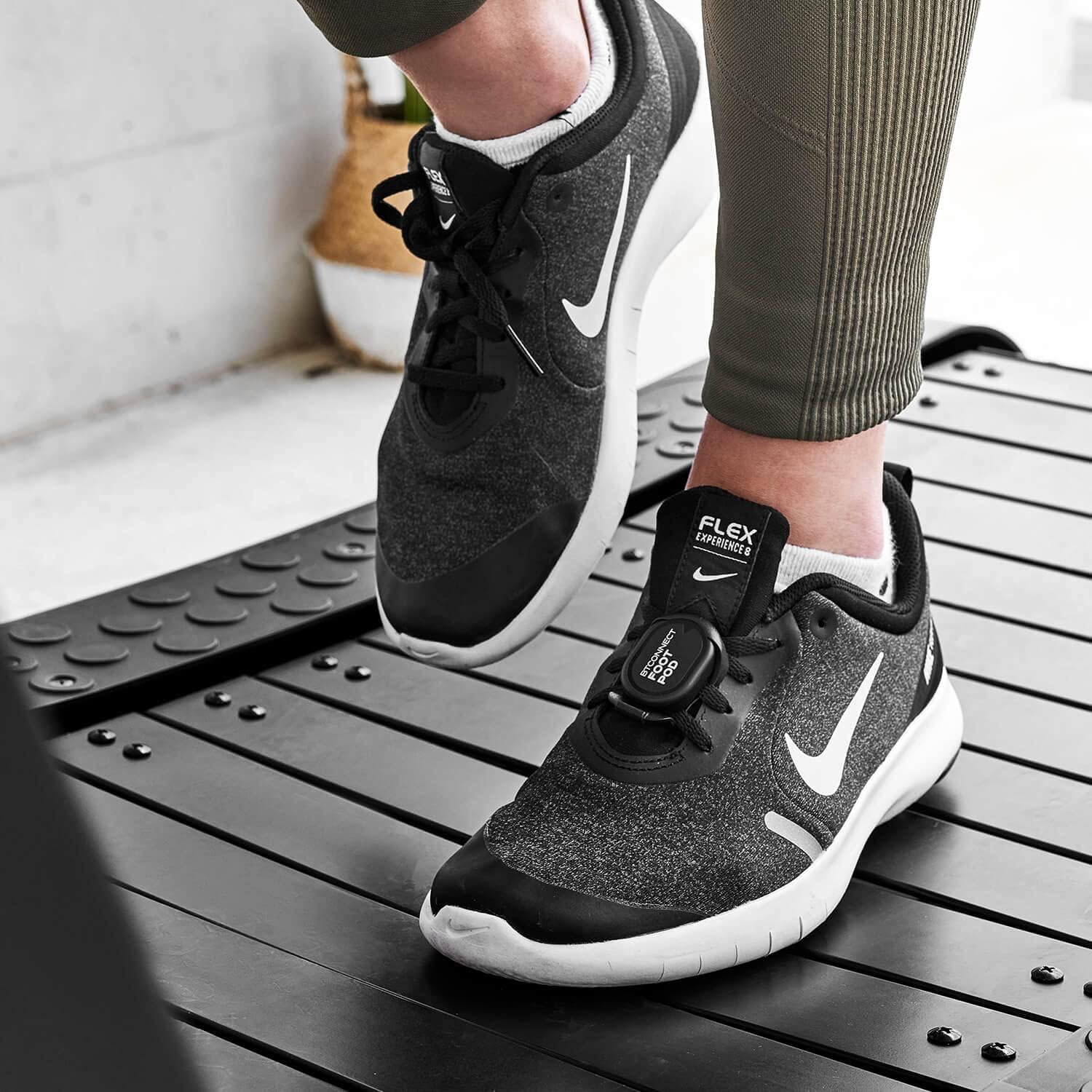
Image: The BODYTONE BTC1 Foot Pod sensor is shown attached to the laces of a running shoe, ready for use.
3. Battery Information
The BTC1 Foot Pod uses a replaceable coin cell battery (e.g., CR2032, typically pre-installed). When the battery is low, the sensor's performance may be affected. To replace the battery:
- Carefully open the battery compartment cover on the back of the sensor.
- Remove the old battery.
- Insert a new battery with the positive (+) side facing up.
- Close the battery compartment cover securely.
Operating Instructions
1. Powering On/Off
The BTC1 Foot Pod automatically activates when motion is detected and enters a low-power sleep mode when inactive for a period. There is no manual power button.
2. Bluetooth Pairing with Applications
The BTC1 sensor uses Bluetooth for wireless connectivity. To pair it with a compatible fitness application:
- Ensure Bluetooth is enabled on your smartphone or tablet.
- Open your preferred compatible fitness application (e.g., MyConnect, Zwift, Kinomap).
- Navigate to the application's sensor or device pairing settings.
- Select "Add Sensor" or "Pair Device" and choose the BTC1 Foot Pod from the list of available Bluetooth devices. The sensor may appear as "BODYTONE BTC1" or a similar identifier.
- Once connected, the application will display a confirmation, and you can begin your workout.
3. Compatible Applications
The BTC1 Foot Pod is compatible with a wide range of applications that support standard Bluetooth speed and cadence services, including:
- MyConnect (Bodytone)
- Zwift
- Kinomap
- Other applications supporting Bluetooth SIG standardized running speed and cadence services.
4. Data Monitoring
Once paired, the BTC1 sensor will transmit real-time data to your connected application. This data typically includes your speed, steps, cadence, and distance covered during your activity, making it ideal for tracking indoor running on treadmills or outdoor runs. Refer to your specific fitness application's instructions for how to view, record, and analyze your training data.
Maintenance
Cleaning
- Wipe the sensor with a soft, damp cloth after each use to remove sweat and dirt.
- Do not use abrasive cleaners or solvents, as these can damage the device.
- Ensure the sensor is completely dry before storing.
Storage
- Store the sensor in a cool, dry place when not in use.
- Avoid storing it in direct sunlight or in environments with high humidity.
Troubleshooting
| Problem | Possible Cause | Solution |
|---|---|---|
| Sensor not detected by app | Bluetooth is off; sensor battery is low; sensor is not active; app permissions. | Ensure Bluetooth is enabled on your device. Check and replace the battery if necessary. Move the sensor to activate it. Grant necessary Bluetooth permissions to the app. |
| Inaccurate speed/distance readings | Sensor not securely attached; calibration issues in app. | Ensure the sensor is firmly attached to your shoe. Check your app's settings for calibration options (e.g., stride length). |
| Sensor disconnects frequently | Interference; low battery; distance from device. | Avoid sources of strong electromagnetic interference. Replace the battery. Keep your smartphone/tablet close to the sensor. |
Specifications
| Model Number | BTC1 |
| Brand | BT BODYTONE |
| Connectivity | Bluetooth |
| Functions | Speed, Steps, Distance, Cadence |
| Weight | 30 grams |
| Color | Black |
Warranty and Support
For warranty information and technical support, please refer to the official BODYTONE website or contact their customer service. Keep your proof of purchase for warranty claims.
Official Website: www.bodytone.eu