
1. Introduction
Thank you for choosing the MINIWARE ES15S Precision Electric Screwdriver. This manual provides essential information for the safe and efficient operation, maintenance, and troubleshooting of your device. Please read it thoroughly before use and keep it for future reference.

Image: The ES15S is designed for precise electronics repair, such as phones, cameras, and laptops, rather than large household appliances.
2. Package Contents
Upon opening the package, please verify that all items listed below are present and in good condition:
- 1 x MINIWARE ES15S Electric Screwdriver
- 1 x Set of 24 Magnetic Bits (4mm Hex & 800 bits compatible)
- 1 x USB Type-C Charging Cable
- 1 x User Manual
- 1 x Safety Instructions Guide

Image: The ES15S screwdriver, its box, user manual, and the included 24-piece bit set.
3. Product Features
- Durable Construction: Made of high-quality 304 stainless steel with engraved anti-skid patterns for enhanced grip and protection.
- Compact Design: Approximately the size of a marker, making it suitable for small appliances and light-duty work.
- Integrated LED Lights: Built-in LED lights illuminate the working area for improved visibility.
- Rechargeable Battery: Features an 800mAh battery with a Type-C port, offering approximately 6 hours of continuous use on a 50-minute full charge.
- Multiple Operating Modes: Supports Smart Motion Control and Directional Modes (forward/reverse rotation).
- Adjustable Torque & Speed: Offers 5 levels of torque adjustment and speeds of 220/360/470 RPM for various tasks.
- OLED Display Screen: A 128x32 pixel OLED screen clearly shows current settings and functions.
- Bit Compatibility: Compatible with 4mm hexagon and 800-series bits.
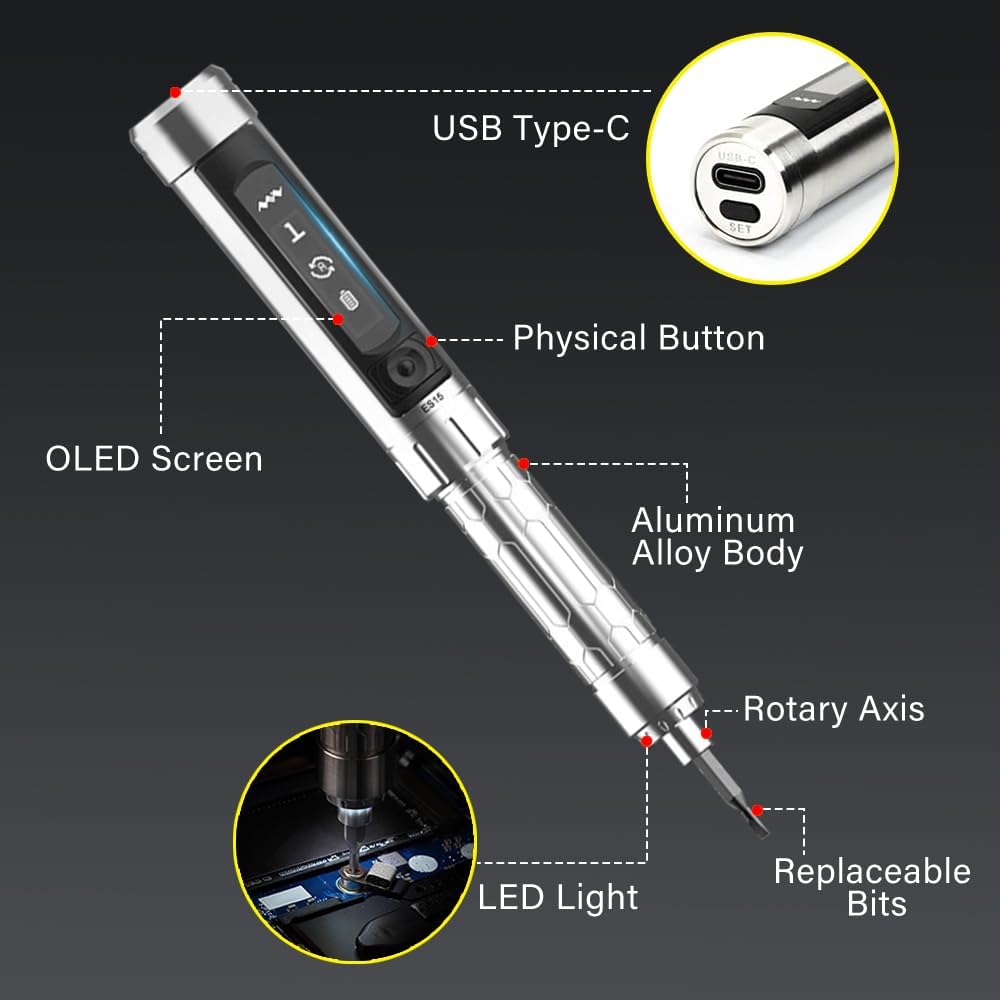
Image: Detailed diagram highlighting the USB Type-C port, physical button, OLED screen, aluminum alloy body, rotary axis, and LED light of the ES15S screwdriver.
4. Setup
4.1 Initial Charging
Before first use, fully charge the ES15S screwdriver using the provided USB Type-C cable. Connect the cable to the USB-C port on the top of the screwdriver and a compatible power adapter (not included) or computer USB port. A full charge takes approximately 50 minutes.

Image: The ES15S screwdriver connected via USB Type-C cable to a laptop for charging. The OLED screen displays a charging icon.
4.2 Bit Installation
Select the appropriate bit from the 24-piece set. Insert the bit firmly into the magnetic hexagonal head at the front of the screwdriver. Ensure it is securely seated before operation.
5. Operating Modes
5.1 Power On/Off and Locking
To power on the device, press the main button. If the device has not been used for a while, it may be locked. To unlock, press the 'SET' button located on the top end of the screwdriver next to the USB-C port.
5.2 Smart Motion Control Mode
In Smart Motion Control mode, the screwdriver's rotation direction and speed are controlled by the angle of your wrist. Twist your wrist clockwise to tighten screws and counter-clockwise to loosen them. The speed of rotation is proportional to the angle of the twist.

Image: Illustration showing the ES15S screwdriver being used with motion control, indicating wrist movements for screwing in and screwing out.
5.3 Directional Modes (Forward/Reverse)
For heavy disassembly and assembly tasks, you can switch to directional modes. Press and hold the 'RUN' button (main button) to activate continuous rotation in the desired direction. The OLED screen will indicate the current mode.
5.4 Torque and Speed Adjustment
Press the 'SET' button to cycle through different torque levels (1-5) and rotation speeds (220/360/470 RPM). The current setting will be displayed on the OLED screen. Choose a lower torque for delicate tasks and higher torque for more demanding applications.

Image: A graphic representation of the ES15S screwdriver's adjustable torque levels (1-5) and speed settings (220, 360, 470 RPM) displayed on its OLED screen.
5.5 Front LED Lighting
The integrated LED lights automatically activate when the screwdriver is in operation, illuminating the work area. This feature is particularly useful in dimly lit environments.
6. Maintenance
- Cleaning: Wipe the screwdriver body with a soft, dry cloth. Do not use abrasive cleaners or solvents.
- Bit Care: Keep the magnetic bits clean and dry. Store them in their designated case to prevent loss and damage.
- Storage: Store the ES15S in a cool, dry place away from direct sunlight and extreme temperatures.
- Charging: Recharge the battery regularly, even if not in frequent use, to maintain battery health.
7. Troubleshooting
| Problem | Possible Cause | Solution |
|---|---|---|
| Screwdriver does not turn on. | Battery is depleted or device is locked. | Charge the device. If charged, press the 'SET' button to unlock. |
| Bit slips or does not engage screw. | Incorrect bit size or worn bit. | Ensure the correct bit is used and replace worn bits. |
| Screwdriver stops unexpectedly. | Overload protection activated or low battery. | Reduce load or recharge battery. |
| OLED screen is blank. | Device is off or in standby mode. | Press the main button to wake or power on. |
8. Specifications
- Model: ES15S
- Brand: MINIWARE
- Manufacturer: MINIWARE (CCDSO)
- Material: 304 Stainless Steel
- Battery: 800mAh Lithium Ion (rechargeable via USB Type-C)
- Charging Time: Approximately 50 minutes
- Continuous Use: Up to 6 hours
- Torque: 0.16 N·m (Electric), 2.0 N·m (Manual)
- Speed: 220/360/470 RPM (adjustable)
- Display: 128x32 OLED Screen
- Bit Compatibility: 4mm Hexagon, 800-series bits
- Dimensions: 6.8 x 3.4 x 1.6 inches (Product)
- Weight: 0.634 ounces
- Special Features: Smart Motion Control, Front LED Lighting
9. Warranty and Support
The MINIWARE ES15S Precision Electric Screwdriver comes with a standard manufacturer's warranty. For detailed warranty information, technical support, or service inquiries, please refer to the official MINIWARE website or contact your retailer. Keep your purchase receipt as proof of purchase.
For firmware updates and additional resources, please visit the official MINIWARE website.
10. Product Videos
MINIWARE ES15 Electric Screwdriver Overview
Video: An official overview of the MINIWARE ES15 electric screwdriver, demonstrating its features, design, and various functions including motion control, LED lighting, and bit compatibility. This video is provided by Geek4Fun.


