
Introduction
This manual provides comprehensive instructions for the installation, operation, and maintenance of your LightInTheBox Golden Black Ornate Swan Style Bathroom Sink Faucet Combo. Please read this manual thoroughly before installation and use to ensure proper function and longevity of your product.
Key Features:
- Ornate Swan Design: Unique and elegant swan-neck spout with detailed wings.
- Dual Handle Operation: Separate handles for hot and cold water control.
- Durable Construction: Made from high-quality brass for reliability.
- Deck Mount Installation: Designed for easy installation on your bathroom sink deck.
- Water Saving Design: Features a built-in imported filter bubbler for 30% water saving.
Product Overview
The LightInTheBox Golden Black Ornate Swan Style Bathroom Sink Faucet Combo is a three-piece set designed to enhance the aesthetic and functionality of your bathroom. It includes a central swan-neck spout and two separate handles for precise temperature and flow control.
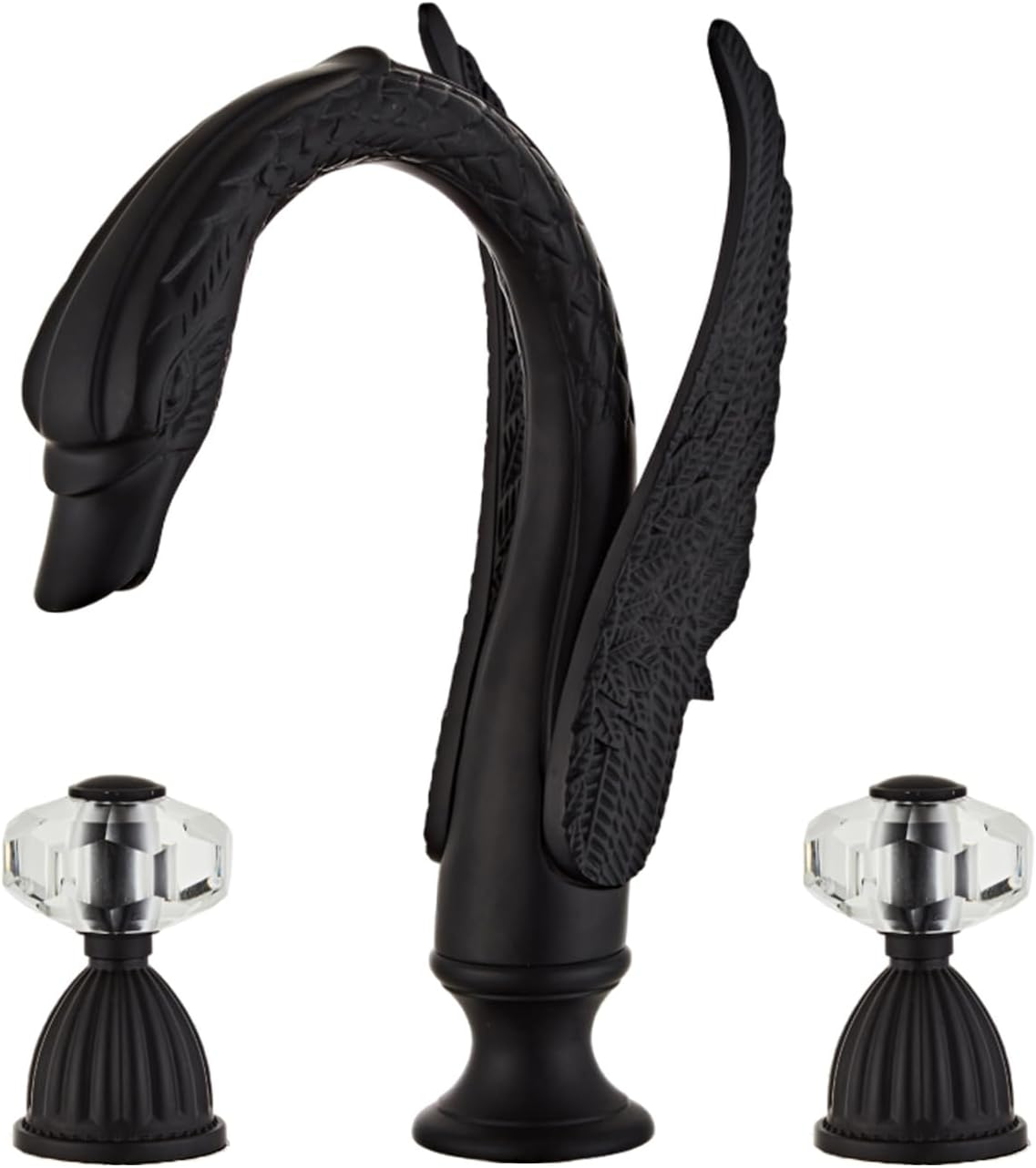
Figure 1: The LightInTheBox Golden Black Ornate Swan Style Bathroom Sink Faucet Combo.

Figure 2: Exploded view of the faucet components, including the swan spout, two handles, and intake pipes.
Setup and Installation
Proper installation is crucial for the optimal performance of your faucet. It is recommended to have a qualified plumber perform the installation if you are unfamiliar with plumbing procedures.
Required Tools (Not Included):
- Adjustable Wrench
- Screwdriver (Phillips/Flathead)
- Plumber's Putty or Silicone Sealant
- Safety Glasses
Installation Steps:
- Prepare the Sink: Ensure the sink surface is clean and dry. Identify the three holes for the faucet and handles.
- Install the Spout: Insert the main swan spout into the center hole of the sink. Secure it from underneath the sink using the provided washer and nut. Tighten firmly with a wrench.
- Install the Handles: Insert the hot and cold water handles into the remaining two holes. Secure them from underneath with their respective washers and nuts. Ensure they are aligned correctly.
- Connect Water Supply Lines: Attach the hot and cold water supply lines to the corresponding inlets on the faucet handles and the main water supply valves. Ensure all connections are tight to prevent leaks.
- Connect Handle to Spout: Connect the flexible hoses from the hot and cold handles to the central spout's inlet.
- Test for Leaks: Slowly turn on the main water supply and check all connections for any signs of leakage. Tighten any leaking connections immediately.
Video 1: Official installation instructions for the Golden Ornate Swan Style Faucet, demonstrating the step-by-step assembly and connection process.

Figure 3: The Black Swan Faucet elegantly installed on a white bathroom sink.
Operating Instructions
The faucet features two handles for precise control over water temperature and flow.
- Hot Water: Turn the left handle counter-clockwise to open the hot water flow.
- Cold Water: Turn the right handle counter-clockwise to open the cold water flow.
- Temperature Control: Adjust the hot and cold handles simultaneously to achieve your desired water temperature.
- Flow Control: The further the handles are turned, the greater the water flow.

Figure 4: Clearly labeled hot and cold handles for easy operation of the faucet.
Maintenance
To maintain the finish and functionality of your faucet, follow these guidelines:
- Cleaning: Clean the faucet regularly with a soft cloth and mild soap. Avoid abrasive cleaners, harsh chemicals, or scouring pads, as these can damage the finish.
- Drying: After cleaning, dry the faucet thoroughly to prevent water spots and mineral buildup.
- Aerator Maintenance: Periodically unscrew the aerator from the spout and clean any debris or mineral deposits to maintain optimal water flow.
Troubleshooting
If you encounter any issues with your faucet, refer to the following common problems and solutions:
| Problem | Possible Cause | Solution |
|---|---|---|
| Water Leakage | Loose connections, worn O-rings, or damaged cartridge. | Check and tighten all connections. Replace O-rings or cartridge if necessary. |
| Low Water Flow | Clogged aerator or partially closed shut-off valves. | Clean the aerator. Ensure shut-off valves are fully open. |
| Loose Handle | Mounting nut underneath the sink is loose. | Tighten the mounting nut securely from underneath the sink. |
Specifications
| Feature | Detail |
|---|---|
| Brand | LightInTheBox |
| Model Name | S8382967 |
| Recommended Uses | Bathroom |
| Mounting Type | Deck Mount |
| Finish Type | Black |
| Material | Brass |
| Number of Handles | 2 |
| Hole Count | 3 |
| Style | Traditional |
| Installation Type | Single Hole (for spout, handles are separate) |
| Spout Height | 7.87 Inches |
| Spout Reach | 5.11 Inches |
| Item Weight | 6.91 pounds (3.14 Kilograms) |
| Product Dimensions | 17.48 x 11.93 x 4.72 inches |
Warranty and Support
For warranty information and customer support, please refer to the product packaging or contact LightInTheBox customer service directly. Keep your purchase receipt for any warranty claims.