
Introduction
This manual provides detailed instructions for the proper use and care of your Samyang 12mm F2.0 AF Lens for Fujifilm X-Mount. This ultra-wide lens is designed for APS-C mirrorless cameras, offering an 18mm full-frame equivalent focal length. It is suitable for various photographic applications including landscapes, architecture, and astrophotography. Please read this manual thoroughly before using the lens to ensure optimal performance and longevity.
Package Contents
Verify that all items listed below are included in your package:
- Samyang 12mm F2.0 AF Lens
- Removable Petal Lens Hood
- Front Lens Cap
- Rear Lens Cap
- Lens Case
- Instruction Manual (this document)
- Warranty Card
Key Features
- Ultra-Wide 12mm Focal Length: Provides a 99.1° angle of view on APS-C sensors, ideal for expansive scenes.
- Bright F2.0 Aperture: Excellent for low-light photography and achieving shallow depth of field.
- Advanced Optical Design: Features 12 elements in 10 groups, including aspherical and extra-low dispersion elements, to minimize aberrations.
- Ultra Multi-Coating (UMC): Reduces flare and ghosting, enhancing contrast and color accuracy.
- Fast and Quiet Autofocus: Equipped with a Linear STM motor for smooth and precise autofocus performance.
- Weather Sealing: Durable construction with weather sealing protects against dust and light moisture.
- Compact and Lightweight: Designed for portability without compromising optical quality.

Figure 1: Visual representation of key lens features.
Setup
Attaching the Lens
- Ensure your camera is powered off.
- Remove the rear lens cap from the Samyang 12mm F2.0 AF lens and the body cap from your Fujifilm X-Mount camera.
- Align the white index mark on the lens barrel with the corresponding white index mark on your camera's lens mount.
- Gently insert the lens into the camera mount and rotate it clockwise until it clicks into place. Do not force the lens.
- Remove the front lens cap.

Figure 2: Samyang 12mm F2.0 AF lens attached to a Fujifilm X-Mount camera.
Attaching the Lens Hood
The included petal-shaped lens hood helps to block stray light from entering the lens, reducing flare and ghosting, and provides physical protection to the front element.
- Align the red dot on the lens hood with the red dot on the front of the lens barrel.
- Gently push the hood onto the lens and rotate it clockwise until it locks securely.
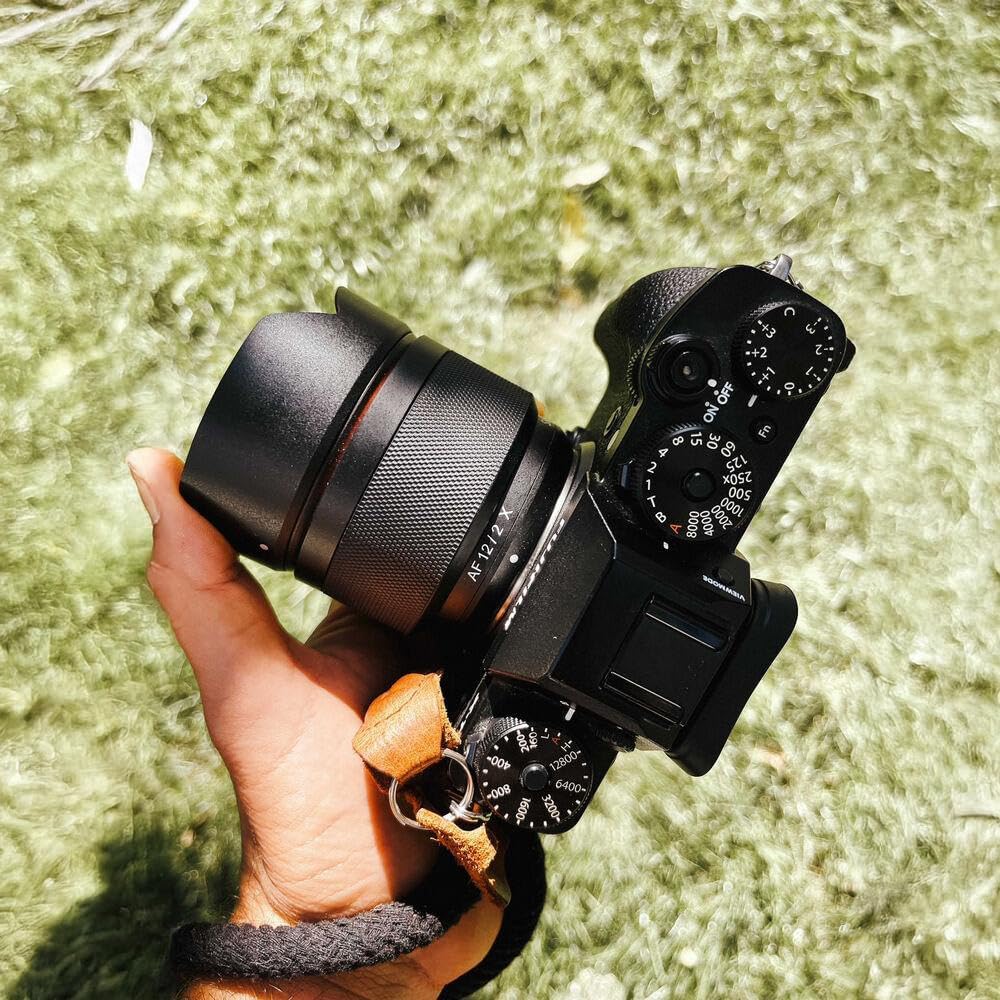
Figure 3: Samyang 12mm F2.0 AF lens with lens hood attached.
Operating the Lens
Autofocus (AF)
The Samyang 12mm F2.0 AF lens features a Linear STM autofocus motor for fast, quiet, and precise focusing. Ensure your camera's focus mode is set to AF (Autofocus). The lens will communicate with your camera's autofocus system to achieve focus.
- For optimal AF performance, ensure your camera's firmware is up to date.
- In challenging low-light conditions, the camera's AF assist lamp (if available) may be used.
Manual Focus (MF)
To use manual focus, set your camera's focus mode to MF (Manual Focus). Rotate the focus ring on the lens barrel to adjust focus. Your camera's focus peaking and magnification features can assist with precise manual focusing.

Figure 4: Front view of the lens, highlighting the focus ring.
Aperture Control
The lens aperture (F-stop) is controlled electronically through your camera. Adjust the aperture setting on your camera body to control the amount of light entering the lens and the depth of field.
Weather Sealing
This lens features weather sealing to protect against dust and light splashes. While it offers enhanced durability, it is not fully waterproof. Avoid exposing the lens to heavy rain or submerging it in water.

Figure 5: Weather sealing points on the lens.
Maintenance and Care
Cleaning the Lens
- Use a blower brush to remove dust and loose particles from the lens surfaces.
- For smudges or fingerprints, use a clean microfiber cloth specifically designed for optical lenses, along with a small amount of lens cleaning solution. Apply the solution to the cloth, not directly to the lens.
- Clean the lens mount contacts with a dry, clean cloth if necessary.
- Never use abrasive materials, solvents, or harsh chemicals to clean the lens.
Storage
- When not in use, attach both the front and rear lens caps.
- Store the lens in a cool, dry place, away from direct sunlight and extreme temperatures.
- If storing for extended periods, consider using a dehumidifying agent to prevent mold growth.
Troubleshooting
Autofocus Issues
- Lens not focusing or "hunting": Ensure your camera's firmware is updated to the latest version. Some camera models may require a lens firmware update for optimal compatibility. This may require a separate Samyang Lens Station.
- Slow autofocus: Check lighting conditions. Autofocus performance can be affected in very low light. Ensure camera settings are appropriate for the scene.
- Focus breathing during video: Some degree of focus breathing is inherent in many lenses. If severe, ensure firmware is updated.
Image Quality Concerns
- Soft images: Verify that the lens is securely mounted and that focus is accurately achieved. Check camera settings for shutter speed and aperture.
- Flare or ghosting: Ensure the lens hood is properly attached. Avoid shooting directly into strong light sources.
- Chromatic aberration or distortion: While the lens design minimizes these, some may be visible in extreme conditions. Post-processing software can often correct these.
General Issues
- Lens not recognized by camera: Power off the camera, remove and reattach the lens, then power on. Clean the lens and camera contacts if the issue persists.
Specifications

Figure 6: Optical construction diagram of the Samyang 12mm F2.0 AF lens.
| Brand | Samyang |
| Model Number | SYIO12AF-FX |
| Focal Length | 12mm (18mm equivalent on APS-C) |
| Maximum Aperture | F2.0 |
| Minimum Aperture | F22 |
| Lens Mount | Fujifilm X |
| Angle of View | 99.1° (APS-C) |
| Optical Construction | 12 Elements in 10 Groups (1 Aspherical, 1 Hybrid-Aspherical, 3 Extra-Low Dispersion) |
| Diaphragm Blades | 7 (Circular) |
| Minimum Focusing Distance | 0.2m (0.66ft) |
| Filter Size | 62mm |
| Autofocus Motor | Linear STM |
| Length | Approx. 2.33 inches |
| Weight | Approx. 213g (7.5 oz) |
| Weather Sealing | Yes |
Warranty and Support
Warranty Information
Your Samyang lens comes with a limited warranty. Please refer to the warranty card included in your package for specific terms, conditions, and duration. Retain your proof of purchase for warranty claims.
Customer Support
For technical assistance, service, or inquiries regarding your Samyang product, please visit the official Samyang website or contact their authorized service centers. You can also find more information and resources on the Samyang Store on Amazon.


