
Introduction
The SilverStone SUGO 16 is a compact Mini-ITX Small Form Factor (SFF) computer case designed for efficient space utilization without compromising hardware compatibility. Constructed with high-grade steel, this 13-liter chassis offers a versatile platform for building powerful systems, from gaming PCs to compact workstations. Its thoughtful design prioritizes airflow and ease of assembly, making it an excellent choice for users seeking a small footprint solution.

Figure 1: Front-left view of the SilverStone SUGO 16 Black Mini-ITX case, showcasing its compact size and perforated side panels for airflow.
Product Overview
The SUGO 16 features a shoebox-shaped design with an all-steel construction, ensuring durability and a premium feel. Its compact 13-liter volume belies its impressive hardware support, making it suitable for a wide range of components.
Key Features:
- Supports standard length graphics / expansion cards of up to 275mm.
- Compatible with Mini-DTX / Mini-ITX motherboards and ATX PSUs.
- Supports 120mm All-In-One liquid cooling radiators.
- CPU cooler opening on motherboard back plate for convenient assembly and upgrade.
- Front I/O port includes 2 x USB 3.0 and 1 x combo audio jack.
Design and Airflow:
The case incorporates a modernistic design with perforated panels on multiple sides to facilitate excellent airflow, crucial for cooling high-performance components within a small enclosure. Magnetic dust filters are included for easy maintenance and to prevent dust accumulation.

Figure 2: Side view of the SUGO 16, highlighting the extensive perforation pattern for optimal ventilation.

Figure 3: Top view of the SUGO 16, showing the magnetic dust filter which can be easily removed for cleaning.

Figure 4: Close-up of the front I/O panel, featuring the power button, reset button, two USB 3.0 ports, and a combo audio jack.
Official Product Overview Video:
Video 1: An official overview of the SilverStone SUGO 16 case, detailing its features and design. This video is provided by the manufacturer, SilverStone.
Setup and Component Installation
The SUGO 16 offers flexible hardware compatibility, allowing users to configure their system based on specific requirements. Careful planning is recommended due to its small form factor.
Motherboard and Power Supply Installation:
The case supports Mini-DTX and Mini-ITX motherboards with a unique 180-degree rotated layout. The choice of power supply (PSU) affects available space for other components, particularly CPU coolers and front-mounted fans/radiators.
- ATX PSU: If an ATX power supply is installed, the option for a 120mm front fan is not feasible, and the CPU cooler height is limited to 85mm.
- SFX/SFX-L PSU: Using an SFX or SFX-L power supply allows for the installation of 80mm, 92mm, or 120mm fans at the front, and provides a CPU cooler height clearance of up to 172mm.

Figure 5: Interior view of the SUGO 16, showing the placement of the power supply, CPU cooler, and graphics card.

Figure 6: Diagram illustrating component placement with an ATX power supply, including fan and radiator options.

Figure 7: Diagram illustrating component placement with an SFX power supply, showing increased flexibility for cooling and drive bays.
Graphics Card and Cooling:
The top compartment is dedicated to the graphics card, supporting dual-fan cards up to 275mm in length and 147mm in width. For liquid cooling, the case supports a 120mm All-In-One (AIO) radiator.
- Radiator Support: With an ATX PSU, only one 120mm radiator can be installed at the rear. With SFX/SFX-L PSUs, 120mm radiators can be installed at both the front and rear.
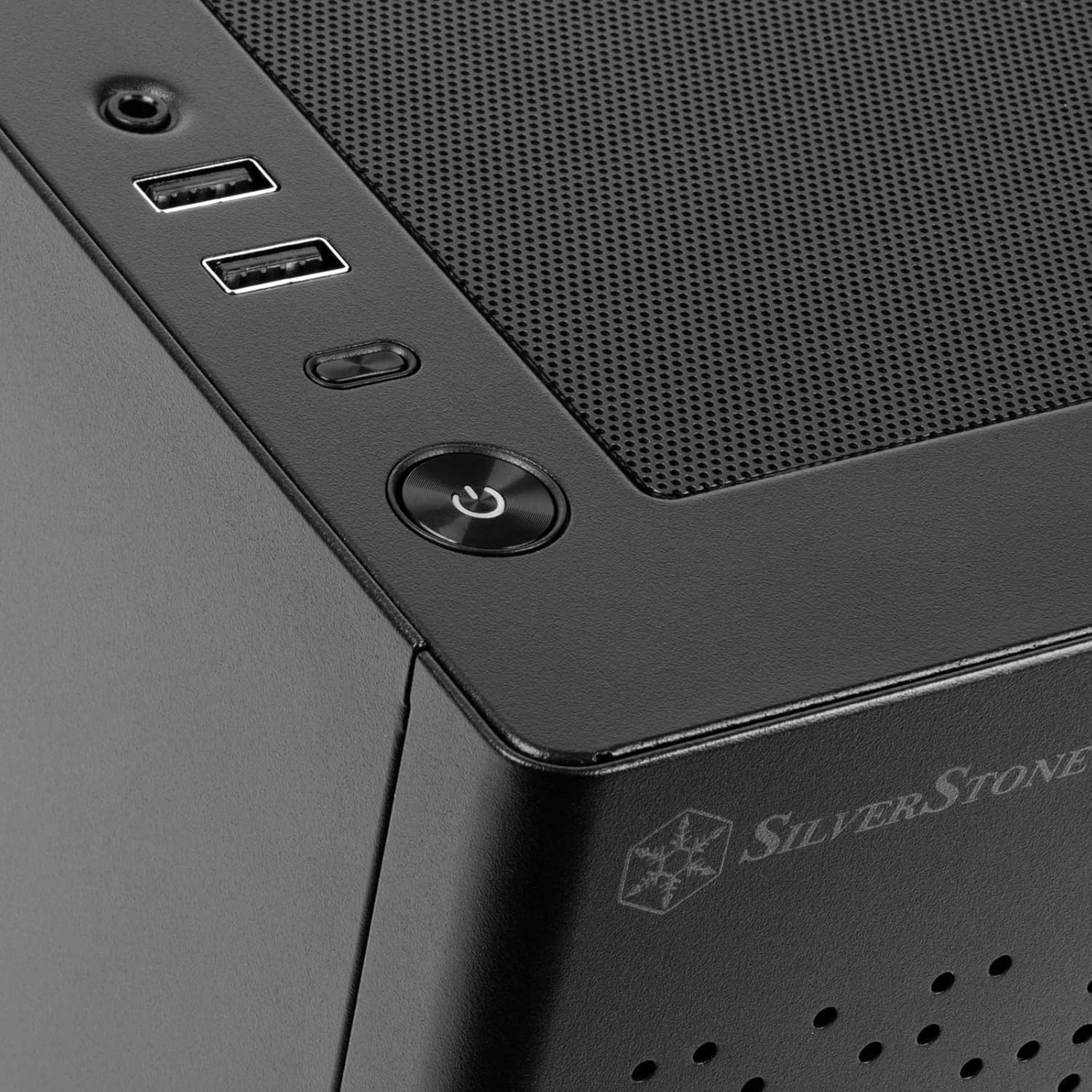
Figure 8: View of the interior showing the graphics card installed in the upper compartment.

Figure 9: Interior view focusing on the power supply and the large air cooler, demonstrating component density.
Storage Drives:
The SUGO 16 accommodates up to two 2.5" drives and one 3.5" drive, providing sufficient storage options for a compact system.
Operating Instructions
To power on your system, press the power button located on the front I/O panel. The case is designed for optimal airflow to keep internal components cool during operation. Ensure adequate space around the case for proper ventilation.
Maintenance
Regular maintenance is essential to ensure the longevity and optimal performance of your SUGO 16 case and its components.
Dust Filter Cleaning:
The SUGO 16 features magnetic dust filters on the top, front, and right side panels. These filters are easily removable for cleaning.
- Gently lift the magnetic dust filter from the top or side panel.
- Clean the filter using compressed air or a soft brush to remove accumulated dust.
- Align the filter with the panel and allow the magnets to secure it back in place.
Figure 10: The top magnetic dust filter, easily removable for cleaning.
General Cleaning:
Wipe the exterior of the case with a soft, damp cloth. Avoid using harsh chemicals or abrasive materials that could damage the finish.
Troubleshooting
If you encounter issues with your SUGO 16 case, consider the following common troubleshooting steps:
- No Power: Ensure all power cables are securely connected to the power supply, motherboard, and wall outlet. Check the power button connection to the motherboard.
- Overheating: Verify that all fans are spinning correctly and that dust filters are clean. Ensure there is adequate space around the case for proper airflow. Consider optimizing fan configurations for better cooling.
- Component Fit Issues: Double-check component dimensions against the case specifications, especially for CPU coolers and graphics cards, as space is limited in SFF cases.
- Loose Connections: If components are not detected or behaving erratically, open the side panel and ensure all internal cables (power, data, front I/O) are firmly seated.
Specifications
| Feature | Detail |
|---|---|
| Brand | SilverStone |
| Series | SUGO 16 |
| Model Number | SST-SG16B |
| Item Weight | 1 pounds |
| Product Dimensions (LxWxH) | 11.02 x 7.87 x 9.13 inches |
| Color | Black |
| Material | Alloy Steel |
| Motherboard Compatibility | Mini-DTX / Mini-ITX |
| Case Type | Mini-Tower |
| Power Supply Mounting Type | Bottom Mount |
| Cooling Method | Fan |
| Front I/O Ports | 2 x USB 3.0, 1 x Combo Audio |
| Max Graphics Card Length | 275mm |
| Max CPU Cooler Height (with SFX/SFX-L PSU) | 172mm |
| Max CPU Cooler Height (with ATX PSU) | 85mm |
| Radiator Support | 120mm (front/rear depending on PSU) |
| Drive Bays | 2 x 2.5", 1 x 3.5" |

Figure 11: Dimensional diagram of the SilverStone SUGO 16 case.
Warranty and Support
For warranty information and technical support, please refer to the official SilverStone Technology website or contact their customer service. Keep your purchase receipt for warranty claims.
Additional protection plans may be available through your retailer. Please consult your retailer for details on extended warranty options.


