
1. Introduction
Thank you for choosing the ZTBH DCP-3500 DC Water Pump. This pump is designed for various aquatic applications, including aquariums, fish tanks, and ponds, offering energy-saving and ultra-quiet operation. This manual provides essential information for the safe and efficient use of your water pump. Please read it thoroughly before installation and operation.
2. Safety Instructions
- Always disconnect the power supply before performing any maintenance, installation, or cleaning.
- Ensure the pump and controller are placed in a dry, well-ventilated area, away from direct sunlight or high temperatures, to prevent overheating.
- Do not operate the pump without water. Dry running can cause damage to the pump.
- Verify that the input voltage matches the pump's specifications (DC 24V).
- Regularly inspect the power cord and connections for any signs of damage. Do not use if damaged.
- Keep out of reach of children.
3. Package Contents
Please check the package for the following items:
- DCP-3500 DC Water Pump Unit
- Controller with LED Display
- Power Adapter
- Hose Connectors/Adapters (various sizes)
4. Product Overview
The ZTBH DCP-3500 pump features a compact design with a separate controller for easy operation and monitoring.

Image 1: Overview of the DCP-3500 pump unit, controller, and included hose adapters. Dimensions are shown as 135mm length and 105mm height for the pump, and 80mm width. The controller displays wattage and features buttons for control. Hose adapters include outer diameters of 25mm and 20mm, and inner diameters of 40mm and 32mm.
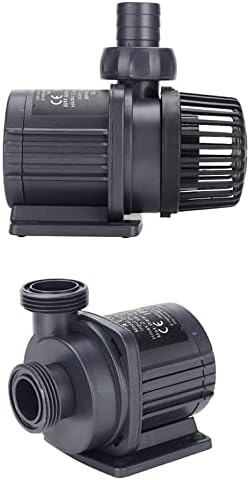
Image 2: Side and top views of the ZTBH DC Water Pump unit, illustrating its compact design and water inlet/outlet connections.
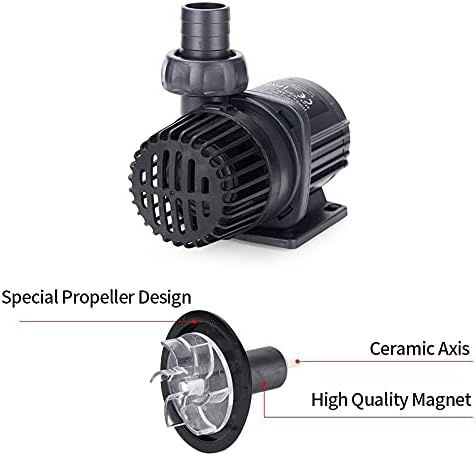
Image 3: Detailed view of the pump's internal components, highlighting the special propeller design, ceramic axis, and high-quality magnet, which contribute to its efficient and quiet operation.
5. Specifications
Key specifications for the ZTBH DCP-3500 DC Water Pump:

Image 4: A table comparing specifications across various ZTBH DC pump models. For the DCP-3500, the voltage is DC 24V, wattage is 28W, maximum flow rate (Q max) is 3500 L/h, and maximum head height (H max) is 3.5 meters.
| Feature | Specification (DCP-3500) |
|---|---|
| Model | DCP-3500 |
| Voltage | DC 24V |
| Watts | 28W |
| Max Flow Rate (Q max) | 3500 L/h |
| Max Head Height (H max) | 3.5 m |
| Power Source | Corded Electric |
| Item Weight | 300 Grams (approx. 10.6 ounces) |
6. Setup Instructions
Follow these steps to set up your ZTBH DCP-3500 DC Water Pump:
- Placement: Position the pump in your aquarium, fish tank, or pond. Ensure it is fully submerged if used for submersible applications, or securely placed for external use.
- Connect Hoses: Attach appropriate hoses to the pump's inlet and outlet. Use the provided hose connectors/adapters to ensure a secure, leak-free connection.
- Connect Controller: Connect the pump unit to the controller. Ensure the connection is firm.
- Connect Power: Plug the power adapter into the controller, then plug the power adapter into a suitable electrical outlet.
- Initial Priming (for external use): If using externally, ensure the pump is primed with water before turning it on to prevent dry running. For submersible use, ensure the pump is fully submerged before powering on.

Image 5: The ZTBH DC Water Pump operating while submerged, with its controller visible above the water line, demonstrating a typical setup.
7. Operating Instructions
The controller allows for easy management of the pump's functions:
- Power On/Off: Press the power button on the controller to turn the pump on or off.
- Flow Adjustment: Use the '+' and '-' buttons on the controller to adjust the water flow rate according to your needs. The LED screen will display the current wattage.
- Feeding Mode: The pump features a 10-minute timing delay restart function. When feeding is suspended, the pump will pause and automatically restart after 10 minutes.
- Memory Function: The pump is equipped with a memory function. In the event of a power outage, it will restart with the last settings applied before the power loss.
8. Maintenance
Regular maintenance ensures optimal performance and extends the lifespan of your pump:
- Cleaning the Impeller: Periodically disconnect the power and remove the pump's front cover to access and clean the impeller. Remove any debris, algae, or mineral buildup.
- Pump Housing: Clean the pump housing and inlet/outlet ports to ensure unrestricted water flow.
- Cable Inspection: Regularly check the power cord and controller cable for any signs of wear, cuts, or damage.
- Controller Care: Keep the controller clean and dry. Avoid exposing it to excessive moisture or direct sunlight.
9. Troubleshooting
The controller's LED display can indicate error codes to help diagnose issues:

Image 6: Close-up of the ZTBH DC Water Pump controller, showing the LED display and buttons. The image also lists common error codes (ERO1-ERO5) and their corresponding troubleshooting steps.
- ERO1: Abnormal working current
Solution: Check for wrong wire connections or abnormal controller operation. Ensure all connections are secure. - ERO2: The controller is overheating
Solution: Check whether the controller is under direct sun exposure or in a high-temperature environment. Relocate to a cooler, shaded area. - ERO3: The pump works without water
Solution: Ensure the pump is fully submerged or properly primed with water before operation. Dry running can damage the pump. - ERO4: The pump is jammed
Solution: Check if there is something stuck in the rotor/impeller or if there is a wrong wire connection. Disconnect power, inspect, and clean the impeller area. - ERO5: Overvoltage, Undervoltage
Solution: Check if the input voltage is correct (DC 24V). Ensure the power supply is stable and matches the pump's requirements.
If you encounter issues not listed here or if troubleshooting steps do not resolve the problem, please contact customer support.
10. Warranty and Support
For product quality issues or further assistance, please contact the seller or manufacturer directly. Keep your purchase receipt as proof of purchase for warranty claims.