
1. Introduction
Thank you for choosing the HOMCOM Massage Recliner TV Chair. This manual provides essential information for the safe assembly, operation, and maintenance of your new chair. Please read it thoroughly before use and retain it for future reference.
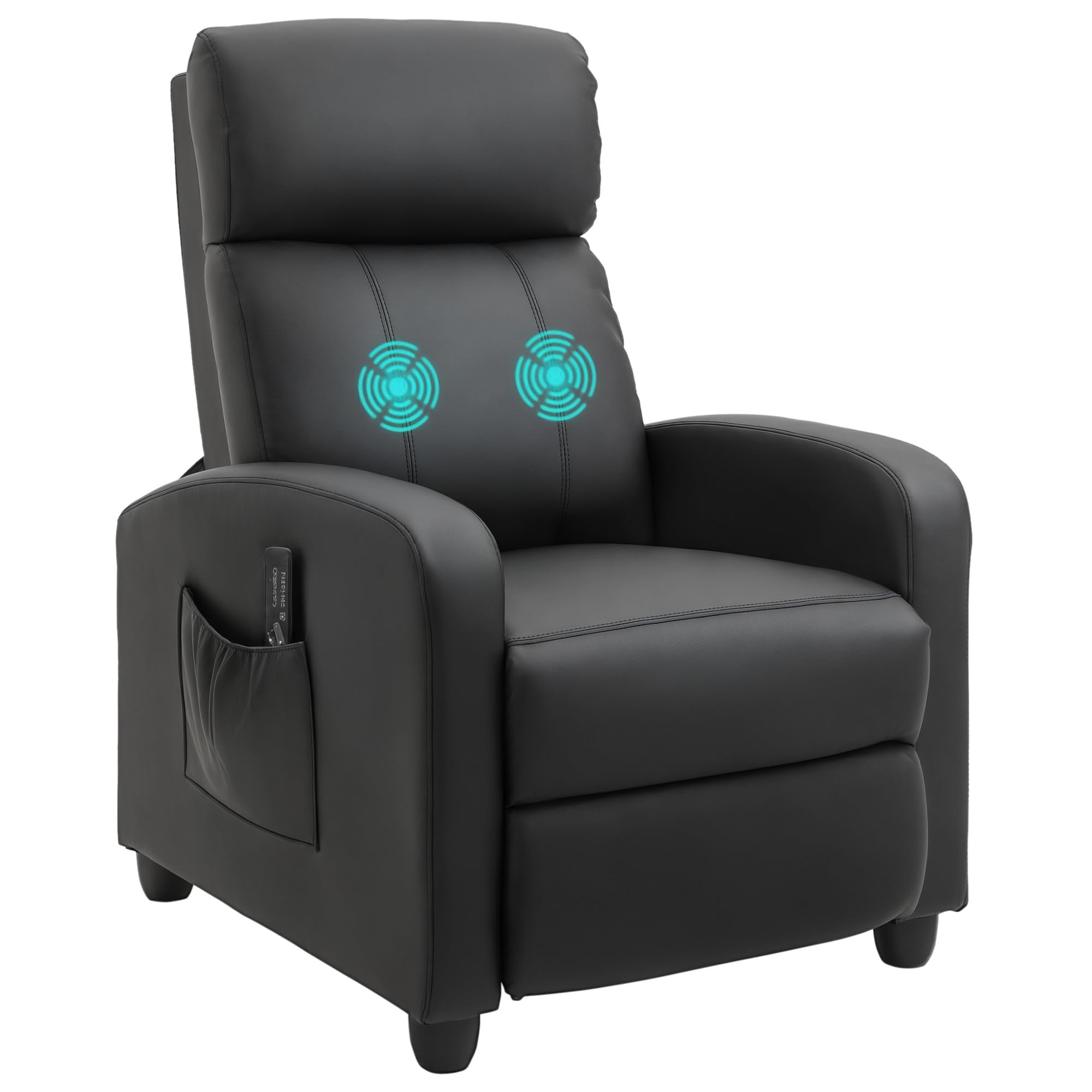
Image 1.1: The HOMCOM Massage Recliner TV Chair in a typical home environment.
This massage recliner is designed to offer comfort and relaxation with its reclining function and integrated 2-point vibration massage. It features durable synthetic leather upholstery and thick foam padding for optimal support.
2. Safety Instructions
- Ensure all components are securely fastened before use.
- Do not exceed the maximum load capacity of 120 kg.
- Keep children and pets away from the chair during assembly and operation.
- Avoid placing the chair near heat sources or in direct sunlight to prevent material damage.
- Do not stand on the chair or use it as a step stool.
- Unplug the power cord when not in use or before cleaning.
- If any part is damaged or missing, do not use the product. Contact customer support for replacement parts.
3. Package Contents
Please check the package carefully to ensure all items are present and undamaged.
- 1 x Massage Recliner (main body)
- 1 x Wired Remote Control
- 1 x Instruction Manual
- Necessary assembly hardware (screws, bolts, etc.)
4. Setup and Assembly
Assembly is required. Follow these general steps for setup:
- Unpack Components: Carefully remove all parts from the packaging and lay them out on a clean, soft surface to prevent scratches.
- Attach Backrest: Align the backrest with the seat base and slide it into the designated slots until it clicks securely into place.
- Connect Wiring: Connect any electrical wires for the massage function, ensuring a snug fit.
- Attach Legs/Base: Secure the chair legs or base to the bottom of the chair using the provided hardware. Tighten all screws firmly.
- Final Check: Ensure all connections are tight and the chair is stable before use.
5. Operating Instructions
5.1 Reclining Function
To recline the chair, simply push back firmly against the backrest. The chair will smoothly adjust up to 150 degrees. To return to an upright position, lean forward and the chair will follow. The integrated footrest extends automatically as you recline, allowing you to stretch out fully.

Image 5.1: Illustration of the chair's reclining mechanism, showing up to 150 degrees of recline.
5.2 Massage Function
The chair features 2 powerful vibration motors located in the backrest. Use the wired remote control to operate the massage functions.

Image 5.2: Visual representation of the two massage points located in the chair's backrest.
- Power On/Off: Press the power button on the remote to activate or deactivate the massage.
- Massage Modes: Select from 8 different massage modes using the 'Mode' button.
- Intensity Levels: Adjust the massage intensity with 5 available levels using the 'Intensity' buttons.
- Timing Function: Utilize the 2 timing functions to set the duration of your massage session.
The remote control can be conveniently stored in the side pocket of the chair when not in use.

Image 5.3: The practical side pocket for remote control storage and the padded armrest for comfort.
6. Maintenance
- Cleaning: Wipe the synthetic leather upholstery with a soft, damp cloth. Do not use harsh chemicals or abrasive cleaners.
- Spills: Blot spills immediately with a clean, dry cloth.
- Inspection: Periodically check all screws and connections to ensure they remain tight. Retighten if necessary.
- Storage: If storing the chair, ensure it is in a clean, dry environment away from extreme temperatures.
7. Troubleshooting
- Chair does not recline smoothly: Check for any obstructions around the reclining mechanism. Ensure the chair is on a level surface.
- Massage function not working: Verify that the power cord is securely plugged into a working outlet. Check the connection of the remote control to the chair. Ensure the power button on the remote is pressed.
- Unstable chair: Ensure all assembly screws are fully tightened. Check that the chair is placed on a flat, stable surface.
If you encounter issues not listed here, please contact HOMCOM customer support.
8. Specifications
| Brand | HOMCOM |
| Model Number | 700-143V90BK |
| Color | Black |
| Overall Dimensions (W x D x H) | 68 cm x 88 cm x 98 cm |
| Reclined Length | Up to 158 cm (approx.) |
| Seat Height | 45 cm (approx.) |
| Material | Synthetic Leather, Foam, PP Plastic, Composite Wood Frame |
| Item Weight | 25 kg |
| Load Capacity | 120 kg |
| Special Features | 2-point vibration massage, 8 massage modes, 5 intensity levels, 2 timing functions, adjustable reclining (up to 150°), extendable footrest, side pocket |

Image 8.1: Detailed dimensions of the massage recliner.
9. Warranty and Support
For warranty information or customer support, please refer to the purchase documentation or contact your retailer. Keep your proof of purchase for any warranty claims.