
Enya Music Q1 Series
Enya Q1 Series Acoustic Guitar User Manual
Model: Q1 Series | Brand: Enya Music
Introduction
Thank you for choosing the Enya Q1 Series Spruce and Rosewood Acoustic Guitar. This manual provides essential information for the proper setup, operation, and maintenance of your instrument. Please read it thoroughly to ensure optimal performance and longevity of your guitar.
Safety Information
- Keep the guitar away from extreme temperatures and humidity fluctuations.
- Avoid direct sunlight exposure for prolonged periods.
- Do not expose the guitar to water or excessive moisture.
- Handle with care to prevent drops or impacts that could damage the instrument.
- Use only recommended cleaning products and methods.
Package Contents
Your Enya Q1 Series Acoustic Guitar package should include the following items:
- Enya Q1 Series Acoustic Guitar (41" Size)
- Premium Gig Bag
- Built-in Pickup System
Product Overview
Familiarize yourself with the main components of your Enya Q1 Series Acoustic Guitar.
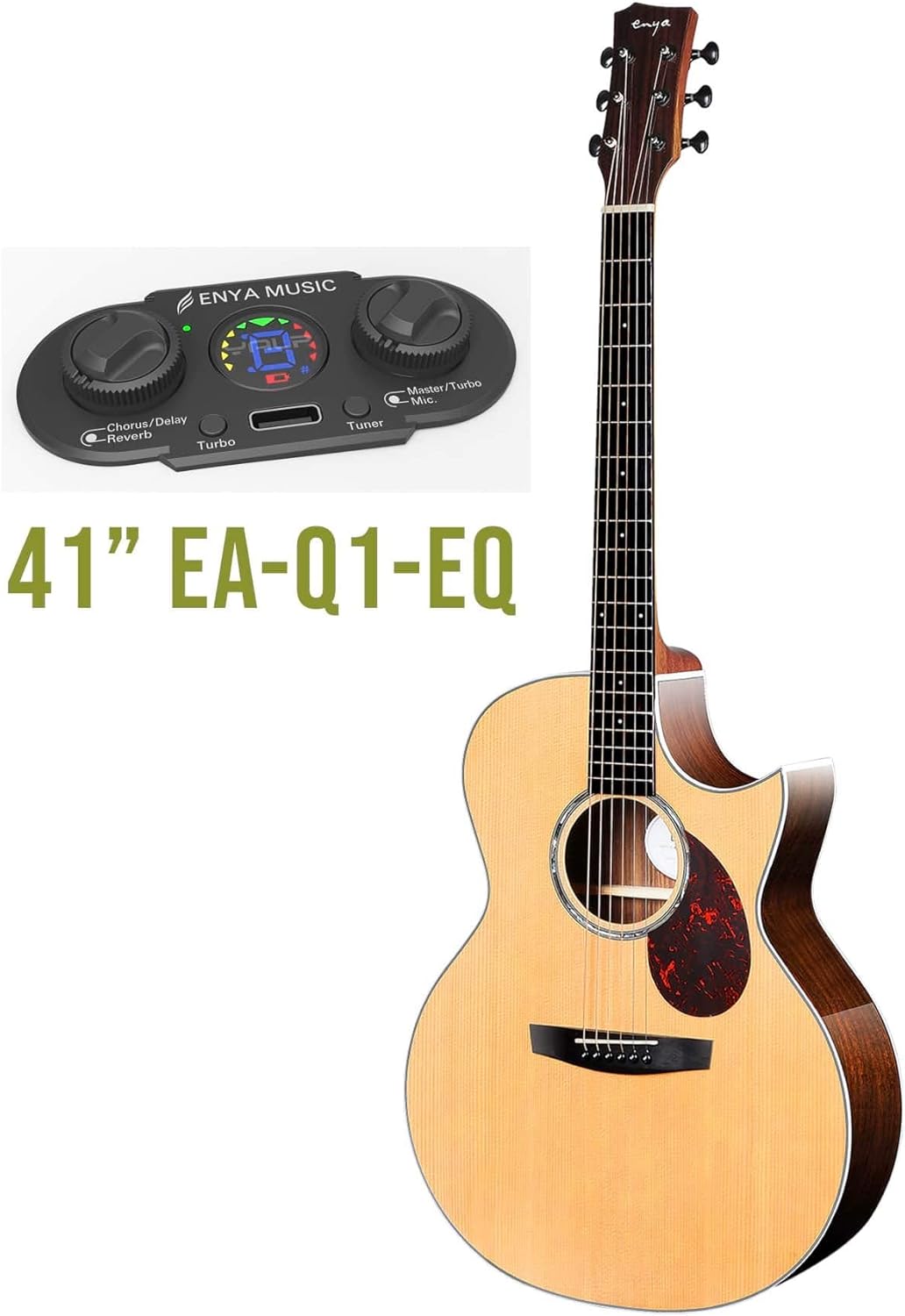


Key Components:
- Headstock: Contains the tuning machines.
- Nut: Supports the strings at the headstock end.
- Neck: The long part of the guitar with frets.
- Fretboard (Fingerboard): The surface of the neck where fingers press strings.
- Frets: Metal strips that divide the fretboard.
- Body: The main resonant chamber of the guitar.
- Soundhole: Opening on the body for sound projection.
- Bridge: Anchors the strings to the body.
- Saddle: Supports the strings at the bridge.
- Pickup System: Integrated electronic system for amplification and effects.
Setup
1. Unpacking
Carefully remove the guitar from its packaging and gig bag. Inspect the instrument for any visible damage that may have occurred during shipping.
2. Initial Tuning
Your guitar may be slightly out of tune due to temperature and humidity changes during transit. Use the built-in tuner or an external tuner to bring the strings to standard pitch (E-A-D-G-B-e, from thickest to thinnest string).
To use the built-in tuner:
- Locate the control panel for the pickup system on the side of the guitar body.
- Press the "Tuner" button to activate the tuner display.
- Pluck each string individually and adjust the corresponding tuning machine until the display indicates the correct pitch.
- Press the "Tuner" button again to deactivate the tuner.

Operating the Pickup System
The Enya Q1 Series guitar features an integrated pickup system for amplified sound and onboard effects.
Controls:
- Master/Turbo Knob: Controls the overall volume when amplified. Pushing this knob may activate a "Turbo" boost for increased output.
- Chorus/Delay/Reverb Knob: Adjusts the intensity or blend of the selected effect.
- Tuner Button: Activates and deactivates the built-in chromatic tuner.
- Effect Selection Button: Cycles through available effects (Chorus, Delay, Reverb).
- USB-C Port: For charging the internal battery of the pickup system.
Connecting to an Amplifier:
Use a standard 1/4-inch instrument cable to connect the guitar's output jack (located at the bottom strap button) to your acoustic amplifier or PA system.
Charging the Pickup System:
The pickup system is powered by an internal rechargeable battery. Connect a USB-C cable to the designated port on the control panel and plug the other end into a compatible USB power adapter (not included).
Maintenance
Cleaning:
- Wipe down the guitar body and neck with a soft, lint-free cloth after each use to remove sweat and oils.
- For deeper cleaning, use a guitar-specific polish or cleaner sparingly. Apply to the cloth, not directly to the guitar.
- Clean the fretboard periodically with a fretboard conditioner to prevent drying and cracking.
- Wipe strings with a string cleaner or dry cloth to extend their life.
Humidity Control:
Acoustic guitars are sensitive to humidity. Maintain a relative humidity level between 45% and 55% to prevent wood warping, cracking, or other damage. Use a humidifier or dehumidifier as needed, especially in extreme climates.
String Replacement:
Replace strings regularly (every 1-3 months depending on usage) to maintain optimal tone and playability. Replace one string at a time to maintain neck tension.
Troubleshooting
| Problem | Possible Cause | Solution |
|---|---|---|
| Guitar won't stay in tune | New strings stretching, improper string winding, worn tuning machines, humidity changes. | Stretch new strings thoroughly. Ensure strings are properly wound on tuning posts. Check for loose tuning machine screws. Control humidity. |
| Buzzing sound from strings | Low action, uneven frets, warped neck, worn strings. | Check string height (action). If persistent, consult a qualified guitar technician for fret leveling or neck adjustment. Replace old strings. |
| No sound from pickup system | Battery drained, cable issue, amplifier off/incorrect settings. | Charge the pickup system battery. Check instrument cable connection. Ensure amplifier is on and input/volume settings are correct. |
| Distorted sound from pickup | Input gain too high on amplifier, damaged pickup. | Reduce input gain on your amplifier. If problem persists, contact support. |
Specifications
- Model: Q1 Series
- Size: 41 inches
- Top Material: Spruce Wood
- Back Material: Wood (Rosewood)
- Neck Material: Mahogany
- Fretboard Material: Rosewood
- Number of Strings: 6
- String Material: Alloy Steel
- Bridge System: Adjustable
- Pickup: Integrated Acoustic Pickup System
Warranty and Support
For warranty information and technical support, please refer to the documentation provided with your purchase or visit the official Enya Music website. Keep your proof of purchase for warranty claims.
For further assistance, you may contact Enya Music customer service through their official channels.
Ask a question about this manual
Ask about setup, troubleshooting, compatibility, parts, safety, or missing instructions. Manuals+ will review the question and use this page’s manual context to help answer it.