
1. Introduction and Overview
The Garmin Tread SxS Edition is a rugged 8-inch powersport navigator designed for off-road adventures. It features an ultrabright, glove-friendly touchscreen display, providing clear visibility in various conditions. This device offers turn-by-turn trail navigation, Group Ride Radio for communication and tracking, and built-in inReach technology for global satellite communication and interactive SOS capabilities. The Tread SxS is built to withstand challenging environments, ensuring reliable performance during your expeditions.
2. What's in the Box & Setup
2.1 Package Contents
- Tread - SxS Edition Navigator
- Group Ride Radio
- Fist Mic
- VHF Antenna
- Antenna Mount Kit
- Locking Magnet-Assisted Mount
- Tube Mount Kit
- High-Current Power Cable
- USB Cable
- Documentation
2.2 Initial Setup
- Mounting the Device: Secure the Tread SxS navigator using the provided locking magnet-assisted mount or the tube mount kit, depending on your vehicle's setup. Ensure the mount is firmly attached and the device is positioned for optimal viewing and accessibility.
- Power Connection: Connect the high-current power cable to your vehicle's power source and to the navigator. Ensure a stable power supply for continuous operation, especially when using features like Group Ride Radio.
- Antenna Installation: Attach the VHF antenna to the Group Ride Radio and mount it using the antenna mount kit for optimal signal reception.
- First Power On: Power on the device. Follow the on-screen prompts to complete initial setup, including language selection and basic preferences.
- Software Updates: Connect the device to a Wi-Fi network or a computer via the USB cable to check for and install any available software updates. Keeping your device updated ensures access to the latest features and map data.

Image: The rugged back of the Garmin Tread SxS navigator, highlighting its durable construction and mounting interface.
3. Key Features
- Rugged, Weather-Resistant Design: The Tread SxS features an 8-inch ultrabright, glove-friendly touchscreen. It is IP67 rated, meaning it is dust-tight and can withstand incidental exposure to water up to 1 meter for 30 minutes.
- Group Ride Radio: Stay connected with friends using the Group Ride Radio, which includes a push-to-talk fist mic and allows group tracking for up to 20 riders. (Note: Group tracking requires a Tread navigator for each rider and connection to vehicle power for full functionality.)
- Turn-by-Turn Trail Navigation: Navigate unpaved roads and trails with preloaded adventure roads and trails map content, including OpenStreetMap and USFS Motor Vehicle Use Maps. (Limitations may exist in map data; always defer to posted road signs and conditions.)
- Preloaded Topographic Maps & BirdsEye Satellite Imagery: Access 3D terrain maps of North and Central America, U.S. public and private landowner information, and subscription-free BirdsEye Satellite Imagery via direct-to-device download.
- Tread App Integration: Pair with the Tread app on your compatible smartphone to track friends via Group Ride Mobile, sync trip data, and plan routes with consistent maps and vehicle profiles. (Group Ride Mobile requires the Tread app, Bluetooth, and an active cellular connection.)
- Built-in inReach Technology: Offers global satellite communication, two-way text messaging, location sharing, and interactive SOS capabilities. (Requires an active subscription; some jurisdictions regulate or prohibit satellite communication devices.)
- Integrated Sensors: Features a built-in altimeter, barometer, compass, and pitch and roll gauges to assist with navigating challenging terrain.
- Garmin Ecosystem Compatibility: Works with other Garmin off-road products, such as the Garmin PowerSwitch digital switch box for 12-volt accessory control and select Garmin GPS dog tracking devices.
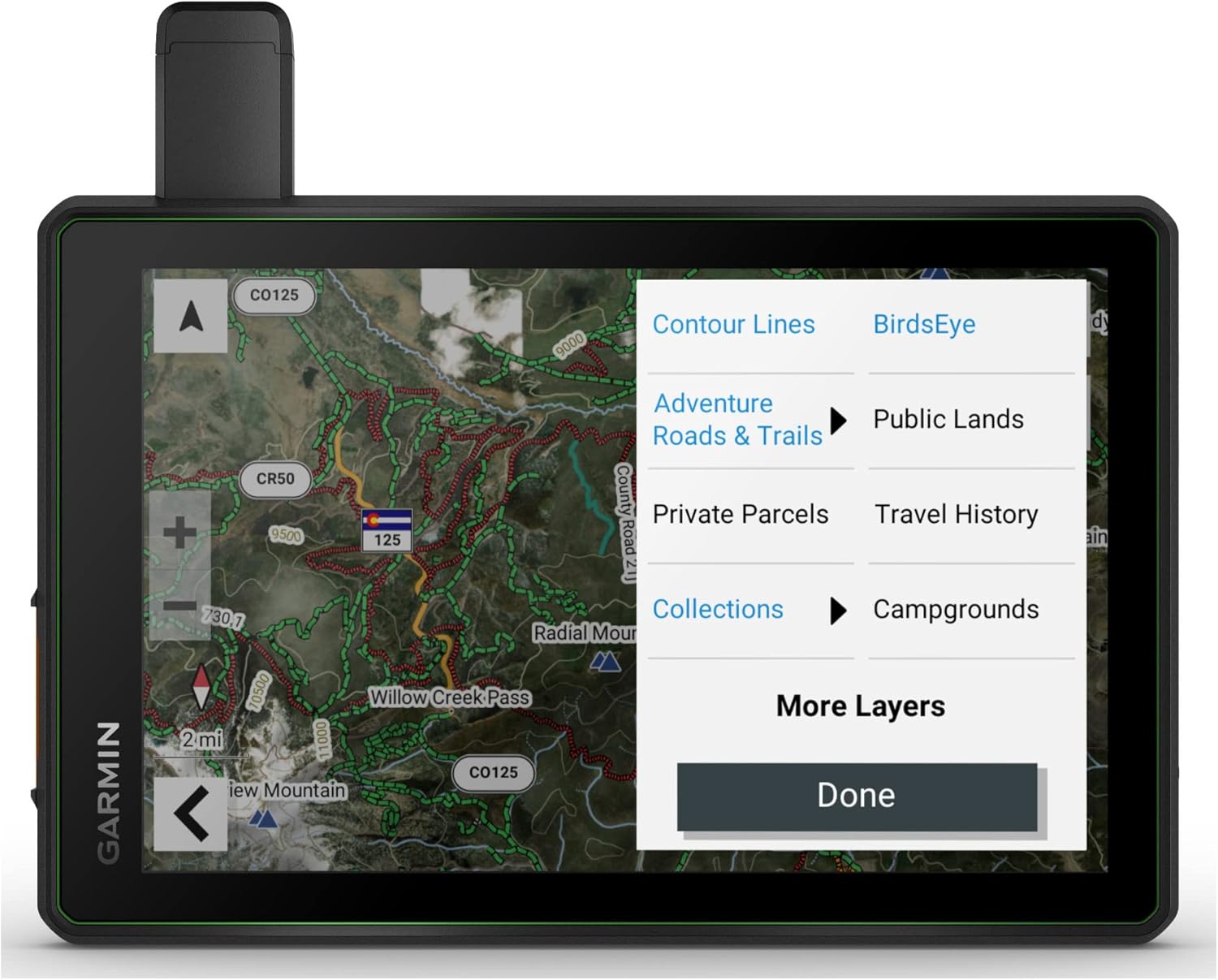
Image: The Garmin Tread SxS display showing various map layers for detailed navigation.
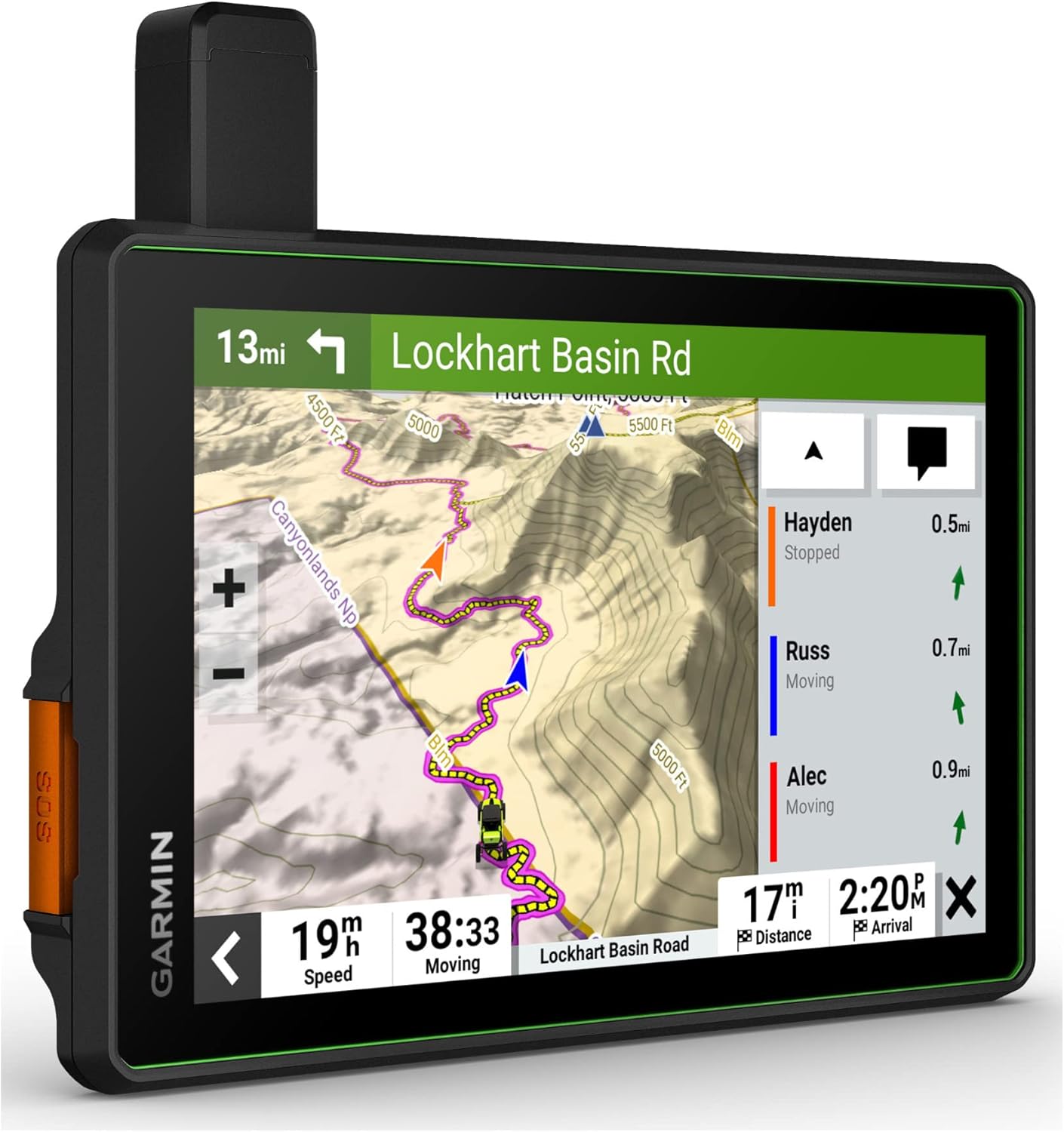
Image: The Garmin Tread SxS displaying real-time group ride tracking on a trail map.

Image: The Garmin Tread SxS inReach messaging screen, demonstrating two-way text communication.
4. Operating Instructions
4.1 Basic Navigation
- Starting a Route: From the main menu, select 'Where To?' and choose your destination (e.g., address, point of interest, saved location). The device will calculate a route based on preloaded maps and your vehicle profile.
- Following a Trail: Utilize the turn-by-turn trail navigation feature. The device will guide you along unpaved roads and trails, displaying your progress and upcoming turns.
- Map Views: Switch between different map views, including topographic maps, 3D terrain, and BirdsEye Satellite Imagery, to get the best perspective for your current environment.
4.2 Using Group Ride Radio
- Connecting to a Group: Ensure all riders have a Tread navigator and are within range. Follow the on-screen instructions to create or join a group ride.
- Tracking Riders: Once connected, you can view the location of up to 20 riders on your map.
- Push-to-Talk Communication: Use the included fist mic for instant voice communication with your group.
4.3 inReach Satellite Communication
- Sending Messages: Compose and send two-way text messages to any phone number or email address, even outside cellular coverage.
- Location Sharing: Share your location with friends and family, allowing them to track your progress.
- Interactive SOS: In case of emergency, activate the interactive SOS feature to send a distress signal to the Garmin International Emergency Response Coordination Center (IERCC).
4.4 Tread App Functionality
- Route Planning: Use the Tread app on your smartphone to plan routes with the same maps and vehicle profiles as your device.
- Data Sync: Sync waypoints, tracks, routes, and collections across all your devices.
- Group Ride Mobile: Track friends who are also using the Tread app with Bluetooth technology and an active cellular connection.
Video: Official Garmin video showcasing the features and usage of the Tread SxS navigator in off-road environments.
5. Maintenance
- Cleaning the Device: Regularly clean the touchscreen and device exterior with a soft, lint-free cloth. For stubborn dirt, use a mild soap solution and wipe gently. Avoid abrasive cleaners or solvents.
- Software Updates: Periodically check for and install software updates via Wi-Fi or Garmin Express on your computer. Updates often include performance improvements, bug fixes, and new features.
- Battery Care: For optimal battery life, avoid exposing the device to extreme temperatures. If storing the device for an extended period, charge it to approximately 50% before storage.
- Mounting System Check: Before each ride, ensure all components of the mounting system are securely fastened and free from damage.
6. Troubleshooting
- Device Not Powering On: Ensure the device is properly connected to a power source and the power cable is not damaged. Check the vehicle's power outlet or fuse.
- No GPS Signal: Ensure the device has a clear view of the sky. Move to an open area away from tall buildings or dense tree cover. Allow several minutes for the device to acquire satellites.
- Touchscreen Unresponsive: Perform a soft reset by holding down the power button until the device restarts. If the issue persists, ensure the screen is clean and dry.
- Group Ride Radio Issues: Verify that all devices in the group are within range and properly configured for group ride. Check antenna connections.
- inReach Messaging Failure: Confirm that your inReach subscription is active and the device has a clear view of the sky for satellite communication.
- Map Data Inaccuracies: Ensure your maps are up to date. Remember that map data for some roads and trails may have limitations; always rely on posted signs and conditions.
7. Specifications
| Feature | Detail |
|---|---|
| Brand | Garmin |
| Model Name | Tread SxS |
| Screen Size | 8 Inches |
| Display Type | Capacitive Touchscreen |
| Connectivity Technology | USB |
| Map Type | North America (Preloaded Topographic) |
| Supported Satellite Navigation System | GPS |
| Battery Life | 3.5 Hours (Average) |
| Mounting Type | Dashboard Mount (Locking Magnet-Assisted, Tube Mount) |
| Water Resistance | IP67 (Dust tight, withstands 1m water for 30 min) |
| Sensors | Altimeter, Barometer, Compass, Pitch and Roll Gauges |
| Item Weight | 22.8 Ounces |
| Item Dimensions L x W x H | 9"L x 7"W x 2"H |
8. Warranty and Support
8.1 Warranty Information
The Garmin Tread SxS GPS Navigator comes with a 1-year limited warranty. This warranty covers defects in materials and workmanship under normal use. Please retain your proof of purchase for warranty claims.
8.2 Customer Support
For further assistance, technical support, or detailed product information, please visit the official Garmin support website. You can find FAQs, software downloads, and contact information for customer service representatives.
Garmin Support Website: www.garmin.com/support


