
ARMODD Squarz 9 Pro Gold
ARMODD Squarz 9 Pro Smart Watch User Manual
Model: Squarz 9 Pro Gold
Introduction
Welcome to the user manual for your new ARMODD Squarz 9 Pro Smart Watch. This guide provides comprehensive instructions on how to set up, operate, and maintain your smartwatch, ensuring you get the most out of its advanced features. The ARMODD Squarz 9 Pro is designed for both men and women, featuring a vibrant 1.72-inch touch screen, IP68 waterproofing, and a wide array of health and fitness tracking capabilities.
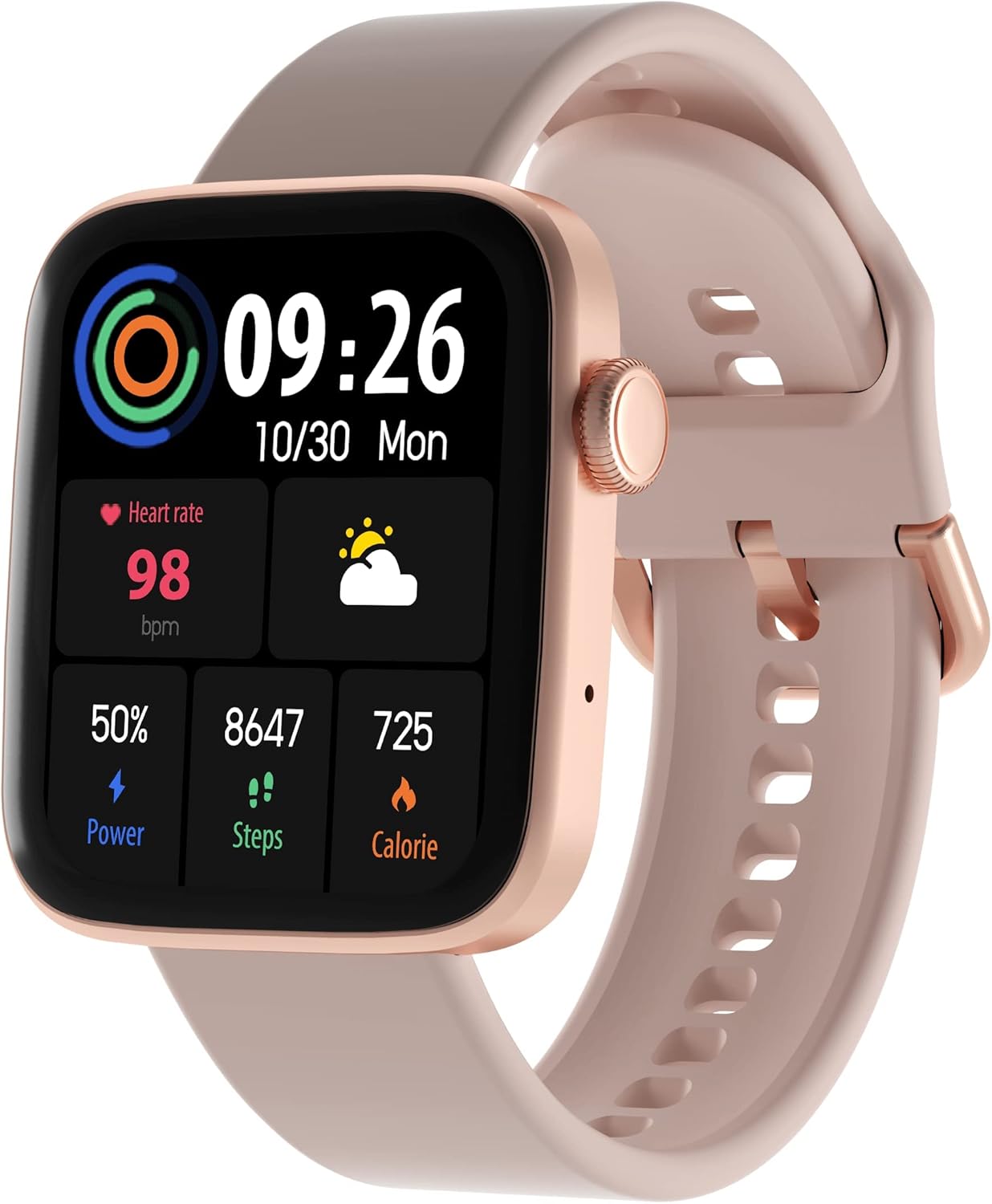
Figure 1: ARMODD Squarz 9 Pro Smart Watch with its main display showing various metrics.
Setup
1. Charging the Smart Watch
Before first use, fully charge your ARMODD Squarz 9 Pro Smart Watch.
- Connect the charging cable to the charging port on the back of the watch.
- Plug the USB end of the cable into a standard USB power adapter (5V/1A recommended) or a computer's USB port.
- The watch display will show a charging indicator. A full charge typically takes about 2 hours.
2. Pairing with Your Smartphone
To unlock all features and synchronize data, pair your smartwatch with the dedicated mobile application.
- Download the App: Search for the "WearPro" app (or the app specified in your watch's quick start guide) on the App Store (iOS) or Google Play Store (Android).
- Enable Bluetooth: Ensure Bluetooth is enabled on your smartphone.
- Open the App: Launch the downloaded app and follow the on-screen instructions to create an account or log in.
- Add Device: In the app, navigate to the "Device" or "Add Device" section. The app will search for nearby Bluetooth devices.
- Select Your Watch: Select "ARMODD Squarz 9 Pro" from the list of found devices.
- Confirm Pairing: A pairing request may appear on both your phone and watch. Confirm the pairing on both devices.
- Synchronization: Once paired, the watch will synchronize time and data with your phone.

Figure 2: Example of the mobile application interface for the ARMODD Squarz 9 Pro.
Operating Instructions
Basic Navigation
- Touch Screen: Swipe left/right, up/down to navigate through menus and features. Tap to select.
- Side Button/Crown: Press the side button to wake the screen, return to the home screen, or access the main menu. Rotate the crown to scroll through options or change watch faces.
Customizing Watch Faces
The ARMODD Squarz 9 Pro offers over 100 watch faces and the ability to upload your own photos.
- On the Watch: From the home screen, long-press the display to enter watch face selection mode. Swipe left/right to browse pre-installed faces and tap to select.
- Via App: Open the mobile app, go to the "Watch Faces" or "Dial Market" section. Browse and download new watch faces, or select an image from your phone's gallery to set as a custom watch face.

Figure 3: The smartwatch displaying a customizable watch face.
Bluetooth Calling
Make and receive calls directly from your smartwatch when connected to your smartphone via Bluetooth.
- Ensure your watch is connected to your phone's Bluetooth.
- Access the "Phone" or "Dialer" function on your watch.
- You can dial numbers directly or access your phone's contacts/call history through the watch.
- Incoming calls will display on the watch, allowing you to answer or reject them.

Figure 4: The smartwatch displaying the Bluetooth calling function.
Health Monitoring
The watch monitors various health metrics to help you stay informed about your well-being.
- Heart Rate: Access the heart rate monitor function on the watch to measure your current heart rate. Continuous monitoring can be enabled via the app.
- Sleep Tracking: Wear the watch to bed to automatically track your sleep patterns, including deep sleep, light sleep, and awake times. View detailed reports in the app.
- Blood Pressure & Blood Oxygen (SpO2): The watch can estimate blood pressure and blood oxygen levels. For medical accuracy, consult professional medical devices.

Figure 5: Heart rate monitoring feature in action.
Sports Modes and Activity Tracking
Track your workouts and daily activity with multiple sports modes and a built-in pedometer.
- Pedometer: The watch automatically counts your steps, distance, and calories burned throughout the day.
- Sports Modes: Select from various sports modes (e.g., running, walking, cycling) to get real-time data during your activity.
- Data Synchronization: All activity data is synchronized with the mobile app for detailed analysis and historical records.

Figure 6: Tracking sports activity with the smartwatch.
Notifications
Receive notifications from your smartphone directly on your watch.
- Enable app notifications in your phone's settings and within the smartwatch app.
- The watch will vibrate and display incoming calls, messages, and app alerts.
Maintenance
Cleaning Your Smart Watch
Regular cleaning helps maintain the watch's appearance and functionality.
- Wipe the watch screen and body with a soft, lint-free cloth.
- For stubborn spots, slightly dampen the cloth with water. Avoid using harsh chemicals or abrasive materials.
- Clean the charging contacts periodically to ensure proper charging.
Water Resistance (IP68)
The ARMODD Squarz 9 Pro is IP68 waterproof, meaning it is resistant to dust and can withstand immersion in water up to 1.5 meters for up to 30 minutes.
- It is suitable for daily use, such as hand washing, rain, and shallow swimming.
- Avoid hot water, steam, or prolonged immersion in deep water.
- Do not operate the watch buttons underwater.
- After exposure to water, wipe the watch dry before charging.
Troubleshooting
| Problem | Possible Cause / Solution |
|---|---|
| Watch does not turn on | Battery might be depleted. Charge the watch for at least 30 minutes. |
| Cannot pair with smartphone |
|
| Inaccurate health data |
|
| Notifications not received |
|
| Short battery life |
|
Specifications
| Feature | Detail |
|---|---|
| Model Name | Squarz 9 Pro Gold |
| Brand | ARMODD |
| Display Size | 1.72 Inches |
| Connectivity Technology | Bluetooth |
| Water Resistance | IP68 |
| Special Features | Time Display, Pedometer, Alarm Clock, Heart Rate Monitor, Sleep Monitor, Bluetooth Calling |
| Compatible Devices | Smartphone (iOS / Android) |
| Battery | 1 Lithium-ion (included) |
Warranty and Support
For warranty information and customer support, please refer to the documentation included with your purchase or visit the official ARMODD website.
Related documentsSquarz 9 Pro Gold


Ask a question about this manual
Ask about setup, troubleshooting, compatibility, parts, safety, or missing instructions. Manuals+ will review the question and use this page’s manual context to help answer it.