
Scheppach HF60
Scheppach HF60 Table Router Instruction Manual
Model: HF60 | Brand: Scheppach
1. Introduction
This instruction manual provides essential information for the safe and effective use of your Scheppach HF60 Table Router. Please read this manual thoroughly before operating the machine to ensure proper setup, operation, and maintenance. Retain this manual for future reference.

Figure 1: The Scheppach HF60 Table Router. This image displays the complete router unit with its blue base, grey table surface, and adjustable fences.
2. General Safety Instructions
Always observe basic safety precautions to reduce the risk of fire, electric shock, and personal injury. Failure to follow these instructions may result in serious injury or damage to the machine.
- Work Area Safety: Keep the work area clean and well-lit. Cluttered or dark areas invite accidents. Do not operate power tools in explosive atmospheres, such as in the presence of flammable liquids, gases, or dust.
- Electrical Safety: Power tool plugs must match the outlet. Never modify the plug in any way. Avoid body contact with earthed or grounded surfaces. Do not expose power tools to rain or wet conditions.
- Personal Safety: Always wear eye protection, hearing protection, and a dust mask. Dress properly; do not wear loose clothing or jewelry. Keep hair, clothing, and gloves away from moving parts.
- Tool Use and Care: Do not force the power tool. Use the correct power tool for your application. Disconnect the plug from the power source before making any adjustments, changing accessories, or storing power tools.
- Maintenance: Maintain power tools. Check for misalignment or binding of moving parts, breakage of parts, and any other condition that may affect the power tool’s operation.
3. Components Overview
The Scheppach HF60 Table Router consists of several key components designed for precision woodworking:
- Router Unit: The main body housing the 1500W motor and spindle.
- Table Surface: A robust work surface for supporting materials during routing.
- Table Extenders: Extendable wings on both sides of the main table for increased work support.
- Adjustable Fences: Guide the workpiece and ensure accurate cuts.
- Spindle Height Adjustment Mechanism: Allows precise control over the routing depth.
- Collet System: Accommodates router bits with 6mm, 8mm, and 12mm shank diameters.
- Power Switch: On/off control for the machine.
- Speed Control Dial: Adjusts the spindle rotation speed.
4. Setup
Proper setup is crucial for safe and accurate operation.
4.1 Unpacking and Inspection
Carefully remove all components from the packaging. Inspect the machine for any signs of damage that may have occurred during transit. Report any damage to your supplier immediately.
4.2 Assembly of Table Extenders
The HF60 comes with table extenders that can be attached to both sides of the main table. Secure these extenders using the provided hardware to expand your working surface (total table size 610 x 360 mm).

Figure 2: The Scheppach HF60 Table Router in a workshop setting, demonstrating the practical table model with its extended work surface and fastening capabilities.
4.3 Mounting the Machine
For stability and safety, it is recommended to securely mount the table router to a workbench or a dedicated stand. Use appropriate fasteners to prevent movement during operation.
4.4 Connecting to Power
Ensure the power switch is in the 'OFF' position before plugging the machine into a 230V power outlet. Verify that the power supply matches the machine's requirements.
5. Operation
Follow these steps for safe and effective operation of your Scheppach HF60 Table Router.
5.1 Installing Router Bits
- Ensure the machine is unplugged from the power source.
- Select the appropriate collet (6mm, 8mm, or 12mm) for your router bit.
- Insert the collet into the spindle.
- Insert the router bit into the collet, ensuring it is seated deeply enough to prevent slippage but not bottomed out.
- Tighten the collet nut securely using the provided wrenches.
5.2 Spindle Height Adjustment
The spindle height can be adjusted from 0 to 40 mm to control the depth of cut.

Figure 3: Close-up view of the Scheppach HF60's spindle height adjustment mechanism, showing a workpiece being routed and the maximum routing depth of 40 mm.
Use the adjustment knob or crank to raise or lower the router bit to the desired height. Lock the adjustment mechanism once the desired height is set.
5.3 Variable Speed Control
The HF60 features variable speed control from 11500 to 24000 rpm. Adjust the speed according to the material being routed and the type of router bit used. Lower speeds are generally suitable for larger diameter bits and harder materials, while higher speeds are for smaller bits and softer materials.
5.4 Adjusting Fences
The aluminum fences guide your workpiece. Adjust them to the desired position to control the width of the cut or to support the workpiece against the router bit.
5.5 Routing Applications
The Scheppach HF60 is suitable for various routing tasks, including:
- Rounding edges
- Chamfering
- Flush trimming
- Grooving
- Profile routing
- Jointing
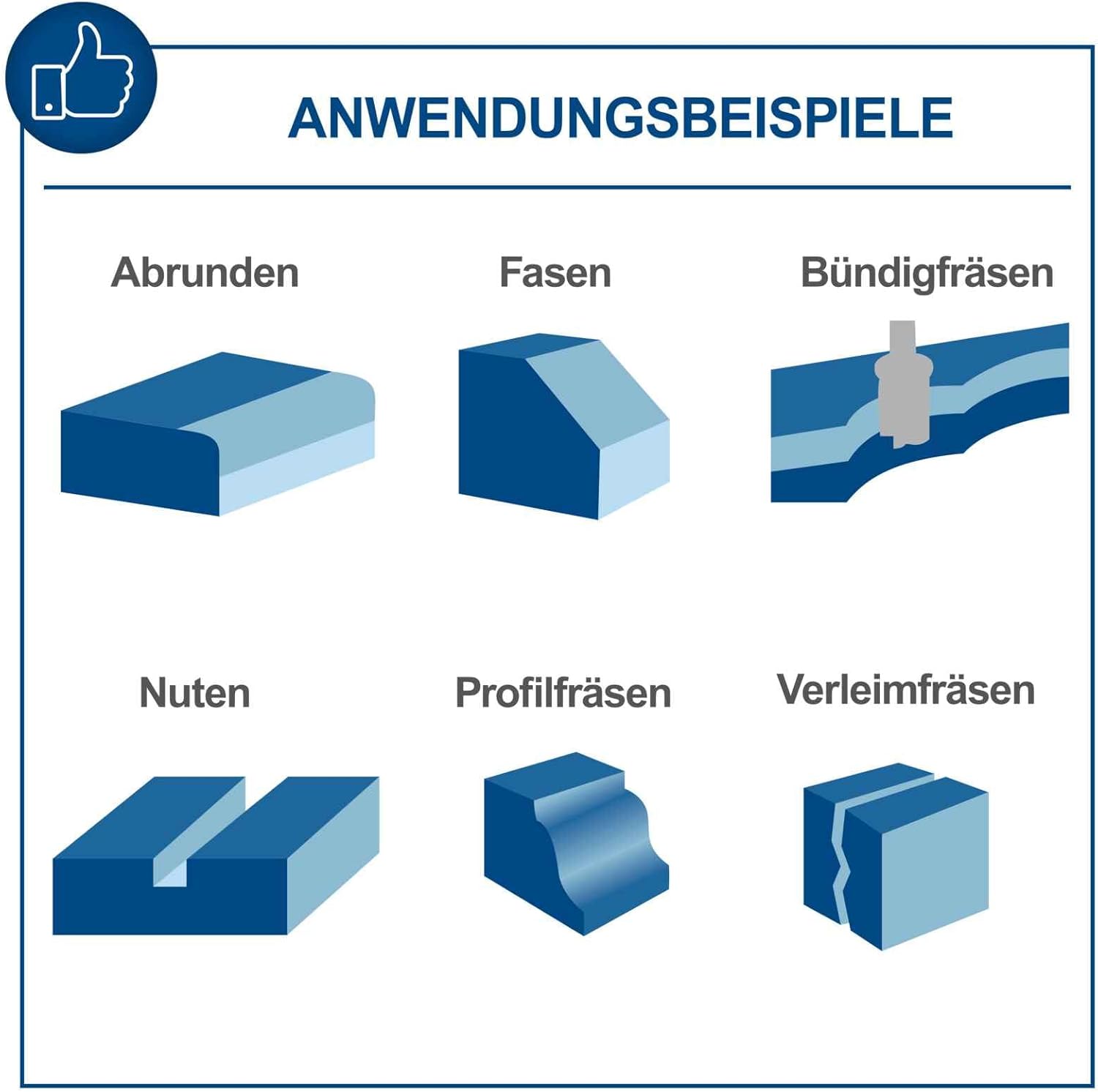
Figure 4: Visual examples of various routing applications possible with the Scheppach HF60, including rounding, chamfering, flush trimming, grooving, profile routing, and jointing.
5.6 Dust Extraction
The machine is designed for direct dust extraction to maintain a clean and safe working environment. Connect a suitable dust extraction system to the designated port.
6. Maintenance
Regular maintenance ensures the longevity and optimal performance of your table router.
- Cleaning: After each use, disconnect the power and clean the machine, especially the table surface, fences, and spindle area, from dust and wood chips. Use a brush or compressed air.
- Lubrication: Periodically lubricate moving parts, such as the spindle height adjustment mechanism, with a suitable lubricant.
- Inspection: Regularly inspect the power cord for damage. Check all fasteners for tightness. Ensure router bits are sharp and free from damage.
- Storage: Store the machine in a dry, secure location, out of reach of children.
7. Troubleshooting
This section addresses common issues you might encounter with your table router.
| Problem | Possible Cause | Solution |
|---|---|---|
| Machine does not start | No power supply; Faulty power cord; Overload protection tripped | Check power connection; Inspect power cord; Reset overload protection (if applicable) |
| Router bit slips or vibrates | Collet not tightened; Incorrect collet size; Damaged router bit | Tighten collet nut securely; Use correct collet; Replace damaged bit |
| Poor cut quality | Dull router bit; Incorrect feed rate; Incorrect speed setting | Replace or sharpen bit; Adjust feed rate; Adjust speed setting |
| Excessive noise or vibration | Loose components; Damaged bearings; Unbalanced router bit | Check and tighten all fasteners; Contact service for bearing replacement; Replace router bit |
If you encounter issues not listed here or if the suggested solutions do not resolve the problem, please contact Scheppach customer support or a qualified service technician.
8. Technical Specifications
| Feature | Specification |
|---|---|
| Model | HF60 |
| Manufacturer | Scheppach |
| Power | 1500 Watts |
| Voltage | 230 Volts |
| Amperage | 6.52 A |
| No-load Speed | 11500 - 24000 rpm (variable) |
| Spindle Height Adjustment | 0 - 40 mm |
| Collet Sizes | 6 mm, 8 mm, 12 mm |
| Table Dimensions (with extenders) | 610 x 360 mm |
| Product Dimensions (L x W x H) | 103 x 36 x 31.1 cm |
| Weight | 21 kg |
| Sound Level | 102 dB |
| Material | Aluminum |
| Included Components | HF60 Table Router with table extenders |
9. Warranty and Support
For information regarding warranty coverage, technical support, or spare parts, please refer to the official Scheppach website or contact your local Scheppach dealer. Keep your purchase receipt as proof of purchase.
Related documentsHF60


Ask a question about this manual
Ask about setup, troubleshooting, compatibility, parts, safety, or missing instructions. Manuals+ will review the question and use this page’s manual context to help answer it.