
1. Introduction
Thank you for choosing the Adler Camry CR 4223 LCD 2000W 5L Planetary Food Processor. This appliance is designed to assist you in various kitchen tasks, from mixing and kneading to whipping, making your cooking experience more efficient and enjoyable. To ensure safe and optimal performance, please read this manual thoroughly before first use and retain it for future reference.
2. Important Safety Instructions
Always follow basic safety precautions when using electrical appliances to reduce the risk of fire, electric shock, and injury.
- Read all instructions before operating the appliance.
- Do not immerse the motor unit, cord, or plug in water or other liquids.
- Close supervision is necessary when any appliance is used by or near children.
- Unplug from outlet when not in use, before assembling or disassembling parts, and before cleaning.
- Avoid contact with moving parts. Keep hands, hair, and clothing, as well as spatulas and other utensils, away from beaters during operation to prevent injury and/or damage to the mixer.
- Do not operate any appliance with a damaged cord or plug, or after the appliance malfunctions or has been dropped or damaged in any manner.
- The use of attachments not recommended or sold by the manufacturer may cause fire, electric shock, or injury.
- Do not use outdoors.
- Do not let the cord hang over the edge of a table or counter or touch hot surfaces.
- Always ensure the head is locked down before operating the mixer.
- Do not use the appliance for anything other than its intended use.
3. Product Components
Familiarize yourself with the parts of your planetary food processor:
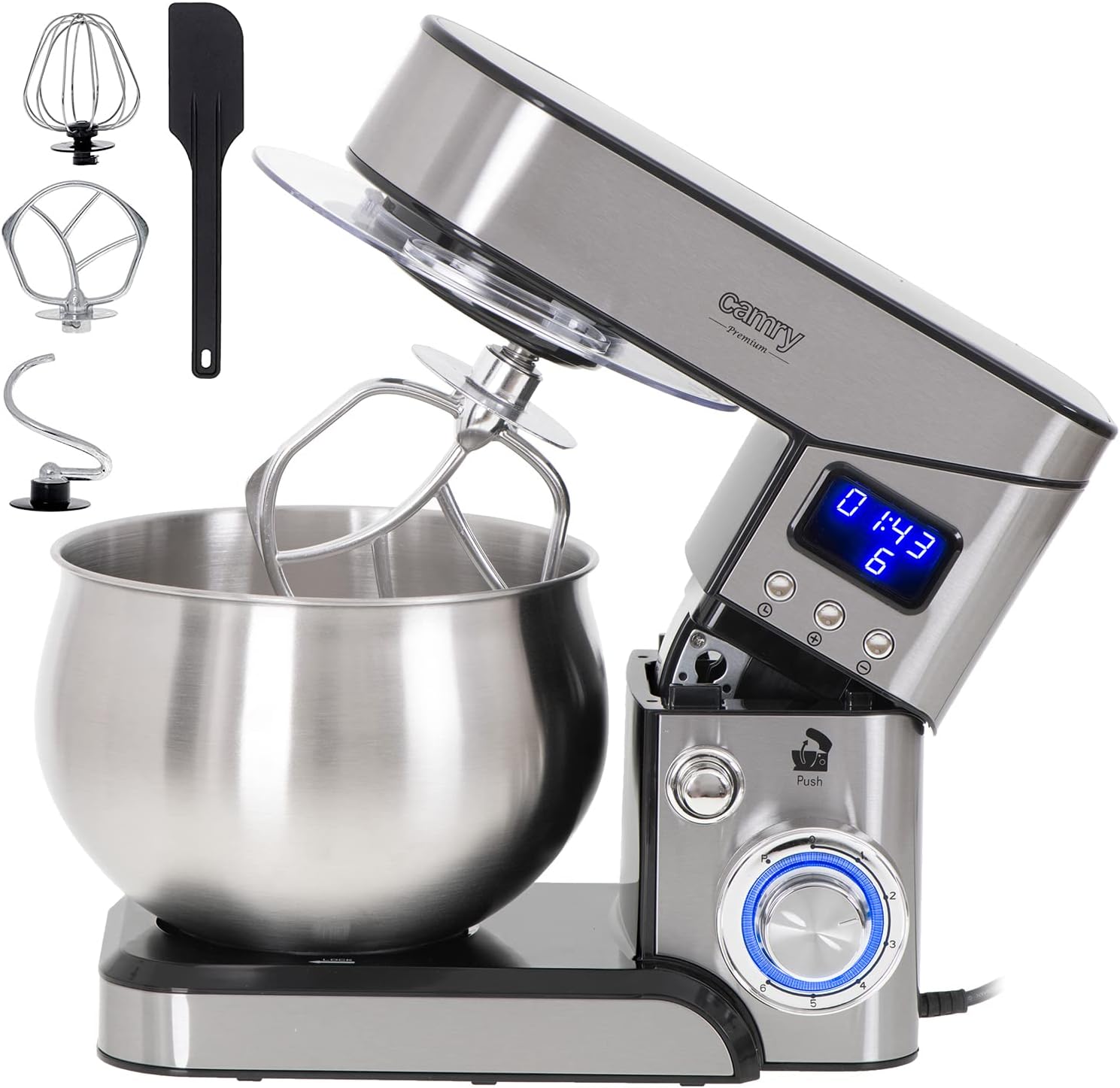
- Motor Unit: The main body containing the motor and control panel.
- Mixing Bowl: A 5.0-liter stainless steel bowl for ingredients.
- Splash Guard: Transparent cover to prevent splashing during operation.
- Dough Hook: For kneading heavy doughs (e.g., bread, pizza).
- Flat Beater: For mixing medium-heavy mixtures (e.g., cakes, cookies, mashed potatoes).
- Wire Whisk: For whipping light mixtures (e.g., egg whites, cream, light batters).
- Control Dial: To select speed settings.
- Tilt-Head Release Button: To raise and lower the motor head.
- LCD Display: Shows timer and speed settings.
4. Setup and First Use
Before using your food processor for the first time, clean all parts that will come into contact with food. Refer to the 'Maintenance and Cleaning' section for detailed instructions.
- Place the Appliance: Position the food processor on a stable, flat, and dry surface.
- Attach the Mixing Bowl: Place the stainless steel mixing bowl onto the base and turn it clockwise until it locks securely into place.
- Raise the Motor Head: Press the tilt-head release button (often labeled 'Push') and lift the motor head until it clicks into the raised position.
- Attach the Desired Accessory: Select the appropriate attachment (dough hook, flat beater, or wire whisk) for your task. Insert the attachment into the shaft and turn it slightly until it locks into place.
- Lower the Motor Head: Press the tilt-head release button again and gently lower the motor head until it locks into the operating position. Ensure it is fully locked before proceeding.
- Attach the Splash Guard: If desired, slide the splash guard onto the motor head, ensuring the opening aligns with the attachment.
5. Operating Instructions
This food processor features a planetary mixing system and 6 speed settings for versatile use.
5.1. Speed Settings and Recommended Use
| Speed | Attachment | Application |
|---|---|---|
| 1-2 (Low) | Dough Hook | Kneading heavy doughs (bread, pizza) |
| 3-4 (Medium) | Flat Beater | Mixing batters, mashing potatoes, creaming butter and sugar |
| 5-6 (High) | Wire Whisk | Whipping egg whites, cream, light batters, meringues |
| P (Pulse) | All | Short bursts of maximum power for quick mixing |
5.2. General Operation Steps
- Ensure the appliance is correctly assembled and the motor head is locked down.
- Add your ingredients to the mixing bowl.
- Plug the power cord into a suitable electrical outlet.
- Turn the control dial to the desired speed setting (1-6). The LCD display will show the current speed and a timer.
- For short bursts of power, turn the dial to the 'P' (Pulse) setting and hold it. Release to stop.
- Monitor the mixing process. Use the splash guard to prevent ingredients from escaping the bowl.
- Once mixing is complete, turn the control dial to '0' (Off) and unplug the appliance.
- Press the tilt-head release button and lift the motor head. Remove the attachment and then the mixing bowl.


6. Maintenance and Cleaning
Proper cleaning and maintenance will extend the life of your food processor.
- Unplug: Always unplug the appliance from the power outlet before cleaning.
- Clean Attachments and Bowl: The stainless steel mixing bowl, dough hook, flat beater, and wire whisk can be washed by hand with warm, soapy water or in a dishwasher. Rinse thoroughly and dry immediately.
- Clean Motor Unit: Wipe the motor unit with a damp cloth. Do not immerse the motor unit in water or any other liquid. Do not use abrasive cleaners or scouring pads, as they may scratch the surface.
- Clean Splash Guard: Wash the splash guard with warm, soapy water and dry thoroughly.
- Storage: Store the appliance and its accessories in a clean, dry place.
7. Troubleshooting
If you encounter issues with your food processor, refer to the following table for common problems and solutions:
| Problem | Possible Cause | Solution |
|---|---|---|
| Appliance does not start. | Not plugged in; power switch off; motor head not locked. | Ensure plug is securely in outlet; turn speed dial to a setting other than '0'; ensure motor head is fully lowered and locked. |
| Attachment not mixing properly. | Attachment not correctly installed; too much or too little mixture. | Re-install attachment, ensuring it clicks into place; adjust ingredient quantities according to recipes. |
| Loud noise during operation. | Overload; improper assembly. | Reduce load; check that all parts are correctly assembled and locked. If noise persists, discontinue use and contact support. |
| Motor unit gets warm. | Normal during heavy use; prolonged operation. | This is normal. If it becomes excessively hot or emits smoke/odor, turn off immediately, unplug, and contact support. Allow to cool down between uses. |
If the problem persists after attempting these solutions, please contact customer support.
8. Technical Specifications
| Feature | Specification |
|---|---|
| Brand | CAMRY |
| Model Number | CR 4223 |
| Power | 2000 Watts |
| Voltage | 240 Volts |
| Bowl Capacity | 5 Liters |
| Number of Speeds | 6 |
| Material | Alloy Steel |
| Product Dimensions (L x W x H) | 32.5 x 22.5 x 27 cm |
| Item Weight | 4 Kilograms |
| Special Feature | Planetary Mixing Movement |
9. Warranty and Support
This product comes with a standard manufacturer's warranty. Please refer to the warranty card included with your purchase for specific terms and conditions. For technical support, spare parts, or warranty claims, please contact your retailer or the manufacturer's customer service department.
Keep your proof of purchase (receipt or invoice) as it will be required for any warranty service.
