
1. Introduction
The eMACROS HS002 Pro 2 Smart Wireless Driveway Alarm system provides advanced perimeter security for your property. Featuring a solar-powered motion sensor and a smart receiver with app connectivity, it offers remote alerts, customizable chimes, and a long wireless range to keep you informed of activity around your home.

Figure 1.1: eMACROS HS002 Pro 2 System Overview

Figure 1.2: Fully Expandable System Capability

Figure 1.3: Wide Range of Application
2. Package Contents
Please check the package contents to ensure all items are present and in good condition:
- 1 x eMACROS Smart Wireless Driveway Alarm Receiver
- 1 x eMACROS Solar-Powered Motion Sensor
- 1 x USB Charging Cable
- Mounting Screws and Anchors
- User Manual (this document)
3. Components Overview
3.1 Motion Sensor
The motion sensor is designed for outdoor use and is powered by a built-in rechargeable battery, which is continuously charged by the integrated solar panel. It features adjustable sensitivity and channel selection.

Figure 3.1: Wireless Motion Sensor Features
- Solar Panel: Charges the internal battery.
- Sensor Eye: Detects motion.
- Sensitivity Switch: Adjusts detection range (Hi = 30ft, Low = 20ft).
- Charge Port: Micro USB port for manual charging (DC5V).
- Channel Switches (CH1-CH4): Assigns the sensor to a specific channel.
- Mounting Plate: For secure installation.
3.2 Receiver
The receiver is the indoor unit that connects to your home Wi-Fi network and provides audible alerts and app notifications. It features multiple chime options and volume control.

Figure 3.2: Receiver Unit
- Speaker: Emits chimes and alerts.
- Control Buttons: For power, volume, and channel selection.
- Wi-Fi Connectivity: Connects to your home 2.4GHz Wi-Fi network for app features.
4. Setup Guide
4.1 Initial Charging
Before first use, ensure both the sensor and receiver are fully charged. The sensor's battery is charged via its solar panel, but an initial manual charge using the provided USB cable and a DC5V adapter (not included) is recommended for optimal performance. The receiver is powered via its USB charging cable.
4.2 Sensor Installation
- Choose Location: Select a location for the sensor that provides a clear line of sight to the detection area (e.g., driveway entrance). Ensure the solar panel receives adequate direct sunlight for continuous charging.
- Mounting: Use the provided screws and anchors to securely mount the sensor to a stable surface, such as a wooden post or wall. Consider using washers under the screw heads for added stability and to prevent cracking the plastic.
- Adjust Angle: Utilize the swivel mount to refine the focus and detection angle of the sensor.
- Set Sensitivity: Adjust the sensitivity switch (located under the rubber flap) to 'Hi' (30ft detection) or 'Low' (20ft detection) based on your needs.
- Select Channel: Set the channel switches (CH1-CH4) on the sensor to your desired channel. This allows you to differentiate alerts from multiple sensors.

Figure 4.1: Sensor Mounted on Post

Figure 4.2: Sensor Installation
4.3 Receiver Setup & App Pairing
- Power On: Plug the receiver into a standard wall outlet using the provided USB cable and a compatible DC5V power adapter.
- Download App: Download the eMACROS app from your smartphone's app store (iOS or Android).
- Connect to Wi-Fi: Follow the in-app instructions to connect your receiver to your home 2.4GHz Wi-Fi network. Ensure your phone is also connected to the same 2.4GHz network during setup.
- Pair Sensor: Once the receiver is connected to the app, follow the app's instructions to pair your sensor(s) to the desired channels on the receiver.
5. Operating Instructions
5.1 Remote App Alert Notification
When the motion sensor detects activity, you will receive instant notifications on your smartphone via the eMACROS app. This allows you to monitor your property remotely.

Figure 5.1: App Remote Alert Notification
5.2 App Remote Arm & Disarm
The eMACROS app allows you to remotely arm and disarm specific defense zones. This feature provides flexibility to activate or deactivate the alarm for certain areas as needed.

Figure 5.2: App Remote Arm & Disarm Control
5.3 Custom Chimes
The receiver offers 27 different chimes. You can customize the alarm chime for each defense zone through the app, allowing you to easily identify which zone has been triggered.
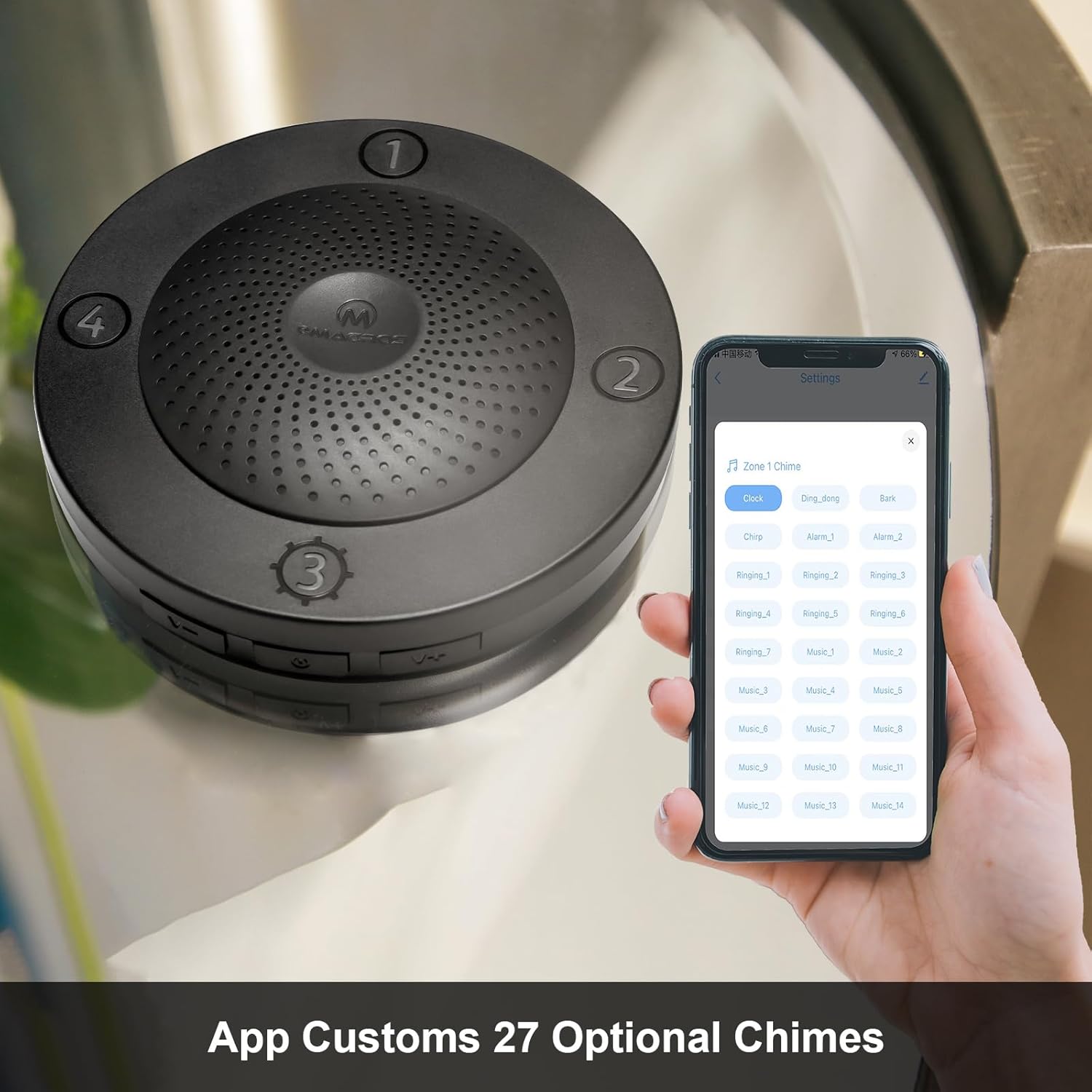
Figure 5.3: App Custom Chimes Selection
5.4 Channel Identification
By assigning different sensors to different channels (CH1-CH4) and setting unique chimes for each, you can quickly determine the location of the detected motion without needing to check the app.
6. Maintenance
6.1 Battery Maintenance
The sensor is primarily solar-powered. Ensure the solar panel is kept clean and free from obstructions (e.g., leaves, dirt) to maximize charging efficiency. If prolonged overcast weather occurs, or if the battery level is low, you can manually charge the sensor using the DC5V charge port.
6.2 Cleaning
Regularly wipe the sensor eye and solar panel with a soft, damp cloth to remove dust and debris. Do not use harsh chemicals or abrasive materials.
7. Troubleshooting
- False Alarms: Adjust the sensitivity of the sensor eye using the 'Hi' (30ft) or 'Low' (20ft) switch. Ensure the sensor is not pointed at moving objects like swaying branches or reflective surfaces.
- No Detection: Check the sensor's battery level. Ensure the sensor is correctly positioned and its detection path is clear. Verify the sensitivity setting.
- No App Notifications: Ensure the receiver is connected to your 2.4GHz Wi-Fi network and has a stable internet connection. Check app permissions on your smartphone to allow notifications.
- Compatibility: Note that the smart driveway alarm is only compatible with the 2021 new solar sensor with the label 'P' on the back.
- Range Issues: While the system boasts a 1500ft range, environmental factors like thick forestry, buildings, or heavy weather can reduce effective range. Try repositioning the sensor or receiver for better signal strength.
8. Specifications
| Feature | Detail |
|---|---|
| Brand | eMACROS |
| Model Number | HS002-W |
| Power Source (Sensor) | Solar Powered (rechargeable battery) / DC5V Adapter |
| Maximum Wireless Range | 1500 Feet |
| Sensor Detection Range | Hi = 30ft, Low = 20ft |
| Receiver Chimes | 27 Options |
| Connectivity | 2.4GHz Wi-Fi (for app features) |
| Mounting Type | Wall Mount |
| Product Dimensions | 4.15"D x 3.2"W x 3.8"H (Sensor) |
| Item Weight | 1.1 pounds (total package) |
| UPC | 798439641764 |
9. Warranty and Support
For warranty information, please refer to the documentation included with your product or visit the official eMACROS website. For technical support or customer service inquiries, you may contact eMACROS directly via email at eMACROS.service@outlook.com.

