
TDK-Lambda HWS150A-24/A AC-DC Power Supply User Manual
Model: HWS150A-24/A
Introduction
This manual provides essential information for the safe and efficient operation of your TDK-Lambda HWS150A-24/A AC-DC Power Supply. This enclosed power supply delivers 24V at 6.5A, totaling 156W, and accepts an input voltage range of 85-265VAC or 120-370VDC. Please read this manual thoroughly before installation and use.
Safety Information
WARNING: Risk of electric shock. This unit contains high voltage. Do not open the casing. Refer all servicing to qualified personnel.
- Ensure proper grounding of the unit.
- Do not operate the power supply in wet or damp conditions.
- Verify input voltage and current ratings match your power source before connecting.
- Disconnect power before making any connections or disconnections.
- Ensure adequate ventilation to prevent overheating.
- Do not block ventilation openings.
Product Overview
The TDK-Lambda HWS150A-24/A is a robust AC-DC power supply designed for industrial and scientific applications. It features an enclosed design for protection and air cooling for reliable performance.
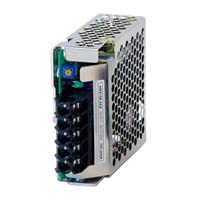
Image: Front view of the TDK-Lambda HWS150A-24/A AC-DC Power Supply, showing its compact, enclosed form factor and connection points.
Specifications
| Feature | Detail |
|---|---|
| Model Name | HWS150A-24/A |
| Brand | TDK-Lambda |
| Output Voltage | 24 Volts |
| Output Current | 6.5 Amps |
| Output Wattage | 156 Watts |
| Minimum Input Voltage | 85 Volts (AC) / 120 Volts (DC) |
| Maximum Input Voltage | 265 Volts (AC) / 370 Volts (DC) |
| Form Factor | Enclosed |
| Cooling Method | Air |
| Item Weight | 6.99 pounds |
Setup
- Unpacking: Carefully remove the power supply from its packaging. Inspect for any visible damage.
- Mounting: Securely mount the power supply in a location that allows for adequate airflow and ventilation. Ensure the mounting surface is stable and can support the unit's weight.
- Input Wiring: Connect the AC input wires (Line, Neutral, Ground) to the designated input terminals on the power supply. Ensure correct polarity and a secure ground connection. Refer to local electrical codes for proper wiring practices.
- Output Wiring: Connect the DC output wires (Positive, Negative) to your load. Double-check polarity to prevent damage to connected devices. Ensure connections are tight and secure.
- Initial Check: Before applying power, visually inspect all connections to ensure they are correct and secure.
Operating Instructions
- Power On: Once all connections are verified, apply input power to the unit. The power supply should activate, and the output voltage should be present.
- Monitoring: If your application requires precise voltage or current, monitor the output using appropriate measurement equipment.
- Load Connection: Connect your load to the power supply output. Ensure the load does not exceed the power supply's maximum output current or wattage.
- Power Off: To shut down the unit, disconnect the input power.
Maintenance
- Cleaning: Periodically clean the exterior of the power supply with a soft, dry cloth. Ensure ventilation openings are free from dust and debris to maintain optimal cooling. Do not use liquid cleaners directly on the unit.
- Connection Checks: Regularly inspect all input and output connections for tightness and signs of wear or corrosion. Re-tighten connections as necessary.
- Environmental Conditions: Ensure the operating environment remains within the specified temperature and humidity ranges to prolong the life of the unit.
- No User-Serviceable Parts: The power supply contains no user-serviceable parts. Do not attempt to open or repair the unit.
Troubleshooting
| Problem | Possible Cause | Solution |
|---|---|---|
| No output voltage | No input power; Blown fuse (internal); Overload protection activated; Incorrect wiring. | Check input power source and connections. Disconnect load and re-apply power. Verify wiring. If problem persists, contact support. |
| Output voltage too low/high | Incorrect input voltage; Overload; Faulty unit. | Verify input voltage is within specified range. Reduce load. If problem persists, contact support. |
| Unit overheating | Insufficient ventilation; Overload. | Ensure clear airflow around the unit. Reduce load. Check ambient temperature. |
If troubleshooting steps do not resolve the issue, do not attempt further repairs. Contact qualified service personnel or TDK-Lambda customer support.
Warranty and Support
This TDK-Lambda product is covered by a standard manufacturer's warranty. Please refer to the warranty documentation provided with your purchase for specific terms and conditions. For technical support, service, or warranty claims, please contact TDK-Lambda customer service through their official website or the contact information provided at the time of purchase.
For the most up-to-date information and support resources, visit the official TDK-Lambda website: www.tdk-lambda.com


