
Introduction
This instruction manual provides detailed guidance for using the deleyCON Network Tool Kit (10 Pieces, Model MK5218). This comprehensive kit is designed for the efficient processing, installation, and testing of network and telephone cables, including RJ11, RJ12, and RJ45 connections. Please read this manual thoroughly before use to ensure proper operation and safety.
Product Components
The deleyCON Network Tool Kit (10 Pieces) includes the following items:
- 1x Cable Tester (RJ45 + RJ11): For verifying network and telephone cable connections. Requires one 9V block battery (not included).
- 1x LSA Punch Down Tool: For terminating network cables into keystone modules or patch panels.
- 1x Modular Crimping Tool (RJ45 + RJ12): For crimping RJ45 and RJ12 connectors onto cables.
- 3x Cable Stripping Tools: Various tools for stripping insulation from different cable types.
- 10x RJ45 Crystal Connectors: Transparent connectors for RJ45 network cables.
- 1x Phillips Screwdriver: For general purpose use.
- 1x Flathead Screwdriver: For general purpose use.
- Cable Ties: For organizing and managing cables.
- 1x Carrying and Storage Bag: For convenient transport and organization of the tools.
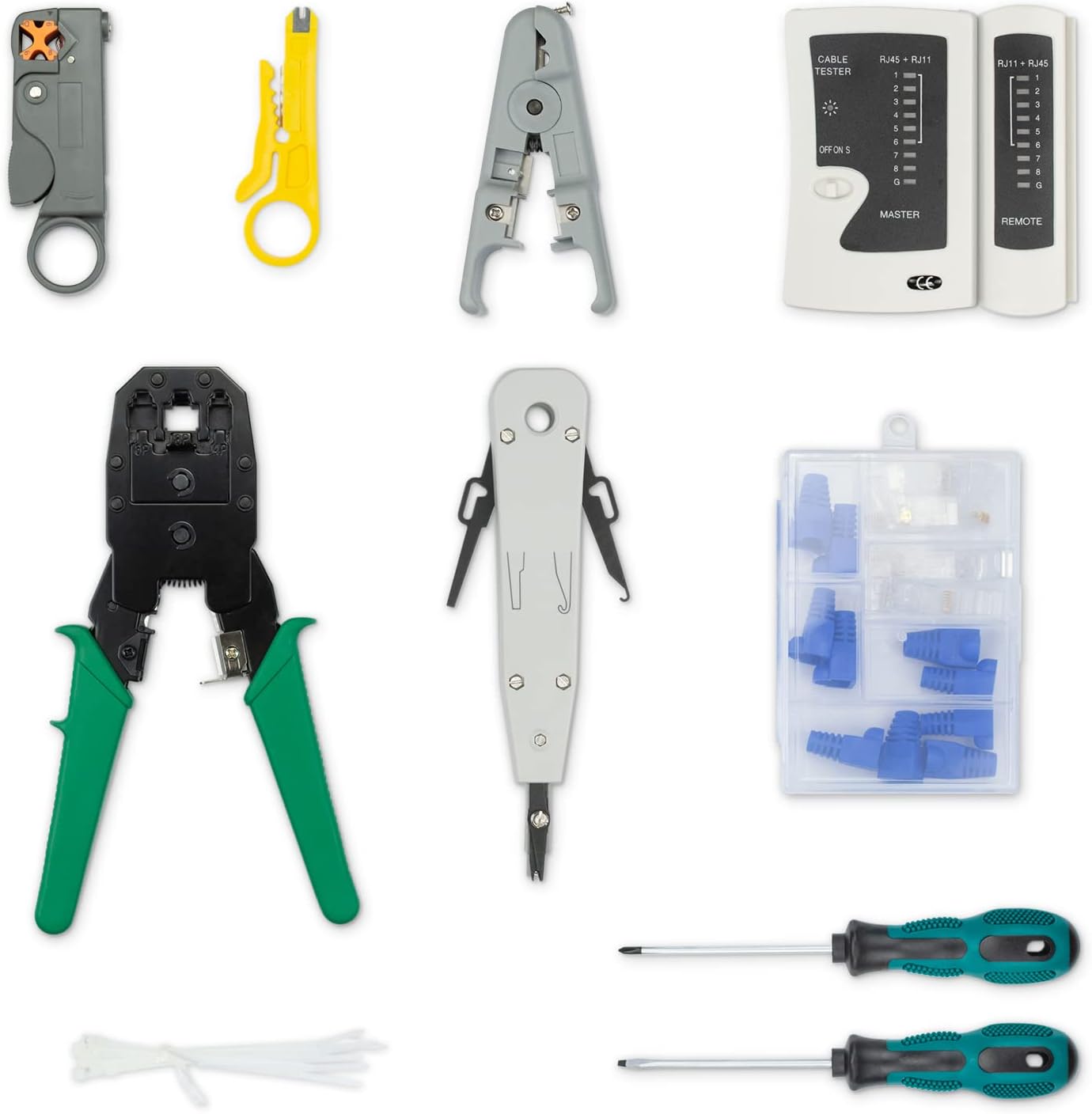
Figure 1: All components included in the deleyCON Network Tool Kit.
Setup
Cable Tester Battery Installation
- Locate the battery compartment on the back of the main unit of the cable tester.
- Open the battery compartment cover.
- Insert one 9V block battery, ensuring correct polarity (+/-).
- Close the battery compartment cover securely.
Note: The 9V battery is not included in the kit and must be purchased separately.
Operating Instructions
1. Modular Crimping Tool (RJ45 + RJ12)
This tool is used to attach RJ45 (8P8C) and RJ12 (6P6C) connectors to network and telephone cables.

Figure 2: Modular Crimping Tool with integrated cable stripper and cutter.
Steps for Crimping:
- Prepare the Cable: Use a cable stripping tool to carefully remove approximately 1.5-2 cm of the outer jacket from the cable end. Be careful not to cut the inner wires.
- Arrange Wires: Untwist the individual wire pairs and arrange them according to the desired wiring standard (e.g., T568A or T568B for RJ45). Trim the wires evenly so they are about 1.2 cm long.
- Insert into Connector: Carefully insert the arranged wires into the RJ45 or RJ12 connector, ensuring each wire reaches the end of its channel and the cable jacket is slightly inside the connector for strain relief.
- Crimp the Connector: Place the loaded connector into the appropriate crimping slot on the modular crimping tool (RJ45 for 8P8C, RJ12 for 6P6C). Squeeze the handles firmly and completely until you hear a click, indicating the pins have been pressed down and the strain relief tab is secured.
- Verify: Remove the crimped connector and visually inspect the connection. All pins should be evenly pressed, and the cable jacket should be securely held.
2. Cable Stripping & Cutting Tools
The kit includes various tools for safely stripping the outer jacket of network, coaxial, and other cables without damaging the inner conductors.

Figure 3: Assortment of cable stripping and cutting tools.
Steps for Stripping:
- Select Tool: Choose the appropriate stripping tool based on the cable type and diameter. Some tools have adjustable blades.
- Insert Cable: Place the cable into the designated slot or opening of the stripping tool.
- Rotate/Squeeze: For rotary strippers, rotate the tool around the cable a few times. For squeeze-type strippers, gently squeeze the handles.
- Remove Jacket: Carefully remove the stripped outer jacket, exposing the inner wires.
3. LSA Punch Down Tool
This tool is used for terminating network cables into LSA (Krone) type keystone jacks or patch panels, pushing the wires into insulation displacement connectors (IDCs).

Figure 4: LSA Punch Down Tool for cable installation.
Steps for Punching Down:
- Prepare Cable: Strip approximately 2-3 cm of the outer jacket from the cable.
- Position Wires: Untwist the wire pairs and place each individual wire into its corresponding slot on the keystone jack or patch panel, following the color code diagram (e.g., T568A or T568B).
- Punch Down: Hold the punch down tool vertically over the wire and slot. Apply firm, even pressure until the tool clicks, seating the wire into the IDC and simultaneously trimming any excess wire.
- Verify: Ensure all wires are securely seated and trimmed.
4. Cable Tester (RJ45 + RJ11)
The cable tester is used to verify the continuity and correct wiring of RJ45 network cables and RJ11 telephone cables.

Figure 5: Cable Tester (Master and Remote units).
Steps for Testing:
- Separate Units: Slide the remote unit off the master unit.
- Connect Cable: Plug one end of the cable to be tested into the appropriate port (RJ45 or RJ11) on the master unit and the other end into the corresponding port on the remote unit.
- Power On: Turn the power switch on the master unit to the 'ON' position.
- Observe LEDs: The LEDs on both units will light up sequentially, indicating the status of each wire.
- Interpret Results:
- Normal Connection: LEDs 1-8 (or 1-6 for RJ11) light up in sequence on both units.
- Open Circuit: If an LED does not light up, that wire is broken or has an open circuit.
- Short Circuit: If two or more LEDs light up simultaneously, there is a short circuit between those wires.
- Crossed Wires: If the sequence of LEDs is different between the master and remote units, the wires are crossed.
- Power Off: After testing, turn the power switch to 'OFF' to conserve battery life.
5. RJ45 Crystal Connectors
These transparent RJ45 connectors are designed for use with the modular crimping tool to terminate network cables.

Figure 6: RJ45 Crystal Connectors and protective boots.
6. Screwdrivers (Phillips & Flathead)
The included Phillips and flathead screwdrivers are standard tools for various tasks, such as opening equipment or tightening terminal screws.

Figure 7: Phillips and Flathead Screwdrivers.
7. Cable Ties
Cable ties are provided for organizing and securing cables, helping to maintain a neat and efficient workspace.
8. Carrying and Storage Bag
The durable carrying bag ensures all tools are kept organized and protected, making the kit portable and easy to store.

Figure 8: Carrying and Storage Bag.
Maintenance
- Cleaning: After each use, wipe down tools with a clean, dry cloth to remove any dirt or debris.
- Storage: Store all tools in the provided carrying bag in a dry, cool place, away from direct sunlight and moisture.
- Lubrication: Periodically apply a small amount of light machine oil to the moving parts of the crimping tool and punch down tool to ensure smooth operation.
- Battery Replacement: Replace the 9V battery in the cable tester when the LEDs become dim or the tester fails to power on.
Troubleshooting
Cable Tester Issues:
- Tester does not power on: Check if the 9V battery is correctly installed and has sufficient charge. Replace if necessary.
- Inconsistent LED sequence: Ensure the cable is fully inserted into both the master and remote units. Verify the cable itself is not damaged.
Crimping Tool Issues:
- Connector not crimped properly: Ensure the cable wires are trimmed to the correct length and fully inserted into the connector. Apply firm and complete pressure to the crimping tool handles.
- Damaged wires during stripping: Adjust the stripping tool blade depth or use a different stripping tool suitable for the cable gauge. Exercise caution and gentle pressure.
Specifications
| Feature | Specification |
|---|---|
| Model Number | MK5218 |
| Kit Contents | 10 Pieces (Cable Tester, Punch Down Tool, Crimping Tool, Stripping Tools, RJ45 Connectors, Screwdrivers, Cable Ties, Carrying Bag) |
| Compatible Connectors | RJ11, RJ12, RJ45 |
| Cable Tester Power | 1x 9V Block Battery (not included) |
| Materials | Alloy Steel, Stainless Steel (tools) |
| Product Dimensions (Bag) | 28.2 x 19.7 x 6.4 cm (approx.) |
| Product Weight | 881 Grams (approx.) |
Support & Contact
For technical support, warranty information, or any questions regarding your deleyCON Network Tool Kit, please contact deleyCON customer service through their official website or the retailer where the product was purchased.
Please have your model number (MK5218) and purchase details ready when contacting support.