
KUCACCI KUCACCI H15 Smart Lock
Kucacci H15 Smart Door Lock User Manual
Model: KUCACCI H15 Smart Lock
1. Product Overview
The Kucacci H15 Smart Door Lock offers advanced security and convenience with multiple access methods including fingerprint, passcode, mobile app, key fob, and traditional key. Designed for easy DIY installation, it provides robust protection and smart home integration, making your home smarter and more secure.

2. Included Components
Verify that all components are present before beginning installation:
- Front Panel
- User Manual
- Mounting Plate
- Back Panel
- Screw Packages
- Traditional Keys (2)
- Key Fobs (2)
3. Installation Guide
The Kucacci H15 Smart Door Lock is designed for easy DIY installation, typically taking around 5 minutes with a Philips screwdriver. No extra drilling or locksmith is needed for standard door retrofits.
3.1 Prepare the Door
Ensure your door meets the thickness requirements (1.38"-2.17" or 35-55mm) and the backset is adjustable to 2-3/8" or 2-3/4" (60mm/70mm).
3.2 Install Latchbolt
Adjust the latchbolt length if necessary. Ensure the latch's square hole is placed horizontally for correct operation.

Insert the latchbolt into the door edge and secure it with screws.

3.3 Adjust Handle Direction
Adjust the direction of the exterior and interior handles according to your door's opening direction (left-handed or right-handed doors).

3.4 Install Exterior Assembly
Carefully route the wire through the door and align the exterior assembly with the latchbolt. Secure it with the provided screws.
3.5 Install Interior Assembly
Connect the wire from the exterior assembly to the interior assembly. Secure the interior assembly to the mounting plate with screws.

3.6 Install Batteries
Insert 4 AA batteries into the battery compartment of the interior assembly. Close the battery cover securely.

3.7 Installation Video Guide
For a detailed visual guide on the installation process, please refer to the official Kucacci H15 Installation Video:
4. Operating Instructions
The Kucacci H15 Smart Door Lock offers multiple convenient ways to access your home:
4.1 Fingerprint Unlock
Place your registered fingerprint on the sensor located on the handle. The lock will unlock instantly.

4.2 Passcode Entry
Enter your unique passcode on the keypad. The lock supports anti-peep passcodes, allowing you to enter random digits before or after your actual code to protect your privacy.

4.3 Mobile App Control (TTLock App)
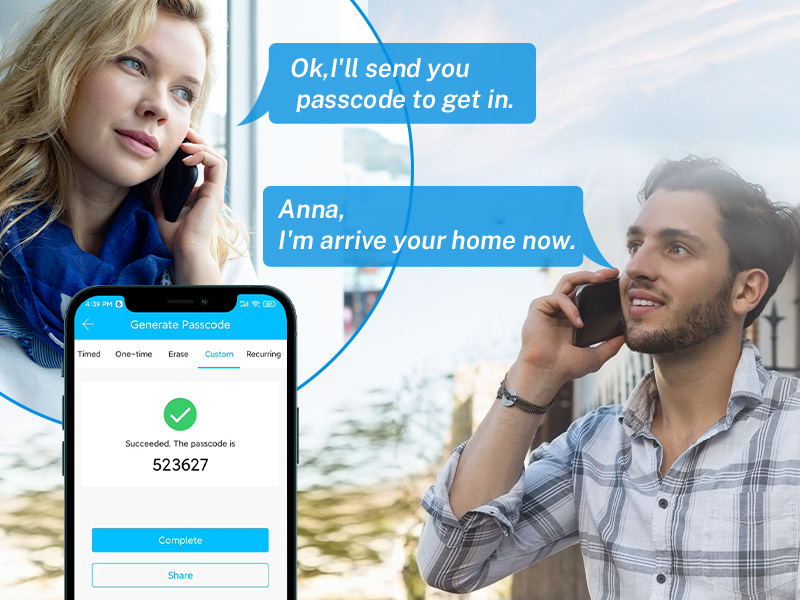
Manage your lock remotely using the TTLock App. You can lock/unlock, generate temporary passcodes, send e-keys, view access records, and manage users.


4.4 Key Fob / IC Card Unlock
Simply tap the provided key fob or IC card against the lock's card reader area to unlock.

4.5 Traditional Key Unlock
For traditional access or in case of emergency, use the provided mechanical keys to unlock the door.
4.6 Smart Voice Control (Alexa/Google Assistant)
When paired with an optional KUCACCI Gateway (sold separately), you can control your lock using voice commands via Amazon Alexa or Google Assistant.

4.7 Auto-Lock Feature
The lock can be configured to automatically lock after a set period of time, ensuring your home is always secure.
4.8 Privacy Lock
Activate the privacy mode from the inside to prevent unlocking from the outside, providing enhanced security when you are home.

5. Maintenance
5.1 Battery Replacement
The lock uses 4 AA batteries. A low battery voice alarm will notify you when replacement is needed. Ensure to replace all batteries simultaneously for optimal performance.
5.2 Emergency Power
In case of complete battery depletion, you can use a standard USB power bank to provide emergency power for unlocking via the USB port on the lock.
5.3 Weather Resistance
The Kucacci H15 Smart Lock has an IP66 weatherproof rating, making it suitable for outdoor use and capable of withstanding extreme weather conditions (-20°F ~ 122°F).
6. Troubleshooting
6.1 Unlocking Issues
If you experience issues with fingerprint or passcode unlocking, ensure your fingerprint is properly registered and the passcode is entered correctly. The lock will provide audible feedback for successful or failed attempts. Repeated unauthorized attempts will trigger an alarm.
6.2 Low Battery
If the low battery alarm sounds, replace all 4 AA batteries promptly. In emergencies, use a USB power bank for temporary power.
7. Specifications
| Feature | Description |
|---|---|
| Brand | KUCACCI |
| Model Name | Fingerprint Smart Door Lock (H15) |
| Lock Type | Keypad |
| Material | Stainless Steel, Aluminum |
| Special Feature | 5 Keyless Accesses + Traditional Key Access, DIY Installation without Extra Drilling, Full APP Control |
| Item Weight | 1 pounds (16 ounces) |
| Connectivity Protocol | Bluetooth |
| Controller Type | Amazon Alexa, Google Assistant, iOS, Android |
| Weatherproof Level | IP66 |
| Operating Temperature | -20°F ~ 122°F |
8. Warranty and Support
The Kucacci H15 Smart Door Lock comes with a 30-Day Money-Back Guarantee, a 1-Year Product Warranty, and Lifetime After-Sales Support. For any inquiries or assistance, please contact Kucacci customer service.
Ask a question about this manual
Ask about setup, troubleshooting, compatibility, parts, safety, or missing instructions. Manuals+ will review the question and use this page’s manual context to help answer it.