
1. Introduction and Overview
This manual provides detailed instructions for the installation, operation, and maintenance of your Real HD 6MP Full Color Night Vision ColorVu Turret Dome IP Camera. Please read this manual thoroughly before use to ensure proper functionality and safety. This camera is designed for outdoor surveillance, featuring high-resolution imaging and advanced night vision capabilities.
2. Key Features
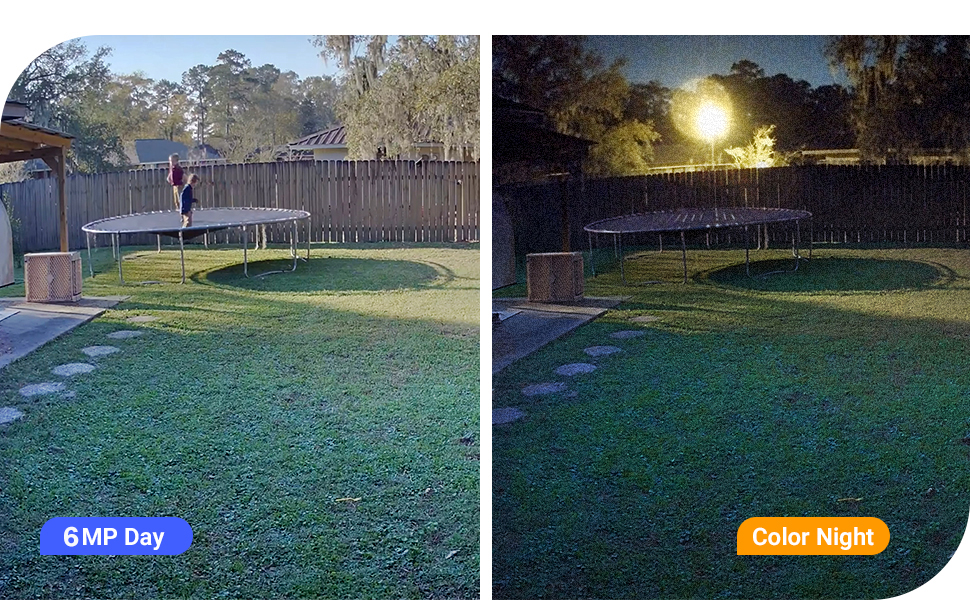
- HD 6MP Resolution & Full-Color Night Vision: Captures clear, sharp, and colorful images and video at 3072x2048 resolution, even in low light conditions, thanks to its 1/2.8" Progressive Scan CMOS sensor and visible white LED lights.
- Power over Ethernet (PoE) & Plug and Play: Simplifies installation by allowing the camera to receive both power and data over a single Ethernet cable, eliminating the need for separate power supplies.
- IP66 Weather Rated Enclosure & 2.8mm Wide Angle Lens: Built to withstand extreme temperatures and protected from dust and rain, making it ideal for outdoor use. The 2.8mm fixed lens provides a wide 105° field of view for extensive coverage.
- Dual H.265/H.264 Compression: Utilizes advanced video compression to reduce file sizes, allowing for more efficient storage and bandwidth usage without compromising video quality.
- Compatibility & US Local Tech Support: Compatible with Uniview NVR, Synology, and iSpy software via ONVIF Protocol. Please select ONVIF Protocol when adding the camera to NVR and software manually through the IP address. US local tech support is available from 9 am-5 pm CST.
3. Setup Instructions
3.1 Physical Installation
Mount the camera securely in your desired outdoor location. The camera features a quick installation base and a 3-axis adjustment mechanism for precise positioning. Cables can be hidden within the base for a clean installation.

3.2 Power and Network Connection (PoE)
Connect the camera to a Power over Ethernet (PoE) NVR or a PoE switch using a single Ethernet cable. This cable will provide both power and network connectivity to the camera.

3.3 Software Configuration
Access the camera through your NVR or compatible software (e.g., Uniview NVR, Synology, iSpy). When adding the camera, ensure you select the ONVIF Protocol and manually enter the camera's IP address for proper integration.
4. Operating Instructions
4.1 Real-time Monitoring
Once configured, you can view the live feed from your camera through your NVR, desktop client, or mobile application. The camera supports multi-platform real-time viewing from anywhere.

4.2 Full-Color Night Vision
The camera utilizes visible white LED lights to provide full-color night vision, capturing detailed and colorful images even in complete darkness. This offers a significant advantage over traditional infrared night vision, which typically produces monochrome images.


4.3 Motion and Human/Vehicle Detection
The camera is equipped with intelligent motion detection and specific human/vehicle detection capabilities. This allows for more accurate alerts and reduces false alarms. Configure detection zones and sensitivity settings via the camera's interface.

Official video demonstrating the Real HD camera's human and vehicle detection capabilities in a busy outdoor environment.
Official video showcasing the smart human and vehicle detection features of the Real HD IP Camera, highlighting its ability to identify and track subjects.
4.4 Audio Recording
The camera includes a built-in microphone for audio recording, allowing you to capture sound along with video footage. This feature can be enabled or disabled through the camera's settings.

5. Maintenance
- Cleaning: Regularly clean the camera lens with a soft, damp cloth to ensure clear image quality. Avoid abrasive cleaners.
- Firmware Updates: Check the manufacturer's website periodically for firmware updates to ensure optimal performance and security. Follow the provided instructions carefully for any updates.
- Cable Inspection: Periodically inspect all cables and connections for any signs of wear or damage, especially in outdoor installations.
6. Troubleshooting
- No Image/Video:
- Verify the camera is receiving power via the PoE connection.
- Check network cable connections at both the camera and the NVR/switch.
- Ensure the camera's IP address is correct and accessible on your network.
- Camera Dropping Offline:
- Inspect the Ethernet cable for damage or loose connections.
- Check the stability of your network connection and PoE switch/NVR.
- Ensure the camera's firmware is up to date.
- Poor Night Vision:
- Clean the camera lens to remove any obstructions or dirt.
- Ensure the visible white LED lights are not obstructed and are functioning correctly.
- Compatibility Issues:
- This camera is compatible with Uniview NVR, Synology, and iSpy software through ONVIF Protocol. It is not compatible with Reolink, Viewtron, or Swann NVRs.
- Always select ONVIF Protocol when manually adding the camera to compatible systems.
If you encounter persistent issues, please contact Real HD US Local Tech Support for assistance.
7. Specifications
| Brand | Real HD |
| Model | Vandal Dome POE IP Camera |
| Video Capture Resolution | 6MP (3072x2048) |
| Effective Still Resolution | 6 MP |
| Lens | 2.8mm Wide Angle |
| Night Vision | Full Color Night Vision with Visible White LED Lights |
| Connectivity Technology | Wired Ethernet (PoE) |
| Indoor/Outdoor Usage | Outdoor |
| Weather Rating | IP66 |
| Audio | Built-in Microphone |
| Video Compression | H.265/H.264 |
| Compatible Devices | NVR (Uniview, Synology, iSpy via ONVIF) |
| Power Source | Corded Electric (PoE) |
| Item Dimensions (L x W x H) | 5.39 x 5.39 x 2 inches |
| Item Weight | 1.26 pounds |
| UPC | 722390682337 |
8. Warranty and Support
Real HD is committed to providing reliable products and after-sales service. For technical assistance, please contact our US local office. Tech support hours are 9 am-5 pm CST. Please refer to your purchase documentation for specific warranty details.
Contact Information: Please refer to the contact details provided with your product packaging or on the official Real HD website for the most up-to-date support information.