
U`King ZQ-B257Y-BLACK-EU-YL-07
UKing 50W Moving Head Stage Light
User Instruction Manual
Model: ZQ-B257Y-BLACK-EU-YL-07
1. Introduction
Thank you for purchasing the UKing 50W Moving Head Stage Light. This professional lighting fixture is designed to create dynamic and vibrant atmospheres for various events, including parties, discos, clubs, and stage performances. Featuring multiple operating modes, a wide range of colors and patterns, and flexible control options, this light is an essential tool for DJs, bands, and event organizers. Please read this manual thoroughly before operation to ensure safe and optimal performance.

The UKing 50W Moving Head Stage Light creating dynamic lighting effects in various event scenarios, including a disco, Christmas party, wedding, and concert.
2. Safety Information
- Electrical Safety: Ensure the power supply voltage matches the product's requirements (AC 100-240V / 50-60Hz). Always connect to a grounded outlet. Disconnect power before cleaning or servicing.
- Ventilation: Do not block ventilation openings. Ensure adequate airflow around the unit to prevent overheating.
- Placement: Install the fixture in a dry location, away from moisture, water, and flammable materials. Avoid direct exposure to sunlight or extreme temperatures.
- Handling: Do not touch the light source directly during operation or immediately after, as it may be hot.
- Professional Use: Installation and servicing should ideally be performed by qualified personnel.
- Eye Safety: Avoid looking directly into the light beam, as it can cause eye damage.
3. Package Contents
Please check that all items listed below are included in your package:
- 1 x UKing 50W Moving Head Stage Light
- 1 x Power Cord
- 1 x Wireless Remote Control (with 1 CR2 battery included)
- 1 x Installation Gadget Set (including mounting bracket)
- 2 x Screws
- 1 x Instruction Manual
4. Product Overview
Familiarize yourself with the main components and interfaces of your moving head light.

Main unit with display, controls, and included remote control.
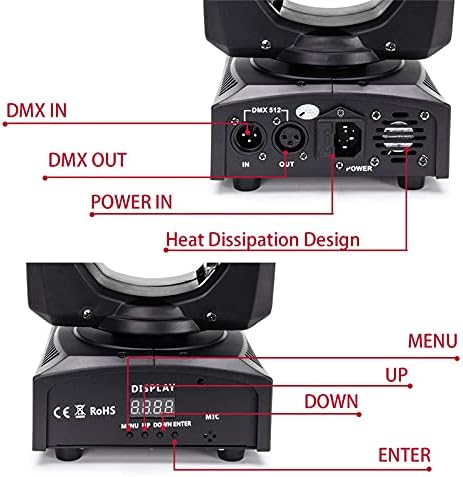
Detailed view of the DMX IN/OUT ports, Power IN, and the control panel with MENU, UP, DOWN, and ENTER buttons.
Key Components:
- Light Head: Contains the 50W LED, color wheel (8 colors), and gobo wheel (8 patterns).
- Base Unit: Houses the power supply, control board, display, and input/output ports.
- Control Panel: LED display and navigation buttons (MENU, UP, DOWN, ENTER) for mode selection and settings adjustment.
- DMX IN/OUT: XLR 3-pin connectors for DMX control signal.
- Power IN: Standard power input for AC 100-240V.
- MIC: Built-in microphone for Sound Activated mode.
5. Setup and Installation
The UKing Moving Head Light offers flexible installation options. Ensure the fixture is securely mounted before operation.

Product dimensions and illustration of pan (540°) and tilt (180°) movement capabilities.
Installation Steps:
- Choose Location: Select a stable and secure location for the light. It can be placed on a flat surface, mounted on a truss, or attached to a T-bar using the provided bracket.
- Attach Bracket: If mounting, securely attach the adjustable bracket to the base of the light using the provided screws.
- Secure Mounting: Use appropriate clamps (not included) to attach the bracket to a truss or T-bar. Ensure all connections are tight and secure to prevent accidental falls.
- Power Connection: Connect the power cord to the "Power IN" port on the light and then plug it into a suitable power outlet.
- DMX Connection (Optional): If using DMX control, connect a DMX cable from your DMX controller to the "DMX IN" port. For multiple lights, daisy-chain them by connecting "DMX OUT" of the first light to "DMX IN" of the next.
6. Operating Modes
The UKing Moving Head Light supports four primary operating modes, selectable via the control panel or remote control.
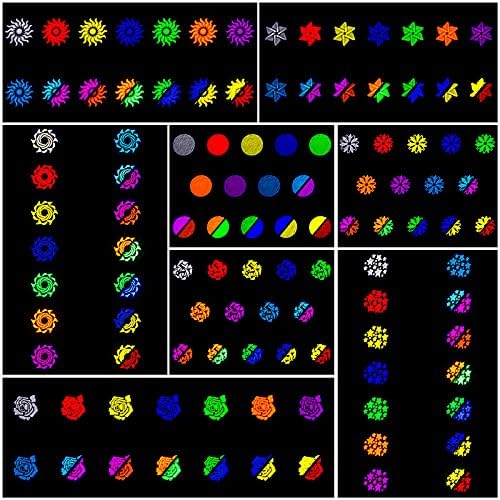
Examples of the diverse patterns and color combinations achievable with the light.
Mode Selection:
- DMX512 Mode: For professional control using a DMX controller. Allows precise control over pan, tilt, color, gobo, strobe, and dimmer functions. The light supports 9 or 11 DMX channels. Refer to the DMX channel chart in the specifications section for details.
- Master/Slave Mode: Connect multiple lights via DMX cables. Set one unit as "Master" and others as "Slave." Slave units will synchronize their movements and effects with the Master unit.
- Sound Activated Mode: The built-in microphone detects music or sound, and the light's patterns and movements will react to the beat. Sensitivity can often be adjusted.
- Auto Mode (Standalone): The light runs through pre-programmed sequences of colors, patterns, and movements automatically. Several auto programs may be available.
Use the MENU button on the control panel to cycle through modes, and UP/DOWN buttons to select options, then ENTER to confirm.
7. Remote Control Operation
The included wireless remote control provides convenient access to basic functions and mode selection from a distance (10-30m range).

Layout and functions of the wireless remote control, including buttons for power, auto modes, sound modes, strobe, color, pattern, and pan/tilt control.
Remote Control Functions:
- Power Button: Turns the unit On/Off.
- Stroboscopic: Activates or deactivates the strobe effect.
- Auto 0/1/2: Selects different automatic programs.
- Sound Mode 0/1/2: Selects different sound-activated programs.
- Save: Saves current settings (specific functionality may vary).
- Color Buttons: Changes the color of the light.
- Pattern Buttons: Changes the gobo pattern.
- Manual Positioning Switch: Activates manual control for pan/tilt.
- Pan Running (X-/X+): Controls horizontal movement.
- Tilt Running (Y-/Y+): Controls vertical movement.
Note: The remote control offers basic functionality and cannot fully replace a DMX console for advanced programming and precise control. It primarily allows for power on/off, sound activation, positioning, and basic effect changes.
8. DMX Control (Advanced)
For professional lighting setups, the DMX512 protocol allows for precise control of the moving head light's functions. It is recommended to use a dedicated DMX console for optimal control rather than software downloaded from the internet.
DMX Channel Assignment (Example for 11-Channel Mode):
| Channel | Function | Value Range (0-255) | Description |
|---|---|---|---|
| CH1 | Pan Movement | 0-255 | 0-540 degrees horizontal movement |
| CH2 | Pan Fine | 0-255 | Fine adjustment for Pan |
| CH3 | Tilt Movement | 0-255 | 0-180 degrees vertical movement |
| CH4 | Tilt Fine | 0-255 | Fine adjustment for Tilt |
| CH5 | Pan/Tilt Speed | 0-255 | Adjusts speed of Pan/Tilt movement (Fast to Slow) |
| CH6 | Dimmer | 0-255 | 0-100% electronic dimming |
| CH7 | Strobe | 0-255 | Strobe speed (Slow to Fast) |
| CH8 | Color Wheel | 0-255 | Selects 8 colors + open |
| CH9 | Gobo Wheel | 0-255 | Selects 8 patterns + open |
| CH10 | Function Mode | 0-255 | Auto, Sound, Master/Slave selection |
| CH11 | Reset | 0-255 | Resets the fixture |
For detailed DMX programming, consult your DMX controller's manual and experiment with the channel values to achieve desired effects.
9. Maintenance
Regular maintenance ensures the longevity and optimal performance of your moving head light.
- Cleaning: Disconnect power before cleaning. Use a soft, lint-free cloth to wipe the exterior. For lenses and mirrors, use a specialized lens cleaning solution and cloth to avoid scratches. Do not use abrasive cleaners or solvents.
- Ventilation: Periodically check and clean the ventilation openings to ensure they are free from dust and debris.
- Inspection: Regularly inspect power cables, DMX cables, and mounting hardware for any signs of wear or damage. Replace damaged components immediately.
- Storage: When not in use for extended periods, store the light in a dry, dust-free environment, preferably in its original packaging or a protective case.
10. Troubleshooting
If you encounter issues with your light, refer to the following common problems and solutions:
| Problem | Possible Cause | Solution |
|---|---|---|
| Light does not power on. | No power, faulty cable, or internal issue. | Check power connection, try a different outlet/cable. If problem persists, contact support. |
| No DMX control. | Incorrect DMX address, faulty cable, or DMX controller issue. | Verify DMX address, check DMX cable connections, ensure DMX controller is sending signal. |
| Light is not responding to sound. | Sound mode not selected, microphone blocked, or low sound input. | Ensure Sound Activated mode is selected. Check microphone for obstructions. Increase music volume. |
| Movement is erratic or stuck. | Obstruction, motor issue, or calibration needed. | Ensure no physical obstructions. Try resetting the unit. If problem persists, contact support. |
| Remote control not working. | Battery dead, remote out of range, or IR sensor blocked. | Replace remote battery. Ensure you are within range (10-30m) and pointing at the unit. Check for obstructions to the IR sensor. |
For issues not covered here, please contact UKing customer support.
11. Specifications
Detailed technical specifications for the UKing 50W Moving Head Stage Light.
| Feature | Detail |
|---|---|
| Product Model | ZQ-B257Y-BLACK-EU-YL-07 |
| Brand | U`King |
| Product Color | Black |
| Shell Material | Aluminum Alloy + Plastic |
| Voltage | AC 100-240V / 50-60Hz |
| Power Consumption | 50W |
| LED Quantity | 1 (High Power LED) |
| Control Modes | DMX512, Master/Slave, Sound Activated, Auto |
| DMX Channels | 9/11 CH |
| Color Effect | 8 Colors + Open |
| Gobo Effect | 8 Patterns + Open |
| Pan Angle | 540° |
| Tilt Angle | 180° |
| Electronic Dimming | 0-100% |
| Focus Method | Manual Focus |
| Display Mode | LED Display |
| Cooling System | Thermostat + Fan |
| Remote Control Range | 10-30m (Wireless) |
| Product Dimensions (L x W x H) | 16 x 16 x 24 cm (6.3 x 6.3 x 9.4 inches) |
| Product Weight | 2.5 kg (5.5 lbs) |
| Included Battery | 1 x CR2 (for remote control) |
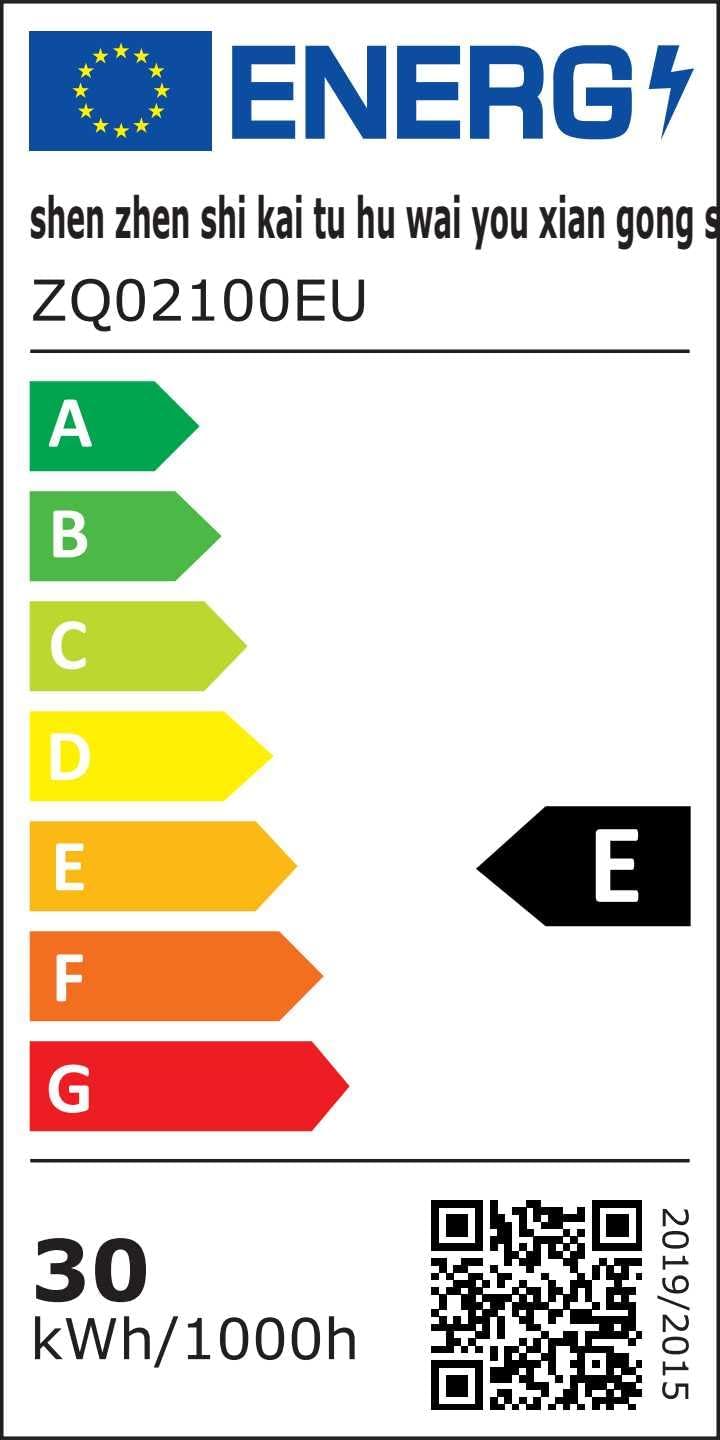
EU Energy Label for the product. For more details, visit the official EPREL database: https://eprel.ec.europa.eu/qr/1508819
12. Warranty and Support
UKing is committed to providing high-quality products and customer satisfaction. For warranty information, technical support, or service inquiries, please contact your retailer or visit the official UKing website. Please have your product model number (ZQ-B257Y-BLACK-EU-YL-07) and purchase details ready when contacting support.
Related documentsZQ-B257Y-BLACK-EU-YL-07


Ask a question about this manual
Ask about setup, troubleshooting, compatibility, parts, safety, or missing instructions. Manuals+ will review the question and use this page’s manual context to help answer it.