
weivision BDV11
Contents
weivision AHD 1080P 3D 360 Degree HD Bird View Panorama System User Manual
Model: BDV11
1. Introduction
The weivision AHD 1080P 3D 360 Degree HD Bird View Panorama System is designed to enhance driving safety by providing a comprehensive surround view of your vehicle. This system helps eliminate blind spots, assists with parking, and offers various driving assistance features. It is suitable for cars, SUVs, and vans.
2. Product Features
- UHD 1080P 2D/3D Around View: Provides a real-time surround vision for improved driving safety.
- 360° Bird's Eye View: Assists with reverse parking, blind spot elimination, and navigating narrow roads.
- Advanced Driving Assistance Systems (ADAS): Includes Blind Spot Detection (BSD), Lane Departure Warning (LDW), and Moving Object Detection (MOD).
- 4-Channel 1080P Recording: Features four 210° wide-angle fisheye cameras for 4-way video recording and playback.
- High-Quality Imaging: Utilizes 4K image processing technology for full HD video playback in various lighting conditions, day or night.
- Loop Recording: Automatically overwrites old files with new recordings.
- Storage Support: Compatible with U disk or TF card (16GB-128GB, exFAT format).
- Multiple View Modes: Supports various 3D view modes and video formats (CVBS, AHD, VGA, HDMI).
- Wireless Remote Control: Convenient control via a wireless knob.

Image: Overview of the 360-degree Around View System, illustrating its comprehensive coverage.

Image: Visual representation of the system's core functions, including Blind Spot Monitoring, Lane Departure Warning, Moving Object Detection, Road Marking, AR 3D Effect, and Parking Monitoring.

Image: Illustration of the Panoramic Driving Assistance System (ADAS) highlighting Blind Spot Detection (BSD) and Lane Departure Warning (LDW) features.
3. Components (What's in the Box)
The package includes the following items:
- 7-inch AHD Monitor
- 4 Channel AHD 1080P Cameras (Front, Rear, Left, Right)
- Wireless Knob Remote Control
- U Disk or TF Card (16GB-128GB, exFAT format)
- Recording Cable
- Host Unit
- Power Cable
- Rear Cables (11ft, 19ft)
- Left Cable (11ft)
- Right Cable (11ft)
- Speaker
- Knob Remote Receiver (Optional)
- IR Receiver
- User Manual

Image: A visual display of all components included in the package, such as the host, cameras, cables, monitor, and remote controls.
4. Setup and Installation
Proper installation is crucial for optimal performance. It is recommended to have this system installed by a professional.
4.1 Wiring Diagram
Follow the wiring diagram carefully to connect all components correctly. Ensure all connections are secure to prevent malfunctions.

Image: Detailed wiring diagram showing connections for the host unit, cameras, IR receiver, power, and monitor.
- Black Wire: Connect to vehicle battery negative (-).
- Yellow Wire: Connect to vehicle battery positive (+).
- Red Wire: Connect to vehicle ACC ON or ignition (+).
- White Wire: Connect to the screen rear view trigger line.
- Connect Front, Rear, Left, and Right cameras to their respective ports on the host unit.
- Connect the IR Receiver to the host unit.
- Connect the AV OUT from the host to the monitor's video input.
4.2 Camera Placement
Mount the four cameras (front, rear, left, right) in positions that provide an unobstructed view of the vehicle's surroundings. The fisheye lenses are designed for wide coverage.
4.3 Calibration
After installation, the system requires calibration to accurately stitch the camera feeds into a seamless 360-degree bird's eye view. Refer to the on-screen menu for calibration procedures. This process ensures precise panoramic imaging and ADAS functionality.
5. Operating Instructions
5.1 Panoramic Display Interface
The system's interface allows for easy viewing and operation while driving. You can switch between 2D and 3D views as needed.

Image: The panoramic display interface, illustrating the 3D view, and icons for Lane Departure Warning (LDW), Blind Spot Detection (BSD), and Moving Object Detection (MOD).
5.2 View Modes
The system supports various display modes to assist with different driving scenarios:
- Front/Rear View + Bird View: Combines a direct front or rear camera feed with the overhead bird's eye view.
- Front/Rear Full View: Displays a full-screen view from the front or rear camera.
- 3D View + Bird View: Offers an augmented 3D perspective alongside the bird's eye view.
- Transparent Mode: Provides a virtual transparent view of the vehicle's underside.
- Front Narrow View + Bird View: Focuses on a narrow front perspective with the bird's eye view.
- Limit Narrow View + Bird View: Offers a restricted narrow view for precise maneuvering.
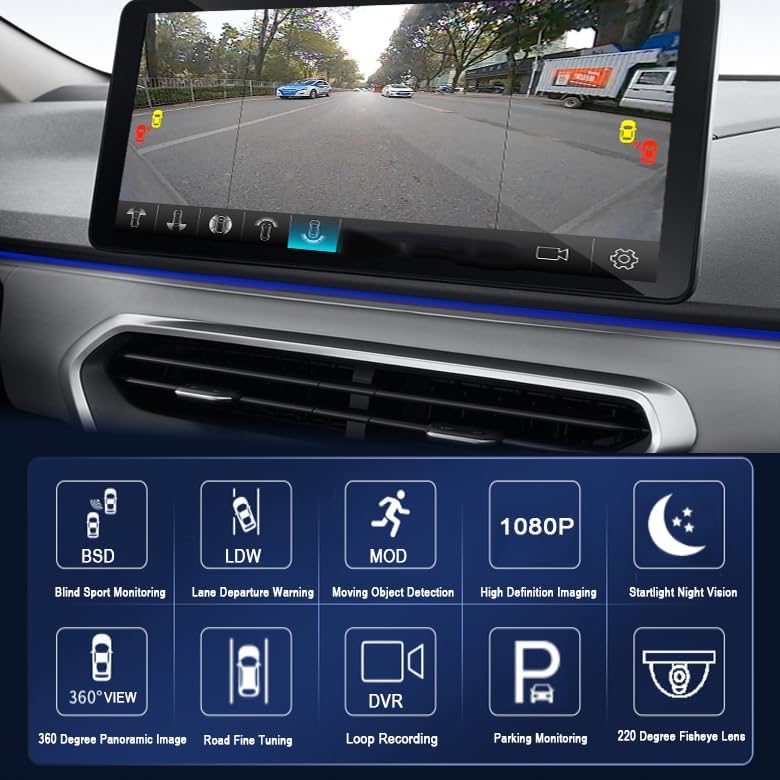
Image: Examples of different view modes, including Front/Rear View + Bird View, Front/Rear Full View, 3D View + Bird View, Transparent Mode, Front Narrow View + Bird View, and Limit Narrow View + Bird View.
5.3 Recording Functionality
The system continuously records video from all four cameras. Recordings are saved in MP4 format at 1920x1080P resolution. Loop recording ensures that older files are automatically overwritten when storage is full.
Video: Demonstration of the weivision 360-degree camera system in operation, showcasing the real-time bird's eye view and driving assistance features.
5.4 Wide Dynamic Range (WDR)
The system incorporates WDR technology for clear picture quality, ensuring full HD video imaging ability even under low visibility conditions, both day and night.

Image: Illustrates how Wide Dynamic Range (WDR) technology improves image quality by balancing exposure in scenes with both very dark and very bright areas.
6. Maintenance
To ensure the longevity and optimal performance of your weivision 360 Degree HD Bird View Panorama System, follow these maintenance guidelines:
- Clean Cameras Regularly: Keep camera lenses clean from dirt, dust, and water spots to maintain clear image quality. Use a soft, damp cloth.
- Check Wiring: Periodically inspect all wiring connections for any signs of wear, corrosion, or looseness. Secure any loose connections.
- Monitor Software Updates: Check the manufacturer's website or contact support for any available firmware updates to ensure the system operates with the latest features and bug fixes.
- Storage Management: Regularly check the storage device (U disk or TF card) for proper functioning and ensure sufficient space for recordings. Format the card periodically if recommended by the system.
- Avoid Harsh Chemicals: Do not use abrasive cleaners or solvents on the monitor or camera lenses, as this can damage the surfaces.
7. Troubleshooting
If you encounter issues with your weivision 360 Degree HD Bird View Panorama System, refer to the following common troubleshooting steps:
- No Display/Black Screen:
- Check all power connections to the host unit and monitor.
- Ensure the monitor is powered on and correctly connected to the host's AV OUT.
- Verify the vehicle's ignition is on if the system is wired to ACC.
- Distorted/Unclear Image:
- Clean camera lenses thoroughly.
- Check camera connections to the host unit for looseness or damage.
- Perform system calibration if the panoramic view appears misaligned.
- Recording Issues:
- Ensure the U disk or TF card is properly inserted and formatted (exFAT).
- Check if the storage device has sufficient free space.
- Verify the storage device is within the supported capacity (16GB-128GB).
- Remote Control Not Responding:
- Ensure the IR receiver is properly connected and unobstructed.
- Replace the batteries in the wireless knob remote control.
- ADAS Features Not Working:
- Ensure the system has been properly calibrated.
- Verify camera lenses are clean and unobstructed.
- Check system settings to ensure ADAS features are enabled.
If these steps do not resolve the issue, please contact customer support.
8. Specifications
| Feature | Specification |
|---|---|
| Brand | weivision |
| Model Name | BDV11 |
| Vehicle Service Type | Car |
| Connectivity Technology | USB |
| Special Feature | Waterproof |
| Video Capture Resolution | 1080p |
| Mounting Type | Dashboard Mount or Windshield Mount |
| Color | Black |
| Field Of View | 210 degrees |
| Control Method | Remote |
| Screen Size | 7 inches |
| Optical Sensor Technology | CMOS |
| Flash Memory Type | USB flash drive |
| Maximum Aperture | 3.5 millimeters |
| Photo Sensor Size | 1/3 inches |
| Display Type | LCD |
| Supported Standards | MP4 |
| Memory Slots Available | 1 |
| Frame Rate | 30 FPS |
| Included Memory Card Size | 128 GB (Max supported) |
| Memory Storage Capacity | 32 GB (Typical included) |
| Item Weight | 3.5 milligrams |
| UPC | 778778260932 |
9. Warranty Information
The weivision AHD 1080P 3D 360 Degree HD Bird View Panorama System comes with a 1-year warranty from the date of purchase. This warranty covers manufacturing defects and malfunctions under normal use. Please retain your proof of purchase for warranty claims. For detailed warranty terms and conditions, refer to the documentation included with your product or contact customer support.
10. Support
For further assistance, technical support, or inquiries regarding your weivision product, please visit the official weivision store or contact their customer service department.
Documents and downloads
Ask a question about this manual
Ask about setup, troubleshooting, compatibility, parts, safety, or missing instructions. Manuals+ will review the question and use this page’s manual context to help answer it.