
1. Introduction
This user manual provides essential information for the safe and effective use of the Whadda WCS104 Transistor And Trimmer Set. This set is designed for electronics enthusiasts, students, and professionals working with circuit design and prototyping. Please read this manual thoroughly before using the components.
2. Product Overview
The Whadda WCS104 set includes a variety of transistors and trimmers (variable resistors) suitable for a wide range of electronic projects. These components are fundamental for building and experimenting with electronic circuits.

Figure 2.1: Packaging of the Whadda WCS104 Transistor and Trimmer Set. The package displays the brand, product name, model number, and a visual representation of the components inside, indicating a total of 160 pieces.
2.1 Components Included
The set contains 160 pieces, comprising various types of transistors and trimmers. These components are organized for easy access and identification.

Figure 2.2: The Whadda WCS104 set with the lid open, revealing the transistors and trimmers neatly sorted into compartments within the storage box.
2.2 Transistors
Transistors are semiconductor devices used to amplify or switch electronic signals and electrical power. They are fundamental building blocks of electronic circuits.

Figure 2.3: A close-up view of a selection of transistors from the WCS104 set, showing their typical three-lead configuration and black plastic casing.
2.3 Trimmers (Variable Resistors)
Trimmers are small variable resistors used for fine-tuning circuits. They allow for precise adjustment of resistance values, which can affect voltage, current, or frequency in a circuit.
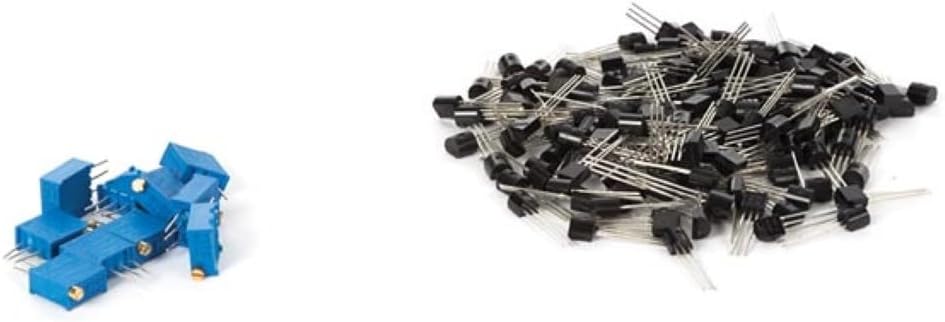
Figure 2.4: A close-up view of several blue trimmers from the WCS104 set, illustrating their compact design and adjustment screw.
3. Setup
Before integrating these components into a circuit, ensure you have a suitable workspace and necessary tools.
- Prepare Workspace: Ensure your work area is clean, well-lit, and free from static electricity. Use an anti-static mat if available.
- Identify Components: Familiarize yourself with the different types of transistors and trimmers in the set. Refer to component datasheets for specific pin configurations and electrical characteristics if needed.
- Tools Required: Basic electronics tools such as a breadboard, multimeter, wire strippers, and soldering iron (if permanent connections are required) may be necessary.
4. Operating Instructions
Proper handling and connection are crucial for the correct operation of these electronic components.
4.1 Using Transistors
- Pin Identification: Transistors typically have three leads: collector, base, and emitter (for BJTs) or drain, gate, and source (for FETs). Correctly identify these pins before connecting.
- Circuit Integration: Connect the transistor into your circuit according to your design. Ensure correct polarity and voltage levels.
- Testing: Use a multimeter to verify connections and measure voltages/currents at different points in the circuit to confirm proper operation.
4.2 Using Trimmers
- Connection: Trimmers typically have three terminals. Two terminals connect to the resistive track, and the third (wiper) moves along the track. Connect them as a variable resistor or potentiometer in your circuit.
- Adjustment: Use a small screwdriver to carefully turn the adjustment screw on the trimmer. This changes the resistance value.
- Fine-tuning: Adjust the trimmer while monitoring the circuit's behavior (e.g., voltage, frequency) with a multimeter or oscilloscope to achieve the desired operational point.
5. Maintenance
Proper care and storage will extend the lifespan of your electronic components.
- Storage: Store components in their original packaging or in anti-static containers to protect them from physical damage, dust, and electrostatic discharge.
- Handling: Always handle components by their bodies, not their leads, to prevent bending or breaking. Avoid touching the leads directly to minimize contamination.
- Cleaning: If necessary, gently clean components with a soft, dry brush. Avoid using liquids unless specifically designed for electronics cleaning.
6. Troubleshooting
If you encounter issues, consider the following common troubleshooting steps:
- Incorrect Connections: Double-check all wiring and ensure components are connected according to the circuit diagram. Pay close attention to polarity.
- Component Damage: Visually inspect components for any signs of physical damage (e.g., bent leads, burn marks).
- Incorrect Values: Use a multimeter to test the resistance of trimmers and verify the functionality of transistors (e.g., diode test for BJT junctions).
- Power Supply Issues: Ensure the power supply to your circuit is stable and within the specified voltage and current limits for the components.
- Static Discharge: Components can be sensitive to electrostatic discharge. Ensure proper grounding and anti-static precautions during handling.
7. Specifications
The following are general specifications for the Whadda WCS104 Transistor And Trimmer Set. Specific component values will vary within the set.
| Feature | Detail |
|---|---|
| Brand | Whadda |
| Model Number | WCS104 |
| Item Weight | 3 ounces (approx. 85 grams) |
| Product Dimensions | 4.72 x 1.97 x 10.24 inches (approx. 12 x 5 x 26 cm) |
| Material | Plastic (for packaging and component casings) |
| Item Package Quantity | 1 (set) |
| Batteries Required? | No |
| Batteries Included? | No |
8. Warranty and Support
For specific warranty information or technical support regarding your Whadda WCS104 Transistor And Trimmer Set, please refer to the documentation included with your purchase or contact Whadda customer service directly. Contact details can typically be found on the manufacturer's official website or product packaging.
Manufacturer: Whadda
Part Number: WCS104


