Introduction
This manual provides detailed instructions for the safe and efficient operation of your GZZBMY Portable Electric Dehumidifier. Please read this manual thoroughly before use and retain it for future reference.
The GZZBMY Portable Electric Dehumidifier is designed to improve indoor air quality by removing excess moisture, preventing mold, mildew, and condensation. It integrates multiple functions such as timing, sleep mode, automatic defrost, and automatic shut-off, providing a new and pleasant experience through technical updates.
Product Features
- Efficient dehumidification with 360° Peltier technology for high energy efficiency.
- Intelligent automatic shut-off when ambient humidity is below 50% or water tank is full.
- Low power consumption (25W) with a dehumidification capacity of 300ml/day.
- Automatic defrosting function for low-temperature environments (below 10°C).
- Ultra-quiet operation (≤35dB) with a dedicated sleep mode for undisturbed rest.
- 800ml removable water tank capacity.
- LED digital display for easy monitoring of humidity, temperature, and status.
- Suitable for rooms ranging from 10-30m².
- Helps refresh air and prevent mold, fogged windows, and bacteria for a healthier home.
Package Contents
Upon opening the package, please ensure all items are present and undamaged:
- 1x GZZBMY Portable Electric Dehumidifier
- 1x Power Cable
- 1x User Manual
Setup
1. Unpacking
Carefully remove the dehumidifier and all accessories from the packaging. Retain the packaging for future storage or transport.
2. Placement
Place the dehumidifier on a flat, stable surface in the desired room. Ensure there is at least 20 cm (8 inches) of clear space around the air inlets and outlets for optimal airflow. Avoid placing it directly against walls or furniture.
The dehumidifier is suitable for various small spaces including bedrooms, bathrooms, kitchens, offices, and closets.

Image: The GZZBMY dehumidifier placed in different room environments, including a bedroom, office, and living room, demonstrating its compact size and versatility for various indoor spaces.
3. Power Connection
Connect the power cable to the dehumidifier's power input port and then plug it into a standard electrical outlet (AC100~240V 50-60Hz).
Operating Instructions
1. Power On/Off
Press the On/Off button (often indicated by a power symbol or "开/关" on the display) to turn the unit on or off. The LED display will illuminate when the unit is powered on.

Image: A close-up of the GZZBMY dehumidifier highlighting key features such as the "Shut down when water is full" indicator, "temperature display", "Touch to start" button, "800ML water tank", and "Low temperature defrost" capability.
2. Understanding the LED Display
The intelligent dynamic liquid crystal display provides real-time information:
- Dehumidification (除湿显示): Indicates active dehumidification.
- Temperature (温度显示): Shows the current ambient temperature.
- Humidity (湿度显示): Displays the current relative humidity percentage.
- Defrost (除霜显示): Indicates when the automatic defrost function is active.
- Purification (净化显示): Indicates air purification mode (if available).
- Water Full (水满): Illuminates when the water tank is full and the unit automatically shuts off.

Image: A detailed view of the dehumidifier's intelligent liquid crystal display, showing indicators for Dehumidification, Temperature, Humidity, Defrost, and Purification, along with the "Water Full" warning.
3. Automatic Operation and Safety Features
- Intelligent Dehumidification: The unit will automatically shut off when the ambient humidity drops below 50% to prevent excessive dehumidification.
- Automatic Shut-off (Water Full): When the 800ml water tank is full, the dehumidifier will automatically stop operating and the "Water Full" indicator will light up. This prevents overflow and ensures safety.
- Automatic Defrost: If the ambient temperature falls below 10°C (50°F) and frost begins to form on the semiconductor surface, the dehumidification function will pause, but the fan will continue to run to defrost the unit. This shortens the defrosting time and ensures continuous operation.

Image: The GZZBMY dehumidifier illustrating its automatic power-off feature, indicating that it stops operation when the water tank is full, with a dehumidification capacity of 300ml/24h.

Image: The GZZBMY dehumidifier demonstrating its low temperature defrosting capability, which activates automatically when the temperature is below 10°C.
4. Sleep Mode (Ultra-Quiet Operation)
To activate sleep mode, press the designated button (refer to the product's physical buttons if not on display). In sleep mode, the unit operates at a very low noise level (≤35dB), ensuring minimal disturbance, ideal for nighttime use in bedrooms.
Maintenance
1. Emptying the Water Tank
When the "Water Full" indicator illuminates, the unit will stop operating. Carefully remove the water tank from the back or bottom of the unit. Dispose of the collected water. Reinsert the empty water tank firmly until it clicks into place. The unit will resume operation automatically.

Image: The GZZBMY dehumidifier showing the option for external water tank drainage, allowing continuous operation without manual emptying.
2. Cleaning the Unit
Wipe the exterior of the dehumidifier with a soft, damp cloth. Do not use abrasive cleaners or solvents. Ensure the unit is unplugged before cleaning.
3. Air Filter Cleaning (if applicable)
While this model primarily uses Peltier technology, some dehumidifiers have an air filter. If your model includes one, refer to the specific instructions for cleaning or replacing it. Regular cleaning of the filter ensures optimal performance and air purification.
Troubleshooting
| Problem | Possible Cause | Solution |
|---|---|---|
| Unit does not turn on. | No power supply; Power cable not connected; Power outlet faulty. | Check power connection; Try a different outlet; Ensure power button is pressed. |
| Dehumidification is weak. | Room size too large; Air inlets/outlets blocked; Ambient humidity too low. | Ensure unit is in a room within recommended size (10-30m²); Clear obstructions around the unit; Unit may automatically stop if humidity is below 50%. |
| "Water Full" indicator is on, but tank is not full. | Water tank not properly seated. | Remove and reinsert the water tank firmly. |
| Unit is noisy. | Unit not on a flat surface; Obstruction in fan. | Place unit on a stable, flat surface; Check for any foreign objects near the fan. |
| Unit stops working intermittently. | Automatic defrosting active; Water tank full; Humidity below 50%. | This is normal operation for defrosting or when humidity targets are met. Empty water tank if full. |
Specifications
| Feature | Detail |
|---|---|
| Brand | GZZBMY |
| Model | Portable Electric Dehumidifier |
| Dehumidification Capacity | 300 ml/day |
| Water Tank Capacity | 800 ml |
| Noise Level | ≤35dB (A) |
| Recommended Room Size | 10-30 m² |
| Operating Temperature | 5 - 35 °C (41 - 95 °F) |
| Voltage/Frequency | AC100 ~ 240 V 50-60 Hz |
| Input Power | 25 W |
| Product Dimensions | 230 x 160 x 140 mm (approx. 9.06 x 6.30 x 5.51 inches) |
| Product Weight | 2 KG (approx. 4.4 lbs) |
| Power Cable Length | 1.5 M (approx. 4.9 ft) |
| Certifications | CE, GS, EMC, ERP |
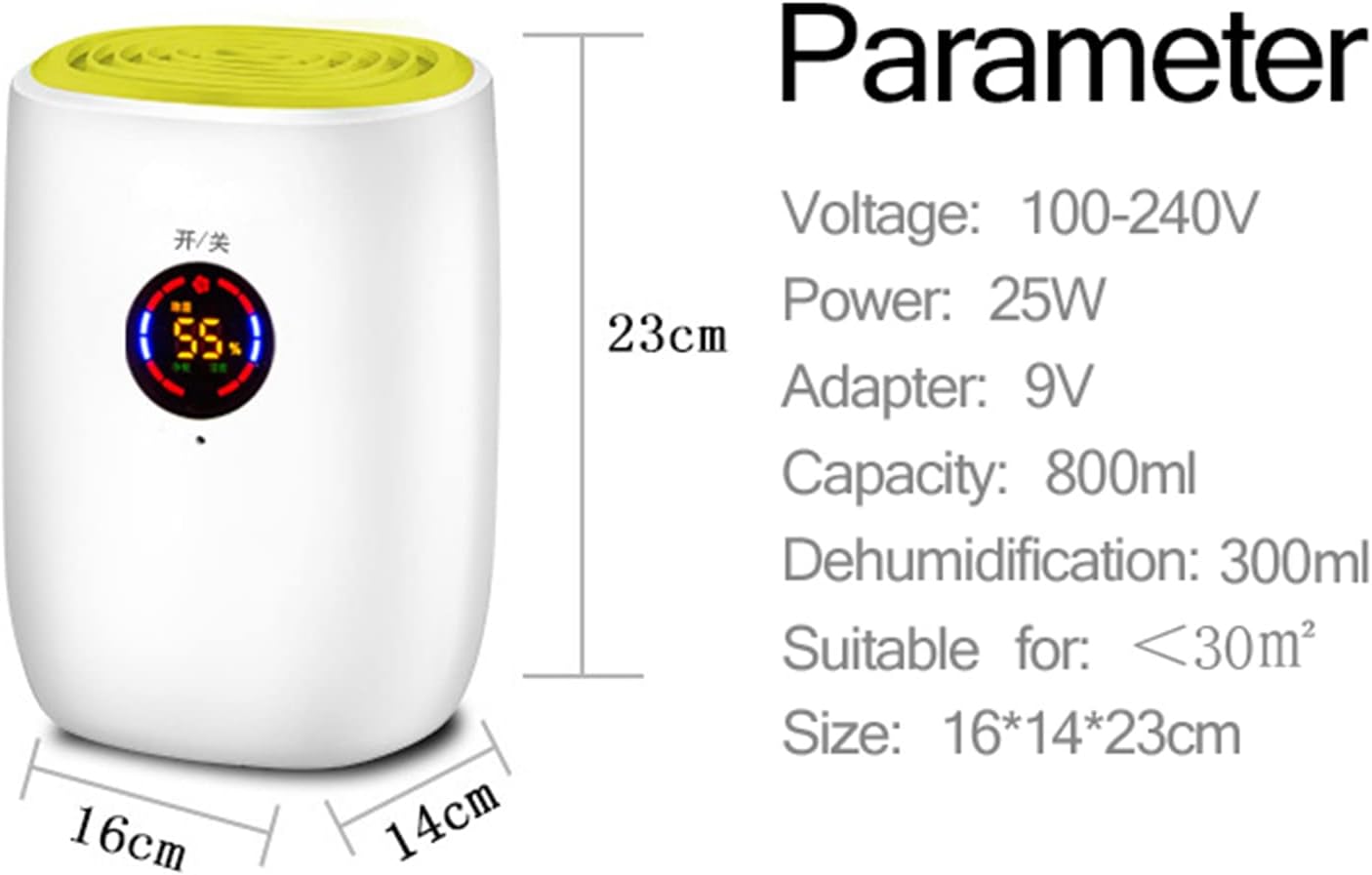
Image: The GZZBMY dehumidifier shown alongside its key parameters including Voltage (100-240V), Power (25W), Adapter (9V), Capacity (800ml), Dehumidification (300ml), suitability for <30m², and physical size (16x14x23cm).
Warranty and Support
Warranty Information
This product comes with a standard return policy of 30 days for refund or replacement, as per Amazon's policy. For specific warranty details beyond this period, please refer to the documentation provided with your purchase or contact the seller directly.
Customer Support
For any questions, technical assistance, or issues not covered in this manual, please contact GZZBMY customer support through the retailer where you purchased the product. You can typically find seller contact information on your order details page.
Seller: GZZB


