
Introduction
This manual provides detailed instructions for the NKF NB677 Replacement Remote Control, designed to be compatible with various Magnavox DVD/CD Players. This remote is a direct replacement, offering full functionality without the need for complex programming.
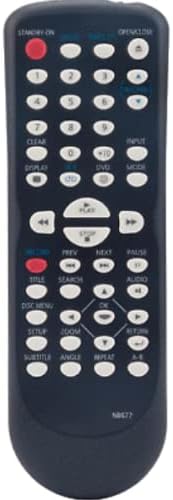
Image: Front view of the NB677 replacement remote control. The remote is dark gray with clearly labeled white buttons, including a prominent red power button at the top left. The model number "NB677" is subtly printed at the bottom.
Setup
The NB677 Replacement Remote Control is designed for immediate use. No programming or pairing is required.
- Battery Installation:
- Locate the battery compartment on the back of the remote control.
- Slide open the battery compartment cover.
- Insert two (2) 1.5V AAA alkaline batteries, ensuring correct polarity (+ and -) as indicated inside the compartment.
- Close the battery compartment cover securely.
- The remote is now ready for operation.
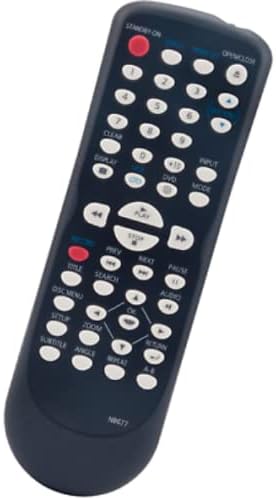
Image: Angled view of the NB677 replacement remote control. This perspective highlights the ergonomic design and the layout of the control buttons, including the numeric keypad, navigation cluster, and playback controls.
Operating Instructions
This remote control functions identically to the original Magnavox remote for compatible DVD/CD players. Point the remote directly at your device's infrared receiver.
Key Functions:
- STANDBY ON (Red Button): Powers the device on or off.
- OPEN/CLOSE: Opens or closes the disc tray.
- Numeric Keypad (0-9): Used for direct track selection or inputting numbers.
- CLEAR: Clears current input or selection.
- DISPLAY: Shows on-screen display information.
- CD / DVD: Selects the playback mode (CD or DVD).
- INPUT / MODE: Switches input sources or operating modes.
- Playback Controls (PLAY, STOP, PAUSE, PREV, NEXT, REW, FF): Standard controls for media playback.
- TITLE: Accesses the DVD title menu.
- SEARCH: Initiates search functions.
- AUDIO: Cycles through available audio tracks or languages.
- DISC MENU: Accesses the DVD disc menu.
- SETUP: Enters the device's setup menu.
- ZOOM: Zooms in or out on the picture.
- RETURN: Returns to the previous menu or screen.
- SUBTITLE: Cycles through available subtitle tracks.
- ANGLE: Changes the camera angle on compatible DVDs.
- REPEAT: Repeats a track, chapter, or disc.
- Directional Arrows (Up, Down, Left, Right) and OK: Used for menu navigation and selection.
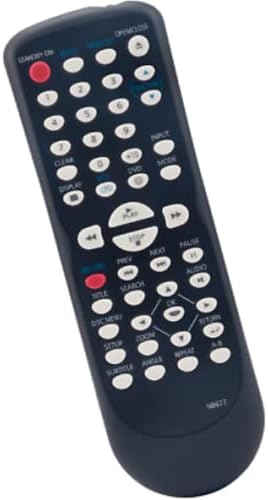
Image: A different angled view of the NB677 replacement remote control, providing a clear perspective of the entire button array and their labels, useful for identifying specific functions.
Maintenance
- Cleaning: Use a soft, dry cloth to clean the remote control. Do not use liquid cleaners or abrasive materials.
- Battery Replacement: Replace batteries when the remote's response becomes sluggish or stops working. Always replace both batteries at the same time with new ones.
- Storage: If the remote will not be used for an extended period, remove the batteries to prevent leakage and damage.
- Avoid Damage: Do not drop the remote, expose it to extreme temperatures, or immerse it in water.
Troubleshooting
- Remote not responding:
- Ensure batteries are inserted correctly with proper polarity.
- Replace old batteries with new 1.5V AAA alkaline batteries.
- Make sure there are no obstructions between the remote and the device's infrared sensor.
- Ensure you are within the effective range of the device.
- Some buttons not working:
- Check for any debris or stickiness around the buttons.
- Ensure the remote is pointed directly at the device.
- Device not listed as compatible:
- This remote is specifically designed for the listed Magnavox DVD/CD Player models. It may not be compatible with other devices.
Specifications
| Feature | Detail |
|---|---|
| Model Number | NB677 |
| Brand | NKF |
| Connectivity Technology | Infrared (IR) |
| Power Supply | 2 x 1.5V AAA Alkaline Batteries (not included) |
| Product Dimensions | 7.09 x 2.36 x 0.79 inches (approx.) |
| Item Weight | 3.2 ounces (approx.) |
| Special Feature | No Programming Required |
| Max Number of Supported Devices | 1 |
Compatible Models
This NKF NB677 Replacement Remote Control is compatible with the following Magnavox DVD/CD Player models:
- DV220MW9/F7
- DV220MW9
- CDV220 (F)
- DV225MG9
- DV225MG9/F7
- GDV228MG9
- DV220MW9A
- CDV220MW9
- CDV220MW9/F7
- NB677
- NB677UD (sub)
- NB327UD (sub)
- NB327 (sub)
Note: Compatibility is limited to the models listed above. This remote is not a universal remote and may not work with other brands or models.
Warranty and Support
For any issues or concerns regarding your NKF NB677 Replacement Remote Control, please contact the seller directly. The seller is committed to resolving any problems you may encounter.
Please refer to your purchase documentation for specific warranty terms and contact information.