
Introduction
This manual provides comprehensive instructions for the setup, operation, and maintenance of your Mackie MC-40BT Wireless Closed-Back Headphones. Please read this manual thoroughly before using the product to ensure proper function and longevity.

Image: The Mackie MC-40BT Wireless Closed-Back Headphones, shown in black, featuring the earcups and headband.
Package Contents
Verify that all items are present in the package:
- MC-40BT Wireless Headphones
- EVA Hard Case
- USB-C Charging Cable
- 1/8" to 1/8" Audio Cable for wired connection
Setup
1. Charging the Headphones
Before initial use, fully charge the MC-40BT headphones. Connect the supplied USB-C charging cable to the headphone's USB-C port and the other end to a USB power source (e.g., computer, wall adapter). The LED indicator will show charging status.
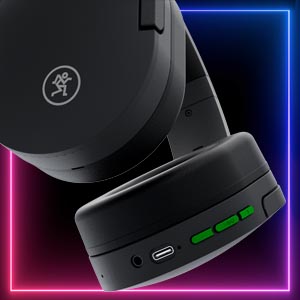
Image: A close-up view of the right earcup's bottom edge, showing the USB-C charging port, 1/8" audio input, and control buttons.
2. Powering On/Off
To power on, press and hold the power button until the LED indicator illuminates. To power off, press and hold the power button until the LED indicator turns off.
3. Bluetooth Pairing
- Ensure the headphones are powered off.
- Press and hold the power button for approximately 5 seconds until the LED indicator flashes blue and red, indicating pairing mode.
- On your device (smartphone, tablet, computer), enable Bluetooth and search for available devices.
- Select "MC-40BT" from the list of devices.
- Once paired, the LED indicator will flash blue periodically.
Operating the Headphones
Wireless Connection (Bluetooth)
The MC-40BT headphones support AAC and aptX for high-quality wireless audio. Once paired, they will automatically connect to the last paired device when powered on and within range (up to 10 meters).
Wired Connection
For a wired connection, use the supplied 1/8" to 1/8" audio cable. Connect one end to the headphone's 1/8" input jack and the other end to your audio source. The headphones do not require power for wired operation.
Controls
The headphones feature integrated controls for audio playback and calls:
- Volume Up/Down: Press the '+' or '-' buttons.
- Play/Pause: Press the multi-function button (usually the center button).
- Skip Track: Double-press the multi-function button for next track; triple-press for previous track.
- Answer/End Call: Press the multi-function button during an incoming call.
- Reject Call: Press and hold the multi-function button during an incoming call.
The built-in microphone allows for hands-free calls and voice commands.
Maintenance
Cleaning
Wipe the headphones with a soft, dry cloth. Do not use liquid cleaners or solvents. Avoid getting moisture into any openings.
Storage
When not in use, store the headphones in the provided EVA hard case to protect them from dust and physical damage. The collapsible design facilitates compact storage.

Image: The Mackie MC-40BT headphones shown in a folded, compact position, ready for storage in their case.
Troubleshooting
| Problem | Possible Cause | Solution |
|---|---|---|
| No Power | Battery is depleted. | Charge the headphones using the USB-C cable. |
| Cannot Pair via Bluetooth | Headphones not in pairing mode; device Bluetooth off; too far from device. | Ensure headphones are in pairing mode (flashing blue/red). Turn device Bluetooth off and on. Move headphones closer to device. |
| No Audio (Wireless) | Not connected; volume too low; audio source issue. | Verify Bluetooth connection. Increase headphone and device volume. Test with another audio source. |
| No Audio (Wired) | Cable not fully inserted; faulty cable; audio source issue. | Ensure 1/8" cable is fully inserted at both ends. Try a different 1/8" cable. Test with another audio source. |
Specifications
- Model: MC-40BT
- Connectivity: Bluetooth 5.0, Wired (1/8" / 3.5mm)
- Wireless Range: Up to 10 meters (33 feet)
- Battery Life: Up to 30+ hours
- Charging Port: USB-C
- Transducer Size: 40 mm
- Frequency Response: 20 Hz - 20 kHz
- Weight: 0.3 kg (10.6 ounces)
- Included Accessories: EVA Hard Case, USB-C Charging Cable, 1/8" Audio Cable
Warranty and Support
For warranty information and technical support, please refer to the official Mackie website or contact their customer service department. Keep your proof of purchase for warranty claims.
Official User Manual (PDF): Download Here