
1. Introduction
Welcome to the user manual for your GIDEALED 2.4G Wireless 5 Channel RGBCCT LED Controller and RF Remote Control. This manual provides detailed instructions for the installation, operation, and maintenance of your LED lighting system. Please read this manual thoroughly before use to ensure proper functionality and safety.
2. Product Overview
2.1 Package Contents
- 1 x 5 Channel LED Controller (Model: V5-M)
- 1 x RF Remote Control (AAA battery not included)
- 1 x Mounting Bracket
2.2 Key Features
- Multi-function dimming for RGBW, RGBWW, CW, RGB, and RGBCCT LED strip lights.
- Sensitive color adjustment touch wheel and button design.
- 5 independent dimming channels.
- Millions of colors, adjustable brightness, and color temperature.
- Group control: Match multiple V5-M controllers to a single remote.
- Automatic signal transmission and synchronization.
- Input voltage: DC12V-24V.
- Easy to use, no Wi-Fi, Bluetooth, or app required.
2.3 Components
The GIDEALED LED Controller system consists of two main components: the V5-M LED Controller and the RF Remote Control.

Figure 1: GIDEALED 5 Channel LED Controller and RF Remote Control.

Figure 2: The V5-M controller is compatible with RGB+CCT, RGBW, RGB, CCT, and 5 White LED strips.
3. Setup Instructions
3.1 Power Requirements
The LED controller requires a DC12V-24V power supply. The DC power socket is 5.5mm*2.5mm. Ensure your power supply matches these specifications and provides sufficient wattage for your LED strips. The power supply and LED strips are not included with this product.
3.2 Wiring the LED Controller
The V5-M controller features screwless terminals for secure wire connections. To connect wires:
- Gently press the insert tab with a small flathead screwdriver.
- Insert the stripped end of the LED strip wire into the corresponding terminal.
- Release the tab to secure the wire. Do not attempt to twist or screw the terminals.
Connect your LED strip to the output terminals (V+, W, CW, R, G, B) and the DC power supply to the input terminals (V+, V-) as shown in the diagrams below.

Figure 3: Wiring connections for RGBW and RGBCCT LED strips to the V5-M controller.

Figure 4: Detailed view of the controller's input and output terminals.
3.3 Pairing the Remote Control
Before initial use, the remote control must be paired with the LED controller. Ensure the controller is powered on.
- Locate the 'MATCH' button on the LED controller.
- Short press the 'MATCH' button once. The indicator lamp on the controller will flash.
- Immediately after, short press the 'ON/OFF' button on the RF remote control.
- The indicator lamp on the controller will stop flashing and remain solid, indicating successful pairing.

Figure 5: Location of the indicator lamp and pairing key on the V5-M controller.
4. Operating Instructions
The RF remote control allows for comprehensive control over your connected LED strips.

Figure 6: Layout of the RF Remote Control.
4.1 Power On/Off
- Press the Power button () to turn the LED lights on or off.
4.2 Color and Color Temperature Adjustment
- Color Wheel: Touch the color wheel to select a specific RGB color.
- RGB/CCT Switch: Press the RGB button to activate RGB color selection via the color wheel. Press the CCT button to activate color temperature adjustment (warm white to cool white) via the color wheel.
- Dedicated Color Buttons: Use the R (Red), G (Green), B (Blue), and W (White) buttons for direct color selection.

Figure 7: Adjusting colors and color temperature using the remote control.
4.3 Brightness Adjustment
- Use the Brightness Up () and Brightness Down () buttons to increase or decrease the light intensity.

Figure 8: Visual representation of brightness adjustment.
4.4 Dynamic Modes and Scene Memory
- The remote includes buttons for dynamic modes and scene memory (S1, S2). Refer to the remote's specific markings for pre-programmed effects or custom scene saving.
4.5 Group Control
The GIDEALED system supports group control, allowing a single remote to manage multiple V5-M controllers. Each remote can be matched to up to 10 controllers. Controllers automatically transmit and synchronize signals within a 30-meter (98ft) distance, enabling seamless control of multiple LED strips throughout your space.
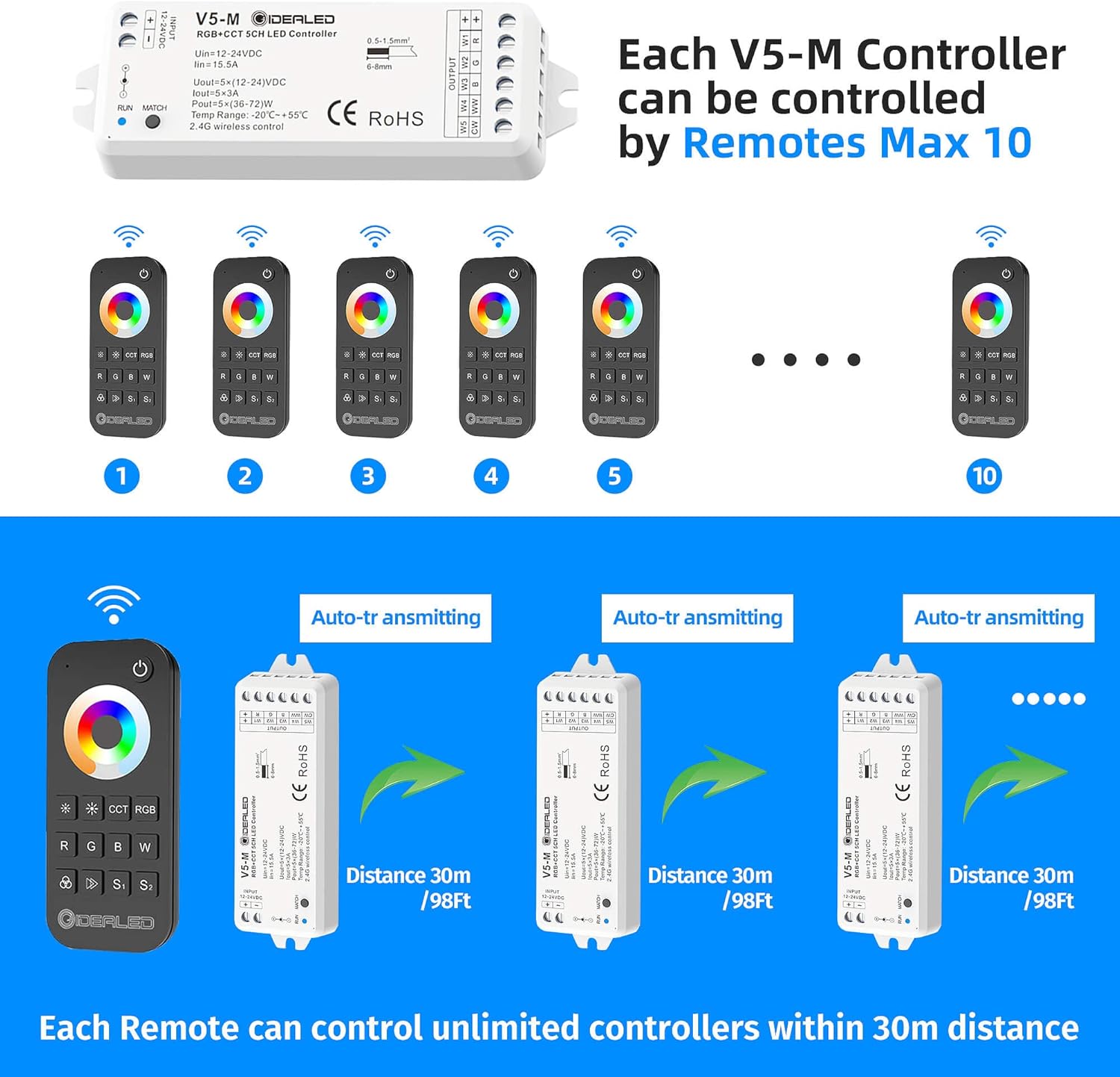
Figure 9: One remote control can manage multiple V5-M controllers.

Figure 10: Example of group control for whole-house lighting.
5. Maintenance
- Cleaning: Use a dry, soft cloth to clean the controller and remote. Do not use liquid cleaners or solvents.
- Battery Replacement: The RF remote control requires AAA batteries (not included). Replace batteries when the remote's performance diminishes. Ensure correct polarity when inserting new batteries.
- Environment: Keep the controller and remote in a dry environment, away from direct sunlight, high temperatures, and moisture. This product is designed for indoor use only and is not water-resistant.
6. Troubleshooting
- Lights not turning on:
- Check if the power supply is correctly connected and providing the correct voltage (DC12V-24V).
- Ensure the LED strip wires are securely connected to the controller's output terminals.
- Verify the remote control has working batteries and is paired with the controller.
- Remote not responding:
- Replace the AAA batteries in the remote control.
- Re-pair the remote control with the LED controller (refer to Section 3.3).
- Ensure the remote is within the 30-meter operating range of the controller.
- Incorrect colors or color temperature:
- Ensure the LED strip is compatible with the RGBCCT controller.
- Check the wiring connections for RGB, W, and CW channels to ensure they match the LED strip's configuration.
- Verify you are in the correct mode (RGB or CCT) on the remote when using the color wheel.
- Flickering lights:
- Check the power supply for stability and sufficient current output for the connected LED strips.
- Ensure all wire connections are secure and free from shorts.
7. Technical Specifications
| Feature | Specification |
|---|---|
| Model | V5-M |
| Input Voltage | DC12V-24V |
| Output Current | 5 x 3A (Max 15A total) |
| Output Power | 5 x (36-72)W |
| Control Method | RF Remote Control (2.4G wireless) |
| Remote Control Distance | Up to 30 meters (98 feet) |
| Operating Temperature | -20°C to +55°C |
| Dimensions (Controller) | Approx. 5.55 x 5.16 x 1.06 inches |
| Weight (Item) | Approx. 4.2 ounces |
| Material | Plastic |
| Indoor/Outdoor Usage | Indoor |
| Water Resistance Level | Not Water Resistant |
8. Warranty and Support
For warranty information or technical support, please contact GIDEALED customer service through the retailer where the product was purchased or visit the official GIDEALED website. Please retain your proof of purchase for warranty claims.


