
Beautiful 6qt Digital Air Fryer with Touch-Activated Display
Contents
Beautiful 6 Quart Touchscreen Air Fryer User Manual
Model: 6qt Digital Air Fryer with Touch-Activated Display (Model No. 829486190384)
Brand: Beautiful by Drew Barrymore
1. Introduction
Thank you for choosing the Beautiful 6 Quart Touchscreen Air Fryer. This appliance is designed to make cooking easier and healthier, offering versatile functions including air frying, roasting, reheating, and dehydrating. Its sleek design with touch-activated illumination and signature gold accents will complement any kitchen.
This manual provides essential information for the safe and efficient operation, maintenance, and troubleshooting of your new air fryer. Please read it thoroughly before first use and keep it for future reference.

Image 1: Front view of the Beautiful 6 Quart Touchscreen Air Fryer, showcasing its sleek black design and gold handle.
2. Important Safeguards
When using electrical appliances, basic safety precautions should always be followed to reduce the risk of fire, electric shock, and injury to persons.
- Read all instructions: Familiarize yourself with the appliance before operation.
- Hot surfaces: The air fryer's exterior surfaces, especially the metal parts, may become hot during use. Always use oven mitts or handles when touching hot surfaces.
- Electrical safety: Do not immerse the cord, plug, or the appliance body in water or other liquids to protect against electrical shock.
- Children: Close supervision is necessary when any appliance is used by or near children.
- Ventilation: Ensure adequate air circulation around the appliance during operation. Do not block any ventilation openings.
- Power supply: Connect the appliance only to a grounded wall outlet.
- Damage: Do not operate any appliance with a damaged cord or plug, or after the appliance malfunctions or has been damaged in any manner.
- Intended use: Use the appliance only for its intended household use as described in this manual.
3. Product Components and Features
Your Beautiful 6 Quart Touchscreen Air Fryer consists of several key components designed for optimal performance and ease of use.
- Main Unit: Houses the heating element, fan, and control panel.
- Touch-Activated Display: Illuminates only when needed, providing controls for time, temperature, and cooking functions (Air Fry, Roast, Reheat, Dehydrate).
- Removable Pan: The main cooking drawer that slides into the unit.
- Crisping Tray: A nonstick tray that fits inside the pan, designed to promote even cooking and crisping.
- Handle: Integrated into the pan for safe removal and insertion.
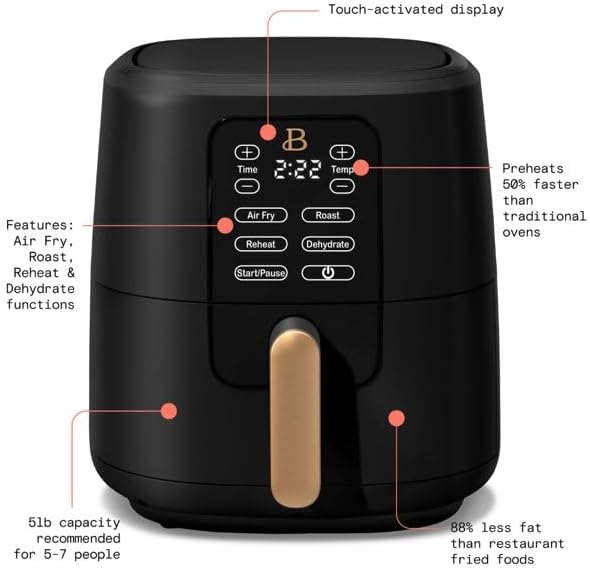
Image 2: The air fryer with visual callouts highlighting its touch-activated display, various cooking functions (Air Fry, Roast, Reheat, Dehydrate), 5lb capacity, and efficiency in preheating and fat reduction.
4. Initial Setup
Before using your air fryer for the first time, follow these steps:
- Unpack: Carefully remove all packaging materials and promotional labels from the air fryer.
- Clean: Wash the removable pan and crisping tray in warm, soapy water. Rinse thoroughly and dry completely. Wipe the exterior of the air fryer with a damp cloth. Do not immerse the main unit in water.
- Placement: Place the air fryer on a stable, level, heat-resistant surface. Ensure there is at least 6 inches of space around the back and sides of the unit for proper air circulation. Do not place it directly against a wall or under cabinets.
- First Use Odor: It is normal for a slight odor to be present upon first use as the appliance heats up. This will dissipate quickly.
5. Operating Instructions
The Beautiful Air Fryer features a user-friendly touch-activated display for easy operation.
General Operation:
- Plug the air fryer into a grounded electrical outlet. The display will illuminate briefly.
- Pull out the pan using the handle. Place the crisping tray inside the pan.
- Place your food onto the crisping tray. Do not overfill the basket to ensure even cooking.
- Slide the pan back into the air fryer until it clicks securely into place. The display will show the default time and temperature.
- Select your desired cooking function (Air Fry, Roast, Reheat, Dehydrate) by touching the corresponding icon.
- Adjust the time and temperature using the '+' and '-' buttons next to 'Time' and 'Temp'. The temperature range is 90°F-400°F.
- Press the 'Start/Pause' button to begin cooking.
- During cooking, you may pull out the pan to shake or flip food for even results. The air fryer will pause automatically and resume when the pan is reinserted.
- The air fryer will automatically shut off after the set time has elapsed.

Image 3: A hand demonstrating the removal of the air fryer basket, filled with cooked french fries, for shaking or serving.

Image 4: A hand interacting with the touch-activated control panel of the air fryer, illustrating the ease of selecting functions and adjusting settings.
Cooking Functions:
- Air Fry: Ideal for crispy foods like fries, chicken wings, and vegetables. Uses high-performance circular heat technology.
- Roast: Suitable for roasting meats, poultry, and larger vegetables.
- Reheat: Quickly warms up leftovers, often restoring crispiness.
- Dehydrate: Operates at lower temperatures for longer durations to dry fruits, vegetables, or make jerky.
6. Cleaning and Maintenance
Proper cleaning ensures the longevity and optimal performance of your air fryer.
- Unplug: Always unplug the air fryer from the power outlet and allow it to cool completely before cleaning.
- Dishwasher Safe Parts: The removable crisping tray and pan are PFOA/PFOS-free and dishwasher safe for convenient cleaning. For stubborn food residue, soak in warm, soapy water before washing.
- Exterior Cleaning: Wipe the exterior of the air fryer with a soft, damp cloth. Do not use abrasive cleaners or scouring pads, as they may damage the finish.
- Interior Cleaning: For the interior of the main unit, wipe with a damp cloth. If necessary, use a mild, non-abrasive cleaner. Ensure the interior is completely dry before next use.
- Storage: Store the air fryer in a cool, dry place when not in use. Ensure all parts are clean and dry before storing.
7. Troubleshooting
If you encounter issues with your air fryer, consult the following table for common problems and solutions.
| Problem | Possible Cause | Solution |
|---|---|---|
| Air fryer does not turn on. | Not plugged in; power outlet issue; pan not fully inserted. | Ensure the power cord is securely plugged into a working outlet. Push the pan firmly until it clicks into place. |
| Food is not cooked evenly. | Basket is overcrowded; food not shaken/flipped. | Cook food in smaller batches. Shake or flip food halfway through cooking. |
| White smoke coming from the appliance. | Grease residue from previous use; high-fat food. | Clean the pan and crisping tray thoroughly after each use. For high-fat foods, drain excess fat from the pan during cooking. |
| Tray does not lock properly. | Obstruction; misalignment; wear and tear. | Check for any food debris or foreign objects preventing the tray from fully inserting. Ensure the pan is aligned correctly with the unit's guides. If the issue persists, contact customer support. |
8. Product Specifications
| Model Name | 6qt Digital Air Fryer with Touch-Activated Display |
| Model Number | 829486190384 |
| Capacity | 6 Quarts (5lb food capacity) |
| Wattage | 1700 Watts |
| Temperature Range | 90°F - 400°F |
| Dimensions (D x W x H) | 13.07" x 12.1" x 13.07" |
| Item Weight | 5 Pounds |
| Material | Plastic (exterior), Stainless Steel (outer material), Nonstick coating (pan/tray) |
| Control Method | Touch |
| Dishwasher Safe Parts | Pan and Crisping Tray |
9. Warranty Information
Warranty coverage for your Beautiful 6 Quart Touchscreen Air Fryer may vary depending on the retailer and manufacturer's policies. It is recommended to retain your proof of purchase and register your product with the manufacturer, if applicable.
For specific details regarding warranty terms, duration, and claims, please refer to the documentation provided with your purchase or visit the official Beautiful by Drew Barrymore website.
10. Customer Support
If you have any questions, require technical assistance, or need to report an issue that cannot be resolved using the troubleshooting guide, please contact customer support.
Please have your product model number (829486190384) and proof of purchase ready when contacting support to expedite the process.
For the most up-to-date contact information, please visit the official website for Beautiful by Drew Barrymore kitchenware.
Ask a question about this manual
Ask about setup, troubleshooting, compatibility, parts, safety, or missing instructions. Manuals+ will review the question and use this page’s manual context to help answer it.