Introduction
This manual provides detailed instructions for the assembly, operation, maintenance, and troubleshooting of your DELTACO GAMING Chair, model GAM-096-F. Please read this manual thoroughly before use to ensure proper setup and safe operation.
The DELTACO GAMING Chair is designed with ergonomic features similar to a racing chair, offering a high backrest and adjustable cushions for head and lumbar support. It features adjustable height, tilt, and armrests for personalized comfort during extended use.
Important Safety Information
Please observe the following safety guidelines to prevent injury or damage to the product:
- Maximum User Weight: The recommended maximum user weight for this chair is 120 kg (264 lbs). Exceeding this limit may compromise the chair's stability and lead to injury.
- Stability: Ensure all components are securely fastened before use. Do not stand on the chair.
- Assembly: Follow all assembly instructions carefully. If you encounter any difficulties, seek professional assistance.
- Children: Keep children away from the chair during assembly. This product is not a toy.
- Maintenance: Regularly check all bolts and screws to ensure they are tight. Retighten as necessary.
Product Features
The DELTACO GAMING Chair GAM-096-F offers a range of features designed for comfort and durability:
- Ergonomic Design: Modeled after racing chairs for optimal support.
- High Backrest: Provides full back support.
- Adjustable Cushions: Includes additional cushions for headrest and lumbar support, which can be adjusted for optimal fit.
- Adjustable Height: Easily adjust the seat height to your preference.
- Tilt Function: Recline the chair for relaxation.
- Adjustable Armrests: Armrests can be raised and lowered to suit your needs.
- Durable Construction: Features a hydraulic gas valve, a 5-point wheelbase with a strong aluminum frame, and a Class 3 gas lift.
- Material: High-quality fabric upholstery in black.

Image: Overview of DELTACO GAMING Chair key features, highlighting soft fabric, 2D armrests, and a metal base.
Specifications
| Feature | Specification |
|---|---|
| Brand | DELTACO GAMING |
| Model Number | GAM-096-F |
| Color | Black |
| Material | Fabric (Soft fabric) |
| Seat Cushion Dimensions | 50 cm x 52 cm (19.7 in x 20.5 in) |
| Backrest Dimensions | 53 cm x 80 cm (20.9 in x 31.5 in) |
| Maximum Seat Height | 56 cm (22 in) |
| Maximum Armrest Height | 34 cm (13.4 in) |
| Recommended Max. User Weight | 110 kg (242 lbs) (Note: Safety warning states 120kg) |
| Recommended Max. User Height | 185 cm (6 ft 1 in) |
| Chair Weight | Approx. 18 kg (39.7 lbs) |
| Gas Lift Class | Class 3 (100 mm) |
| Wheelbase | 5-point with strong aluminum frame |
Note: There is a slight discrepancy between the recommended maximum weight (110 kg) in the product description and the warning (120 kg). Always adhere to the higher safety limit of 120 kg.
Setup and Assembly
While specific assembly instructions are not provided, general steps for assembling a gaming chair are outlined below. Refer to the included assembly diagram (if any) for detailed part identification.
Unpacking and Parts Inspection
- Carefully unpack all components from the box.
- Verify that all parts listed in the "What's in the Box" section are present:
- Armrests
- Cushions (Headrest and Lumbar)
- Seat base
- Backrest
- Gas lift cylinder
- Star base with wheels
- Mechanism plate
- Screws and tools (usually an Allen key)
- Inspect all parts for any damage. If any parts are missing or damaged, contact customer support before proceeding.
Assembly Steps
- Attach Wheels to Base: Insert the wheels into the holes on the star base until they click into place.
- Insert Gas Lift: Place the gas lift cylinder into the center hole of the star base.
- Attach Mechanism to Seat: Secure the mechanism plate to the underside of the seat cushion using the provided screws. Ensure the front of the mechanism faces the front of the seat.
- Connect Seat to Gas Lift: Place the assembled seat (with mechanism) onto the gas lift cylinder.
- Attach Backrest to Seat: Align the backrest with the mounting brackets on the seat and secure it with screws.
- Install Armrests: Attach the armrests to the sides of the seat or mechanism, depending on the design, using the appropriate screws.
- Attach Cushions: Secure the headrest and lumbar cushions using their integrated straps or clips.
- Final Check: Ensure all screws are tightened and the chair is stable before use.
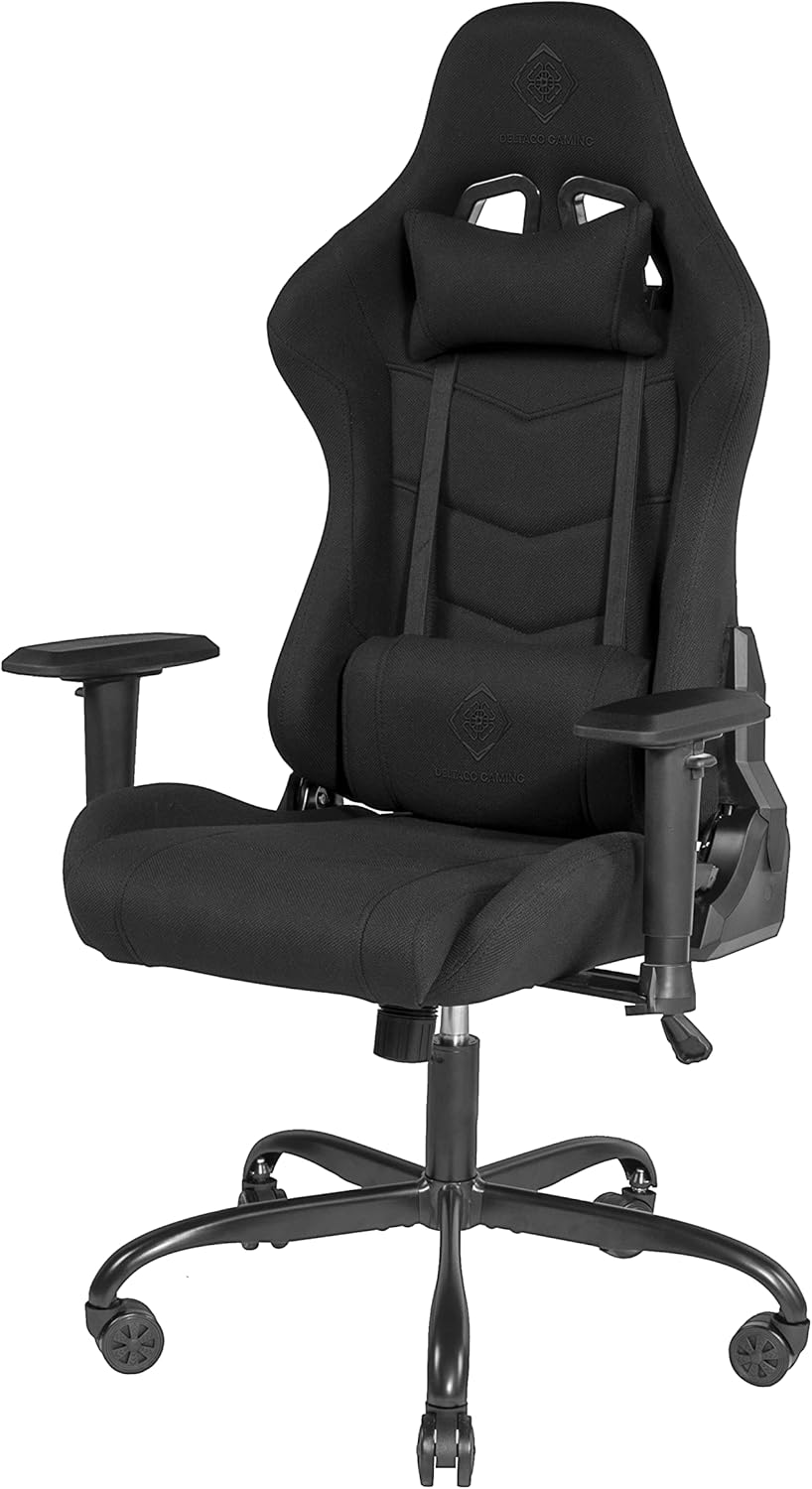
Image: Fully assembled DELTACO GAMING Chair, showing the seat, backrest, armrests, and star base with wheels.

Image: Front view of the assembled DELTACO GAMING Chair, highlighting the headrest and lumbar cushions.
Operating Instructions
Familiarize yourself with the chair's adjustment mechanisms to optimize your comfort.
Chair Adjustments
- Seat Height Adjustment: Locate the lever typically on the right side, under the seat.
- To raise the seat: Lift the lever while taking your weight off the seat.
- To lower the seat: Lift the lever while seated.
- Backrest Recline/Tilt: There is usually a lever or knob on the side of the chair.
- To recline: Pull the lever (often on the left side) and lean back. Release the lever to lock the backrest in position.
- To adjust tilt tension: Rotate the tension knob (usually under the seat, at the front) to increase or decrease the effort required to recline.

Image: Side view of the DELTACO GAMING Chair in an upright position.

Image: Side view of the DELTACO GAMING Chair with the backrest reclined.
- Armrest Adjustment: The armrests are adjustable in height.
- To adjust height: Locate the button or lever on the side of the armrest support. Press it and move the armrest up or down. Release to lock.
- Cushion Adjustment: The headrest and lumbar cushions are typically attached with elastic straps.
- Adjust their position by sliding them up or down along the backrest straps to find your preferred support.
Maintenance
Regular maintenance will extend the life and performance of your gaming chair.
- Cleaning:
- For fabric upholstery, use a soft brush or vacuum cleaner to remove dust and debris.
- For spills, blot immediately with a clean, dry cloth. For stubborn stains, use a mild fabric cleaner according to the product's instructions, testing on an inconspicuous area first.
- Do not use harsh chemicals or abrasive cleaners.
- Hardware Check: Periodically (e.g., every 3-6 months) check all screws, bolts, and connections. Tighten any loose hardware to ensure stability and safety.
- Wheel Cleaning: Remove any hair or debris that may accumulate around the wheels to ensure smooth movement.
- Gas Lift: The gas lift is a sealed unit and requires no maintenance. If it fails, it must be replaced by a qualified technician.
Troubleshooting
If you encounter issues with your DELTACO GAMING Chair, refer to the following common problems and solutions:
| Problem | Possible Cause | Solution |
|---|---|---|
| Chair wobbles or feels unstable. | Loose screws or improper assembly. | Check and tighten all assembly screws, especially those connecting the backrest to the seat and the mechanism to the seat. Ensure the gas lift is fully seated in the base. |
| Seat does not adjust height. | Gas lift malfunction or lever not engaged. | Ensure the height adjustment lever is fully pulled. If the issue persists, the gas lift may need replacement. Contact customer support. |
| Backrest does not recline or lock. | Recline mechanism jammed or broken. | Check if the recline lever is fully engaged or disengaged. Inspect the mechanism for any obstructions. If broken, contact customer support. |
| Wheels do not roll smoothly. | Debris caught in wheels or damaged wheels. | Turn the chair over and remove any hair, dust, or debris from the wheel casters. If wheels are damaged, they may need replacement. |
| Squeaking noises. | Loose connections or friction between parts. | Tighten all screws. Apply a small amount of silicone-based lubricant to moving parts or joints if the noise persists (avoid oil-based lubricants on plastic). |
Warranty and Support
This product is new goods from a specialist dealer. An invoice including VAT is provided. Shipping to a packing station is possible.
For warranty claims, technical support, or replacement parts, please contact your point of purchase or the DELTACO GAMING customer service. Keep your purchase receipt as proof of purchase.
For more information, you may visit the official DELTACO GAMING store: DELTACO GAMING Store


