
Introduction
This manual provides essential instructions for the proper setup, operation, and maintenance of your NAUTICA Pacific Beach 44mm Quartz Watch, model NAPPBF146. Please read this manual thoroughly to ensure optimal performance and longevity of your timepiece.
The NAUTICA Pacific Beach watch features a robust design with 100-meter water resistance, a date display, and luminous hands for visibility in low light conditions. It is powered by a reliable quartz movement.
Setup
1. Setting the Time and Date
- Unscrew the Crown: The watch features a screw-down crown for enhanced water resistance. To operate, gently rotate the crown counter-clockwise until it is free from the case.
- Set the Date: Pull the crown out to the first click position. Rotate the crown clockwise or counter-clockwise (depending on the movement) to set the correct date. Avoid setting the date between 9 PM and 3 AM, as this can interfere with the automatic date change mechanism.
- Set the Time: Pull the crown out to the second click position. The second hand will stop. Rotate the crown to set the correct hour and minute. To ensure accuracy, synchronize with a reliable time source. Push the crown back in completely.
- Secure the Crown: Once the time and date are set, push the crown back into the case and screw it clockwise firmly until it is tight. This ensures the watch's water resistance.

Image: Side view of the watch, highlighting the screw-down crown and the rotating bezel. The crown must be unscrewed before pulling to adjust settings and screwed back in for water resistance.
2. Adjusting the Bracelet / Changing the Strap
The watch comes with a stainless steel bracelet and includes a replacement blue rubber strap. To adjust the metal bracelet or change to the rubber strap, professional assistance is recommended to avoid damage to the watch or bracelet. A spring bar remover tool is included for strap changes, but caution is advised.
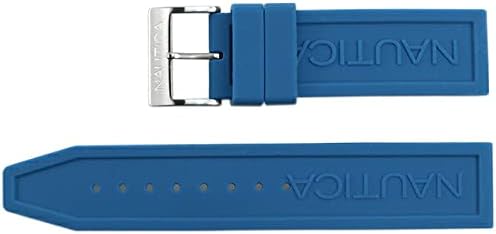
Image: The included blue rubber replacement strap. This strap can be interchanged with the stainless steel bracelet using the provided spring bar remover tool.
Operating Instructions
1. Basic Timekeeping
Once the time and date are set and the crown is securely screwed down, your watch will accurately display the current time and date. The second hand provides continuous time measurement.
2. Water Resistance (100 meters)
Your NAUTICA Pacific Beach watch is water resistant to 100 meters (10 ATM). This rating makes it suitable for swimming, snorkeling, and recreational diving. However, it is not suitable for high-impact water sports or deep-sea diving.
- Always ensure the crown is fully screwed down before any contact with water.
- Do not operate the crown or pushers (if any) while the watch is submerged or wet.
- After exposure to saltwater, rinse the watch with fresh water and dry it thoroughly.

Image: A close-up view of the watch dial, clearly showing the "WATER RESIST 100M" marking, indicating its water resistance capabilities.
3. Luminous Hands and Markers
The watch features luminous material on its hands and hour markers, allowing for readability in low-light conditions. Exposure to light will charge the luminous elements, causing them to glow in the dark.
Maintenance
1. Cleaning Your Watch
To maintain the appearance of your watch, wipe the case and bracelet regularly with a soft, dry cloth. For stainless steel components, a slightly damp cloth can be used, followed by immediate drying. Avoid using harsh chemicals or abrasive materials.
2. Water Resistance Checks
Over time, the gaskets that ensure water resistance can degrade. It is recommended to have your watch's water resistance checked by an authorized service center every 1-2 years, especially if it is frequently exposed to water.
3. Battery Replacement
As a quartz watch, it is powered by a battery. When the battery runs low, the watch may stop or the second hand may jump in irregular intervals (End-of-Life indicator). Battery replacement should be performed by a qualified watch technician to ensure proper sealing and maintain water resistance.
Troubleshooting
Watch Not Running
- Check the Crown: Ensure the crown is fully pushed in and screwed down. If it's pulled out, the watch will not run.
- Battery Depletion: If the watch has stopped completely, the battery may need replacement. Contact an authorized service center.
- Impact: A severe impact could affect the internal movement. Seek professional inspection.
Date Not Changing Correctly
- Incorrect Setting Time: Ensure you are not attempting to set the date between 9 PM and 3 AM. Adjust the time past this period, then set the date.
- Crown Position: Verify the crown is in the correct first click position for date adjustment.
Condensation Inside the Crystal
- This indicates a potential breach in water resistance. Immediately take the watch to an authorized service center for inspection and repair to prevent further damage.
Specifications
| Brand | NAUTICA |
| Model Number | NAPPBF146 |
| Display Type | Analog |
| Movement | Quartz |
| Water Resistance | 100 meters (10 ATM) |
| Case Material | Stainless Steel (PVD processing) |
| Case Diameter | 44 millimeters |
| Case Thickness | 13 millimeters |
| Band Material | Stainless Steel |
| Band Color | Silver |
| Dial Color | Blue |
| Windshield Material | Mineral Glass |
| Special Features | Second hand, Date display, Luminous hands/indexes, Fixed bezel, Screw-down crown, Screw-back |
| Approx. Belt Arm Circumference | Max 21 cm |

Image: The Nautica Pacific Beach watch featuring its stainless steel bracelet and blue dial with orange and blue bezel.
Warranty Information
This NAUTICA watch comes with a two-year manufacturer's warranty from the date of purchase. The warranty covers manufacturing defects in materials and workmanship under normal use. It does not cover:
- Battery life.
- Normal wear and tear (e.g., scratches on case, crystal, or strap).
- Damage resulting from improper handling, lack of care, accidents, or unauthorized repairs.
- Water damage if the crown was not properly secured or if the watch was used beyond its specified water resistance limits.
Please retain your proof of purchase for warranty claims. For service under warranty, contact an authorized NAUTICA service center.
Support and Contact
For more detailed instructions, specific inquiries, or to locate an authorized service center, please refer to the official NAUTICA website or contact their customer support. The manufacturer's official page is the primary resource for comprehensive user manuals and support.
Manufacturer: NAUTICA

Image: Rear view of the watch, showing the screw-back case and the branded clasp on the stainless steel bracelet.