
1. Product Overview
The XTRONS 10.25 Inch IPS Touch Screen Car Stereo is an advanced in-dash navigation system designed specifically for BMW X5 (E70) and X6 (E71) models with the CCC system (2007-2010). Featuring the latest Android 13 operating system powered by a Qualcomm Snapdragon 662 Octa-core processor, 8GB LPDDR4 RAM, and 128GB Solid State ROM, this unit offers a responsive and powerful user experience. It integrates seamlessly with your vehicle's original systems while providing modern features like Wireless Car Auto Play, Wired Android Auto, Bluetooth 5.1, and Dual Wi-Fi Band connectivity.

Front view of the XTRONS 10.25 Inch IPS Touch Screen Car Stereo, showcasing its sleek design and large display.
2. Key Features
- Latest Android 13 with Qualcomm Snapdragon 662: Ensures responsive performance with 8GB RAM and 128GB ROM for app storage.
- Original Car Information Display: Designed to integrate with BMW X5/X6 dashboards, displaying vehicle information and retaining original functions.
- iDrive System Control Retention: Maintains full access to original iDrive functions and navigation.
- Built-in Wireless Car Auto Play & Wired Android Auto: Seamlessly connects iPhone (iOS 8+) and Android phones (Android 4.3+) for navigation, calls, and music.
- Amplifier System: Retains the original fiber optical sound system.
- Qualcomm Bluetooth 5.1: Provides stable connections and high-quality audio for hands-free calls and music streaming.
- Dual Wi-Fi Band: Supports 2.4GHz and 5GHz bands for faster data transfer speeds.
- GPS Navigation: Compatible with popular Android navigation software like Google Maps, Sygic, and Waze.
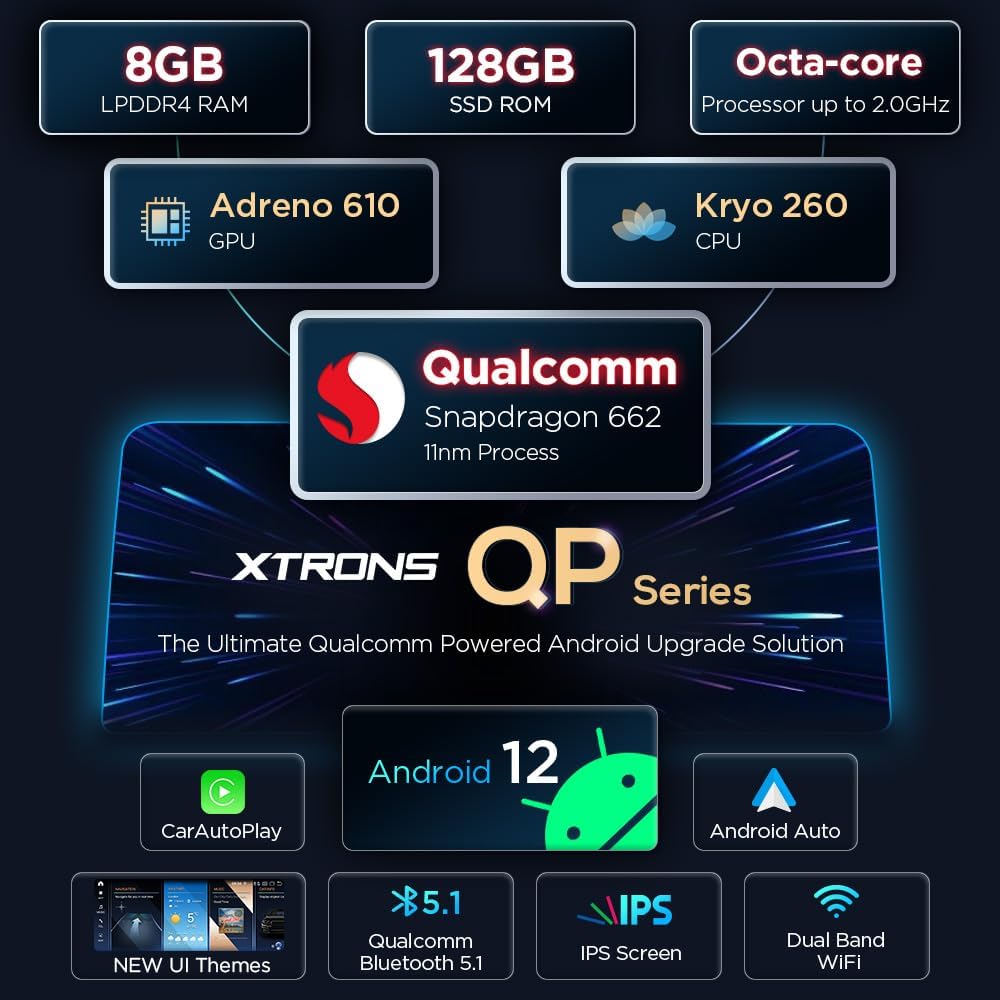
An overview graphic highlighting key features such as 8GB RAM, 128GB ROM, Octa-core processor, Adreno 610 GPU, Kryo 260 CPU, Qualcomm Snapdragon 662, Android 12, CarAutoPlay, Android Auto, Bluetooth 5.1, IPS Screen, and Dual Band WiFi.
3. Applicable Models & Important Notes
This unit is compatible with the following BMW models and years:
- BMW X5 E70 (2007, 2008, 2009, 2010) CCC
- BMW X6 E71 (2007, 2008, 2009, 2010) CCC
Important Note:
Please ensure your car has an AUX-IN port. If an AUX-IN port is not present, an adapter may be required to ensure audio output after installation. For vehicles with a CIC system, please refer to model QPB12X5CIP.

Images showing the dashboard of a BMW X5 E70 and X6 E71, indicating compatibility for models from 2007-2010.

A detailed guide on how to identify if your original BMW system is CCC, CIC, or NBT, based on CD/DVD slots, LVDS ports, and iDrive controller buttons.
4. Core Functionality
4.1 iDrive System Retention and Amplifier System
The XTRONS unit is designed to retain the full functionality of your vehicle's original iDrive system, allowing you to continue controlling various features and navigation as before. It also preserves the original fiber optical sound system, ensuring high-quality audio output.

Visual representation of the iDrive system control and a car speaker, illustrating the retention of original features.
4.2 User Interface and Display Options
Customize your driving experience with multiple user interface themes. The unit offers 4 themes, including a special XTRONS QP series UI and 3 original BMW Style UIs, allowing you to personalize the dashboard appearance and widget layout.

Screenshots demonstrating the stylish new dashboard with customizable widgets and seven impressively beautiful UI themes available on the unit.

Images showcasing the original car information display with color themes, 1080P video playback, Bluetooth 5.1 interface for calls and audio streaming, and GPS navigation capabilities.
4.3 Wireless Car Auto Play & Android Auto
Enjoy seamless integration with your smartphone. Wireless Car Auto Play is compatible with iPhone 5 and newer models (iOS 8 and above), allowing you to display compatible apps and access voice commands. For Android users, Wired Android Auto connects your phone via USB, enabling safe use of apps and Google Assistant.
Official XTRONS video demonstrating the features of the Android 11 Car Stereo, including its IPS touch screen, GPS navigation, and compatibility with BMW X5 CCC models. The video highlights the user interface, connectivity options, and overall functionality of the unit.
5. Connectivity & Navigation
5.1 Qualcomm Bluetooth 5.1
The integrated Qualcomm Bluetooth 5.1 module provides a faster transmission speed and more stable performance for all your wireless needs. Enjoy high-fidelity music streaming and clear hands-free calls without interruption.
5.2 Dual Wi-Fi Band
This unit supports both 2.4GHz and 5GHz Wi-Fi bands, offering greater flexibility and faster data transfer speeds for internet access and online features.
5.3 GPS Navigation
The system supports various Android OS compatible navigation software, including Google Maps, Sygic, and Waze, providing reliable and up-to-date guidance for your journeys.
6. Installation & Accessories
6.1 Wiring Harness and Connections
The package includes a comprehensive ISO Wiring Harness and other necessary cables for installation. Refer to the detailed wiring diagram provided in the installation instructions for proper connection of all components, including USB ports, RCA cables, GPS antenna, and 4G antenna.

A detailed diagram illustrating the various cables and ports on the back of the unit, including the ISO Wiring Harness, RCA cables, USB cables, GPS antenna, and 4G antenna connections.
6.2 Included Accessories
The following accessories are included with your XTRONS Car Stereo:
- 1 × ISO Wiring Harness
- 1 × RCA Cable
- 1 × Audio Cable
- 1 × USB Cable
- 1 × GPS Antenna
- 1 × 4G Antenna
- 1 × Mini Speaker
- 1 × User Manual
- 1 × Installation Instructions

A visual display of all accessories included in the package, such as the ISO wiring harness, RCA cable, audio cable, USB cable, GPS antenna, 4G antenna, mini speaker, user manual, and installation instructions.
7. Technical Specifications
| Feature | Specification |
|---|---|
| Display Size | 10.25 Inches |
| Operating System | Android 13 |
| Processor | Qualcomm Snapdragon 662 Octa-core |
| RAM | 8GB LPDDR4 |
| ROM | 128GB Solid State |
| Screen Resolution | 1280*480 Capacitive |
| Bluetooth Version | 5.1 |
| Wi-Fi Bands | 2.4GHz and 5GHz |
| Connectivity Technology | Wi-Fi, USB |
| Mounting Type | Dashboard Mount |
8. Maintenance
To ensure the longevity and optimal performance of your XTRONS car stereo, regular maintenance is recommended. Keep the screen clean using a soft, lint-free cloth. Avoid using harsh chemicals or abrasive materials that could damage the display. Ensure all connections are secure and free from dust or debris. If the unit is exposed to extreme temperatures, allow it to acclimate to normal operating temperatures before use.
9. Troubleshooting
If you encounter any issues with your XTRONS car stereo, please refer to the following common troubleshooting steps:
- No Sound After Installation: Verify that your vehicle has an AUX-IN port and that the audio cable is correctly connected. An adapter may be required if no AUX-IN port is present.
- Unit Not Powering On: Check all power connections and fuses. Ensure the wiring harness is securely connected to both the unit and the vehicle's power source.
- GPS Signal Issues: Ensure the GPS antenna is installed in a location with a clear view of the sky and is securely connected to the unit.
- Bluetooth Connectivity Problems: Ensure Bluetooth is enabled on both the stereo and your mobile device. Try unpairing and re-pairing the devices.
- Touch Screen Unresponsive: Perform a soft reset of the unit. If the issue persists, check for any physical obstructions or damage to the screen.
- Slow Performance: Close unnecessary applications running in the background. Clear cache and temporary files if available in the system settings.
For more complex issues or persistent problems, please contact XTRONS customer support.
10. Warranty and Support
Your XTRONS 10.25 Inch IPS Touch Screen Car Stereo comes with a manufacturer's warranty. Please refer to the warranty card included in your package for specific terms and conditions. For technical support, product inquiries, or warranty claims, please visit the official XTRONS website or contact their customer service department through the contact information provided in your user manual or on their website. Keep your proof of purchase for any warranty-related services.