
1. Introduction and Overview
This manual provides comprehensive instructions for the assembly, operation, and maintenance of your Anman Racing Simulation Cockpit with Seat, Model Racing Simulator Mount 24. Designed for an immersive racing experience, this cockpit is compatible with various steering wheels, pedals, and shifters from brands like Logitech, Thrustmaster, and Fanatec.
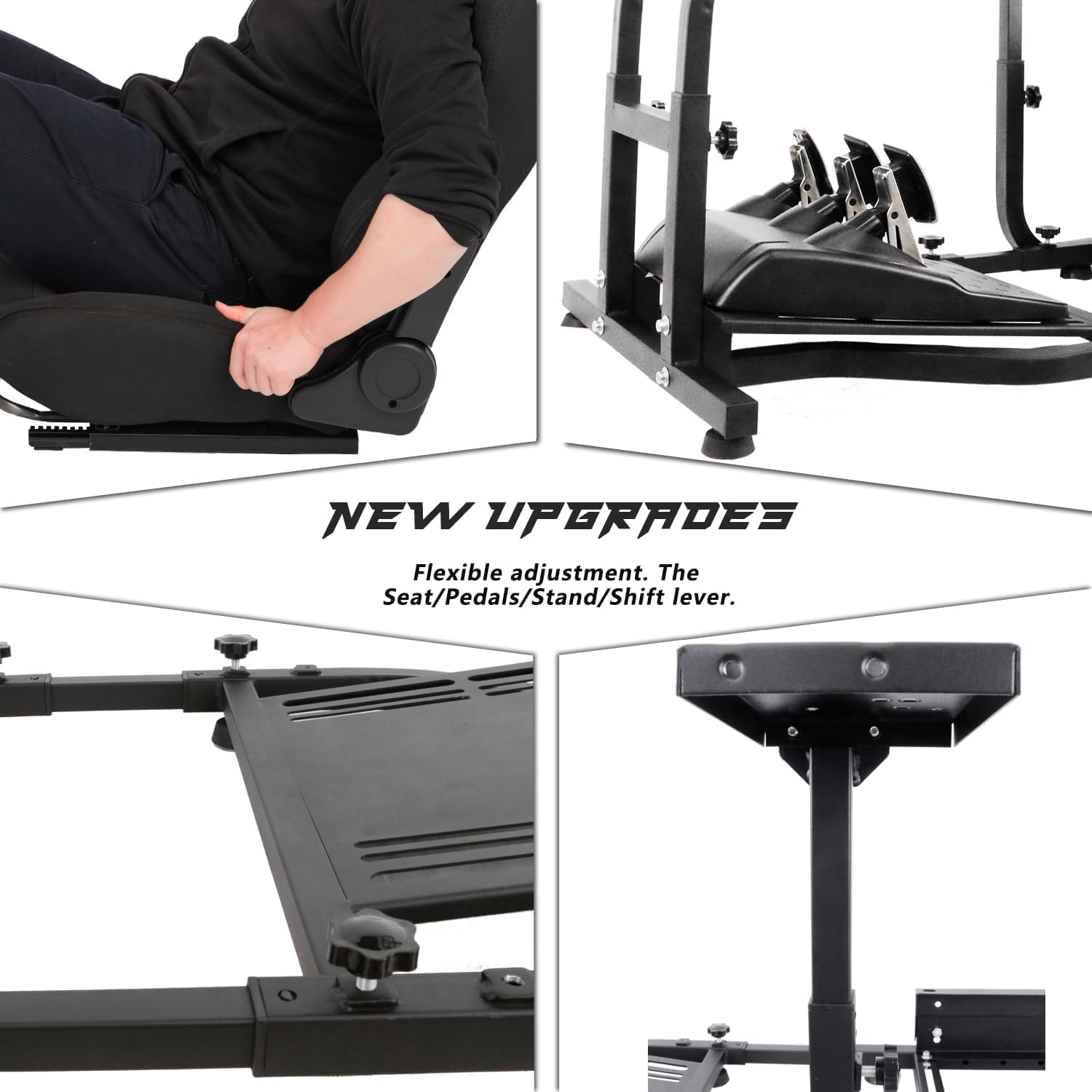
Figure 1.1: Fully assembled Anman Racing Simulation Cockpit with Seat.
The cockpit features a durable carbon steel frame with an anti-rust coating, ensuring longevity and stability. Its ergonomic design and adjustable components allow for a personalized and comfortable racing setup.
2. Product Features
The Anman Racing Simulation Cockpit is engineered with several key features to enhance your gaming experience:
- Durable Construction: Made from high-quality carbon steel with an anti-rust coating for a robust and long-lasting frame.
- Ergonomic Racing Seat: Features a comfortable cotton cloth exterior and high-density sponge interior for extended gaming sessions.
- Optimized Pedal Platform: A newly upgraded trapezoidal double-arm structure provides enhanced stability for pedals.
- Adjustable Design: The cockpit offers extensive adjustability for height, length, seat position (front/back, up/down, angle), and shifter placement (left or right).
- Wide Compatibility: Designed to fit popular racing peripherals including Logitech G25, G27, G29, G920, G923, G PRO, Thrustmaster T80, T300RS, TMX, T248X, and Fanatec models.

Figure 2.1: Key components of the racing cockpit, including the racing seat, shift lever platform, steering wheel platform, and pedal platform.

Figure 2.2: Illustration of the newly upgraded pedal platform, offering increased area and stability compared to traditional designs.

Figure 2.3: The cockpit's wide compatibility with popular racing peripherals from Logitech, Thrustmaster, and Ferrari.
2.1 Adjustability
The cockpit offers multiple adjustment points for optimal user comfort and performance:
- Steering Wheel Platform Distance: Adjustable from 0 to 4 inches.
- Bracket Height: Adjustable from 24 to 30.7 inches.
- Shifter Platform: Can be positioned on the left or right and adjusted for height.
- Seat Position: Adjustable front-to-back (0-70 inches) and up-to-down (3.5-4.7 inches). The seat backrest angle is also adjustable from 65 to 180 degrees.
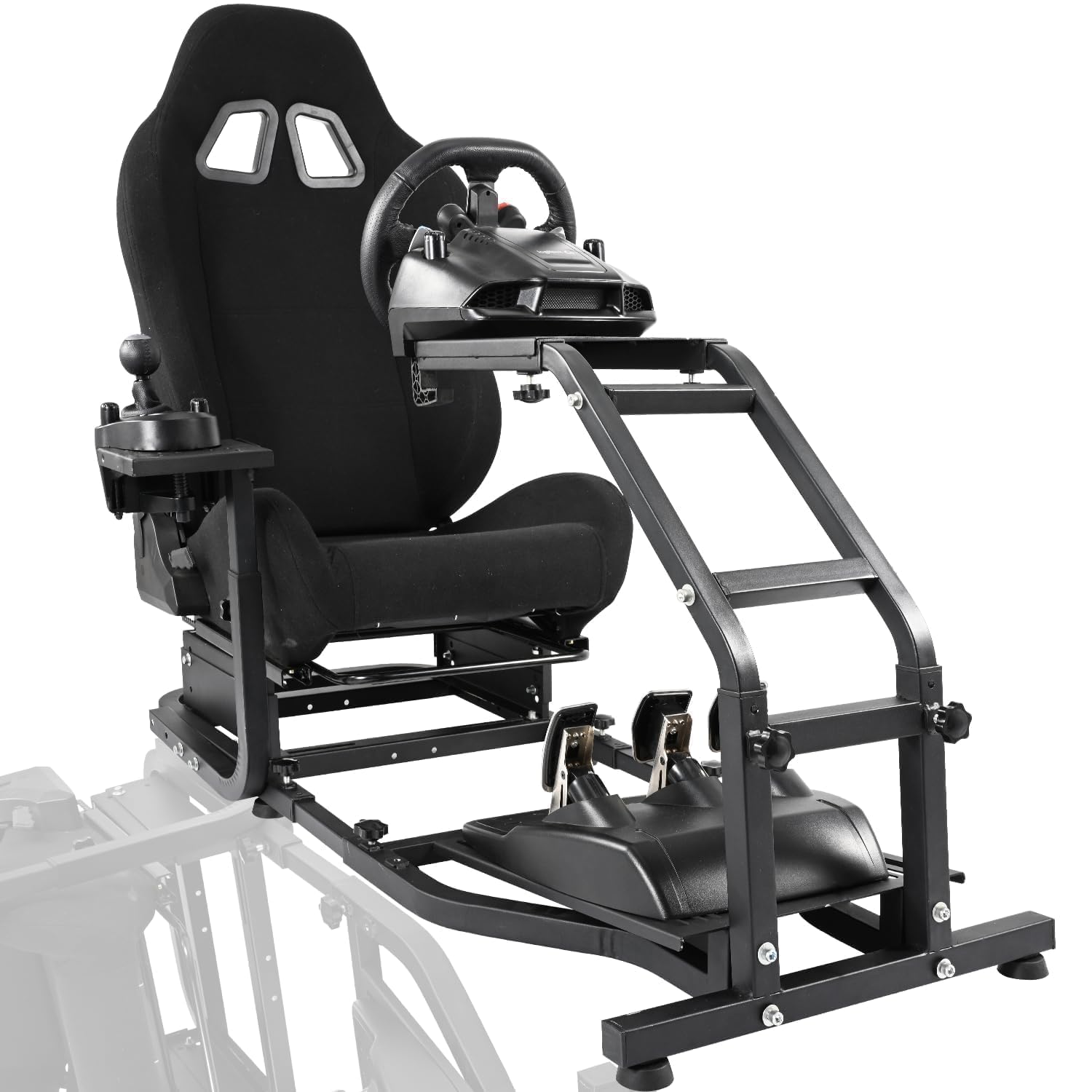
Figure 2.4: Steering wheel platform distance adjustment.
Figure 2.5: Main bracket height adjustment.
Figure 2.6: Shifter platform left/right adjustment.
Figure 2.7: Seat front/back adjustment.
Figure 2.8: Seat up/down height adjustment.

Figure 2.9: Seat recline angle adjustment.
3. Setup Instructions
Follow these steps to assemble your Anman Racing Simulation Cockpit. It is recommended to have a second person assist with assembly.
3.1 Seat Installation
- Release the slide locks on the seat using an Allen wrench and remove the seat slides.
- Align the seat slide/bracket mounting holes sequentially.
- Secure the bolts and nuts to attach the seat to the main frame.
- Unlock the seat slides and slide the seat rearward to confirm proper alignment.
- Confirm all aligned holes and tighten all bolts and nuts securely.
Video 3.1: Detailed instructions for installing the racing seat onto the cockpit frame.
3.2 Attaching Peripherals
Mount your steering wheel, pedals, and shifter to their respective platforms using the provided hardware. Ensure all connections are secure and stable.
- Steering Wheel: Attach to the steering wheel platform using clamps or bolts as per your wheel's manufacturer instructions.
- Pedals: Secure the pedal set to the pedal platform. The platform is designed to accommodate various pedal configurations.
- Shifter: Mount the shifter to the adjustable shifter platform. You can choose to place it on either the left or right side.

Figure 3.1: Example of a steering wheel and shifter mounted on the cockpit stand.
4. Operating Instructions
Once assembled and your peripherals are attached, you can begin using your Anman Racing Simulation Cockpit. Adjust the various components to achieve your preferred racing position.
4.1 Adjusting Your Position
- Seat Adjustment: Use the levers on the side of the seat to recline the backrest or slide the entire seat forward or backward. The seat height can also be adjusted.
- Steering Wheel Platform: Loosen the adjustment knobs to change the distance and angle of the steering wheel platform. Tighten securely once set.
- Shifter Platform: Adjust the height and position (left/right) of the shifter platform to ensure comfortable access.
- Pedal Platform: The pedal platform's angle and position can be adjusted for optimal foot placement.
Video 4.1: Demonstration of the racing cockpit in use, highlighting the adjustable features and immersive experience.
Always ensure all adjustment knobs and bolts are tightened before beginning a racing session to prevent movement and ensure safety.
5. Maintenance
Regular maintenance will ensure the longevity and optimal performance of your Anman Racing Simulation Cockpit.
- Cleaning: Wipe down the metal frame with a damp cloth. For the fabric seat, use a mild fabric cleaner as needed. Avoid abrasive cleaners.
- Fastener Check: Periodically check all bolts, nuts, and adjustment knobs to ensure they are tight. Re-tighten if any looseness is detected.
- Moving Parts: Ensure that all sliding and pivoting mechanisms operate smoothly. If necessary, apply a small amount of silicone-based lubricant to moving parts, avoiding contact with fabric.
- Storage: If storing the cockpit for an extended period, ensure it is clean and dry. Store in a cool, dry place away from direct sunlight.
6. Troubleshooting
If you encounter any issues with your Anman Racing Simulation Cockpit, refer to the following common troubleshooting tips:
- Cockpit feels unstable: Ensure all assembly bolts and adjustment knobs are fully tightened. Check that the floor surface is even.
- Seat not sliding smoothly: Check for any obstructions in the seat rails. Clean the rails and apply a small amount of silicone lubricant if needed.
- Peripherals (wheel, pedals, shifter) are loose: Verify that the mounting clamps or bolts for your specific peripherals are securely fastened to the cockpit platforms. Refer to your peripheral's manual for proper mounting.
- Difficulty adjusting components: Loosen the corresponding adjustment knobs or levers sufficiently before attempting to reposition. Do not force adjustments.
If problems persist, please contact Anman customer support for further assistance.
7. Specifications
| Feature | Detail |
|---|---|
| Model Number | Racing Simulator Mount 24 |
| Product Dimensions | 52 x 19.2 x 30.7 inches |
| Item Weight | 32.8 pounds |
| Manufacturer | Anman |
| Material | Carbon Steel (with anti-rust coating) |
| Seat Material | Cotton cloth exterior, high-density sponge interior |
| Compatibility | Logitech G25, G27, G29, G920, G923, G PRO; Thrustmaster T80, T300RS, TMX, T248X; Fanatec |
| Adjustable Height | 24" - 30.7" (Bracket) |
| Adjustable Seat Travel | 0" - 70" (Front/Back) |
| Adjustable Seat Height | 3.5" - 4.7" (Up/Down) |
| Adjustable Seat Recline | 65° - 180° |
8. Warranty and Support
Anman products are manufactured to high-quality standards. For specific warranty information, please refer to the documentation included with your purchase or visit the official Anman website.
If you require technical assistance, have questions about assembly, or need to report a missing part, please contact Anman customer support. Contact details can typically be found on the product packaging or the Anman brand store on Amazon.
Anman Customer Support: Please refer to your purchase documentation or the Anman brand store for the most current contact information.