
1. Introduction
This manual provides detailed instructions for the setup, operation, maintenance, and troubleshooting of the Hollyland Solidcom M1 1.9 GHz Full-Duplex Wireless Intercom System. Please read this manual thoroughly before using the system to ensure proper functionality and to maximize your user experience. The Solidcom M1 is designed for professional communication in various production environments, offering reliable full-duplex communication for up to 8 users.
2. Product Overview and Components
The Hollyland Solidcom M1 system includes a base station, multiple belt packs, and professional LEMO headphones, designed for seamless wireless communication. Key features include a 1.9 GHz frequency range, full-duplex communication, and a communication range of up to 984 feet.
2.1 System Components
The standard package includes:
- 1 x Solidcom M1 Base Station
- 8 x Solidcom M1 Belt Packs
- 8 x Professional LEMO Headphones
- External FRP Antennas (for extended range)
- Charging Station for Belt Packs
- Power Adapter and Cables

Figure 1: Overview of the Hollyland Solidcom M1 wireless intercom system, showing the base station, multiple belt packs, charging station, and headphones.
2.2 Key Features
- 1.9 GHz Full-Duplex Communication: Enables simultaneous two-way conversation.
- Extended Range: Up to 984 feet (300 meters) talking range.
- 8-Channel System: Supports communication for up to 8 users with individual belt packs.
- Enhanced Audio Quality: Features noise-cancellation algorithms for clear sound.
- Built-in Panel Antenna & External FRP Antenna: Provides flexible antenna options for optimal signal.
- Removable Li-ion Batteries: Offers 6 hours of battery life per belt pack, with 2.5 hours for a full charge.
- App/Web Configuration: Allows for easy settings adjustment and grouping.
- Rugged Design: Durable construction for professional use.

Figure 2: Visual representation of the Solidcom M1's key features, including communication range, audio quality, grouping talk, and frequency.
3. Setup Instructions
Follow these steps to set up your Solidcom M1 system for operation.
3.1 Base Station Setup
- Placement: Position the base station in a central location within your desired communication area to maximize signal coverage.
- Power Connection: Connect the base station to a power source using the provided power adapter. The base station also supports Power over Ethernet (PoE).
- Antenna Connection: The base station has a built-in panel antenna. For extended range or specific directional needs, connect the external FRP antennas to the designated ports on the base station.
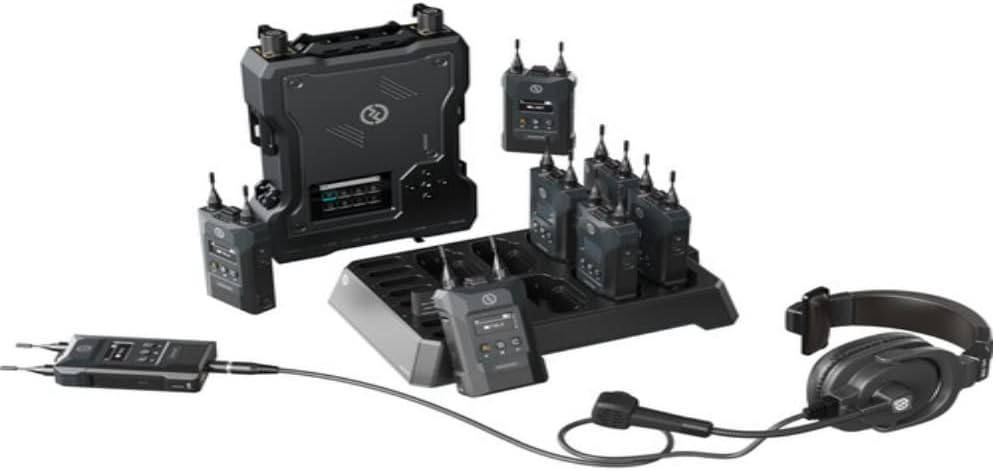
Figure 3: Rear view of the Solidcom M1 base station, showing ports for power, external antennas, and other connections.
3.2 Belt Pack Preparation
- Battery Installation/Charging: Each belt pack uses removable Li-ion batteries. Ensure batteries are fully charged before use. Place belt packs in the charging station for charging. A full charge takes approximately 2.5 hours.
- Headphone Connection: Connect the professional LEMO headphones to the 3.5mm audio jack on the belt pack. Ensure the connection is secure.
- Antenna Attachment: The belt pack antennas are detachable. Securely attach the antennas to the top of each belt pack.

Figure 4: Diagram illustrating the removable Li-ion batteries, charging process, and power options for the Solidcom M1 system.

Figure 5: Close-up view of the professional LEMO headphones, highlighting the microphone boom and 3.5mm connector.
4. Operating Instructions
This section details the basic operation of the Solidcom M1 system.
4.1 Powering On/Off
- Base Station: Once connected to power, the base station will power on automatically.
- Belt Packs: Press and hold the power button on each belt pack until the screen illuminates. To power off, press and hold the power button again until the screen shuts down.
4.2 Basic Communication
The Solidcom M1 operates in full-duplex mode, allowing all connected users to speak and listen simultaneously.
- Volume Adjustment: Use the volume up/down buttons on the side of the belt pack to adjust headphone volume.
- Microphone Activation: The LEMO headphones feature a microphone boom. Pushing the microphone boom down activates the microphone, and pulling it up mutes it.
- Sidetone Function: The sidetone function allows users to hear their own voice in their headphones, which can be adjusted for comfort.

Figure 6: Front view of a Solidcom M1 belt pack, showing the display and control buttons (A, B, C for group selection).
4.3 Grouping Talk
The Solidcom M1 supports multiple communication groups. Refer to the belt pack display and buttons (A, B, C) to select or switch between groups. Detailed group configuration can be performed via the dedicated app or web interface.
5. Maintenance
Proper maintenance ensures the longevity and optimal performance of your Solidcom M1 system.
5.1 Battery Care
- Always use the official charging station and power adapters.
- Avoid fully discharging the batteries frequently.
- Store batteries in a cool, dry place if not used for extended periods.
- Replace batteries if you notice a significant decrease in operating time.
5.2 Cleaning
- Wipe the base station and belt packs with a soft, dry cloth.
- Do not use harsh chemicals or abrasive cleaners.
- Keep all ports and connectors free from dust and debris.
5.3 General Handling
- The belt packs feature a double injection molding technology for a comfortable grip and scratch resistance.
- The antennas on the belt packs are detachable, allowing for easy replacement and enhanced durability.
- The system is not water resistant. Avoid exposure to rain, splashes, or high humidity.
- Utilize the lanyard loop on the back clip of the belt pack for secure attachment to your waistband or chest strap.

Figure 7: Details on the Solidcom M1 belt pack's rugged design, including the lanyard loop for attachment and detachable antennas.
6. Troubleshooting
This section addresses common issues you might encounter and provides basic solutions.
6.1 No Audio from Belt Pack
- Check Headphone Connection: Ensure the headphones are securely plugged into the belt pack.
- Adjust Volume: Increase the volume using the side buttons on the belt pack.
- Microphone Position: Ensure the microphone boom is pushed down to activate.
- Battery Level: Check the battery indicator on the belt pack display. Recharge if low.
6.2 Limited Communication Range
- Base Station Placement: Relocate the base station to a more central position, free from obstructions.
- Antenna Check: Ensure all antennas (built-in and external) are properly connected and oriented.
- Interference: Move away from other wireless devices or large metal structures that might cause interference.
6.3 Belt Pack Not Charging
- Charging Station Connection: Verify the charging station is properly connected to power.
- Battery Seating: Ensure the belt pack batteries are correctly inserted into the charging slots.
- Battery Condition: If the battery is old or damaged, it may need replacement.
If issues persist after attempting these solutions, please contact Hollyland customer support.
7. Specifications
| Feature | Specification |
|---|---|
| Brand | Hollyland |
| Model Number | Solidcom M1 |
| Frequency Range | 1.9 GHz |
| Number of Channels | 8 |
| Talking Range Maximum | 984 Feet (300 meters) |
| Battery Life (Belt Pack) | 6 Hours |
| Battery Charging Time | 2.5 Hours (Full Charge) |
| Included Components | 8 x Belt Packs, Base Station, Headphones, Antennas, Charging Station |
| Water Resistance Level | Not Water Resistant |
| Compatible Devices | Belt Packs, External Antennas |
8. Warranty and Support
For detailed warranty information, please refer to the official Hollyland website or the warranty card included with your product. Hollyland provides customer support for technical assistance and service inquiries.
8.1 Manufacturer Contact
Manufacturer: Hollyland
Please visit the official Hollyland website for the most up-to-date support resources, FAQs, and contact information.


