
Introduction
The LetonPower TS Pro S1s Diving Flashlight is a high-performance underwater video light designed for professional outdoor and underwater sports. It features a versatile lighting system with multiple color combinations, robust waterproof construction, and efficient power management. This manual provides essential information for the safe and effective use of your diving flashlight.
Product Overview
The TS Pro S1s diving flashlight is engineered for durability and performance in challenging underwater environments. It integrates advanced LED technology to provide diverse lighting options for various underwater activities.

Figure 1: The LetonPower TS Pro S1s Diving Flashlight, a powerful underwater video light.
Key Features:
- Multi-Color Lighting: Composed of 4 XHP50 LED white lights (6000K), 4 XHP50 LED yellow lights (3500K), 2 red R5 LED (620nm), and 2 blue R5 LED (395nm), offering up to 19 different color combinations.
- Adjustable Color Temperature: Ranging from 3500K to 7000K to adapt to various underwater conditions.
- Deep Sea Waterproofing: 100% tested to 120m underwater limit pressure.
- Durable Construction: High-strength shell with thickened hard oxidation process, titanium alloy switch, and non-conductive design to prevent electrolytic corrosion.
- Long Endurance: Provides 200 minutes of weak light or 60 minutes of strong light.
- Type-C Charging: Convenient charging for extended underwater activities.
- Dual LED Indicator: Instantly displays remaining battery power.
Package Contents:

Figure 2: Contents of the LetonPower TS Pro S1s package, including the flashlight, USB-C cable, L-type screwdriver, long screw, round ball handle bracket, and unlock coin.
- LetonPower TS Pro S1s Diving Flashlight
- USB Charging Cable (Type-C)
- L-type Screwdriver
- Long Screw
- Round Ball Handle Bracket
- Unlock Coin
- Instruction Manual
Setup
Charging the Device:
- Locate the Type-C charging port on the flashlight.
- Connect the provided USB-C charging cable to the flashlight and a compatible USB power source.
- The dual LED indicator lights will show charging status. Blue indicates battery level above 40%, red indicates below 40%.
- Ensure the charging port is clean and dry before connecting the cable.

Figure 3: Close-up of the flashlight's control buttons and dual LED battery indicator. Blue indicates sufficient charge, red indicates low battery.
Attaching the Handle Bracket:
- Align the round ball handle bracket with the mounting point on the flashlight.
- Use the provided long screw and L-type screwdriver to securely attach the bracket.
- Ensure the connection is firm to prevent detachment during use.
Operating Instructions
Power On/Off and Lock/Unlock:
- To turn on/unlock the flashlight, long press both control buttons simultaneously for three seconds.
- To turn off/lock the flashlight, long press the light switch button for three seconds when the light is in any gear.
Mode Selection:
The TS Pro S1s offers 19 different light combinations. Use the control buttons to cycle through the modes:
- White Light Modes: Cycle through weak white, strong white, warm white.
- Yellow Light Modes: Cycle through weak yellow, strong yellow.
- Combined White/Yellow Modes: Various combinations of white and yellow light.
- Red Light Modes: Red light, red flash.
- Blue Light Modes: Blue light.
- Combined Red/Blue Modes: Red/blue flash.

Figure 4: Visual representation of the 19 different color combinations available with the LetonPower TS Pro S1s Diving Flashlight, including white, yellow, red, and blue light.
Battery Indicator:
The dual LED indicator lights on the control panel provide real-time battery status:
- Blue Light: Battery level is greater than 40%.
- Red Light: Battery level is less than 40%.
Operational Videos:
Video 1: LetonPower Diving Flashlight Underwater Lights Dive Lights. This video demonstrates the flashlight's various lighting modes and its use in an underwater environment.
Video 2: LetonPower Diving Flashlight Underwater Scuba Diving Light. This video showcases the flashlight's performance during scuba diving, highlighting its brightness and color rendering capabilities.
Video 3: LetonPower Scuba Diving Flashlight Underwater Video Torch. This video illustrates the flashlight's use as an underwater video torch, demonstrating its wide beam and color accuracy.
Maintenance
Post-Dive Care:
- After each dive, rinse the flashlight thoroughly with fresh water to remove salt, sand, and other debris.
- Pay special attention to the control buttons and charging port area.
- Dry the flashlight completely with a soft cloth before storage or recharging.
O-Ring Inspection:
- Regularly inspect the O-rings for any signs of damage, cracks, or debris.
- Clean the O-rings and their grooves with a soft, lint-free cloth.
- Apply a thin layer of silicone grease to the O-rings to maintain their sealing properties.
- Replace damaged O-rings immediately to ensure waterproof integrity.
Storage:
- Store the flashlight in a cool, dry place away from direct sunlight and extreme temperatures.
- Ensure the flashlight is fully charged before long-term storage to preserve battery health.
Safety Guidelines
- Do not attempt to disassemble the flashlight, especially the battery compartment, as this may compromise its waterproof seal and void the warranty.
- Avoid direct eye exposure to the light beam, as it is extremely bright.
- Ensure the charging port is completely dry before connecting the USB-C cable to prevent electrical hazards.
- Operate the flashlight within its specified depth limit of 120 meters.
- Keep the flashlight away from children.
Troubleshooting
| Problem | Possible Cause | Solution |
|---|---|---|
| Flashlight does not turn on. | Low battery. | Charge the flashlight using the provided USB-C cable. |
| Flashlight does not turn on. | Flashlight is locked. | Long press both control buttons for three seconds to unlock. |
| Water leakage. | Damaged or improperly seated O-rings. | Inspect and clean O-rings, apply silicone grease, or replace if damaged. |
| Inconsistent light output. | Low battery or internal issue. | Ensure battery is fully charged. If problem persists, contact customer support. |
Specifications
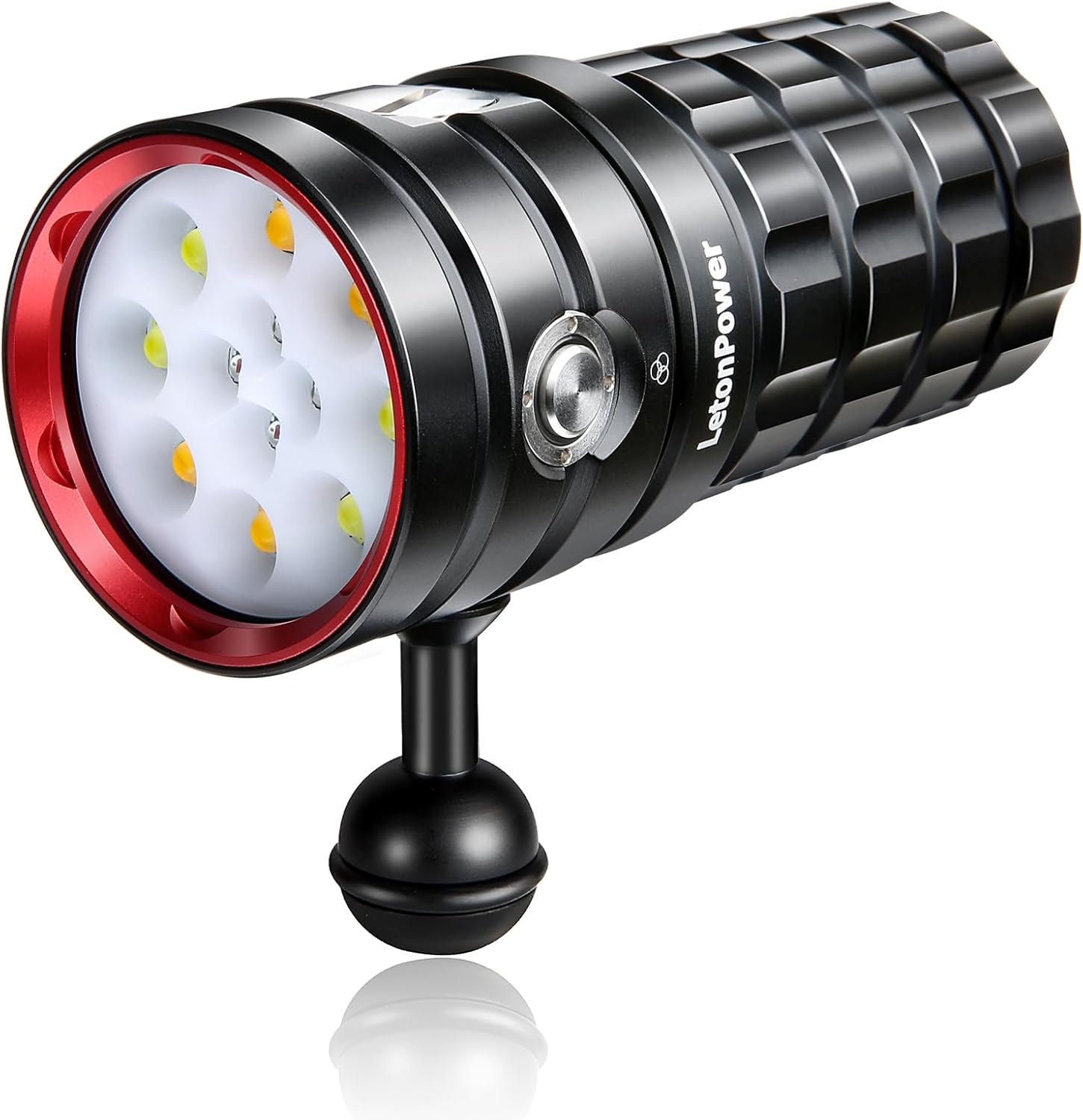
Figure 5: Technical drawing showing the dimensions (13.5cm length, 5.5cm diameter) and weight (607.3g) of the LetonPower TS Pro S1s Diving Flashlight.
| Feature | Detail |
|---|---|
| Brand | LetonPower |
| Model | S1s |
| Light Source | 4x XHP50 LED White (6000K), 4x XHP50 LED Yellow (3500K), 2x Red R5 LED (620nm), 2x Blue R5 LED (395nm) |
| Color Combinations | Up to 19 |
| Color Temperature | 3500K - 7000K |
| Water Resistance | 120m (IPX8) |
| Battery Life (Weak Light) | 200 minutes |
| Battery Life (Strong Light) | 60 minutes |
| Charging Interface | USB Type-C |
| Item Weight | 611 Grams |
| Dimensions | 13.5cm (Length) x 5.5cm (Diameter) (approximate, based on image) |
Warranty and Support
Warranty:
LetonPower provides a one-year quality guarantee from the date of purchase. During this period, if your TS Pro S1s fails due to manufacturing defects, it will be replaced with a new unit free of charge. This warranty covers replacement without repair.
Customer Support:
For any questions, technical assistance, or warranty claims, please contact LetonPower customer support through the retailer where the product was purchased or visit the official LetonPower website for contact information.