
Aigostar B09MF4R422
Aigostar 10000 BTU Smart 4-in-1 Portable AC Unit User Manual
Model: B09MF4R422
Brand: Aigostar
Important Safety Instructions
Please read all instructions carefully before operating this appliance. Keep this manual for future reference.
- Always ensure the unit is placed on a flat, stable surface.
- Do not block air inlets or outlets.
- Unplug the unit before cleaning or maintenance.
- Keep children and pets away from the unit during operation.
- Do not operate the unit with a damaged cord or plug.
- For indoor use only.
Product Features
The Aigostar 10000 BTU Smart 4-in-1 Portable AC Unit offers versatile climate control for your home or office.
- 4-in-1 Functionality: Cooling, Dehumidifier, Fan (Low/High Speed), and Sleep Mode.
- Smart Control: Compatible with WIFI App, Remote Control, Amazon Alexa, and Google Assistant.
- Powerful Cooling: 10000 BTU (6500 BTU SACC) effective for rooms up to 350 sq. ft.
- Convenient Mobility: Equipped with 360° rotatable casters and a portable recessed handle for easy movement.
- User-Friendly Interface: LED touch screen display for intuitive operation.
- 24-Hour Timer: Program the unit to turn on or off automatically.
- Child Lock: Prevents unintended changes to settings.
- Reusable Filter: Easy to slide out and clean for optimal performance.

Image: Overview of the 4-in-1 functions including Cooling, Fan Mode, Dehumidifier, and Sleep Mode.
Video: General overview of the Aigostar Smart 4-in-1 Portable Air Conditioner and its features.
Setup Guide
Follow these steps to set up your Aigostar Portable AC Unit.
Window Kit Installation
The unit comes with a window kit for proper exhaust ventilation. Ensure the window panel is securely installed to prevent air leakage.
Video: Demonstrates the step-by-step process for installing the window kit for the portable air conditioner.

Image: Illustration of baffle installation for standard windows and cloth support installation for non-standard windows (purchased separately).
Operating Your AC Unit
The Aigostar AC unit offers multiple control options for your convenience.
Control Panel and Remote Control
The unit can be operated directly via the LED touch screen or with the included remote control.
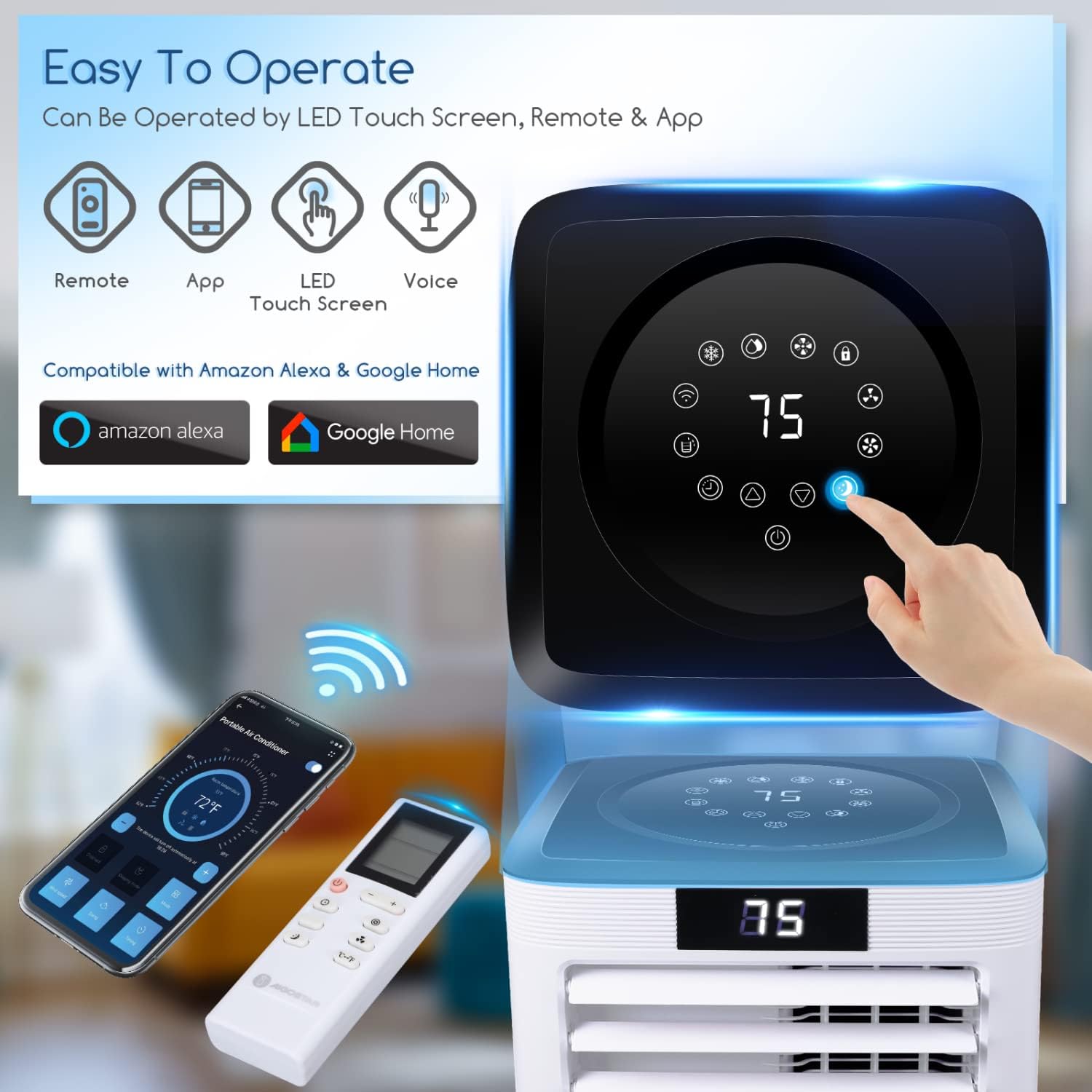
Image: The unit's control panel, remote, and app interface for easy operation.

Image: Detailed view of the intuitive touch control panel.
Smart App Control (AigoSmart)
Control your AC unit from anywhere using the AigoSmart App. Download the app from your device's app store.
- Download App: Scan the QR code or visit app.aigostar.com/downLoad.html?appType=4 to download the AigoSmart app.
- Account Setup: Create and log in to your AigoSmart account.
- Add Device: Follow the in-app instructions to add your portable air conditioner. Ensure Bluetooth is enabled for initial discovery.
- Connect to Network: Connect the unit to your 2.4GHz Wi-Fi network. 5GHz networks are not supported.
Video: Step-by-step guide on how to connect the Aigostar portable AC unit to Wi-Fi using the AigoSmart app.

Image: User-friendly AigoSmart app interface for controlling the unit.

Image: Visual guide for app download, device selection, adding device, network connection, and completion.
Video: Demonstrates smart app control features including cooling, dehumidifier, and fan modes.
Voice Control (Alexa & Google Assistant)
Integrate your AC unit with Amazon Alexa or Google Assistant for convenient voice commands. Ensure your AigoSmart account is linked to your smart home assistant.
Video: Instructions on how to connect the Aigostar portable AC unit with Alexa for voice control.

Image: Compatibility chart for AigoSmart, Alexa, and Google Home, detailing available functions and voice commands.

Image: Voice control feature demonstration with Alexa and Google Assistant.
Modes and Settings
- Cooling Mode: Provides powerful cooling for your space.
- Fan Mode: Circulates air with adjustable low/high speeds.
- Dehumidifier Mode: Reduces humidity in the room.
- Sleep Mode: Adjusts temperature and fan speed for comfortable sleep (operable via app in cooling mode).
- 24-Hour Timer: Set specific times for the unit to turn on or off.
- Child Lock: Activate to prevent accidental changes to settings.

Image: Sleep Mode and 24-hour timer features for enhanced comfort.

Image: Dehumidifier function reducing room humidity.

Image: Fan modes for different comfort levels.

Image: Child lock feature to prevent accidental operation.
Maintenance
Regular maintenance ensures optimal performance and longevity of your AC unit.
Filter Cleaning
The unit features a slide-out, reusable filter that should be cleaned regularly to maintain air quality and efficiency.

Image: Instructions for cleaning the slide-out reusable filter.
- Slide out the filter from its compartment.
- Rinse the filter under running water to remove dust and debris.
- Allow the filter to air dry completely before reinserting it into the unit.
- Clean the filter every two weeks or more frequently depending on usage and air quality.
Troubleshooting
If you encounter issues with your AC unit, refer to the following common problems and solutions.
| Problem | Possible Cause | Solution |
|---|---|---|
| Unit does not turn on. | No power, power cord unplugged, circuit breaker tripped. | Check power connection, ensure outlet is functional, reset circuit breaker. |
| Unit not cooling effectively. | Dirty air filter, blocked air vents, room too large, doors/windows open. | Clean air filter, clear obstructions, ensure room size is within specifications, close all doors and windows. |
| Water leakage. | Drain plug not properly sealed, unit tilted, drainage hose kinked. | Check and secure drain plug, ensure unit is level, straighten drainage hose. |
| Unusual noise. | Unit not on a level surface, internal component issue. | Place unit on a level surface. If noise persists, contact customer support. |
| Wi-Fi connection issues. | Incorrect Wi-Fi password, 5GHz network, unit too far from router. | Verify password, ensure 2.4GHz network, move unit closer to router. |
For further assistance, please refer to the "Warranty and Support" section.
Technical Specifications
| Specification | Value |
|---|---|
| Brand Name | Aigostar |
| Model Number | B09MF4R422 |
| Cooling Power | 10000 British Thermal Units |
| Item Weight | 55.9 pounds |
| Product Dimensions | 13.8 x 12.2 x 27.4 inches |
| Noise Level | 70 dB |
| Installation Type | Portable |
| Form Factor | Cannister |
| Special Features | Dehumidifier, Google Assistant, LED Display, Portable, Wifi |
| Color | White |
| Voltage | 120 Volts |
| Floor Area Coverage | 350 Square Feet |
| Refrigerant | R-410A |
Warranty and Support
For warranty information and customer support, please refer to the following resources:
- User Manual (PDF): Download User Manual
- User Guide (PDF): Download User Guide
- Customer Support: For direct assistance, please visit the Aigostar store on Amazon or contact their customer service as per the product packaging.
Note: Warranty terms and conditions may vary. Please retain your proof of purchase.
Related documentsB09MF4R422


Ask a question about this manual
Ask about setup, troubleshooting, compatibility, parts, safety, or missing instructions. Manuals+ will review the question and use this page’s manual context to help answer it.