1. Introduction
This instruction manual provides essential information for the safe and efficient use of your Samsung HW-A58C 5.1ch Soundbar system. This system is designed to enhance your home audio experience with optimized sound for various content, clear dialogue, and dynamic surround sound. Please read this manual thoroughly before operating the product and retain it for future reference.
- Optimized Sound: Enjoy sound tailored for sports, games, movies, and more.
- Clear Dialogue: A dedicated center channel speaker ensures voices are projected clearly.
- Wireless Surround Sound: Wireless rear speakers provide an immersive audio experience.
- Bass Boost: Instantly enhance bass with a dedicated button.
2. Safety Information
Please observe the following safety precautions to prevent electric shock, fire, or damage to the product.
- Electric Shock Risk: Do not remove the cover or back of the product. There are no user-serviceable parts inside. Refer all servicing to qualified service personnel.
- FCC Compliance (U.S.A.): This device complies with Part 15 of the FCC Rules. Operation is subject to two conditions: (1) this device may not cause harmful interference, and (2) this device must accept any interference received.
- FCC Caution: Any changes or modifications not expressly approved by the party responsible for compliance could void the user's authority to operate this equipment.
- Shielded Cables: Use only shielded cables and connectors to connect the unit to other equipment to ensure compliance with FCC requirements.
- Radiation Exposure: This product complies with FCC radiation exposure limits. It should be installed and operated with a minimum distance of 20cm between the radiator and your body.
3. Package Contents
Verify that all components are present in the package:
- Samsung Soundbar (HW-A58C)
- Wireless Subwoofer
- Wireless Rear Speakers (2 units)
- Wireless Receiver for Rear Speakers
- Remote Control with 2 AA Batteries
- Power Cables (3 for Soundbar, Subwoofer, and Wireless Receiver)
- HDMI Cable
- Wall Mount Kit (Brackets)
- Quick Setup Guide
Video: Unboxing the Samsung HW-A58C 5.1ch Soundbar system, showing all included components and their initial appearance.

Image: Front view of the Samsung HW-A58C Soundbar, showcasing its sleek design.

Image: Front view of the wireless subwoofer, designed to provide deep bass.
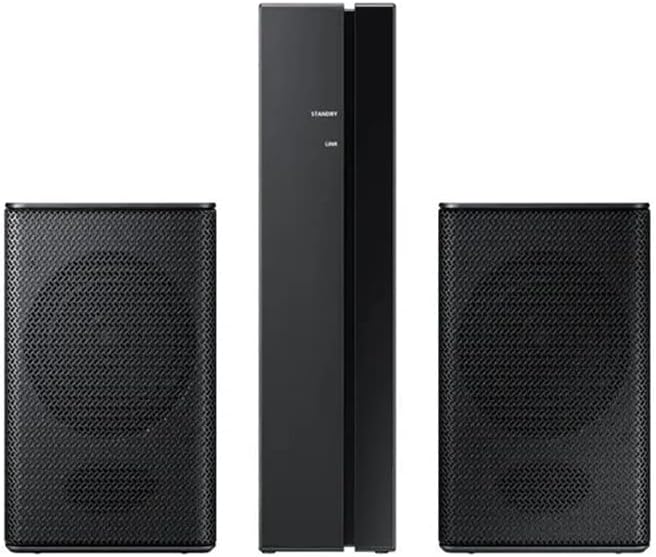
Image: The two wireless rear speakers and their receiver unit, which connect wirelessly to the soundbar.
4. Setup
4.1. Placement
- Soundbar: Place the soundbar centrally below your TV. Ensure it is on a stable surface or securely wall-mounted using the provided kit.
- Subwoofer: Position the wireless subwoofer in a corner of the room or near the soundbar for optimal bass distribution.
- Rear Speakers: Place the wireless rear speakers behind your listening position, ideally equidistant from the center. Connect them to the wireless receiver.
4.2. Connections
Connect the soundbar to your TV using one of the following methods:
- HDMI ARC (Recommended):
- Connect one end of the HDMI cable to the HDMI TO TV (ARC) port on the soundbar.
- Connect the other end to the HDMI ARC port on your TV.
- Ensure your TV's Anynet+ (HDMI-CEC) function is enabled.
- Optical Cable:
- Connect an optical cable (not included) from the soundbar's DIGITAL AUDIO IN (OPTICAL) port to your TV's optical output port.
- Bluetooth:
- Refer to the "Operating" section for detailed Bluetooth pairing instructions.
Connect the power cables to the soundbar, subwoofer, and wireless receiver, then plug them into power outlets.
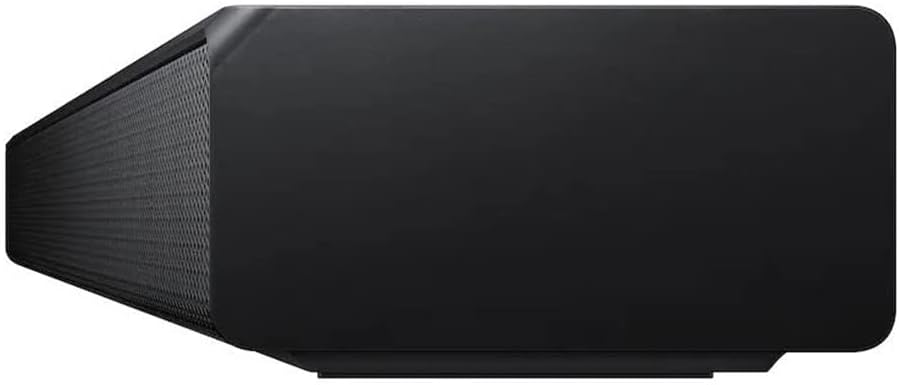
Image: Rear view of the soundbar, showing the HDMI ARC, HDMI IN, USB, and power ports.
4.3. Wireless Speaker Pairing
The subwoofer and wireless rear speakers should automatically connect to the soundbar when powered on. If they do not connect, follow these steps:
- Ensure the soundbar and wireless receiver are powered on.
- On the back of the wireless receiver, press and hold the ID SET button for at least 5 seconds. The LINK LED indicator will blink blue.
- With the soundbar powered off, press and hold the Up button on the soundbar's remote control for 5 seconds.
- The soundbar display will show "ID SET" and then "LINK" when connected. The LINK LED on the wireless receiver will turn solid blue.
5. Operating Instructions
5.1. Basic Controls (Using Remote Control)
- Power: Press the Power button to turn the soundbar On/Off.
- Volume: Use the Volume Up/Down buttons to adjust the master volume.
- Source: Press the Source button to cycle through input modes (HDMI, D.IN, BT, USB).
- Mute: Press the Mute button to temporarily silence the audio.
5.2. Sound Modes and Effects
- Adaptive Sound Lite: Automatically optimizes sound based on content (movies, sports, news).
- Bass Boost: Press the Bass Boost button on the remote for enhanced low-frequency sound.
- Game Mode: Provides perfectly synced directional audio and crosstalk cancellation for gaming.
- Surround Sound Expansion: Expands the soundstage for a more immersive experience.
- Standard: Delivers original sound without additional effects.
5.3. Bluetooth Connectivity
To connect a Bluetooth device:
- Press the Source button on the remote until "BT" appears on the soundbar display.
- On your mobile device, enable Bluetooth and search for available devices.
- Select "[AV] Samsung Soundbar A-Series" from the list.
- Once connected, "BT PAIRING" will appear on the soundbar display.
The soundbar supports Bluetooth multi-connection, allowing two devices to be connected simultaneously.
6. Maintenance
To ensure the longevity and optimal performance of your soundbar system:
- Cleaning: Wipe the surfaces with a soft, dry cloth. Do not use liquid cleaners or abrasive materials.
- Ventilation: Ensure proper ventilation around all units to prevent overheating. Do not block any ventilation openings.
- Power Cord: Regularly check the power cords for any damage. If damaged, discontinue use and contact service personnel.
- Storage: If storing the unit for an extended period, disconnect it from the power supply and store it in a cool, dry place.
7. Troubleshooting
| Problem | Solution |
|---|---|
| No power. | Ensure all power cords are securely connected to the units and a working power outlet. |
| No sound. |
|
| Subwoofer or rear speakers not connecting/no sound. |
|
| Remote control not working. |
|
| Sound is distorted or unclear. |
|
8. Specifications
| Feature | Detail |
|---|---|
| Model Name | HW A58C |
| Speaker Type | Soundbar |
| Special Features | Bass Boost, Stereo Pairing |
| Recommended Uses | For Surround Sound Systems |
| Compatible Devices | Smartphone, Tablet, Laptop, Television, Projector |
| Surround Sound Channel Configuration | 5.1 |
| Color | Black |
| Included Components | Soundbar, Wireless Rear Speakers |
| Item Weight | 12.45 Kilograms (27.4 pounds) |
| Waterproof | FALSE (Not Water Resistant) |
| Number of Items | 1 |
| Control Method | Touch |
| Wireless Communication Technology | Bluetooth |
| Power Source | AC |
| Audio Driver Type | Dynamic Driver |
| Bluetooth Range | 10 Meters |
| Subwoofer Connectivity Technology | Wireless |
| Specific Uses | Home Entertainment Systems |
| Style | Sleek, Modern, Home Theater, Cinematic |
| Indoor/Outdoor Usage | Indoor |
| Manufacturer | Samsung |
| Soundbar Dimensions (W x H x D) | 38.6" x 2.3" x 4.1" |
| Subwoofer Dimensions (W x H x D) | 7.1" x 13.5" x 10.7" |
| Rear Speaker Dimensions (W x H x D) | 3" x 5" x 3" |
| Speaker Maximum Output Power | 380 Watts |
| Connectivity Technology | Bluetooth |
| Audio Output Mode | Surround |
| Mounting Type | Wall Mount |
9. Warranty and Support
This product is offered as an Amazon Renewed item. Amazon Renewed products are professionally inspected and tested to work and look like new. If you are not satisfied with your purchase, renewed products are eligible for replacement or refund under the Amazon Renewed Guarantee.
For technical support or further assistance, please contact Samsung Customer Service or refer to the official Samsung support website.
- Samsung Support Phone: 1-800-SAMSUNG (1-800-726-7864)
- Amazon Renewed Guarantee: Learn More


