Introduction
Thank you for purchasing the Nahamo SH39 Wireless Hi-Fi Bluetooth Speaker. This speaker is designed to provide a high-quality audio experience with versatile connectivity options. Please read this manual carefully before use to ensure proper operation and to maximize the product's lifespan.
Package Contents
Please check the package for the following items:
- 1 x Nahamo SH39 Wireless Hi-Fi Bluetooth Speaker
- 1 x 3.5mm Audio Cable
- 1 x USB Charging Cable
- 1 x User Manual
Product Overview
The Nahamo SH39 speaker features a sleek design with integrated controls and a display. It offers multiple audio input modes and a built-in battery for portability, delivering clear and full sound with rich bass.

Figure 1: Nahamo SH39 speaker setup on a desk with peripherals.

Figure 2: Close-up view of the Nahamo SH39 speaker's 1800R curved screen and colorful spectrum lights.

Figure 3: The SH39 speaker delivers Hi-Fi sound quality with clear, melodious, and surround sound.
Setup
- Unpacking: Carefully remove all components from the packaging.
- Placement: Place the speaker on a stable, flat surface. Ensure there is adequate ventilation around the unit.
- Initial Charge: Before first use, fully charge the speaker using the provided USB cable. Connect the USB cable to the speaker's charging port and the other end to a 5V/1A USB power adapter (not included) or a computer USB port. The charging indicator will show the charging status.
Operating Instructions
Power On/Off
- To power on, press and hold the Power button until the display lights up.
- To power off, press and hold the Power button again until the display turns off.
Mode Selection
Press the 'M' (Mode) button to cycle through available input modes: Bluetooth, AUX, USB, TF Card, FM Radio.
Volume Control
Use the '+' and '-' buttons to adjust the volume. Press '+' to increase volume, and '-' to decrease volume.
Playback Control (Bluetooth/USB/TF Card Mode)
- Press the Play/Pause button to play or pause audio.
- Press the 'Previous Track' button to go to the previous song.
- Press the 'Next Track' button to go to the next song.
Connectivity Options
Bluetooth Connection
- Power on the speaker and switch to Bluetooth mode. The speaker will enter pairing mode, indicated by a flashing light or a voice prompt.
- Enable Bluetooth on your device (smartphone, tablet, laptop, etc.).
- Search for "SH39" in the list of available Bluetooth devices and select it to pair.
- Once successfully paired, the speaker will indicate a successful connection.

Figure 4: The SH39 speaker offers versatile connectivity, shown here with a smartphone, tablet, and smartwatch.

Figure 5: The SH39 speaker is compatible with various Bluetooth devices including Android, iOS, and PC.

Figure 6: Bluetooth 5.0 technology provides a stable and barrier-free connection up to 10 meters.
AUX (3.5mm Audio) Connection
- Connect one end of the 3.5mm audio cable to the AUX port on the speaker.
- Connect the other end to the audio output jack of your device (e.g., computer, laptop, TV, smartphone).
- Switch the speaker to AUX mode using the 'M' button.
USB Drive / TF Card Playback
- Insert a USB drive or TF card (up to 32GB) containing MP3 audio files into the respective port on the speaker.
- Switch the speaker to USB or TF Card mode. The speaker will automatically begin playing music from the storage device.
FM Radio
- Switch the speaker to FM Radio mode.
- Press the Play/Pause button to automatically scan and save available FM stations.
- Use the 'Previous Track' and 'Next Track' buttons to navigate between saved stations.
Charging
The speaker is equipped with a 3600mAh rechargeable battery. When the battery is low, the speaker may indicate this with a sound prompt or a visual indicator. Connect the speaker to a 5V/1A USB power source using the provided USB cable to charge. A full charge typically takes a few hours.
Maintenance
- Cleaning: Use a soft, dry cloth to clean the speaker's surface. Do not use abrasive cleaners or solvents.
- Storage: Store the speaker in a cool, dry place away from direct sunlight and extreme temperatures.
- Water Exposure: This speaker is not waterproof. Avoid exposing it to water or high humidity.
- Handling: Handle the speaker with care to prevent damage from drops or impacts.
Troubleshooting
| Problem | Possible Cause | Solution |
|---|---|---|
| Speaker does not power on. | Low battery. | Charge the speaker fully. |
| No sound. | Volume too low; incorrect mode selected; device not connected properly. | Increase volume; select correct input mode; re-establish connection. |
| Bluetooth pairing fails. | Speaker not in pairing mode; device Bluetooth off; too far from speaker. | Ensure speaker is in Bluetooth pairing mode; enable Bluetooth on device; move device closer (within 10m). |
| FM radio reception is poor. | Weak signal. | Relocate the speaker to an area with better reception. |
Specifications
| Feature | Detail |
|---|---|
| Brand | Nahamo |
| Model | SH39 |
| Material | ABS (Acrylonitrile Butadiene Styrene) |
| Bluetooth Version | 5.0 |
| Output Power | 6W x 2 (Total 12W) |
| Power Supply | DC 5V 1A |
| Battery Capacity | 3.7V 3600mAh |
| Input Options | USB, AUX (3.5mm), TF Card, Bluetooth, FM Radio |
| Separation | ≥60dB |
| Signal-to-Noise Ratio | ≥70dB |
| Frequency Response | 80Hz - 20KHz |
| USB/TF Card Support | Up to 32GB |
| Control Method | Mechanical Buttons, Voice (as per product data) |
| Color | Black |
| Product Dimensions (L x W x H) | Approx. 49 x 9 x 6 cm (19.29 x 3.54 x 2.36 inches) |
| Audio Output Mode | Stereo |
| Special Features | Wireless, Portable, Hi-Fi Bass, Surround Sound, Curved Screen, Colorful Spectrum Lights, Time Display |
| Compatible Devices | Personal Computers, TVs, Tablets, Laptops, Smartphones |
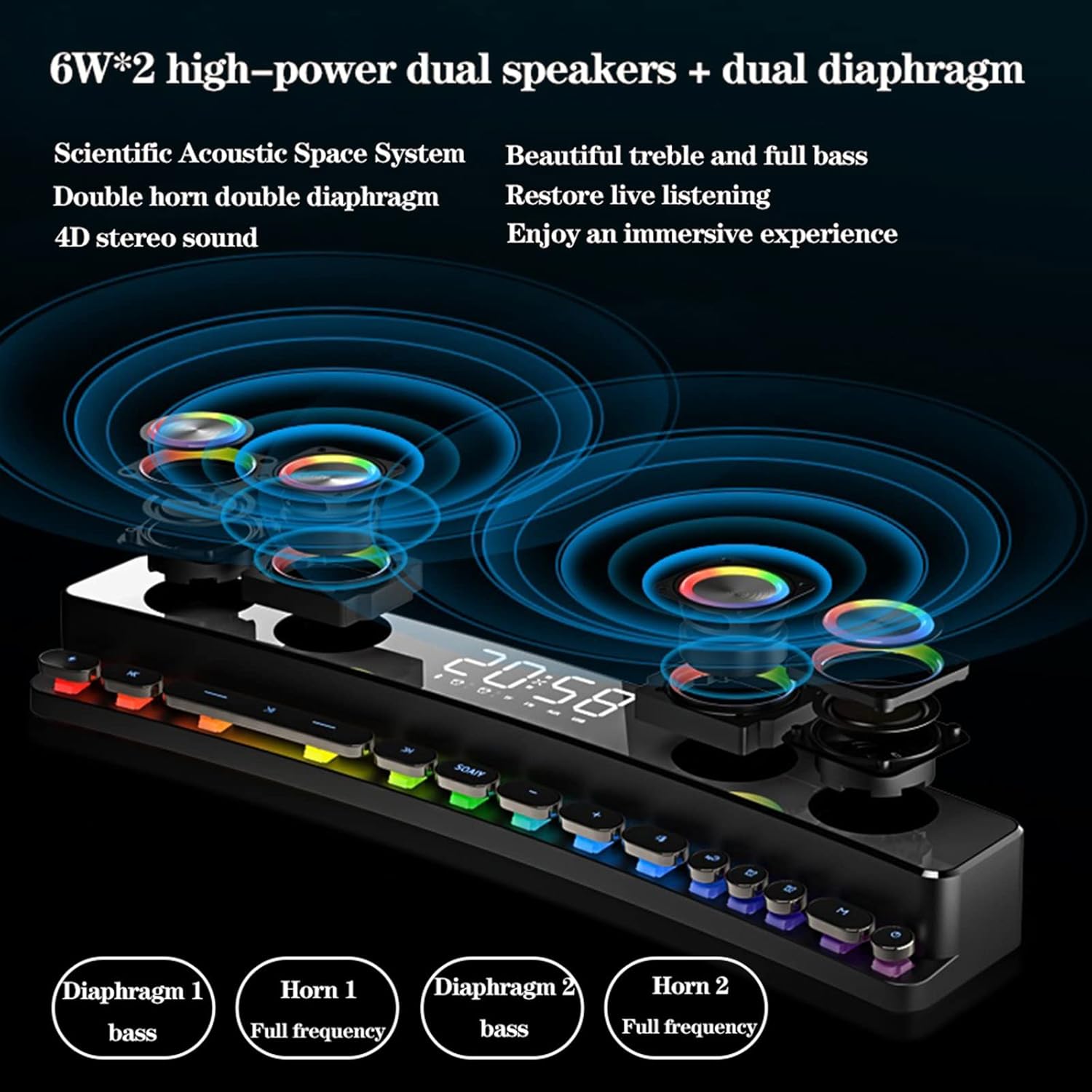
Figure 7: Illustration of the speaker's dual 6W high-power speakers and dual diaphragms for enhanced bass and full-frequency audio.

Figure 8: Detail of the HD full-range speaker, designed for clear and immersive sound.
Safety Information
- Do not disassemble or modify the speaker.
- Keep away from heat sources, direct sunlight, and flammable materials.
- Do not expose to rain, moisture, or immerse in water.
- Use only the provided charging cable and a compatible 5V/1A power adapter.
- Avoid listening at high volumes for extended periods to prevent hearing damage.
- Keep out of reach of children.
Warranty and Support
For warranty information or technical support, please refer to the contact details provided on the product packaging or the retailer's website where you purchased the product. Please retain your proof of purchase for warranty claims.


