
1. Introduction
The Lite Brite Oval HD Deluxe offers a unique and engaging way to create vibrant art using light. This manual provides essential information for setting up, operating, and maintaining your device to ensure optimal performance and enjoyment. Please read these instructions carefully before first use.
2. Package Contents
Verify that all items listed below are present in your package:
- 1 x Lite Brite Oval HD Deluxe Unit
- 915 x Colorful Pegs (various colors)
- 12 x Oval Design Templates

Image Description: The product box for the Lite Brite Oval HD Deluxe. The box displays the oval-shaped Lite Brite unit, colorful pegs, and examples of designs that can be created using the included templates. Text on the box highlights features like 'New Oval HD Screen' and '900 Colorful Pegs & 12 Design Templates'.
3. Setup
- Powering the Unit: The Lite Brite Oval HD Deluxe does not require user-replaceable batteries. Ensure the unit is charged or connected to a power source if applicable (power adapter/cable not specified as included).
- Selecting a Template: Choose one of the 12 included design templates. Place the template over the Lite Brite screen, aligning it with the peg holes.
- Inserting Pegs: Select pegs of various colors. Gently push each peg into the corresponding hole on the template and screen. Ensure pegs are seated firmly but do not force them.

Image Description: A close-up view of a hand carefully inserting a small, colorful peg into the Lite Brite Oval HD Deluxe unit. Several small white cups filled with different colored pegs are visible in the background, indicating the variety of pegs available for creation.
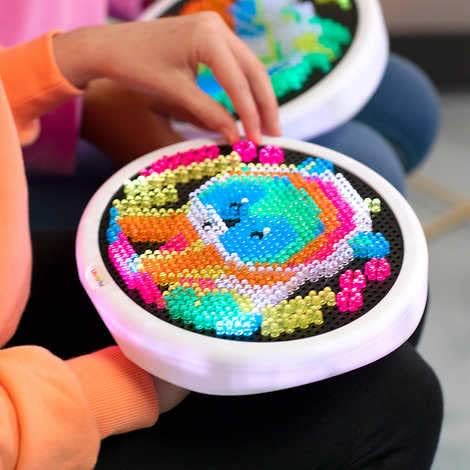
Image Description: A person's hand is shown in the process of inserting a peg into the Lite Brite Oval HD Deluxe. The screen already has a partially completed colorful design, demonstrating the creative process.
4. Operating Instructions
Once pegs are inserted and your design is complete, you can activate the light features:
- Power Button: Locate the power button (usually on the side or back of the unit). Press it once to turn on the lights.
- Light Modes: The Lite Brite Oval HD Deluxe features color-changing lights and animation modes. Repeatedly press the power button or a dedicated mode button (if present) to cycle through different light effects, such as:
- Static White Light
- Color-Changing Fade
- Slow Flash
- Fast Flash
- Animated Light Patterns
- Turning Off: Press and hold the power button, or cycle through all modes until the unit powers off.

Image Description: Two young girls are smiling and holding up their Lite Brite Oval HD Deluxe units, which are illuminated with colorful peg designs. The image conveys the interactive and enjoyable nature of the product.
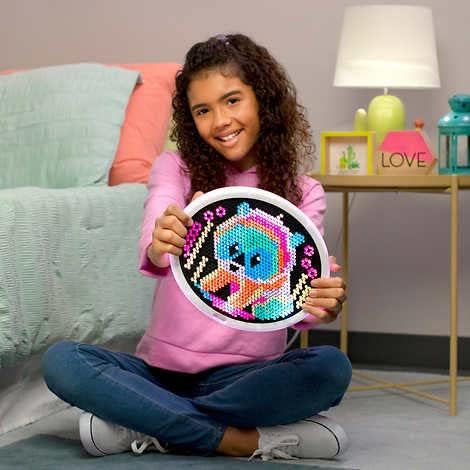
Image Description: A young girl is seated on the floor, holding an illuminated Lite Brite Oval HD Deluxe unit. The unit displays a vibrant, completed animal design made from colorful pegs, showcasing the product in use.
5. Maintenance
- Cleaning: To clean the Lite Brite unit, gently wipe the surface with a soft, dry cloth. For stubborn marks, a slightly damp cloth can be used, ensuring no moisture enters the peg holes or electronic components. Do not use abrasive cleaners or solvents.
- Peg Care: Store pegs in a secure container to prevent loss. If pegs become dirty, they can be washed with mild soap and water, then thoroughly dried before reuse.
- Storage: When not in use, store the Lite Brite Oval HD Deluxe in a cool, dry place away from direct sunlight and extreme temperatures.
6. Troubleshooting
| Problem | Possible Cause | Solution |
|---|---|---|
| Lights do not turn on. | Unit is not powered or charged. | Ensure the unit is adequately charged or connected to a power source. Press the power button firmly. |
| Pegs do not fit into holes. | Pegs are misaligned or debris is in the hole. | Ensure the peg is aligned correctly. Check for and remove any obstructions in the peg hole. Do not force pegs. |
| Lights are dim or flickering. | Low power. | Recharge the unit if it has an internal battery, or ensure it is connected to a stable power source. |
7. Specifications
- Model Number: 02269
- Number of Pieces: 915 (Colorful Pegs)
- Material: Plastic
- Color: Multicolor
- Educational Objective: Creative Thinking, Hand-Eye Coordination, Motor Skills
- Special Features: Color-changing lights, New oval frame
- Item Weight: 454 g
- Parcel Dimensions: 40.6 x 31.1 x 6.5 cm
8. Warranty and Support
Information regarding product warranty and customer support was not provided in the available product data. Please refer to the product packaging or the manufacturer's official website for details on warranty coverage and how to contact customer support for assistance.