Introduction
This manual provides essential information for the proper setup, operation, and maintenance of your HP Dhs-2111S 2.1 Wired Mini Multimedia Speaker. Please read these instructions carefully before using the product to ensure optimal performance and to prevent damage.
The HP Dhs-2111S is a 2.1 channel wired multimedia speaker system designed to deliver enhanced audio for computers, laptops, and other compatible devices. It features a compact design, easy connectivity via a 3.5mm audio jack, and convenient volume control.
Package Contents
Verify that all items are present in the package:
- 1 x Subwoofer (Main Unit)
- 2 x Satellite Speakers
- 1 x USB Power Cable (integrated)
- 1 x 3.5mm Audio Cable (integrated)
Setup
Follow these steps to set up your HP Dhs-2111S speaker system:
- Positioning Speakers: Place the subwoofer on a stable surface. Position the two satellite speakers on either side of your listening area for optimal stereo separation.
- Connect Satellite Speakers: Connect the cables from the two satellite speakers into their respective ports on the back of the subwoofer unit.
- Connect Audio Source: Plug the 3.5mm audio jack from the speaker system into the audio output port (headphone jack) of your computer, laptop, or other audio device.
- Connect Power: Insert the USB power cable into an available USB port on your computer or a compatible USB power adapter (not included). The speakers will power on automatically or indicate readiness.
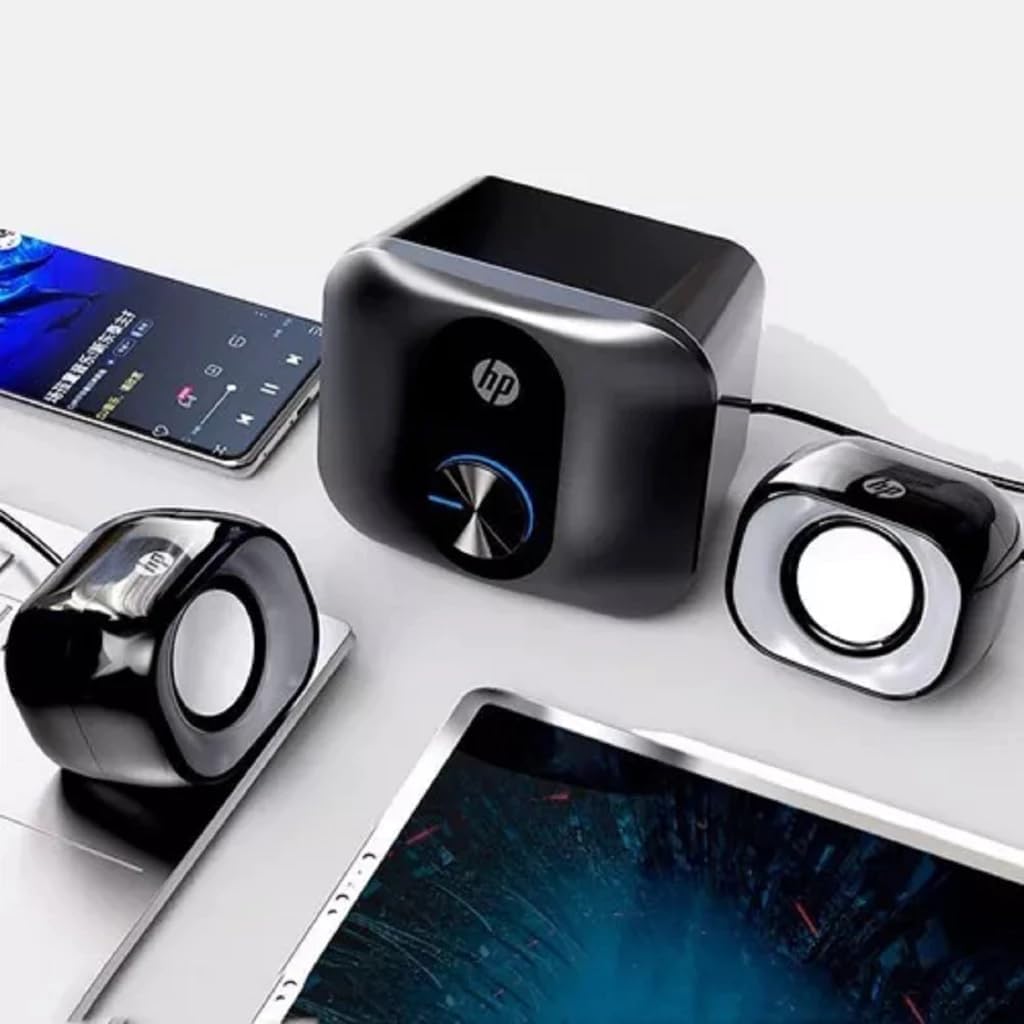
This image shows the HP Dhs-2111S speaker system, including the main subwoofer unit and two satellite speakers, connected to a laptop and a smartphone, illustrating a typical setup configuration.

This image displays the integrated USB cable for power supply and the 3.5mm audio jack for connecting to an audio source, which are essential for the speaker's functionality.
Operating Instructions
Once the speakers are set up, follow these instructions for operation:
- Power On: The speakers typically power on automatically when the USB power cable is connected to an active USB port. There is no separate power button.
- Volume Control: Use the rotary knob located on the front of the main subwoofer unit to adjust the volume. Turn clockwise to increase volume and counter-clockwise to decrease volume.
- Audio Playback: Start playing audio from your connected device. Ensure the volume on your device is also set to an audible level.

This image provides a close-up view of the main subwoofer unit, highlighting the central rotary knob used for adjusting the speaker volume.
Maintenance
To ensure the longevity and optimal performance of your speakers, follow these maintenance guidelines:
- Cleaning: Use a soft, dry cloth to clean the speaker surfaces. Do not use liquid cleaners, aerosols, or solvents, as these may damage the finish or internal components.
- Avoid Liquids: Keep the speakers away from water, moisture, and other liquids. Do not operate with wet hands.
- Ventilation: Ensure proper ventilation around the subwoofer unit to prevent overheating. Do not block any vents.
- Storage: When not in use for extended periods, store the speakers in a cool, dry place, away from direct sunlight and extreme temperatures.
Troubleshooting
If you encounter issues with your HP Dhs-2111S speakers, refer to the following troubleshooting steps:
- No Sound:
- Ensure the USB power cable is securely connected to a powered USB port.
- Verify the 3.5mm audio jack is fully inserted into the audio output of your device.
- Check the volume knob on the speaker unit and ensure it is turned up.
- Confirm the volume on your connected audio device is not muted or set too low.
- Test with a different audio source or USB port if possible.
- Distorted Sound:
- Reduce the volume on both the speakers and your audio device.
- Ensure the audio source is playing high-quality audio.
- Check for any loose connections.
- Speakers Not Powering On:
- Confirm the USB power cable is connected to a functional USB port that provides power.
- Try connecting to a different USB port or a USB wall adapter.
Specifications
| Feature | Specification |
|---|---|
| Model Name | Dhs-2111S |
| Speaker Type | 2.1 Surround Sound Multimedia Speaker |
| Connectivity Technology | Wired (USB for power, 3.5mm Jack for audio) |
| Audio Output Mode | Surround |
| Speaker Maximum Output Power | 3 Watts |
| Impedance | 4 Ohms |
| Speaker Size | 2 Inches |
| Power Source | Corded Electric (USB) |
| Control Method | Manual Knob Control |
| Mounting Type | Tabletop |
| Color | Black |
| Item Weight | 553 Grams |
| Product Dimensions | 10.5 x 9.5 x 12.8 cm |
| Recommended Uses | For Computers |
| Compatible Devices | Laptops, Desktop Computers, Televisions |
Warranty Information
This product comes with a limited warranty. For specific terms and conditions, please refer to the warranty documentation included with your purchase or contact HP customer support.
Support
For further assistance, technical support, or product information, please visit the official HP website or contact HP customer service in your region. Keep your product model number (Dhs-2111S) handy when seeking support.