Introduction
Thank you for choosing the Celebrat A20 Wireless In-Ear Headphones. This manual provides essential information for setting up, operating, and maintaining your new headphones. Please read it carefully before use to ensure optimal performance and longevity of your device.
Package Contents
- Celebrat A20 Wireless In-Ear Headphones
- Charging Cable (not explicitly listed but implied for wireless)
- User Manual
Product Overview
The Celebrat A20 are wireless in-ear headphones designed for music and communication. They feature a lightweight design and touch controls for ease of use.
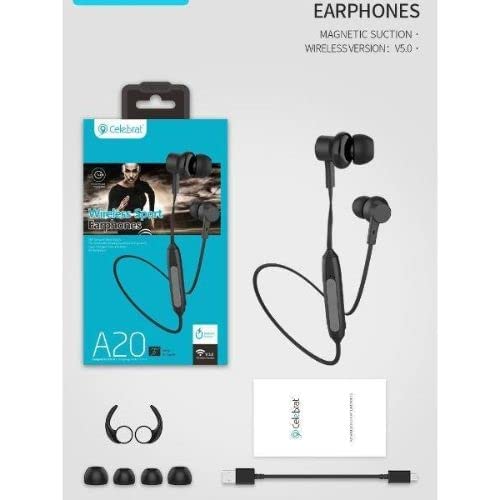
Image: Celebrat A20 Wireless In-Ear Headphones, black color, showing the in-ear design and inline control module.
Setup
1. Charging the Headphones
- Connect the charging cable to the charging port on the headphones.
- Plug the other end of the cable into a USB power source (e.g., computer, wall adapter).
- The indicator light will show charging status (e.g., red for charging, blue for fully charged).
- Allow approximately 1-2 hours for a full charge.
2. Bluetooth Pairing
- Ensure the headphones are fully charged.
- Press and hold the power button on the inline control module until the indicator light flashes red and blue, indicating pairing mode.
- On your mobile device, enable Bluetooth and search for available devices.
- Select "Celebrat A20" from the list of devices.
- Once connected, the indicator light will typically turn solid blue or flash slowly.
Operating Instructions
Power On/Off
- Power On: Press and hold the power button for 3 seconds.
- Power Off: Press and hold the power button for 5 seconds.
Music Playback
- Play/Pause: Press the power button once.
- Next Track: Press and hold the Volume Up (+) button.
- Previous Track: Press and hold the Volume Down (-) button.
Call Management
- Answer/End Call: Press the power button once.
- Reject Call: Press and hold the power button for 2 seconds.
Volume Control
- Volume Up: Press the Volume Up (+) button.
- Volume Down: Press the Volume Down (-) button.
Maintenance
- Cleaning: Use a soft, dry cloth to clean the headphones. Do not use liquids or abrasive cleaners.
- Storage: Store the headphones in a cool, dry place away from direct sunlight and extreme temperatures.
- Battery Care: To preserve battery life, charge the headphones regularly, even if not in frequent use. Avoid fully discharging the battery for extended periods.
- Water Resistance: These headphones are not water-resistant. Avoid exposure to water or excessive moisture.
Troubleshooting
| Problem | Solution |
|---|---|
| Headphones do not power on. | Ensure the headphones are fully charged. |
| Cannot pair with device. | Ensure headphones are in pairing mode (flashing red/blue). Turn off and on Bluetooth on your device. Move closer to the device. |
| No sound or low volume. | Check volume levels on both headphones and connected device. Ensure headphones are properly connected. |
| Intermittent connection. | Move closer to the connected device. Avoid obstacles between headphones and device. Ensure no other devices are interfering with the Bluetooth signal. |
Specifications
| Feature | Detail |
|---|---|
| Brand Name | Celebrat |
| Model Name | A20 |
| Connectivity Technology | Wireless (Bluetooth) |
| Headphone Form Factor | In-Ear |
| Ear Placement | In-Ear |
| Color | Black |
| Control Type | Volume Control, Touch Control |
| Noise Control | Active Noise Cancellation |
| Sensitivity | 102 dB |
| Headphone Jack | No Jack (Wireless) |
| Item Weight | 160 grams |
| Water Resistance Level | Not Water Resistant |
| Material | Plastic |
| Compatible Devices | Mobile Phone |
| Package Dimensions | 19.8 x 10.2 x 3.1 cm |
Warranty Information
Celebrat products are covered by a limited warranty. Please refer to the warranty card included in your package or contact customer support for detailed information regarding warranty terms and conditions.
Support
For further assistance, technical support, or warranty claims, please contact Celebrat customer service through the contact information provided on the product packaging or the official Celebrat website. Please have your product model number (A20) and purchase details ready when contacting support.


