
Introduction
This manual provides instructions for the setup, operation, and troubleshooting of your YAOHUIMI G-02-FLAME replacement remote control for Greystone Electric Fireplaces. Please read this manual carefully before use to ensure proper functionality and to extend the life of your remote control.
Compatibility
This remote control is designed to be compatible with various Greystone Electric RV Fireplace models. Please verify your fireplace model number against the list below:
- 324-000067
- 324-000076
- 324-000079
- 324-000080
- 324-000142
- F2622BCFW
- F2625
- F2653BCFW
- F2655BCFW
- F2655T
- F3025
- F31-18A
- F32-18A
- W31BCFW
- W32BCFW
- W32BLFW
- W32SSCW
- W36BCFW
- W36BCFW-1
Note: Compatibility may vary. Refer to your fireplace's original manual for specific remote control requirements.
Setup
Battery Installation
- Open the battery compartment cover on the back of the remote control.
- Insert two AAA 1.5V batteries, ensuring the correct polarity (+/-) as indicated inside the compartment.
- Close the battery compartment cover securely.
For optimal performance, use new, fresh batteries.
Operating Instructions
The remote control features several buttons for controlling your Greystone Electric Fireplace. Familiarize yourself with the button layout and their primary functions.

Image: Front view of the YAOHUIMI G-02-FLAME remote control, displaying its six function buttons.
- ON/OFF (Power Button): Turns the fireplace unit on or off.
- TEMP (Temperature Button): Adjusts the temperature setting of the fireplace.
- HEAT (Heat Level Button): Controls the heat output level.
- TIMER (Timer Button): Sets the operational timer for the fireplace.
- FLAME (Flame Effect Button): Adjusts the flame brightness or style.
Important Note: Some users have reported that the functions of the buttons on this replacement remote may not perfectly align with the labels, or may differ from the original remote. For example, the "TEMP" button might activate the fireplace, and the "ON/OFF" button might control heat levels. If you experience unexpected behavior, test each button to determine its actual function with your specific fireplace model.
Maintenance
- Keep the remote control clean by wiping it with a soft, dry cloth.
- Avoid exposing the remote to extreme temperatures, humidity, or direct sunlight.
- If the remote will not be used for an extended period, remove the batteries to prevent leakage.
- Do not attempt to disassemble the remote control.
Troubleshooting
If your remote control is not working as expected, consider the following steps:
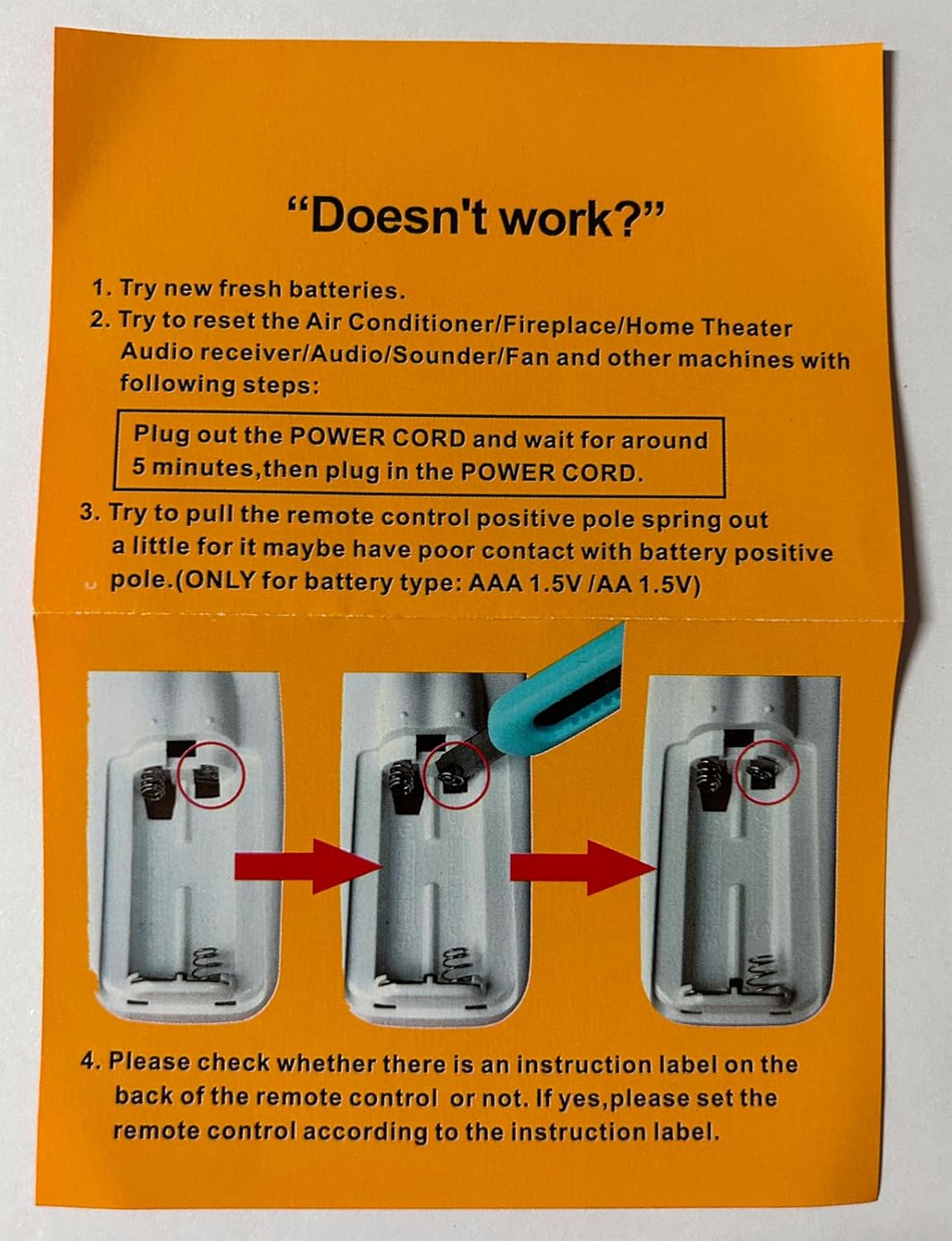
Image: Visual guide for troubleshooting common remote control issues, focusing on battery and power connections.
- Replace Batteries: Ensure you are using new, fresh AAA 1.5V batteries.
- Reset Fireplace Power:
- Unplug the power cord of your Greystone Electric Fireplace.
- Wait for approximately 5 minutes.
- Plug the power cord back into the outlet.
- Check Battery Contact: Gently pull out the positive pole spring inside the remote's battery compartment slightly. This can improve contact if it's loose. (Applicable for AAA 1.5V / AA 1.5V battery types only).
- Verify Instruction Label: Check the back of your remote control for any specific instruction labels regarding setup or pairing. Follow any instructions provided there.
- Line of Sight: Ensure there are no obstructions between the remote control and the fireplace's infrared receiver.
- Distance: Operate the remote within its maximum range of 10 meters (approximately 33 feet).
Specifications
| Brand | YAOHUIMI |
| Model Name | G-02-FLAME |
| Connectivity Technology | Infrared |
| Controller Type | Button Control |
| Maximum Range | 10 Meters |
| Power Source | 2 x AAA 1.5V Batteries (not included) |
| Max Number of Supported Devices | 1 |
Warranty & Support
This product comes with a 1-Year Warranty from the manufacturer. For warranty claims or technical support, please contact your retailer or the manufacturer directly with your purchase details.
Please retain your proof of purchase for warranty purposes.


